

 README

README

Ramble
A streaming gRPC point to point chat system.
This app is a quick proof of concept for a bidirectional streaming service using gRPC. The app implements both a chat server and a chat client. Note that this really is only proof of concept code; if you're interested check out ramble.go and the protobuf definition in pb/chat.proto. Almost everything else is me fumbling around with making a terminal UI.
Connecting to a Chat
To install ramble, first go get the project:
$ go get github.com/bbengfort/ramble/...
If you have placed $GOPATH/bin in your $PATH you should now be able to lookup ramble directly; otherwise, cd $GOPATH/src/github.com/bbengfort/ramble and run make install. Once ramble is connected to your path, you can enter the chat client as follows:
$ ramble chat -n username -a 192.168.1.1:3265
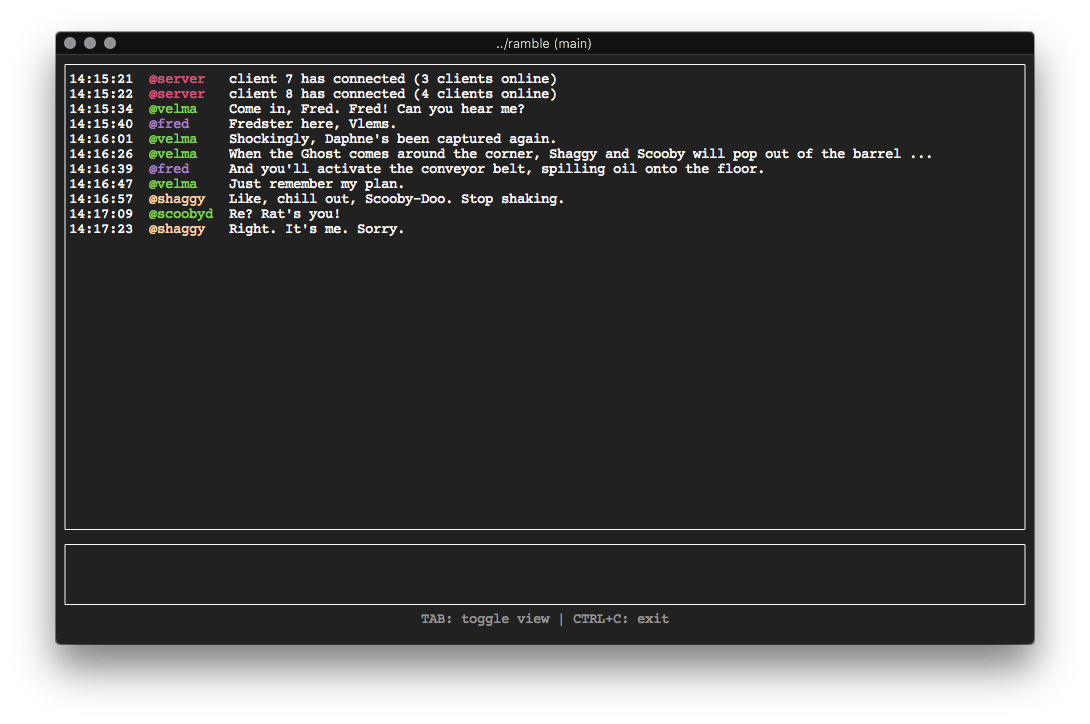
Replacing username with the name you wish to be identified as, and 192.168.1.1:3265 with the address of the chat server. You should now be connected to the chat and see a terminal UI.
In order to start chatting, press the TAB button to enter the chat window; you can then type your message and press ENTER to send it. If you hit tab again, you'll be taken to the message history window, which will allow you to scroll through messages. Note that the chat history only keeps 150 of the most recent messages in memory at a time. To quit, use CTRL+C.
Benchmarks

Ran the benchmarks with N clients on my MacBook Pro sending 5000 messages to a chat server on Nevis - an Ubuntu server on the local area network. Throughput is defined as the total number of messages sent divided by the time it took all N clients to send all messages, which simultaneously receiving messages from the channel.
Running a Server
Running the server is as simple as running:
$ ramble serve -p 3265
Replacing 3265 with the port you'd like the server to listen for chat messages on (the default is 3265).
Of course, things get more complicated when deploying a server to run as a long running-service. Instructions for deploying the chat server as a systemd service on Ubuntu follow.
Ubuntu systemd service
Ramble is set up to use systemd, following the instructions from GoLang: Running a Go binary as a systemd service on Ubuntu 16.04
Clone the repository to your $GOPATH and change directories into the project directory. If you have already run go get, then make sure that the binary in $GOPATH/bin is symlinked to /usr/local/bin/ramble, otherwise run make install to build the binary in this location.
After installing ramble, create the ramble service user and move the systemd unit service file to the correct location:
$ sudo useradd ramble -s /sbin/nologin -M
$ sudo cp conf/ramble.service /lib/systemd/system/
$ sudo chmod 755 /lib/systemd/system/ramble.service
At this point you should be able to enable the service, start it, then monitor the logs using journalctl.
$ sudo systemctl enable ramble.service
To save the logs using syslog, writing to /var/log/ramble/ramble.log, we can configure rsyslog (for more see Ubuntu: Enabling syslog on Ubuntu and custom templates). First, edit /etc/rsyslog.conf and uncomment the lines below which tell the server to listen for syslog messages on port 514:
module(load="imtcp")
input(type="imtcp" port="514")
Then create /etc/rsyslog.d/30-ramble.conf with the following content:
if $programname == 'ramble' or $syslogtag == 'ramble' then /var/log/ramble/ramble.log
& stop
Restart the rsyslog service and the ramble service.
$ sudo systemctl restart rsyslog
$ sudo systemctl restart ramble
You should now see log messages appearing when chats are sent!
 Documentation

Documentation

Index 
- Constants
- func ChatTime() string
- func Colorize(color int, text string) string
- func LogLevel() string
- func Prompt(prompt string) string
- func SetLogLevel(level uint8)
- func SetLogger(l *log.Logger)
- func ShutdownSignal(shutdown func() error)
- type Benchmark
- type ChatBox
- type Console
- type HelpWidget
- type Messages
- type Ramble
- type Widget
Constants 
const (
	LogTrace uint8 = iota
	LogDebug
	LogInfo
	LogCaution
	LogStatus
	LogWarn
	LogSilent
)
Levels for implementing the debug and trace message functionality.
const (
	MsgsView    = "messages"
	ChatView    = "chatbox"
	HelpView    = "helpbox"
	HistorySize = 150
)
View names for the major layout components
const CautionThreshold = 5
CautionThreshold for issuing caution logs after accumulating cautions.
const PackageVersion = "1.1"
PackageVersion of the Ramble app
const ServerName = "server"
ServerName is reserved for use by system messages
Variables 
This section is empty.
Functions 
func ChatTime 
func ChatTime() string
ChatTime returns the current timestamp formatted for the chat window.
func LogLevel 
func LogLevel() string
LogLevel returns a string representation of the current level
func SetLogLevel 
func SetLogLevel(level uint8)
SetLogLevel modifies the log level for messages at runtime. Ensures that the highest level that can be set is the trace level.
func SetLogger 
SetLogger sets the logger for writing output to. Can set to a noplog to remove all log messages (or set the log level to silent).
func ShutdownSignal 
func ShutdownSignal(shutdown func() error)
ShutdownSignal allows the registration of a a function to be called when SIGINT (CTRL+C) or SIGTERM is sent to the process, after which os.Exit is called with 0 if the function does not return an error or 1 if it does.
Types 
type Benchmark 
type Benchmark struct {
	// contains filtered or unexported fields
}
Benchmark implements several go routines sending chat messages in their own connections concurrently for a fixed number of messages, then returns the observed throughput from the client side.
func NewBenchmark 
NewBenchmark creates the benchmark for the specified number of clients and number of messages per client, then runs the benchmark.
func (*Benchmark) NumClients 
NumClients returns the number of concurrent clients.
func (*Benchmark) NumMessages 
NumMessages returns the total number of messages sent.
func (*Benchmark) String 
String returns a CSV string of the benchmark data. n_clients,n_messages,duration,throughput
func (*Benchmark) Throughput 
Throughput returns the number of operations per second.
type ChatBox 
type ChatBox struct {
	// contains filtered or unexported fields
}
ChatBox implements the editable box to write messages in
type Console 
type Console struct {
	// contains filtered or unexported fields
}
Console implments a terminal UI client to the chat server.
func NewConsole 
NewConsole creates the terminal UI in 256 colors, instantiates the layout and widgets, and binds the keys to event handlers. Not thread safe!
func (*Console) CreateLayout 
func (c *Console) CreateLayout()
CreateLayout creates the messages and chatbox widgets then sets the layout manager on the GUI application.
type HelpWidget 
type HelpWidget struct {
	// contains filtered or unexported fields
}
HelpWidget displays the help text at the bottom of the screen.
type Messages 
Messages implements the message reader interface
func (*Messages) Append 
func (w *Messages) Append(msg *pb.ChatMessage) (err error)
Append a message to the messages window, limiting the history size.
func (*Messages) Layout 
Layout draws a full width and tall height box, leaving room only for the chatbox and helpbox widgets at the bottom of the screen.
func (*Messages) ScrollDown 
ScrollDown scrolls the messages down by one line
type Ramble 
type Ramble struct {
	sync.Mutex // Protect concurrent access to sequence and client manager
	// contains filtered or unexported fields
}
Ramble implements the RambleService
func NewServer 
NewServer creates a chat server to distribute messages to all streaming clients that connect via gRPC.
 Source Files
 Directories