

 README

README

DingTalk Workspace CLI (dws)
dws — DingTalk Workspace on the command line, built for humans and AI agents.




中文版 · English · Reference · Changelog
[!IMPORTANT] Co-creation Phase: This project accesses DingTalk enterprise data and requires enterprise admin authorization. Join the DingTalk DWS co-creation group for support and updates. See Getting Started below.

Table of Contents
Why dws?
- For humans —
--helpfor usage,--dry-runto preview requests,-f table/json/rawfor output formats. - For AI agents — structured JSON responses + built-in Agent Skills, ready out of the box.
- For enterprise admins — zero-trust architecture: OAuth device-flow auth + domain allowlisting + least-privilege scoping. Not a single byte can bypass authentication and audit.
Installation
macOS / Linux:
curl -fsSL https://raw.githubusercontent.com/DingTalk-Real-AI/dingtalk-workspace-cli/main/scripts/install.sh | sh
Windows (PowerShell):
irm https://raw.githubusercontent.com/DingTalk-Real-AI/dingtalk-workspace-cli/main/scripts/install.ps1 | iex
Other install methods
npm (requires Node.js (npm/npx)):
npm install -g dingtalk-workspace-cli
Pre-built binary: download from GitHub Releases.
macOS users: If you see "cannot be opened because Apple cannot check it for malicious software", run:
xattr -d com.apple.quarantine /path/to/dws
Build from source:
git clone https://github.com/DingTalk-Real-AI/dingtalk-workspace-cli.git
cd dingtalk-workspace-cli
go build -o dws ./cmd       # build to current directory
cp dws ~/.local/bin/         # install to PATH
Requires Go 1.25+. Use
make packageto cross-compile for all platforms (macOS / Linux / Windows x amd64 / arm64).
Upgrade
Requires v1.0.7 or later. For earlier versions, please re-run the install script to upgrade.
dws has built-in self-upgrade capability. Updates are pulled directly from GitHub Releases with SHA256 integrity verification and automatic backup.
dws upgrade                    # interactive upgrade to latest version
dws upgrade --check            # check for new versions without installing
dws upgrade --list             # list all available versions
dws upgrade --version v1.0.7   # upgrade to a specific version
dws upgrade --rollback         # rollback to the previous version
dws upgrade -y                 # skip confirmation prompt
How it works
The upgrade process follows a two-phase atomic flow to ensure consistency:
- Prepare — downloads the platform-specific binary and skill packages to a temporary directory, verifies SHA256 checksums, and extracts/validates all files. If any step fails, the upgrade aborts without modifying the existing installation.
- Apply — only after all preparations succeed, the binary is replaced and skill packages are installed to all detected agent directories (
~/.agents/skills/dws,~/.claude/skills/dws,~/.cursor/skills/dws, etc.).
A backup of the current version is automatically created before each upgrade. Use dws upgrade --rollback to restore the previous version if needed.
| Flag | Description |
|---|---|
--check |
Check for updates without installing |
--list |
List all available versions with changelogs |
--version |
Upgrade to a specific version (e.g. v1.0.7) |
--rollback |
Rollback to the previous backed-up version |
--force |
Force reinstall even if already on the latest version |
--skip-skills |
Skip skill package update |
-y |
Skip confirmation prompt |
Getting Started
dws auth login            # browser opens automatically
dws auth login --device   # for headless environments (Docker, SSH, CI)
Select your organization and authorize. That's it.
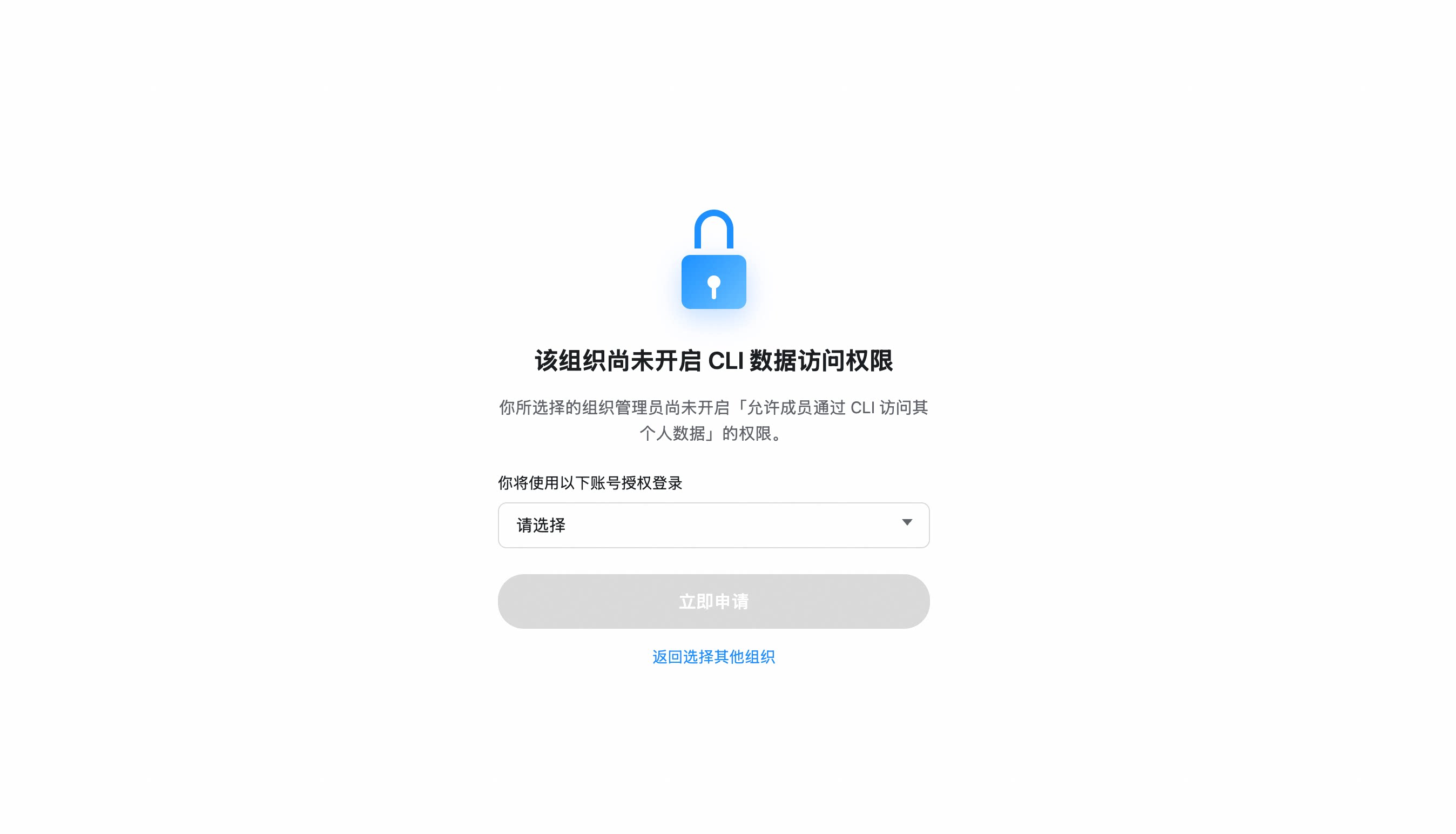
If your organization hasn't enabled CLI access, you'll be prompted to send an access request to your admin. Once approved, re-run
dws auth login.
Organization hasn't enabled CLI access?
- After selecting your organization, click "Apply Now" to notify the admin
- The admin receives a request card and can approve with one click
- Once approved, re-run
dws auth login
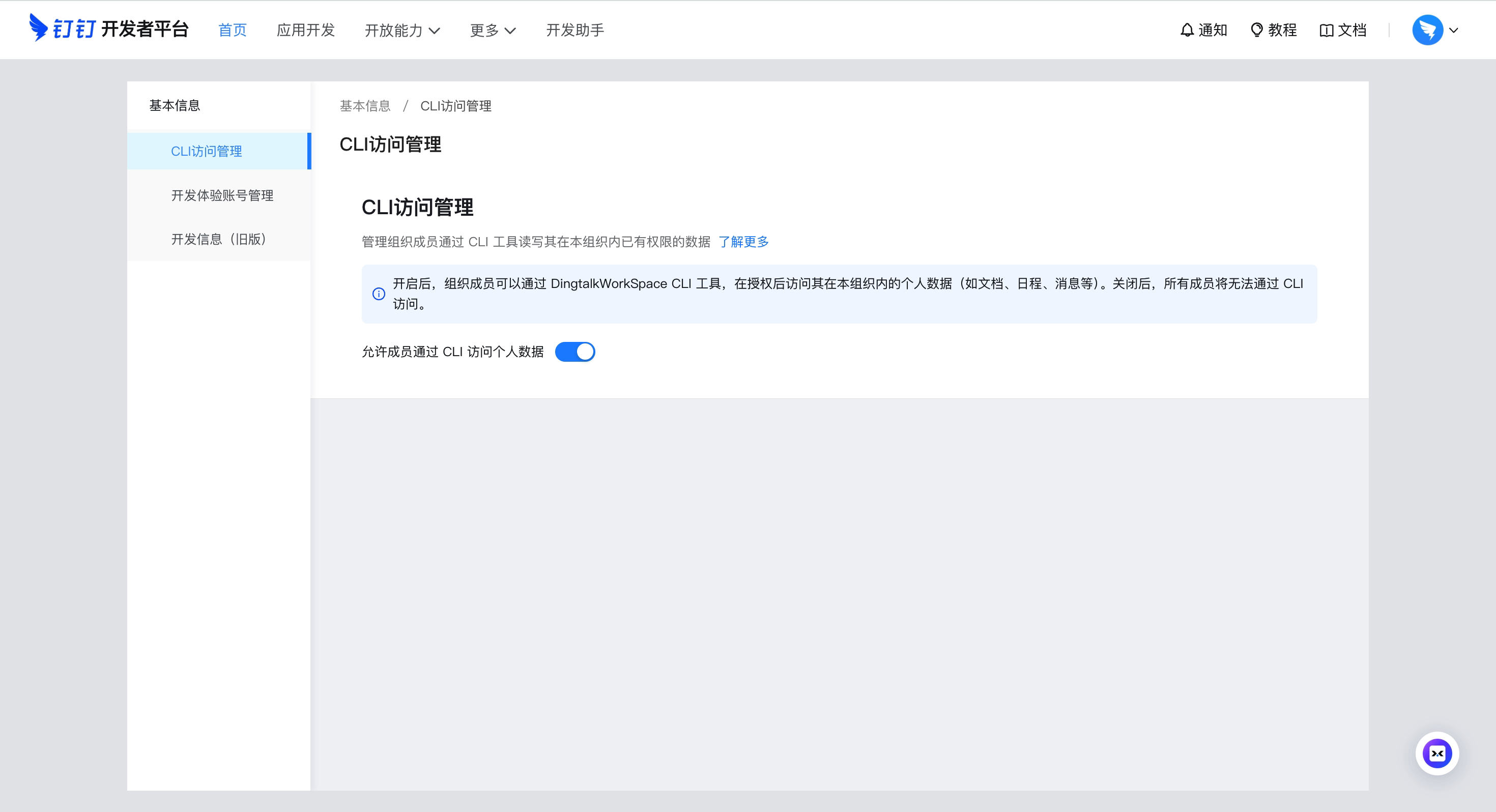
Admin: Enable CLI access for your organization
Go to Developer Platform → "CLI Access Management" → Enable.
Custom App mode (CI/CD, ISV integration)
For enterprise-managed scenarios, create your own DingTalk app:
- Open Platform Console → Create App
- Security Settings → Add redirect URLs:
http://127.0.0.1,https://login.dingtalk.com - Publish the app
- Login:
dws auth login --client-id <your-app-key> --client-secret <your-app-secret>
Credentials are securely persisted after first login (Keychain). Subsequent runs auto-refresh tokens.
Quick Start
dws contact user search --query "engineering"      # search contacts
dws calendar event list                            # list today's calendar events
dws doc search --query "quarterly"                 # search DingTalk Docs
dws minutes list mine                              # list AI meeting notes I created
dws drive list                                     # list DingTalk drive files
dws todo task create --title "Quarterly report" --executors "<your-userId>"   # create a todo (replace <your-userId>)
dws todo task list --dry-run                       # preview without executing
Full command list:
docs/command-index.md— all commands with descriptions and when-to-use guidance.
Using with Agents
dws is designed as an AI-native CLI. Complete Installation and Getting Started first, then configure your agent:
Agent Invocation Patterns
# Use --yes to skip confirmation prompts (required for agents)
dws todo task create --title "Review PR" --executors "<your-userId>" --yes

# Use --dry-run to preview operations (safe execution)
dws contact user search --query "engineering" --dry-run

# Use --jq to extract precisely (save tokens)
dws contact user get-self --jq '.result[0].orgEmployeeModel | {name: .orgUserName, dept: .depts[0].deptName, userId}'
Schema Discovery
Agents don't need pre-built knowledge of every command. Use dws schema to dynamically discover capabilities:
# Step 1: Discover all available products
dws schema --jq '.products[] | {id, tool_count: (.tools | length)}'

# Step 2: Inspect target tool's parameter schema
dws schema aitable.query_records --jq '.tool.parameters'

# Step 3: Construct the correct call
dws aitable record query --base-id BASE_ID --table-id TABLE_ID --limit 10
Agent Skills
The repo ships a complete Agent Skill system (skills/). After installing, AI tools like Claude Code / Cursor can operate DingTalk directly through natural language:
# Install skills into current project
curl -fsSL https://raw.githubusercontent.com/DingTalk-Real-AI/dingtalk-workspace-cli/main/scripts/install-skills.sh | sh
install.shinstalls to$HOME/.agents/skills/dws(global);install-skills.shinstalls to./.agents/skills/dws(current project).
What's included:
| Component | Path | Description |
|---|---|---|
| Master Skill | SKILL.md |
Intent routing, decision tree, safety rules, error handling |
| Product references | references/products/*.md |
Per-product command reference (aitable, chat, calendar, etc.) |
| Intent guide | references/intent-guide.md |
Disambiguation for confusing scenarios (e.g. report vs todo) |
| Global reference | references/global-reference.md |
Auth, output formats, global flags |
| Error codes | references/error-codes.md |
Error codes + debugging workflows |
| Recovery guide | references/recovery-guide.md |
RECOVERY_EVENT_ID handling |
| Ready-made scripts | scripts/*.py |
13 batch operation scripts (see below) |
Ready-made scripts — 13 Python scripts for common multi-step workflows
| Script | Description |
|---|---|
calendar_schedule_meeting.py |
Create event + add participants + find & book available meeting room |
calendar_free_slot_finder.py |
Find common free slots across multiple people, recommend best meeting time |
calendar_today_agenda.py |
View today/tomorrow/this week's schedule |
import_records.py |
Batch import records from CSV/JSON into AITable |
bulk_add_fields.py |
Batch add fields to an AITable data table |
upload_attachment.py |
Upload attachment to AITable attachment field |
todo_batch_create.py |
Batch create todos from JSON (with priority, due date, executors) |
todo_daily_summary.py |
Summarize today/this week's incomplete todos |
todo_overdue_check.py |
Scan overdue todos and output overdue list |
contact_dept_members.py |
Search department by name and list all members |
attendance_my_record.py |
View my attendance records for today/this week/specific date |
attendance_team_shift.py |
Query team shift schedules and attendance statistics |
report_inbox_today.py |
View today's received reports with details |
ISV Integration: Author your own Agent Skills and orchestrate them with dws skills for cross-product workflows: ISV Skill → dws Skill → DingTalk Open Platform API (enforced auth + full audit).
Features
Raw API Access — call any DingTalk OpenAPI directly
dws api lets you call any DingTalk OpenAPI without an SDK. Tokens are automatically acquired and refreshed.
Prerequisite: Must login with your own app credentials (see Custom App mode). Encrypted tokens from MCP default-credential login are not supported for raw API calls.
# Login (first time only)
dws auth login --client-id <APP_KEY> --client-secret <APP_SECRET>

# === api.dingtalk.com ===

# List all enterprise apps
dws api GET /v1.0/microApp/allApps

# Search users (POST + JSON body)
dws api POST /v1.0/contact/users/search \
  --data '{"queryWord":"engineering","offset":0,"size":10}'

# === oapi.dingtalk.com ===

# Get user details (use --base-url to specify domain)
dws api POST /topapi/v2/user/get \
  --base-url https://oapi.dingtalk.com \
  --data '{"userid":"<USER_ID>"}'

# Or use the full URL directly
dws api POST https://oapi.dingtalk.com/topapi/v2/user/get \
  --data '{"userid":"<USER_ID>"}'

# === General ===
dws api GET /v1.0/microApp/allApps --page-all   # auto-paginate
dws api GET /v1.0/microApp/allApps --dry-run     # preview request
dws api GET /v1.0/microApp/allApps --jq '.agentId'  # jq filtering
| Feature | Details |
|---|---|
| Dual-form auto-detection | Automatically selects api.dingtalk.com (header auth) or oapi.dingtalk.com (query-param auth) based on URL |
| Automatic token management | App-level accessToken is fetched on first call, cached while valid, auto-refreshed on expiry |
| Domain allowlist | Only api.dingtalk.com and oapi.dingtalk.com permitted — prevents token leakage |
| Auto-pagination | --page-all iterates all pages. --page-limit caps the maximum (default 10, set to 0 for unlimited, hard cap at 500 to prevent infinite loops) |
Smart Input Correction — auto-corrects common AI model parameter mistakes
Built-in pipeline engine that normalizes flag names, splits sticky arguments, and fuzzy-matches typos:
# Naming convention auto-conversion (camelCase / snake_case / UPPER -> kebab-case)
dws aitable record query --baseId BASE_ID --tableId TABLE_ID         # auto-corrected to --base-id --table-id

# Sticky argument splitting
dws contact user search --query "engineering" --timeout30           # auto-split to --timeout 30

# Fuzzy flag name matching
dws aitable record query --base-id BASE_ID --tabel-id TABLE_ID       # --tabel-id -> --table-id

# Value normalization (boolean / number / date / enum)
# "yes" -> true, "1,000" -> 1000, "2024/03/29" -> "2024-03-29", "ACTIVE" -> "active"
| Agent Output | dws Auto-Corrects To |
|---|---|
--userId |
--user-id |
--limit100 |
--limit 100 |
--tabel-id |
--table-id |
--USER-ID |
--user-id |
--user_name |
--user-name |
jq Filtering & Field Selection — fine-grained output control to reduce token consumption
# Built-in jq expressions
dws aitable record query --base-id BASE_ID --table-id TABLE_ID --jq '.invocation.params'
dws schema --jq '.products[] | {id, tools: (.tools | length)}'

# Return only specific fields
dws aitable record query --base-id BASE_ID --table-id TABLE_ID --fields invocation,response
Schema Introspection — query parameter schemas before making calls
dws schema                                              # list all products and tools
dws schema aitable.query_records                        # view parameter schema
dws schema aitable.query_records --jq '.tool.required'   # view required fields
dws schema --jq '.products[].id'                        # extract all product IDs
Pipe & File Input — read flag values from files or stdin
# Read message body from a file
dws chat message send-by-bot --robot-code BOT_CODE --group GROUP_ID \
  --title "Weekly Report" --text @report.md

# Pipe content via stdin
cat report.md | dws chat message send-by-bot --robot-code BOT_CODE --group GROUP_ID \
  --title "Weekly Report"

# Read from stdin explicitly
dws chat message send-by-bot --robot-code BOT_CODE --group GROUP_ID \
  --title "Weekly Report" --text @-
Key Services
| Service | Command | Commands | Subcommands | Description |
|---|---|---|---|---|
| Contact | contact |
6 | user dept |
Search users by name/mobile, batch query, departments, current user profile |
| Chat / IM | chat (alias im) |
23 | message group bot conversation-info search search-common list-top-conversations |
Messages (send / list / list-all / by-sender / mentions / focused / unread / topic replies / search), group CRUD + member management (incl. add-bot), bot-identity messaging (send-by-bot / recall-by-bot / send-by-webhook), conversation info, common groups lookup |
| Calendar | calendar |
14 | event room participant busy |
Events CRUD + suggested times + attachments, meeting room booking, free-busy query, participant management |
| Todo | todo |
6 | task |
Create, list, update, done, get detail, delete |
| Approval | oa |
9 | approval |
Approve / reject / revoke, pending / initiated instances, process list, operation records |
| Attendance | attendance |
4 | record shift summary rules |
Clock-in records, shift schedules, attendance summary, group rules |
| Ding | ding |
2 | message |
Send / recall DING messages |
| Report | report |
7 | create list detail template stats sent |
Create reports, sent/received list, templates, statistics |
| AI Tables | aitable |
41 | base table record field view dashboard chart import export attachment template |
Full CRUD for Bases / datasheets / records / fields / views; charts & dashboards with public-share configs; data import/export; attachments; templates |
| Doc | doc |
21 | search list info read create update upload download copy move rename file folder block comment |
Search / read / write docs, file & folder create, block-level editing, comments (list / create / reply / create-inline), upload / download |
| Drive | drive |
6 | list info download mkdir upload-info commit |
DingTalk drive file ops: list, info, download, create folders, two-phase upload |
| Minutes | minutes |
19 | list get update mind-graph speaker hot-word upload |
List AI meeting notes (mine / shared), details (info / summary / keywords / transcription / todos / batch), title/summary updates, mind map, speaker replace, hot-word, upload session |
mail |
4 | mailbox message |
List mailbox addresses, KQL message search, get full message content, send email | |
| Sheet | sheet |
34 | range filter-view (top-level: create new list info find replace append merge-cells unmerge-cells add-dimension insert-dimension delete-dimension move-dimension update-dimension write-image copy_sheet update_sheet submit_export_job query_export_job create_filter get_filter update_filter delete_filter set_filter_criteria clear_filter_criteria sort_filter) |
Online spreadsheet (contentType=ALIDOC, extension=axls): worksheet CRUD, range read/write/append, dimension ops, cell merge, find/replace, named filter views + sheet-level filters, image write, async export (submit_export_job + query_export_job — no consolidated export in v1.0.25) |
| Wiki | wiki |
7 | space member |
Knowledge base management: space create / get / list / search + member add / list / update |
| DevDoc | devdoc |
1 | article |
Search the DingTalk Open Platform documentation |
| AI Search | aisearch |
1 | person |
Enterprise people search by name / department / position / duty / supervisor / subordinate / phone / job-number (single command, multi-dimension filter) |
| AI App | aiapp |
3 | — | AI application lifecycle: create (with prompt / attachments / skills) / query (by task ID) / modify (by thread ID) |
| Live | live |
1 | stream |
DingTalk live streaming: list my lives |
| Raw API | api |
1 | — | Call any DingTalk OpenAPI directly (api / oapi dual-form), with automatic app-level token management |
209 commands across 19 products. Full listing with descriptions and usage scenarios:
docs/command-index.md. Rundws --helpfor the top-level tree, ordws <service> --helpfor subcommands.
Note on
chat bot: bot capabilities (send-by-bot/recall-by-bot/add-bot/send-by-webhook/ bot search) are merged into the relevantchatsubtrees (e.g.dws chat message send-by-bot,dws chat group members add-bot) so the agent-facing command surface stays flat and discoverable. There is no longer a separate top-levelbotproduct.
Coming soon
conference (video meetings)
Security by Design
dws treats security as a first-class architectural concern, not an afterthought. Credentials never touch disk, tokens never leave trusted domains, permissions never exceed grants, operations never escape audit — every API call must pass through DingTalk Open Platform's authentication and audit chain, no exceptions.
For Developers
| Mechanism | Details |
|---|---|
| Encrypted token storage | PBKDF2 + AES-256-GCM encryption, keyed by device physical MAC address; cross-platform Keychain/DPAPI integration provides additional protection — tokens cannot be decrypted on another machine |
| Input security | Path traversal protection (symlink resolution + working directory containment), CRLF injection blocking, Unicode visual spoofing filtering — prevents AI Agents from being tricked by malicious instructions |
| Domain allowlist | DWS_TRUSTED_DOMAINS defaults to *.dingtalk.com; bearer tokens are never sent to non-allowlisted domains |
| HTTPS enforced | All requests require TLS; HTTP only permitted for loopback during development |
| Dry-run preview | --dry-run shows call parameters without executing, preventing accidental mutations |
| Zero credential persistence | Client ID / Secret used in memory only — never written to config files or logs |
For Enterprise Admins
| Mechanism | Details |
|---|---|
| OAuth device-flow auth | Users must authenticate through an admin-authorized DingTalk application |
| Least-privilege scoping | CLI can only invoke APIs granted to the application — no privilege escalation |
| Allowlist gating | Admin confirmation required during co-creation phase; self-service approval planned |
| Full-chain audit | Every data read/write passes through the DingTalk Open Platform API — enterprise admins can trace complete call logs in real time; no anomalous operation can hide |
For ISVs
| Mechanism | Details |
|---|---|
| Tenant data isolation | Operates under authorized app identity; cross-tenant access is impossible |
| Skill sandbox | Agent Skills are Markdown documents (SKILL.md) — prompt descriptions only, no arbitrary code execution |
| Zero blind spots | Every API call during ISV–dws skill orchestration is forced through DingTalk Open Platform authentication — full call chain is traceable with no bypass path |
Found a vulnerability? Report via GitHub Security Advisories. See SECURITY.md.
Reference & Docs
- Command Index — every runtime command with description and when-to-use guidance
- Reference — environment variables, exit codes, output formats, shell completion
- Architecture — discovery-driven pipeline, IR, transport layer
- Changelog — release history and migration notes
Contributing
See CONTRIBUTING.md for build instructions, testing, and development workflow.
License
Apache-2.0
 Directories

Directories

| Path | Synopsis |
|---|---|
|
internal
|
|
|
apiclient
Package apiclient provides a lightweight HTTP client for calling DingTalk OpenAPI (https://api.dingtalk.com) directly, bypassing the MCP JSON-RPC transport.
|
Package apiclient provides a lightweight HTTP client for calling DingTalk OpenAPI (https://api.dingtalk.com) directly, bypassing the MCP JSON-RPC transport. |
|
auth
identity.go manages agent instance identification for tracking.
|
identity.go manages agent instance identification for tracking. |
|
cobracmd
Package cobracmd provides shared Cobra command utilities used across multiple internal packages (app, cli, compat, helpers).
|
Package cobracmd provides shared Cobra command utilities used across multiple internal packages (app, cli, compat, helpers). |
|
editionmerge
Package editionmerge converts edition.ServerInfo hooks into market.ServerDescriptor values and merges them into discovery results.
|
Package editionmerge converts edition.ServerInfo hooks into market.ServerDescriptor values and merges them into discovery results. |
|
generator/cmd_generate
command
|
|
|
generator/cmd_snapshot
command
|
|
|
i18n
Package i18n provides lightweight internationalization for the DWS CLI.
|
Package i18n provides lightweight internationalization for the DWS CLI. |
|
keychain
Package keychain provides cross-platform secure storage for secrets.
|
Package keychain provides cross-platform secure storage for secrets. |
|
logging
Package logging provides file-based structured logging for diagnostics.
|
Package logging provides file-based structured logging for diagnostics. |
|
pat
Package pat implements the "dws pat" command group for PAT (Personal Action Token) authorization management.
|
Package pat implements the "dws pat" command group for PAT (Personal Action Token) authorization management. |
|
plugin
Package plugin implements the DWS CLI plugin system.
|
Package plugin implements the DWS CLI plugin system. |
|
upgrade
Package upgrade provides self-update functionality for the DWS CLI using GitHub Releases as the data source.
|
Package upgrade provides self-update functionality for the DWS CLI using GitHub Releases as the data source. |
|
pkg
|
|
|
authretry
Package authretry exposes the AuthRefreshRequired marker error used by edition overlays (in separate Go modules) to signal "the current access token was rejected by the server; please run a force-refresh and retry".
|
Package authretry exposes the AuthRefreshRequired marker error used by edition overlays (in separate Go modules) to signal "the current access token was rejected by the server; please run a force-refresh and retry". |
|
cli
Package cli exposes public entry points for the DWS CLI so that external overlay modules can embed and launch the CLI after customising edition hooks.
|
Package cli exposes public entry points for the DWS CLI so that external overlay modules can embed and launch the CLI after customising edition hooks. |
|
cmdutil
Package cmdutil provides reusable CLI helper functions for Cobra commands.
|
Package cmdutil provides reusable CLI helper functions for Cobra commands. |
|
config
Package config provides shared constants used across multiple internal packages.
|
Package config provides shared constants used across multiple internal packages. |
|
configmeta
Package configmeta provides a central registry of all environment-variable based configuration items used by the DWS CLI.
|
Package configmeta provides a central registry of all environment-variable based configuration items used by the DWS CLI. |
|
convert
Package convert provides shared type conversion helpers used across multiple internal packages (cli, compat).
|
Package convert provides shared type conversion helpers used across multiple internal packages (cli, compat). |
|
edition
Package edition provides an extension-point mechanism that allows private overlay modules (e.g.
|
Package edition provides an extension-point mechanism that allows private overlay modules (e.g. |
|
editiontest
Package editiontest provides contract-test helpers that any edition.Hooks implementation (open-source or overlay) must satisfy.
|
Package editiontest provides contract-test helpers that any edition.Hooks implementation (open-source or overlay) must satisfy. |
|
runtimetoken
Package runtimetoken resolves API bearer tokens for features that bypass the MCP runner (e.g.
|
Package runtimetoken resolves API bearer tokens for features that bypass the MCP runner (e.g. |
|
validate
Package validate provides input sanitization and validation functions to prevent injection attacks (control characters, CRLF, Unicode spoofing, ANSI escape sequences) at the CLI boundary.
|
Package validate provides input sanitization and validation functions to prevent injection attacks (control characters, CRLF, Unicode spoofing, ANSI escape sequences) at the CLI boundary. |
|
test
|
|