

 README

README

# Agenda-Service

API
the Api UI :


镜像构建与下载
在Docker Hub上关联github项目之后进行自动构建镜像

下载镜像
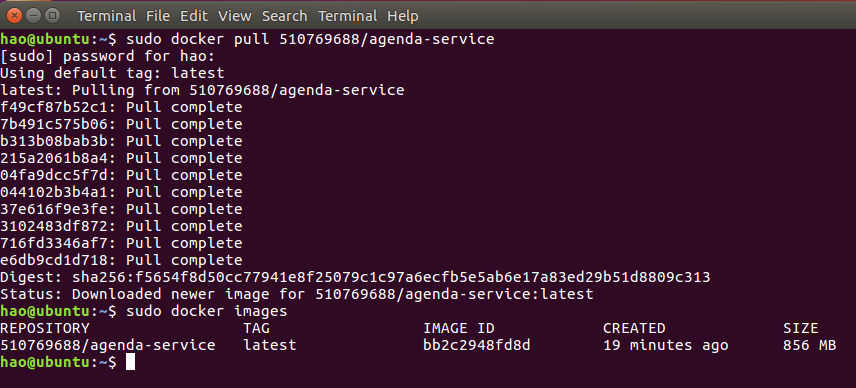
启动服务器

功能测试
监听端口状态:
$ go run main.go
[negroni] listening on :8080
UserRegister:
客户端
$ ./agenda register -u Alice -p 123 -e Alice@163.com -t 123
Register successfully.The account detail is :
{
  "Name": "Alice",
  "Password": "123",
  "Email": "Alice@163.com",
  "Phone": "123"
}
$ ./agenda register -u Bob -p 123 -e Bob@163.com -t 123
Register successfully.The account detail is :
{
  "Name": "Bob",
  "Password": "123",
  "Email": "Bob@163.com",
  "Phone": "123"
}
服务器
[negroni] 2017-12-13T04:10:34-08:00 | 201 | 	 288.047584ms | localhost:8080 | POST /v1/user
[negroni] 2017-12-13T04:13:50-08:00 | 201 | 	 24.764167ms | localhost:8080 | POST /v1/user
ListAllUsers:
客户端
$ ./agenda users
[
  {
    "Name": "Alice",
    "Password": "123",
    "Email": "Alice@163.com",
    "Phone": "123"
  },
  {
    "Name": "Bob",
    "Password": "123",
    "Email": "Bob@163.com",
    "Phone": "123"
  }
]
服务器
ListAllUser
[{Alice 123 Alice@163.com 123} {Bob 123 Bob@163.com 123}]
[negroni] 2017-12-13T04:15:35-08:00 | 200 | 	 535.839µs | localhost:8080 | GET /v1/users
UserLogin:
客户端
$ ./agenda login -u Bob -p 123
Login successfully!
 username:Bob
服务器
login
[negroni] 2017-12-13T04:18:34-08:00 | 403 | 	 408.049µs | localhost:8080 | GET /v1/login
login
{Bob 123 Bob@163.com 123}[negroni] 2017-12-13T04:19:09-08:00 | 200 | 	 1.849012ms | localhost:8080 | GET /v1/login
UserDelete:
当前的账号为Bob 客户端
$ ./agenda delete
Delete successfully.
服务器
delete user successfully!
[negroni] 2017-12-13T04:20:42-08:00 | 200 | 	 17.604143ms | localhost:8080 | DELETE /v1/user
MeetingCreate:
重新登陆Alice:
$ ./agenda login -u Alice -p 123
Login successfully!
 username:Alice
重新注册Bob:(用于创建会议)
./agenda register -u Bob -p 123 -e Bob@163.com -t 123
Register successfully.The account detail is :
{
  "Name": "Bob",
  "Password": "123",
  "Email": "Bob@163.com",
  "Phone": "123"
}
创建会议: 客户端
$ ./agenda create -t Meeting-Alice -p Bob -s 2000-01-01/00:00 -e 2001-01-01/00:00
CreateMeeting successfully.
{
  "Sponsor": "Alice",
  "Title": "Meeting-Alice",
  "StartDate": "2000-01-01/00:00",
  "EndDate": "2001-01-01/00:00",
  "Participators": [
    "Bob"
  ]
}
./agenda create -t Meeting-Alice-2 -p Bob -s 2002-01-01/00:00 -e 2003-01-01/00:00
CreateMeeting successfully.
{
  "Sponsor": "Alice",
  "Title": "Meeting-Alice-2",
  "StartDate": "2002-01-01/00:00",
  "EndDate": "2003-01-01/00:00",
  "Participators": [
    "Bob"
  ]
}
服务器
[negroni] 2017-12-13T04:30:00-08:00 | 201 | 	 9.650766ms | localhost:8080 | POST /v1/meeting
[negroni] 2017-12-13T04:36:17-08:00 | 201 | 	 10.600482ms | localhost:8080 | POST /v1/meeting
ListAllMeetings:
客户端
$ ./agenda meetings
[
  {
    "Sponsor": "Alice",
    "Title": "Meeting-Alice",
    "StartDate": "2000-01-01/00:00",
    "EndDate": "2001-01-01/00:00",
    "Participators": [
      "Bob"
    ]
  },
  {
    "Sponsor": "Alice",
    "Title": "Meeting-Alice-2",
    "StartDate": "2002-01-01/00:00",
    "EndDate": "2003-01-01/00:00",
    "Participators": [
      "Bob"
    ]
  }
]
服务器
[negroni] 2017-12-13T04:37:38-08:00 | 200 | 654.026µs | localhost:8080 | GET /v1/meetings
Go Test
使用cmd_test测试:
同时在上传github前将客户端的host改为https://private-c9f16-retokani.apiary-mock.com以进行mock测试
$ go test
=====> In TEST of UserRegister
Register successfully.The account detail is :
{
  "Name": "Alice",
  "Password": "123",
  "Email": "Alice@163.com",
  "Phone": "123"
}

=====> In TEST of UserLogin
Using UserName and PassWord to login Agenda:

attention:If the PassWord is right,you can login Agenda and use it
If forget the PassWord,you must register another one User

Usage:
  agenda login -u [UserName] -p [PassWord] [flags]

Flags:
  -p, --password string   new user's password
  -u, --username string   new user's username

Global Flags:
      --config string   config file (default is $HOME/.cli.yaml)
Login successfully!
 username:Alice
=====> In TEST of ListAllUser
[
  {
    "Name": "Alice",
    "Password": "123",
    "Email": "Alice@163.com",
    "Phone": "123"
  }
]

=====> In TEST of MeetingCreate
To create a new meeting with:

[Title] the Title of the meeting
[Participator] the Participator of the meeting,the Participator can only attend one meeting during one meeting time
[StartTime] the StartTime of the meeting
[EndTime] the EndTime of the meeting

Usage:
  agenda create -t [Title] -p [Participator] -s [StartTime] -e [EndTime] [flags]

Flags:
  -e, --EndTime string         meeting's endTime
  -p, --Participator strings   meeting's participator
  -s, --StartTime string       meeting's startTime
  -t, --Title string           meeting title

Global Flags:
      --config string   config file (default is $HOME/.cli.yaml)
=====> In TEST of ListAllMeeting
[]

=====> In TEST of UserDelete
Delete successfully.Delete user failed.
PASS
ok  	Agenda-Service/cli/cmd	0.138s
 Directories
Click to show internal directories.
Click to hide internal directories.