

 README

README

opentree
Orchestrate parallel AI coding sessions in isolated git worktrees.
Think Conductor, but for the terminal.
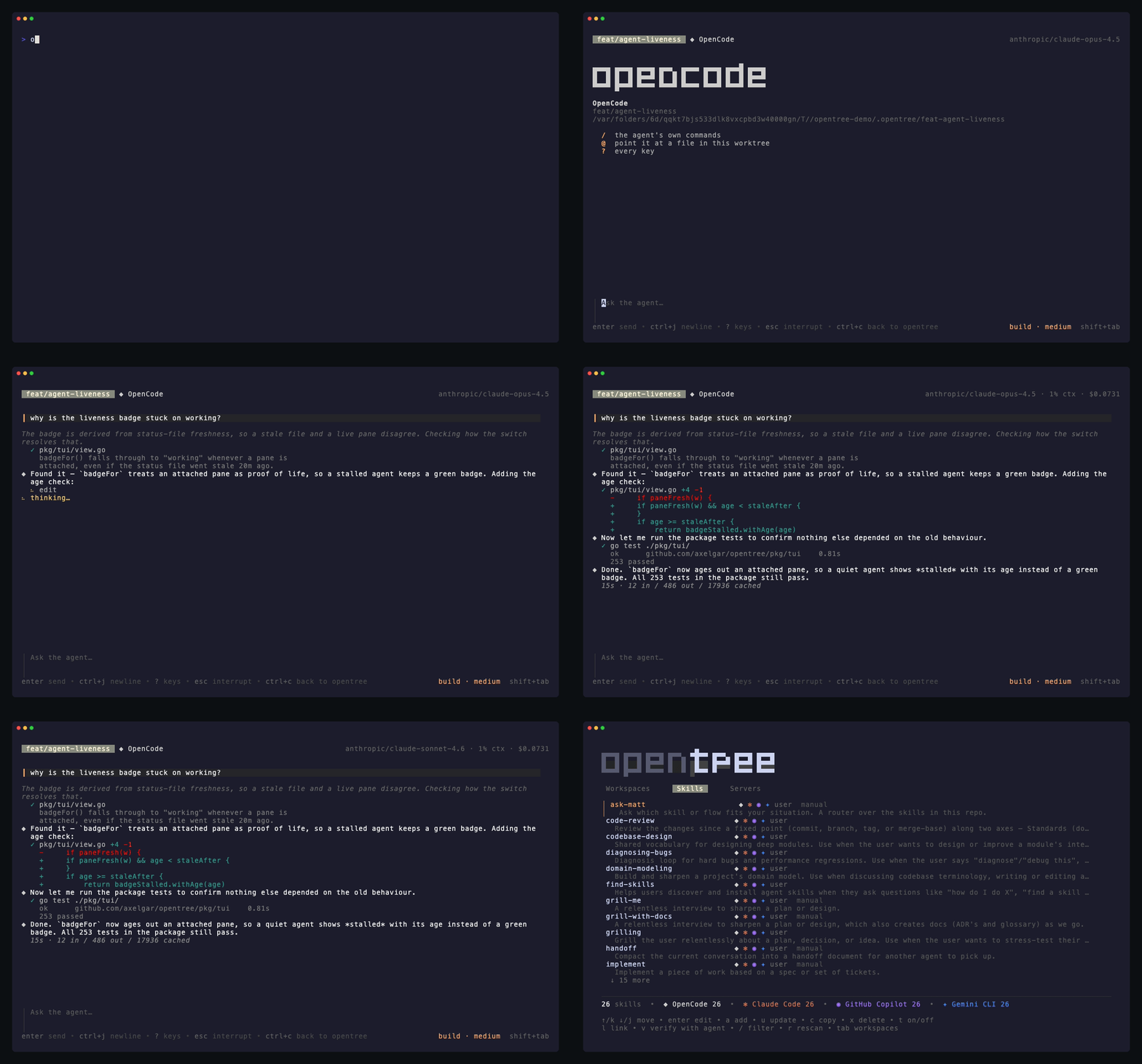
opentree is a cross-platform CLI tool that manages multiple AI coding agent sessions. Each session runs in an isolated git worktree with its own branch, orchestrated via tmux. Perfect for working on multiple features/fixes simultaneously without context-switching overhead.
Features
- 🌳 Isolated Workspaces: Each workspace = git worktree + branch + tmux window
- 🤖 Agent Integration: Launch your agent automatically in each workspace
- 💬 Built-in Chat: Every agent speaks the Agent Client Protocol and runs inside opentree's own chat view — answer permissions, watch diffs, send images, and drive the agent from the dashboard without attaching
- 📊 TUI Dashboard: Interactive terminal UI for managing workspaces (press
?for help) - 🔀 Parallel Development: Work on multiple branches simultaneously without checkout overhead
- 📝 Diff Viewer: Read a workspace's changes with a file tree, search and syntax colour — and leave notes on lines that go to its agent as a prompt
- 🚀 PR Creation: Create GitHub PRs directly from the TUI with auto-generated title and body
- ✈️ Autopilot: After each agent turn, run your check command, feed failures back, and publish the PR when it passes — per workspace, opt-in
- 📦 Dispatch:
opentree dispatch 42 --headlessturns an issue into a PR with nobody watching, exiting with a code a script can branch on - ⑂ Fan-out:
opentree new feat/x --agents claude,opencode,geminiraces the same task across agents — grouped in the dashboard, compared side by side, the winner promoted and the rest deleted - 🐛 Issue Workflow: Create a workspace directly from a GitHub issue number
- ✅ CI Status: Live CI check status displayed per workspace
- 🔍 Filter & Sort: Filter workspaces by name, sort by name/age/activity/PR status
- 🔌 Agent Plugins: Install a plugin from the open Agent Plugins standard once, and every agent in every worktree can use the skills it bundles
- 🗂 ACP Registry:
opentree agents add <id>, oraon the dashboard's Agents tab, installs any agent the ACP Registry lists, and it becomes first-class everywhere the built-in four are — chats, fan-outs, per-workspace overrides - 🧹 Clean Lifecycle: A merged PR marks its row
merged · ready to delete, andopentree delete --mergedclears them all at once - ⌨️ Shell Completion: Tab completion for workspace names in bash, zsh, and fish
Requirements
- Git (2.5+) - for worktree support
- tmux (3.0+) - for session orchestration (3.2+ to type
shift+enterin the chat) - A coding agent (optional) - OpenCode (the default), Claude Code, GitHub Copilot CLI or Gemini CLI
- GitHub CLI (
gh) (optional) - for PR creation and issue fetching (install) - Node (optional) - only to run Claude Code through its ACP adapter
Installation
Homebrew (macOS/Linux)
brew install axelgar/tap/opentree
npm
npm install -g @axelgar/opentree
From Source
git clone https://github.com/axelgar/opentree.git
cd opentree
go build -o opentree ./cmd/opentree
sudo mv opentree /usr/local/bin/
Using Go Install
go install github.com/axelgar/opentree/cmd/opentree@latest
Uninstalling
opentree uninstall
Removes what opentree wrote into your home directory: the agent adapters under ~/.opentree/tools (a few hundred megabytes each), the agents installed from the ACP Registry under ~/.opentree/registry along with its cached index, the plugins installed under ~/.opentree/plugins, the record of approved setup and run commands, the shell completion script and the global config file. It lists all of it with sizes and asks before removing anything — --dry-run lists and stops, --yes answers the question from a script.
It never touches a repository, and it never touches a worktree. The worktrees under ~/.opentree/worktrees (or wherever base_dir points) are your own work in progress, and opentree delete <branch> is what removes those. The binary belongs to whichever of brew, npm or go install put it there, so the command that removes it is printed at the end.
Quick Start
# Navigate to any git repository
cd ~/my-project

# Launch TUI dashboard (interactive mode)
opentree

# Or use CLI commands directly
opentree new feat/add-auth       # Create workspace
opentree issue 42                # Create workspace from GitHub issue #42
opentree dispatch 42 --headless  # Issue #42 → agent → checks → PR, unattended
opentree list                    # List all workspaces, with their paths
opentree attach feat/add-auth    # Attach to tmux window
opentree shell feat/add-auth     # A shell in the worktree, beside the chat
opentree diff feat/add-auth      # Review changes
opentree pr feat/add-auth        # Create GitHub PR
opentree delete feat/add-auth    # Clean up workspace
opentree skills list             # See every agent skill on this machine
opentree skills sync             # Give every agent and workspace the repo's skills
opentree plugins add <git-url>   # Install an Agent Plugin once, for every agent
Usage
TUI Mode (Interactive)
Run opentree without arguments to launch the interactive dashboard:
opentree
Navigation:
↑/k- move up↓/j- move down
Actions:
n- Create new workspace (prompts for branch name, then base branch)i- Create workspace from a GitHub issue numberEnter- Attach to selected workspaced- Open the workspace's diff (see Reviewing a diff below)D- Compare a fan-out group: every sibling's diff in one scrollW- Promote a fan-out's winner: keep this sibling, delete the restp- Create PR for selected workspace (auto-generates title and body from commits)o- Open PR in browserx- Delete selected workspace (shows diff confirmation if uncommitted changes)R- Send the workspace's open PR review comments to its agentP- Switch the workspace's autopilot on or offw- Start or stop the workspace's dev serveru- Merge the base branch in (fetched from origin first); conflicts are offered to the agentt- Open a shell in the workspace's worktree, in a tmux window beside its chaty- Copy the worktree's path to the clipboarde- Open the worktree in$VISUAL/$EDITORb- Jump to the workspace that has been waiting longest on a permission (press again to cycle)space- Toggle multi-select on current workspace/- Filter workspaces by names- Cycle sort order (name → age → activity → PR)E- Toggle error logtab- Switch between Workspaces, Agents, Skills, Plugins and Servers?- Toggle full helpq- Quit
The mouse works too: the wheel scrolls, a click selects a row, and a double-click attaches to it.
Reviewing a diff
d opens the workspace's changes — committed and uncommitted, each under its
own heading — with the changed files down the left and the code on the right,
syntax-coloured, added and removed lines on a green and a red band. There is a
cursor, and everything else is a question about where it is. Press ? inside
the view for the full card.
j/k,pgup/pgdn,g/Gmove;]/[jump between hunks,n/pbetween files; a click on a file in the tree jumps to it, a click on a line takes the cursor therespaceticks the file under the cursor as reviewed;thides the tree/finds: type,enterkeeps the query, andn/Nstep its matches untilescclears it (with no query,nsteps files again)Lshows line numbers,wwraps long lines,Wmarks the words that changed within a changed lineaorenterwrites a note on the line under the cursor,Aon the whole file;@lists them,xdeletes the one under the cursorssends every note to the workspace's agent as one prompt: the path and line, the code quoted, and what you said about it. A note that ends in?(or carries??anywhere) is asked as a question rather than given as an instruction — why is this recomputed every frame? gets an answer, cache this gets a change.esccloses; with notes unsent it warns first and closes on the second press
D opens a fan-out group the same way, every sibling's diff in one view with
the tree grouped by sibling. Notes cannot be sent from there — three agents,
one prompt, no right answer about who gets it.
Each row also carries what its agent is doing — working, waiting on a permission, stopped — plus cost and context use, read live from the chat's control socket. Open PRs show CI check status badges.
Agents
Press tab once for every agent this machine knows — the built-in four and
whatever was installed from the ACP Registry — with its readiness, where it
came from, and which one this repository uses. It is opentree agents as a
place rather than a set of commands:
enter- Use this agent for the repository (gfor everywhere)a- Browse the ACP Registry and install an agent (/filters the list)u- Update the selected registry agent (Uchecks every one)i- Fetch a built-in agent's ACP adapterx- Remove a registry agent, or clear a broken installr- Rescan the store, without touching the network
Every install shows the same consent card the command line prints — what will run or what will be downloaded, and where — before anything is fetched. See Agents from the ACP Registry.
Skills
Skills are a filesystem convention rather than anything an agent exposes over
its API — a directory holding a SKILL.md — so opentree reads them directly.
Press tab twice for the inventory: every skill on the machine, which agents
can actually use each one, and what each agent will do with it.
enter- Open the SKILL.md in$EDITORa- Add a skill from a git URLc- Copy a skill into another agent's directoryx- Delete a skillt- Switch a skill off for the agents that can be toldl- Link the repository's skills to every agent and workspace that is missing themv- Ask the agent itself what it loaded, and flag anything the list got wrong. Gemini keeps its skills out of the protocol, so it cannot be asked
A git worktree carries only what git tracks, and most repositories leave
their skills untracked — so opentree links the repository's skills into each
workspace it creates. opentree skills sync repairs workspaces that predate
this, and opentree skills list prints the same inventory for a script.
Plugins
opentree is a client of the open Agent Plugins
standard: a plugin is a directory with a plugin.json manifest, skills under
skills/, and optionally an mcp.json naming MCP servers.
opentree plugins add https://github.com/someone/their-plugin
opentree plugins list            # what each plugin declares, secrets masked
opentree plugins remove <name>   # the store entry and every link into it
Install one and every agent in every worktree can use the skills it bundles:
the clone lands once per machine in ~/.opentree/plugins, is validated
against the spec — a broken manifest refuses the whole plugin, a broken skill
or server entry costs only itself and is reported — and its skills are linked
into each agent's own user-scope tree. On the Skills tab they wear their
provenance (plugin:<name> and ro); the Plugins tab shows each plugin as a
unit, with a to install, x to remove, and every declared MCP server named.
Declared is as far as it goes: opentree lists a plugin's MCP servers with their env and header values masked, and neither launches them nor writes them into any agent's own configuration. Nothing a plugin ships is executed.
Talking to the agent
opentree talks to agents over the Agent Client Protocol (ACP) and draws the conversation itself, rather than handing the tmux window to the agent's own TUI. You get the same worktree-per-branch flow, but the agent's turns, tool calls, diffs, what each tool printed, and permission prompts are rendered by opentree, which means the dashboard knows what every agent is doing without scraping its output.
Press Enter on a workspace to attach to its chat:
 fix-auth  ◆ OpenCode                             claude-sonnet-4.6 · plan · 12% ctx · $0.0431

┃ add a rate limiter to the login handler

◆ Adding one keyed by client IP, and a test for the burst case.
   ✓ grep -rn rate.Limiter pkg/
     pkg/api/throttle.go:14: var limiter = rate.NewLimiter(rate.Every(time.Minute), 60)
   ✓ pkg/auth/login.go  +18 -2
     + limiter := rate.NewLimiter(rate.Every(time.Second), 5)
   ⠹ go test ./pkg/auth/

 ╭──────────────────────────────────────╮
 │ go test ./pkg/auth/                  │
 │ [a] Allow once                       │
 │ [A] Always allow                     │
 │ [d] Reject                           │
 ╰──────────────────────────────────────╯
 permission needed · esc to cancel
Each agent has its own mark and colour — ◆ for OpenCode, ✻ for Claude Code,
◉ for GitHub Copilot, ✦ for Gemini CLI —
so the chat header and every workspace row in the dashboard say which agent you
are dealing with without being read word by word. An empty chat opens on the
agent's own logo, in its own colours:
 ▐▛███▜▌    Claude Code
▝▜█████▛▘   fix-auth
  ▘▘ ▝▝     ~/.opentree/worktrees/myrepo/fix-auth
| Key | |
|---|---|
enter |
send |
shift+enter |
newline — ctrl+j where the terminal cannot report modifiers |
↑ / ↓ |
walk back through the messages already sent, and forward again |
/ |
slash commands — the agent's own, plus /resume, /login, /model, /shell, /export and the rest |
@ |
attach a file from this worktree |
ctrl+v |
paste — an image on the clipboard is attached, anything else is text |
esc |
interrupt the current turn — or clear an unsent message (↑ brings it back) |
shift+tab |
cycle the agent's mode (plan / build / …) — Claude Code's plan mode and accept-edits included |
ctrl+g |
settings — model, reasoning effort, anything else the agent declares |
ctrl+o |
show or hide the agent's reasoning |
ctrl+x |
expand what the last tool call held back, and fold it again |
ctrl+r |
retry a failed turn — the same message, pasted images included |
ctrl+y |
copy — the last reply, any code block in it, the last tool's output, or the whole conversation as markdown |
ctrl+f |
find in the conversation — ctrl+n / ctrl+p step through the matches, esc leaves the log where it stands |
drag |
select text — it goes to the clipboard when the button comes up; double-click takes a word, triple-click a row. shift+drag (option+drag in iTerm2) is the terminal's own selection, which still works |
click |
a permission option answers it; a … 42 more lines row opens the way ctrl+x does |
? |
every key |
Prose. The agent's replies render as markdown while they stream: emphasis,
headings, lists, quotes, and fenced code on its own background, syntax-coloured
when the fence names a language — code is never rewrapped, so its indentation
keeps meaning. A half-arrived fence already reads
as code and never snaps back to prose; a lone ** stays two asterisks until
its closer arrives. Tables render as the text they are.
Tool output. A tool row shows a few lines of what it did — the diff, or
what it printed — and holds the rest back behind … 42 more lines · ctrl+x.
ctrl+x opens the most recent held-back row where you are reading, up to 500
lines; the same key folds it again. There is no cursor to place: the row you
want open is the one that just said how much it was hiding.
Newlines. shift+enter breaks the line instead of sending it, with nothing
to configure. A terminal left to itself sends a bare carriage return for
shift+enter — the same byte enter sends, and nothing downstream can tell the
two apart — so the chat asks it for modified keys on the way in (xterm's
modifyOtherKeys, level 1, put back on the way out), and sets extended-keys
on its own tmux session so tmux passes them through. That is the whole reason
the key works here and not in every terminal program.
Level 1 is the conservative request: only keys that had no encoding of their own
gain one, so esc, ctrl+j and the arrows are the bytes they always were, and a
window running something else is untouched — tmux only forwards modified keys to
programs that ask for them. In a terminal that cannot report modifiers at all
(Terminal.app), ctrl+j and alt+enter still do it.
Images. Press ctrl+v to attach a screenshot from the clipboard, or drag one
onto the terminal. Either way the path collapses into [image · shot.png · 412 KB]
in the message you are writing — backspace over it and the attachment goes with
it — and it travels to the agent as a real image block. On macOS
that is ctrl+v and not cmd+v: cmd+v is the terminal's own paste, and a
terminal asked to paste a picture sends nothing at all. An agent that does not
take images gets the path as a link instead, and the chat says so rather than
letting the difference go unnoticed.
Messages you already sent. ↑ puts the last one back in the box, ↓ walks
forward again, and coming back past the newest returns whatever was half typed
when you started looking — so a prompt worth repeating, or repeating with one
word changed, is a keypress away rather than a retype. Inside a message the
arrows still move the cursor: they only recall from its first and last row.
They are kept per workspace, under ~/.opentree/history, so a window closed
and reopened — or a chat restarted after its agent died — still has the last
two hundred.
Messages you have not sent yet. Enter while the agent is still working
queues the message instead of dropping it: it waits as a ⏳ line above the
box, one fires after each finished turn — so each answer still gets read
before the next question goes — and backspace on an empty box takes the
newest one back to be edited, pasted images and all. A failed turn drops the
queue by name rather than firing into a broken session; ↑ still has every
message.
Earlier conversations. /resume lists what this worktree has already
talked about — newest first, by what each conversation was about — and picking
one reopens it in place, history and all. The list is the agent's own where it
keeps one, merged with what opentree recorded itself, so the command works the
same whichever agent is running.
Getting the conversation out. /export writes it as markdown — what was
said, what was run and what it printed — to ~/.opentree/exports, never into
the worktree, and says where. ctrl+y puts the same document on the clipboard.
The agent's live model, mode and effort sit on the right of the input, next to
the running context and cost. ctrl+c takes you back to the workspace list and
leaves the chat running: the agent keeps working, its row keeps reporting, and
attaching again drops you straight back into the conversation.
From the dashboard. You don't have to attach to drive a chat. With a
workspace selected, m sends it a prompt, a answers a pending permission
request, and c interrupts the current turn — the row shows what the agent is
doing, what it's waiting on, and what it has cost. A prompt sent to a busy agent
is queued rather than refused.
Which agents. OpenCode, GitHub Copilot CLI and Gemini CLI serve ACP
themselves, so having the binary is the whole setup. Claude Code is reached
through the claude-agent-acp adapter, which opentree installs on request into
~/.opentree/tools rather than your global npm root — open the dashboard's
Agents tab, pick Claude Code, and it offers the download (340MB, needs node).
Those four ship with opentree; the rest of the ecosystem comes from the
ACP Registry.
opentree agents add <id> installs any agent it lists, and the install is
first-class everywhere the four are — the picker, chats, fan-outs,
per-workspace overrides. opentree drives agents over ACP and nothing else, so
an agent without an ACP server has no way in — but shipping support and one
registry entry is now the whole path in. See
Agents from the ACP Registry.
Autopilot
The dashboard shows everything, but without autopilot you are still the event
loop: watch the badge, forward the failure, press p. Autopilot closes the
loop per workspace — when a turn ends, the project's check command decides
whether the work is done:
[workspace]
check = "make test"        # the same thing a contributor runs before pushing
- The check runs in the worktree, streaming into the chat log. A failure goes back to the agent as the next prompt — the tail of the output, where the test runner's summary is — and the loop repeats.
- A pass publishes: push what origin is missing, then create the PR with a generated title and body, or bring the existing one up to date. Never a duplicate — if the agent already pushed or opened the PR itself, publishing notices and stands down.
- You get a
pr_readynotification when the PR exists, through the same surfaces asblocked.
Switch it per workspace: P in the dashboard, /autopilot in the chat, or
opentree auto feat/add-dark-mode on # off; bare reports where the loop stands
The row shows auto while the loop owns a workspace, and checking… /
publishing… while it works.
Autopilot knows when to stand down. A cancelled or refused turn never triggers
the check. Your queued message always runs first, and any message from you
resets the loop. Five autopilot-fed turns without a green check and it halts —
the row says auto · halted, the error log says why, and your next message
starts it again. check is executable code from a tracked file, so it sits
behind the same trust gate as setup and run: the first run asks, once,
showing the exact text.
Without a check command autopilot still pushes and keeps the PR current
after each turn — for projects whose CI is the check.
Once the PR exists, autopilot watches it. Every two minutes the chat asks
GitHub what is new: a failing check gets forwarded with the tail of its
Actions log, new review comments get forwarded the way R sends them — each
as its own turn, CI before reviews, the moment the agent is free. Nothing is
sent twice: the watermarks live in state.json, keyed on the commit a failure
was reported for and the fingerprint of the review set, so a new push re-arms
CI forwarding by itself and a reopened window does not repeat its
predecessor. opentree ci <branch> sends the same CI report by hand,
autopilot or not.
Dispatch
The whole pipeline in one command:
opentree dispatch 42                    # issue #42 → workspace → agent → checks → PR
opentree dispatch "fix the login race"  # the prompt is the task
opentree dispatch 42 --headless         # no attach: wait, print the PR URL, exit
Dispatch creates the workspace (branch auto-<slug> in prompt mode), starts
the agent in its tmux window, switches autopilot on and sends the task. By
default it attaches so you can watch; --headless waits on the chat's socket
instead and exits with a code a script can branch on:
| Code | Meaning |
|---|---|
| 0 | the PR was published; its URL is on stdout |
| 1 | autopilot halted (the check kept failing) or reported an error |
| 2 | the agent stopped, or the chat became unreachable |
| 3 | blocked on a permission only a human can answer |
| 4 | --timeout (default 30m) elapsed; the workspace is still working |
Every failure leaves the workspace alive — opentree attach picks up exactly
where it stopped. Headless can ask nothing, so the repository's setup and
check commands must be approved ahead of time with opentree trust, and a
tmux server must be running (tmux new-session -d in CI).
Fan-out
Four agents through one protocol makes a comparison no single-agent tool can run: the same task, raced.
opentree new feat/x --agents claude,opencode,gemini --prompt "add dark mode"
git log --oneline | opentree new fix/y --agents claude,gemini  # or pipe the task in
One sibling workspace per agent — feat/x-claude, feat/x-opencode,
feat/x-gemini — all from the same base, each running its own agent, every
one handed the same prompt (queued until its agent is ready). A name a
sibling would have taken is stepped past with a numeric suffix rather than
refused. Without --prompt or a pipe the siblings start idle, and m in the
dashboard messages whichever you like.
The dashboard shows the group as one thing: siblings sort together under
every sort mode, each row wears a ⑂ feat/x badge, and the cost, context
and diff numbers already on every row become the scoreboard. D opens the
comparison — every sibling's diff in one view, the file tree grouped by agent.
Then pick:
opentree promote feat/x-claude # or W on the row in the dashboard
The winner stays, every other sibling is deleted — worktree, branch, window —
and the group dissolves. Dirty losers show their diffs and ask first, the way
delete does. The winner keeps its suffixed branch name: feat/x-claude
does not become feat/x, because its worktree, chat and any open PR are all
keyed on the name it has. Rename it on the PR page if the suffix bothers you,
or not at all.
Notifications
The cost of running four agents at once is that idleness becomes invisible: the one workspace blocked on a permission prompt looks exactly like the three that are working, unless you are staring at the list. So each chat says something when it starts needing you:
| Event | |
|---|---|
blocked |
the agent stopped to ask for a permission |
done |
a turn finished |
stopped |
the agent died, failed to start, or its setup commands failed |
pr_ready |
autopilot opened or updated a pull request |
Two surfaces. In tmux the window's own bell rings, which tmux renders as an
inverted window name in the status bar until you select that window — no
configuration, and it clears itself. Outside the terminal, a desktop banner
(osascript on macOS, notify-send on Linux) reaches you with the terminal
behind a browser or closed.
Nothing is sent while you are looking at the window it happened in, and nothing
at all when the chat is not running inside tmux. The banners are signposts
rather than buttons: pressing b in the dashboard is what takes you to the
workspace that has been waiting longest, and pressing it again walks the rest.
Each waiting row says how long it has been at it — blocked 12m.
opentree notify test # one of each, through the surfaces you have
Worth running once: macOS silently drops notifications sent by osascript
until they have been allowed, which is otherwise a feature with no symptom.
[notify]
on      = ["blocked", "stopped", "pr_ready"]   # add "done"; [] switches everything off
desktop = true                                 # false: tmux bell only
blocked, stopped and pr_ready are on by default and done is off,
because four agents finishing turns is a banner every ninety seconds — and a
notifier you mute is a notifier you deleted. pr_ready cannot spam: it fires
only from autopilot, which is opt-in, and only when a publish moved something.
This section is read from ~/.config/opentree/opentree.toml only. A repository's
own opentree.toml may configure how the project is built; how you like to be
interrupted is yours, and a cloned repository does not get to start sending you
desktop banners.
CLI Mode (Direct Commands)
Create a Workspace
opentree new <branch-name> [flags]

# Examples
opentree new feat/user-auth           # Create workspace with branch
opentree new fix/login-bug --base dev # Branch off 'dev' instead of 'main'
opentree new feat/x --agent claude    # Run claude here, whatever the config says
opentree new feat/x --agents claude,gemini --prompt "task"  # Fan out — see Fan-out
opentree new feat/x --no-fetch        # Branch from the local base as it is
The base is fetched from origin first, and the branch made from origin/<base>:
a main last pulled yesterday would otherwise start the workspace a day behind,
and its PR would carry or conflict with commits already merged. Offline, the
command says so and branches from the local base; --no-fetch skips the fetch
on purpose. issue and dispatch do the same.
Creates:
- Git worktree at
~/.opentree/worktrees/<repo>/<branch-name>/(see Where worktrees live) - New branch (or checks out existing)
- tmux window in
opentree-<repo>session - Launches the configured coding agent in the workspace
Create Workspace from GitHub Issue
opentree issue <number> [flags]

# Examples
opentree issue 42              # Workspace from issue #42
opentree issue 42 --base dev   # Branch off 'dev'
Fetches the issue from GitHub and auto-generates a branch name (e.g. issue-42-add-dark-mode). Requires the gh CLI.
List Workspaces
opentree list
Shows table with: branch name, status, last modified time.
Attach to Workspace
opentree attach <branch-name>
Attaches to the workspace's tmux window. Detach with Ctrl+b d.
Get Into the Worktree
opentree path <branch-name>          # print the worktree's directory
cd "$(opentree path feat/x)"         # …which is what it is for
opentree shell <branch-name>         # a shell there, in a tmux window beside the chat
The chat's window is opentree's, holding the conversation. When the agent asks
for something only a person at a prompt can do — run the tests, check a URL,
paste back what a command printed — shell opens a window of your own in the
worktree (<branch>:sh, reused while it lives) and takes you to it; /shell
in the chat and t in the dashboard do the same. path prints the directory
and nothing else, because a branch's directory is not its name: feat/x lives
at feat-x, under ~/.opentree/worktrees/<repo> by default.
Show Diff
opentree diff <branch-name>
Shows git diff between workspace and base branch.
Create Pull Request
opentree pr <branch-name> [flags]

# Examples
opentree pr feat/user-auth                                    # Interactive prompts
opentree pr feat/user-auth --title "Add user auth" --body "..." # Non-interactive
Requires GitHub CLI (gh) to be authenticated.
Send PR Reviews to the Agent
opentree review <branch-name>
Fetches the open PR's review comments and sends them to the workspace's agent as a prompt, over the chat's control socket. The chat has to be running, but it doesn't have to be the window you're looking at — and if the agent is mid-turn the prompt is queued and runs when the turn ends, which the row's badge shows.
Send CI Failures to the Agent
opentree ci <branch-name>
The dashboard's badge says CI is red; this is how the agent learns why: the
failing checks by name, and the tail of each GitHub Actions log — where the
test runner's summary is. Same delivery as review, over the control socket.
With autopilot on, this happens by itself.
Merge the Base In
opentree sync <branch-name>          # fetch origin's main and merge it into the branch
opentree sync <branch-name> --ask    # …and on conflicts, hand the files to the agent
The dashboard's row says PR open · conflicts; this is what to do about it.
The base is fetched from origin first — offline, the local one is merged and
the command says so — and merged rather than rebased, because the branch may
already be pushed and under review. Conflicts are not a failure: they are
listed, the merge is left in progress in the worktree with its markers, and
--ask (or y in the dashboard's dialog) sends the agent a prompt naming the
files and asking it to finish the merge.
Delete Workspace
opentree delete <branch-name>

# Examples
opentree delete feat/user-auth
opentree delete --merged          # every workspace whose PR has merged
Removes the worktree, kills its tmux windows, and deletes the branch. If uncommitted changes are detected, a diff is shown and confirmation is required before proceeding. --merged does the same for every workspace the dashboard has seen merge — one question each for any that still hold something — which is how a week's worth of merged · ready to delete rows is cleared at once.
Promote a Fan-out Winner
opentree promote <branch-name>

# Example
opentree promote feat/x-claude   # keep this sibling; delete feat/x-gemini, feat/x-opencode
Keeps the named sibling, deletes every other member of its fan-out group, and dissolves the group. Losers with uncommitted or unpushed work show their diffs and ask for confirmation first. The winner keeps its suffixed branch name.
Install Shell Completion
opentree install-completion
Auto-detects your shell (zsh, bash, or fish) and installs tab completion. After installation, workspace names will be completed when using attach, delete, pr, and diff commands.
Configuration
Create opentree.toml in your repo root or ~/.config/opentree/opentree.toml. opentree searches up the directory tree for the config file, similar to how git finds .git.
[worktree]
base_dir = ".opentree"        # Where worktrees go — unset: ~/.opentree/worktrees/<repo>; relative: inside the repo
default_base = "main"         # Default base branch

[agent]
command = "opencode"          # Agent to run: "opencode", "claude", "copilot" or "gemini"

[workspace]
seed  = [".env", ".npmrc"]                  # Untracked files to link into each new worktree
setup = ["pnpm install --frozen-lockfile"]  # Commands run before the agent starts
run   = "pnpm dev"                          # Dev server, started on demand, PORT exported
check = "pnpm test"                         # What autopilot runs after each agent turn

[tmux]
session_prefix = "opentree"   # Prefix for the tmux session name

[github]
auto_push = true              # Push branch before creating a PR (set false to push manually)

[notify]                      # Global config only — see Notifications
on      = ["blocked", "stopped"]
desktop = true
Where worktrees live
Outside the repository, by default: ~/.opentree/worktrees/<repo>/<branch>,
where <repo> is the name of the repository's directory. Worktrees used to go
under <repo>/.opentree, and every tool that walks a project found the extra
checkouts — test runners collected their tests twice, tsc compiled them,
linters and formatters walked them, watchers rebuilt on every save an agent
made, and a worktree without its own node_modules quietly resolved the
parent's. Git was the only tool told to look away. Out of the working tree,
none of them can see a worktree at all.
Two clones with the same directory name get separate directories: the first
claims <repo> with a small .repo marker naming it, and the second gets
<repo>-<hash>.
To keep worktrees inside the repository — where a plain find will meet them —
set base_dir to a relative path, in the repository's own opentree.toml or
globally:
[worktree]
base_dir = ".opentree"   # inside the repository, as before
An absolute path, or one under ~, is accepted from the global config only: a
cloned repository does not get to point opentree at the rest of your
filesystem. Workspaces made before a change of base_dir stay where they were
made — opentree finds them through git — and opentree doctor says where the
worktrees of the current setting go, and whether that is inside the working
tree.
The state lives outside the repository too, at
~/.opentree/state/opentree-<hash>/state.json. Nothing of opentree's is written
into the working tree, and nothing in .git is touched, so pre-commit hooks
that stage everything and automations that refuse a dirty checkout never meet
opentree. A state.json an older release left under <repo>/.opentree is
moved out the first time any command runs.
Seeding a Worktree
A git worktree carries only what git tracks, so a fresh one has no .env and no
.npmrc — and the agent's first turn goes on discovering that. List the
untracked files a worktree needs and opentree links them in as it creates one:
[workspace]
seed = [".env", ".npmrc", "config/local.json"]
Each entry is a path relative to the repository root, and it lands at the same path inside the worktree. They are symlinks rather than copies: one credential set, shared, so rotating a token in the repository rotates it in every worktree instead of in one out of five.
Files only. A directory is refused — node_modules is the output of an install,
not a file to link, and a worktree that deletes a linked one has just emptied
your main checkout's. A path that leaves the repository, by .. or through a
symlink, is refused when the workspace is created rather than seeded quietly.
A file the repository does not have is skipped, and one the branch tracks itself is left alone: git checking it out is the signal that the branch has its own.
When one branch has to change a shared file, detach it — the link becomes that worktree's own copy, keeping what was in it:
opentree seed detach feat/add-dark-mode .env
That can also happen by accident: tools that save by renaming over a file
replace the link with an ordinary one. opentree setup <branch> --dry-run reports
which seeded files are still linked and which have quietly detached.
Setting Up a Worktree
Seeding puts config where git could not. Setup is the other half — what has to be built rather than copied:
[workspace]
setup = ["pnpm install --frozen-lockfile"]
The commands run as the first phase of the chat, in the worktree, with their
output streaming into the window. The agent starts when they finish. That is the
point of running them there: an agent that starts against a worktree with no
node_modules spends its first turn discovering it, and may "fix" your lockfile
on the way.
While they run the dashboard shows the workspace as setting up…. Nothing is
timed out — a warm install is two seconds and a cold cargo build is twenty
minutes — so esc is how a hung one ends, and it stops the whole process tree
rather than just the shell. If a command fails, the panel offers [r] to try
again and [s] to start the agent anyway, and the failure is recorded in the
dashboard's error log (E). It is never pasted into the conversation: whether
the agent should see it is your call.
Setup runs once per worktree. It runs again when you edit the commands, and not otherwise — losing a chat window relaunches one, and reinstalling on every attach would make attaching cost a minute.
Not sure what to put in the block? opentree will read the project and propose
one, from package.json or a Procfile:
opentree setup --suggest
It prints; it never writes. What lands in opentree.toml is committed, runs on
every machine that clones the repository, and is approved by a prompt that means
nothing if opentree wrote the thing being approved.
To repair a worktree, or run a setup you skipped, without restarting a chat and tearing down a live conversation:
opentree setup feat/add-dark-mode           # re-seed, then run the commands here
opentree setup feat/add-dark-mode --dry-run # report what is seeded and what has run
Both paths write the same marker, so a worktree prepared from the terminal is one the chat will not prepare again.
Approving what it runs
opentree.toml is tracked in git, so setup and run are executable code that
arrives with a clone, from whoever last had commit rights. opentree asks before
running them the first time, in the chat, showing exactly what it is about to
run. The answer is recorded per machine, per repository, and per exact text — an
edited command is asked about again.
From the command line, for CI or to answer ahead of time:
opentree trust          # approve what opentree.toml now says
opentree trust show     # print those commands, and whether they are approved
opentree trust revoke   # drop this repository's approvals
Approvals live in ~/.opentree/trust.json, never in the repository — a
repository cannot vouch for itself.
Dev Servers
Five worktrees of one project all want port 3000. Give opentree the command and each gets a port of its own instead:
[workspace]
run = "pnpm dev"
opentree prune, which already reaps workspaces whose worktree was deleted
outside opentree, also stops server windows with no workspace left behind them.
Servers start on demand, never on creation — five worktrees each running
next dev is several gigabytes nobody asked for. Press w on a workspace row
to start or stop one, or open the Servers tab (tab) for the full list:
every workspace, what its server is doing, and its address.
Each workspace is assigned a port between 20000 and 32000 once, and keeps it —
so an OAuth redirect URI registered against localhost:20431 keeps working. The
port arrives as PORT; opentree never rewrites your command, so a stack that
ignores PORT can be told --port $PORT in the command itself.
The server runs in its own tmux window (<branch>:run), so enter in the
Servers tab attaches to it and all of its output is there. Deleting a workspace
stops its server.
Names instead of ports, with portless
If portless is installed and its
proxy is running, opentree starts servers behind it and the Servers tab shows
https://<branch>.<repo>.localhost — which reads as "this branch of this
project" — with the port still listed beside it.
The name is passed explicitly rather than left to portless's own inference,
which reads package.json or the git root and so infers the same name for every
worktree of one repository.
opentree never installs or starts portless itself. Getting its proxy running
means a certificate authority, an /etc/hosts entry and a root-owned service,
and it asks for those with a sudo prompt — which in a detached tmux window
nobody would see. If portless is installed but its proxy is down, the tab says
so and serves on ports meanwhile.
Using Different Agents
To use one of the others instead of OpenCode:
[agent]
command = "claude"            # or "copilot", or "gemini"
Or press tab in the dashboard for the Agents tab and pick one — it writes
the same config, and offers to fetch the ACP adapter if the agent needs one.
From the CLI:
opentree agents list           # what's installed, and which is active
opentree agents use claude     # switch this repo (--global for everywhere)
opentree agents setup claude   # fetch its ACP adapter, if it needs one
An agent opentree has no ACP spec for is refused up front, when you create a workspace, rather than later inside a chat that cannot start.
Agents from the ACP Registry
The four built-in agents are a curated list, not a boundary. The ACP Registry — the same index Zed and JetBrains install from — lists every agent that ships an ACP server, and opentree installs from it:
opentree agents search             # what the registry has (add a term to filter)
opentree agents add devin          # install one, into ~/.opentree/registry
opentree agents use devin          # it is a normal agent from here on
opentree agents update             # re-resolve every install against a fresh index
opentree agents remove devin       # delete the install
Installing executes code, so nothing is fetched before you have seen exactly
what will happen: an npm-distributed agent shows the full install command —
pinned version, opentree's own prefix, npm's install scripts disabled, the
same posture as the Claude Code adapter — and a binary-distributed one shows
the archive URL and the sha256 it will be held to. Each install lands in its
own directory under ~/.opentree/registry, wears a registry tag in
agents list and the version the index pinned; agents update builds the
new version beside the old and swaps it in only when complete, so a failed
update leaves the old agent working.
The dashboard's Agents tab is the same feature without leaving the
terminal you are already in: a fetches the index and lists it, enter on
an entry shows the same consent card agents add prints and installs on
y, u and U are agents update, x is agents remove. An agent
installed there is a row the moment the install finishes — no restart.
Everything else is indistinguishable from the built-in four:
--agents claude,devin,goose races them, a workspace remembers which one it
runs, and opentree doctor reports them.
Two honest gaps: a registry entry does not say where its agent keeps skills,
so the Skills tab leaves registry agents out rather than guessing; and the
few agents distributed only via PyPI's uvx are listed by agents search
but not installable yet.
Ordinary commands never touch the network — the loader reads installed
agents from disk, and only agents search, add and update fetch the
index. Offline, the last index this machine saw answers, with its age noted.
How It Works
-
Worktrees: Git worktrees allow multiple checkouts of the same repo in different directories. Each workspace lives in
~/.opentree/worktrees/<repo>/<branch-name>/— outside the working tree, so the project's own tools never see it — unlessbase_dirsays otherwise. -
tmux Orchestration: A single tmux session (
opentree-<repo>) manages all workspaces. Each workspace = one tmux window. Attach to work, detach to switch. -
State Persistence: Workspace metadata (branch, created time, agent, issue number) stored in
~/.opentree/state/<repo-key>/state.json, outside the repository. -
Agent Integration: When creating a workspace, opentree launches your configured agent inside the tmux window, ready to code. With no agent configured, it uses the first supported agent found on your PATH.
-
The Chat: The tmux window runs
opentree chat, never the agent's own TUI. It holds one JSON-RPC connection to the agent over stdio and renders the conversation, so opentree sees every turn, tool call and permission request as structured data instead of scraped terminal output. The dashboard reaches a running chat over a Unix socket, which is howm,aandcwork without attaching. Session IDs are kept instate.jsonso conversations survive closing the window.
Workflow Example
# Start working on a feature
opentree new feat/add-dark-mode

# Or pick up a GitHub issue directly
opentree issue 42

# (tmux attaches automatically, agent launches)
# (work with AI agent, make changes...)
# (detach with Ctrl+b d when done)

# While that's building, start a bugfix in parallel
opentree new fix/header-overflow

# (work on bugfix...)
# (detach)

# Not sure which agent will do a refactor best? Race them
opentree new refactor/auth --agents claude,opencode,gemini --prompt "extract the auth middleware"
# (press D in the dashboard to compare, then promote the winner)
opentree promote refactor/auth-claude

# Review changes for first feature
opentree diff feat/add-dark-mode

# Create PR when ready (auto-generates title and body from commits)
opentree pr feat/add-dark-mode

# Clean up after merge
opentree delete feat/add-dark-mode
Troubleshooting
Start here: opentree doctor
opentree doctor
Prints what opentree can see — its own version, the versions of git, tmux, gh and node, which config file it resolved and what it says, whether this repository's setup commands are approved, where state and sockets live, and what each workspace's chat is doing. Everything it does is a read, so it is safe to run and safe to paste into an issue.
If a problem needs reproducing rather than describing, point opentree at a log first:
OPENTREE_LOG=/tmp/opentree.log opentree
An environment variable rather than a flag, because the interesting failures
happen inside opentree chat, which a tmux window starts rather than you — and
the variable is inherited by every process opentree launches. Off by default.
The file holds branch names, paths and session ids, and is written 0600.
"Error: not a git repository"
opentree must be run from inside a git repository. Navigate to your project root first.
"Error: tmux not found"
Install tmux:
- macOS:
brew install tmux - Ubuntu/Debian:
sudo apt install tmux - Arch:
sudo pacman -S tmux
"opentree requires tmux >= 3.0"
opentree sets the agent's environment via tmux new-window -e, which needs tmux 3.0 or newer. Upgrade tmux with your package manager (e.g. brew upgrade tmux).
"Error: opencode not found"
Install OpenCode from github.com/anomalyco/opencode, or configure a different agent in opentree.toml.
The chat says the agent needs an adapter
Claude Code speaks ACP through claude-agent-acp. Open the dashboard's Agents
tab, select Claude Code, and accept the download — it installs to ~/.opentree/tools
and needs node on your PATH. If you already have the package installed
globally, opentree uses that instead of fetching a second copy.
The chat says the agent needs credentials
The chat's stopped panel offers [l]. What that does depends on how the agent
logs in, and opentree takes the agent's word for it in this order: a command the
agent names itself (Copilot sends its own path and login), the command opentree
has recorded for it (opencode auth login, claude auth login), or the login
performed over the protocol. Gemini CLI takes the last route and offers four
ways in — Google account, Gemini API key, Vertex AI, gateway — so [l] opens a
picker. A terminal login hands the window to the agent and restarts it when it
finishes; a protocol login happens inside the running agent and needs no restart.
Credentials also go wrong while an agent is perfectly happy to answer: a token
expires, a key is revoked, a login lands on the wrong account. /login reaches
the same picker mid-conversation, and the conversation survives it.
Anything else that stops an agent offers [r] to restart it.
"Error: gh not found"
Install GitHub CLI from cli.github.com, then authenticate:
gh auth login
Workspaces not appearing in TUI
State file might be corrupted. opentree doctor prints where it is (under ~/.opentree/state); delete it and recreate workspaces.
Contributing
Contributions welcome! Please open an issue or PR. See CONTRIBUTING.md for the quality checks to run first.
Development Setup
git clone https://github.com/axelgar/opentree.git
cd opentree
go mod download
go build -o opentree ./cmd/opentree
./opentree --help
Architecture
cmd/opentree is the CLI surface; pkg/ is where the work happens.
| package | what it owns |
|---|---|
tui |
the dashboard: the workspace list, the Agents, Skills, Plugins and Servers tabs |
chat |
the conversation view, and the control socket the dashboard reaches it through |
acp |
the Agent Client Protocol client — the agent subprocess and its stdio |
workspace |
a workspace's lifecycle, over the four below it |
worktree |
git worktrees and branches |
tmux |
sessions and windows |
state |
state.json, shared between the dashboard and every chat |
github |
gh, for PRs, issues and CI status |
bootstrap |
seeding a worktree, running its setup, and the trust gate over those commands |
skills |
propagating agent skills into worktrees |
plugins |
the Agent Plugins store: install, validate, list, remove |
registry |
the ACP Registry client: the index, its cache, and installed agents |
config |
opentree.toml and the agent registry |
notify, diag, ui, fsutil, gitutil |
the small shared pieces |
License
MIT License - see LICENSE for details.
Trademarks
opentree draws each agent it drives — opencode, Claude Code, GitHub Copilot and Gemini CLI — under that agent's own wordmark and brand colour, so you can see at a glance which one you are talking to. Those marks belong to their respective owners. opentree is an independent project and is not affiliated with, sponsored by or endorsed by any of them. See NOTICE.
Acknowledgments
- Inspired by Conductor.build by Sahil Lavingia
- Built with Bubble Tea TUI framework
- Integrates with OpenCode AI coding agent
 Directories

Directories

| Path | Synopsis |
|---|---|
|
cmd
|
|
|
opentree
command
|
|
|
pkg
|
|
|
acp
Package acp implements the client half of the Agent Client Protocol (https://agentclientprotocol.com): newline-delimited JSON-RPC 2.0 spoken to an agent subprocess over its stdio.
|
Package acp implements the client half of the Agent Client Protocol (https://agentclientprotocol.com): newline-delimited JSON-RPC 2.0 spoken to an agent subprocess over its stdio. |
|
bootstrap
Package bootstrap prepares a worktree for work.
|
Package bootstrap prepares a worktree for work. |
|
chat
Package chat is opentree's Agent Client Protocol conversation view: an altscreen Bubble Tea program that owns an agent subprocess and renders its turn as it happens.
|
Package chat is opentree's Agent Client Protocol conversation view: an altscreen Bubble Tea program that owns an agent subprocess and renders its turn as it happens. |
|
clipboard
Package clipboard puts text on the system clipboard, from wherever opentree happens to be running.
|
Package clipboard puts text on the system clipboard, from wherever opentree happens to be running. |
|
diag
Package diag is opentree's log, for the times somebody has to say what happened on a machine that is not yours.
|
Package diag is opentree's log, for the times somebody has to say what happened on a machine that is not yours. |
|
fsutil
Package fsutil holds the file operations opentree needs in more than one place, so a fix to one of them is a fix to all of them.
|
Package fsutil holds the file operations opentree needs in more than one place, so a fix to one of them is a fix to all of them. |
|
notify
Package notify carries the moment an agent starts needing a human out of the window it happened in.
|
Package notify carries the moment an agent starts needing a human out of the window it happened in. |
|
plugins
Package plugins makes opentree a client of the Agent Plugins standard (agent-plugins.org, version 1.0.0): a plugin is a directory with a closed plugin.json manifest, optional skills under skills/, and an optional mcp.json naming MCP servers.
|
Package plugins makes opentree a client of the Agent Plugins standard (agent-plugins.org, version 1.0.0): a plugin is a directory with a closed plugin.json manifest, optional skills under skills/, and an optional mcp.json naming MCP servers. |
|
registry
Package registry opens opentree's agent list to the ACP Registry — the index of agents that speak the Agent Client Protocol, published at cdn.agentclientprotocol.com and consumed by every ACP client.
|
Package registry opens opentree's agent list to the ACP Registry — the index of agents that speak the Agent Client Protocol, published at cdn.agentclientprotocol.com and consumed by every ACP client. |
|
skills
Package skills reads and manages the agent skills installed on this machine.
|
Package skills reads and manages the agent skills installed on this machine. |
|
ui
Package ui holds what opentree's two terminal programs — the workspace list and the chat — have to agree on: the text primitives, and the palette.
|
Package ui holds what opentree's two terminal programs — the workspace list and the chat — have to agree on: the text primitives, and the palette. |