

 README

README

remote pbcopy for use over ssh
pbcopy is a well-known macOS tool that copies data to the clipboard.
It's very useful, but available only in your local machine, not in remote machines.
Fortunately, with OSC52 escape sequence, we can access the local machine clipboard via a remote machine.
I prepared a simple tool that is rpbcopy for remote machines.
Install
Copy rpbcopy to a directory where $PATH is set.
   [local]  $ ssh remote
   [remote] $ wget -O rpbcopy-linux-amd64.tar.gz https://github.com/bottlerocketlabs/remote-pbcopy/releases/latest/download/rpbcopy-linux-amd64.tar.gz
   [remote] $ tar xf rpbcopy-linux-amd64.tar.gz
   [remote] $ mv rpbcopy /path/to/bin/
iTerm2
Features required are not enabled by default
-
First, make sure you use iTerm2 version 3.0.0 or later
-
Check "Applications in terminal may access clipboard" in iTerm2 Preferences:
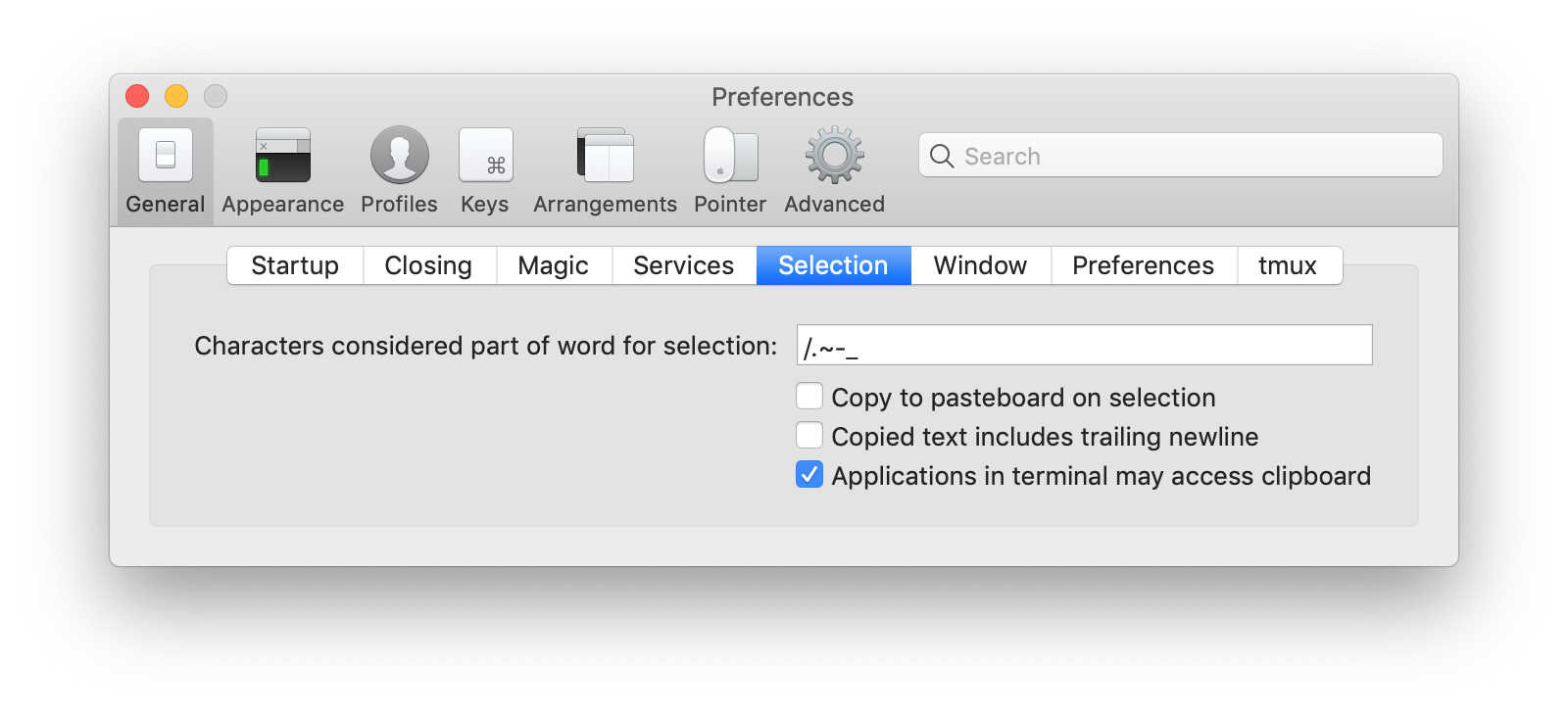
Usage
Just like the normal pbcopy:
[local]  $ ssh remote
[remote] $ date | rpbcopy
[remote] $ exit
[local]  $ pbpaste
Sun Jan 18 20:28:03 JST 2015
How about pbpaste?
Currently most terminals do not allow OSC 52 read access for security reasons. But we can just use command+V key to paste content from clipboard.
If you want to save the content of clipboard to a remote file, try this:
[remote] cat > out.txt
# press command+V to paste content of clipboard,
# and press control+D which indicats EOF
Tested with
See also
For OSC52
- http://doda.b.sourceforge.jp/2011/12/15/tmux-set-clipboard/
- http://qiita.com/kefir_/items/1f635fe66b778932e278
- http://qiita.com/kefir_/items/515ed5264fce40dec522
- https://chromium.googlesource.com/apps/libapps/+/HEAD/hterm/etc/osc52.vim
- https://chromium.googlesource.com/apps/libapps/+/HEAD/hterm/etc/osc52.el
- https://chromium.googlesource.com/apps/libapps/+/HEAD/hterm/etc/osc52.sh
- https://invisible-island.net/xterm/ctlseqs/ctlseqs.html#h2-Operating-System-Commands
- https://github.com/fcpg/vim-osc52
Author
Contributors
- Stuart Warren
License
MIT
 Directories