

 README

README


caphouse stores network packet captures in ClickHouse, making them queryable at the column level while preserving lossless PCAP reconstruction.
Read more and get started at the documentation site: https://cochaviz.com/caphouse/.
This project is still in an experimental state and should be used with caution! See the note on experimental state.
Use cases
- Network sensor capture and search — run
caphouse-monitoron a sensor to continuously ingest tcpdump ring buffers, then search across all captures using SQL filters or thecaphouse-uiweb interface. - Network telescope data storage — ingest high-volume unsolicited traffic
at scale;
ReplacingMergeTree-based deduplication makes re-ingest safe and--max-storagekeeps disk usage bounded. - Ad-hoc network analysis — load one or more PCAPs into a local ClickHouse instance and analyse them directly with SQL: inter-arrival times, flow statistics, protocol distributions, and anything else ClickHouse can express.
- Forensic analysis on large datasets — filter and export byte-exact PCAPs
across millions of packets without downloading unfiltered data; sanitize
captures before sharing with
caphouse-sanitize.
caphouse operates in two broad modes. For local analysis, use the caphouse
CLI to ingest PCAPs into a local ClickHouse, query them with -f, and export
filtered results. For hosted analysis, deploy caphouse-api behind
caphouse-ui for browser-based packet search, packet inspection, stream
overview, SQL exploration, GeoIP enrichment, and AI-assisted SQL generation.
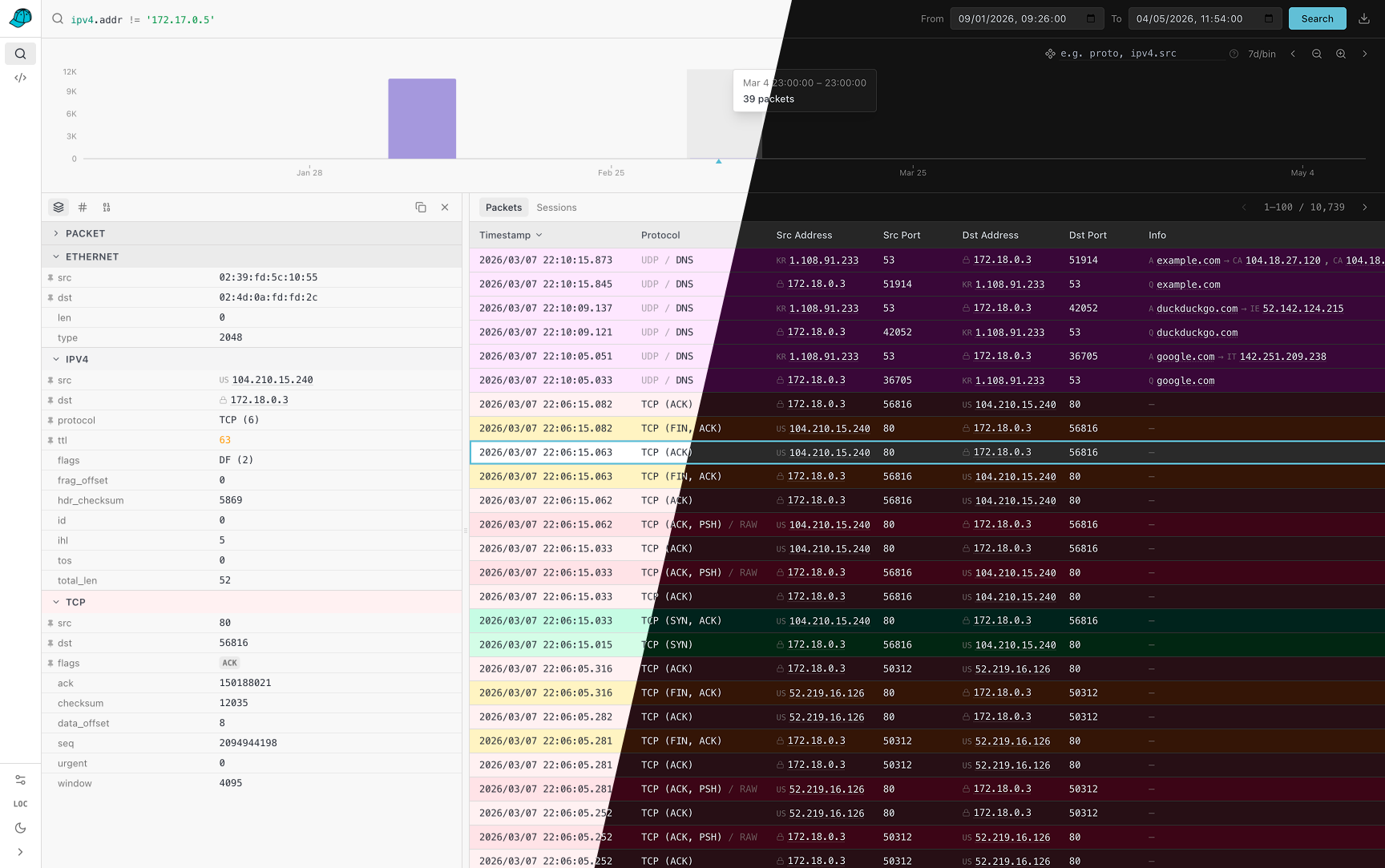
Install
To install caphouse, you need Go (version 1.25 or above:
https://go.dev/doc/install) installed and have an active ClickHouse instance
(we recommend using the Docker image: https://clickhouse.com/docs/install).
Then, you run the following command:
go install github.com/cochaviz/caphouse@latest
go install github.com/cochaviz/caphouse/cmd/caphouse-api@latest
go install github.com/cochaviz/caphouse/cmd/caphouse-sanitize@latest
You can verify the installation by running:
caphouse --version
Quick example
Option A — use your own ClickHouse
If you have a ClickHouse instance running (native protocol on localhost:9000),
point caphouse at it directly:
# DSN format: clickhouse://<user>:<password>@<host>:<port>/<database>
export DSN="clickhouse://default:default@localhost:9000/default"

# Ingest (prints the capture_id when done)
caphouse -d "$DSN" capture.pcap

# Ingest multiple files or a glob
caphouse -d "$DSN" ring*.pcap

# Keep caphouse-managed storage under 100 GiB
caphouse -d "$DSN" --max-storage 100GiB capture.pcap

# Export
caphouse -w -d "$DSN" -c "<capture_id>" out.pcap

# Filter and export
caphouse -w -d "$DSN" -c "<capture_id>" -f "ipv4.addr = '10.0.0.1' AND tcp.dst = 443" filtered.pcap
Option B — spin up a local test environment
No ClickHouse? The devcontainer stack bundles one. First, copy the env file:
cp .devcontainer/.env.example .devcontainer/.env
Then bring up the stack:
docker compose -f .devcontainer/docker-compose.yml up --build -d
The .env file sets COMPOSE_PROFILES=caphouse-ui by default, so this starts
clickhouse, dev, caphouse-api (with hot reload via air), and
caphouse-ui together. The UI is then available at http://localhost:8080 and
the API at http://localhost:8081.
To start only the core services (without the API and UI), remove or unset
COMPOSE_PROFILES in .devcontainer/.env.
Load test data
The repository ships sample captures under testdata/ tracked with
Git LFS. Retrieve them with:
git lfs pull
git-lfs is pre-installed in the devcontainer dev image. For Option A,
install it from https://git-lfs.com first.
Once the files are available, ingest them:
Option A — from your local shell:
caphouse -d "$DSN" testdata/*.pcap
Option B — open a shell in the dev container and run:
docker compose -f .devcontainer/docker-compose.yml exec dev bash
caphouse testdata/*.pcap
More usage examples can be found in the documentation.
caphouse-ui
caphouse-ui is the browser frontend for caphouse-api. It is meant for the
hosted side of caphouse, where you can explore captures without dropping to the
CLI for every query.
It currently gives you:
- A packet search workspace with the same filter model used by
caphouse -f, interactive time ranges, histogram zooming, histogram breakdowns, and one-click PCAP export. - A packet detail drawer with structured per-layer fields, copy helpers, raw bytes, hex dumps, and quick filter pivots from packet values back into the search bar.
- A sessions view for higher-level stream inspection, including L7 summaries such as HTTP, TLS, and SSH where stream tracking is enabled.
- A query workbench with schema browsing, SQL preview/build/execute flows,
saved queries, history, and AI-assisted SQL generation when
ANTHROPIC_API_KEYis configured oncaphouse-api. - An admin page for re-encoding older under-parsed packets after new protocol components are added.
To use the UI, run caphouse-api against your ClickHouse database and serve
caphouse-ui so that /v1, /docs, and /openapi.json resolve to the API.
The repo ships the UI in caphouse-ui/ and the API in
cmd/caphouse-api/. In the repository dev environment,
the UI is available on port 8080.
Deployment
The repository ships two container images:
Dockerfilebuilds the backend image withcaphouseandcaphouse-api. The runtime image defaults tocaphouse-api.caphouse-ui/Dockerfilebuilds the frontend as a static site and serves it with nginx.
Development stack
The devcontainer compose file (.devcontainer/docker-compose.yml)
includes a bundled ClickHouse service. See Quick example — Option B
above for the exact commands.
When working inside a devcontainer-capable editor (VS Code, JetBrains), open
the repo in the devcontainer: the dev container starts automatically with
CAPHOUSE_DSN pre-set and air available for hot-reloading the API.
Production images
For production, the repository-level docker-compose.yml
builds caphouse-api and caphouse-ui, but intentionally does not start a
ClickHouse container. Production deployments are expected to point at an
existing ClickHouse instance via CAPHOUSE_DSN.
That means the simplest production flow is:
- Provision ClickHouse separately.
- Build and run the backend from
DockerfilewithCAPHOUSE_DSNset to that ClickHouse instance. - Build and run the frontend from
caphouse-ui/Dockerfile. - Put both behind your preferred reverse proxy so the UI and API share an
origin and
/v1,/docs, and/openapi.jsonreachcaphouse-api.
The top-level compose file is a good starting point for steps 2 and 3, but you will usually add your own port mappings, TLS, and reverse-proxy configuration around it.
Filters and Querying
For querying stored captures, you can use the standalone -f/--filter flag to
generate a SQL query and pipe it to clickhouse-client:
caphouse -f "ipv4.addr = '10.0.0.1' AND tcp.dst = 443" -c "<capture_id>" | clickhouse-client
Use --capture all with a time-range filter to query or export across every
capture at once:
# Export all captures within a time window, merged and sorted by time
caphouse -w -d "..." -c all \
  --from 2024-01-01T00:00:00Z --to 2024-01-01T01:00:00Z merged.pcap

# Generate SQL spanning all captures
caphouse -d "..." -c all \
  --from 2024-01-01T00:00:00Z --to 2024-01-01T01:00:00Z \
  -f "ipv4.addr = '10.0.0.1'" | clickhouse-client
For more details on filters and querying, see the documentation.
Streaming
By default, caphouse uses stdin for input and stdout for output, meaning
you can pipe PCAP data directly to caphouse with tcpdump:
tcpdump -i eth0 -w - | caphouse -d "..."
Because of caphouse's retry mechanism, you can use tcpdump's ring buffers
for at-least-once delivery. A companion script, caphouse-monitor, can be used
for this exact purpose. First, install it using the following command:
caphouse install-scripts
This will install caphouse-monitor to $HOME/.local/bin, allowing you to
continuously capture network traffic without losing packets if ClickHouse is
temporarily unavailable:
caphouse-monitor -i eth0 -d "..." -D captures/
Note on Experimental State
This project is in an experimental state. I personally use it for backing up network captures in the context of research, and we have some testing deployments for network sensors. Your mileage may vary depending on the application.
Beyond maturity, there are various features (either functional or non-functional) that are missing before we can consider a pre-release stage:
- Thorough test coverage: Most of the tests are happy-path, with some covering explicit design decisions to avoid accidental regession. We need more thorough coverage in various e2e scenarios to validate reliability.
- High-throughput ingest/export: Now we're limited with ingest up to 10MB/s, and similar export speed.
- Clustered deployments: A single web interface couples to exactly one ClickHouse instance. This might be problematic when working with a cluster of network sensors.
- Least privilege: An ingest account needs full creation/insertion/deletion privileges. Depending on the deployment, this might or might not be problematic. (Web needs read-only.)
 Documentation

Documentation

Overview 
Package caphouse stores and queries classic PCAP captures in ClickHouse.
Architecture 
Instead of storing raw frames as opaque blobs, caphouse decomposes each packet into its protocol layers and writes each layer to a dedicated ClickHouse table. This gives ClickHouse homogeneous columns — narrow integer and fixed-byte fields — that compress and scan far more efficiently than raw frame data, while still allowing lossless PCAP reconstruction on export.
The storage model has three tiers:
- pcap_captures — one row per capture session (link type, snaplen, creation time, codec version).
- pcap_packets — one row per packet (timestamp offset from capture start, lengths, component bitmask, raw tail bytes for unrecognised payload).
- pcap_<protocol> — one row per packet per layer (e.g. pcap_ethernet, pcap_ipv4, pcap_tcp). Each table is managed by a components.Component.
Stream-level data (TCP sessions, HTTP reconstructions) is stored separately in stream_captures and stream_http.
Typical usage 
Create a client, initialise the schema once, then ingest and export:
c, err := caphouse.New(ctx, caphouse.Config{
    DSN: "clickhouse://user:pass@localhost:9000/default",
})
if err != nil { ... }
defer c.Close()

if err := c.InitSchema(ctx); err != nil { ... }

// Ingest a PCAP or PCAPng file
f, _ := os.Open("capture.pcap")
captureID, err := c.IngestPCAPStream(ctx, f, uuid.Nil, "sensor1", 0, nil)

// Export the capture back as a PCAP stream
rc, err := c.ExportCapture(ctx, captureID)
defer rc.Close()
io.Copy(out, rc)

// Filter and export
q, _ := query.ParseQuery("host 10.0.0.1 and port 443")
rc, total, err := c.ExportCaptureFiltered(ctx, captureID, q, nil)

// Merge all captures within a time window
q, _ := query.ParseQuery("time 2024-01-01T00:00:00Z to 2024-01-01T01:00:00Z")
rc, total, err := c.ExportAllCapturesFiltered(ctx, q, nil)
Ingest pipeline 
Client.IngestPCAPStream is the primary ingest entry point. It:
- Sniffs the first four bytes to detect classic PCAP vs PCAPng.
- Calls Client.CreateCapture to register the capture (idempotent).
- Reads packets in a loop, calling Client.IngestPacket for each one.
- Flushes the batch buffer and finalises TCP streams via Client.FinalizeStreams.
Packets are buffered and sent to ClickHouse in batches (default 1 000 packets or 1 s, whichever comes first). Failed batches are retried with exponential backoff up to five attempts before the error is returned.
Packet timestamps are stored as nanosecond offsets from the capture's CreatedAt time (derived from the first packet) rather than as absolute timestamps. This keeps the ts column small and ensures offsets are always non-negative for archived captures.
Query and export pipeline 
Filter expressions follow a tcpdump-style syntax parsed by [query.ParseQuery]. The resulting [query.Query] is compiled into a ClickHouse subquery by each node in the AST and executed via INTERSECT / UNION DISTINCT / EXCEPT set operations. [Client.GenerateSQL] and [Client.GenerateSQLForCaptures] render the same query as a human-readable SELECT for inspection or further customisation.
Export methods reconstruct the original frame bytes from the stored columns and stream them as a valid classic PCAP. The reconstruction path is the inverse of ingest: each components.Component serialises its fields back into a gopacket SerializableLayer, which is then serialised to bytes.
Schema management 
Call Client.InitSchema once before the first ingest. It creates the database and all tables (captures, packets, every registered component table, and stream tables) using CREATE TABLE IF NOT EXISTS, so it is safe to call on every startup. See schema.go for the table layout and codec conventions.
For the full public API see https://pkg.go.dev/github.com/cochaviz/caphouse.
Index 
- Variables
- type BreakdownBin
- type BreakdownField
- type CaptureMeta
- type Client
- func (c *Client) Close() error
- func (c *Client) Conn() clickhouse.Conn
- func (c *Client) CountPackets(ctx context.Context, sessionID uint64) (int64, error)
- func (c *Client) CountStreams(ctx context.Context, sessionIDs []uint64, l7proto string, fromNs, toNs int64) (uint64, error)
- func (c *Client) CreateCapture(ctx context.Context, meta CaptureMeta) (uint64, error)
- func (c *Client) DisplaySchema() []TableSchema
- func (c *Client) Export(ctx context.Context, opts ExportOpts) (io.ReadCloser, int64, error)
- func (c *Client) FetchAllSessions(ctx context.Context) ([]CaptureMeta, error)
- func (c *Client) FinalizeStreams(ctx context.Context) error
- func (c *Client) Flush(ctx context.Context) error
- func (c *Client) GenerateSQLForSessions(sessionIDs []uint64, q Filter, comps []string) (string, error)
- func (c *Client) GeoIPLookupBatch(ctx context.Context, ips []string) (map[string]geoip.GeoInfo, error)
- func (c *Client) IngestPCAPStream(ctx context.Context, r io.Reader, sessionID uint64, sensor string, ...) (uint64, error)
- func (c *Client) IngestPacket(ctx context.Context, linkType uint32, p Packet) error
- func (c *Client) InitGeoIP(ctx context.Context, cfg geoip.InitConfig) error
- func (c *Client) InitSchema(ctx context.Context) error
- func (c *Client) ParseBreakdownSpec(spec string) ([]BreakdownField, error)
- func (c *Client) QueryCounts(ctx context.Context, sessionIDs []uint64, f Filter, binSizeSeconds int64, ...) ([]CountBin, error)
- func (c *Client) QueryCountsBreakdown(ctx context.Context, sessionIDs []uint64, f Filter, binSizeSeconds int64, ...) ([]BreakdownBin, error)
- func (c *Client) QueryJSON(ctx context.Context, sessionIDs []uint64, q Filter, comps []string, ...) ([]map[string]any, error)
- func (c *Client) QueryPacketDetails(ctx context.Context, sessionID uint64, packetID uint32) (*PacketDetails, error)
- func (c *Client) QueryPacketFrame(ctx context.Context, sessionID uint64, packetID uint32) ([]byte, error)
- func (c *Client) QueryRaw(ctx context.Context, sql string) (columns []string, rows [][]any, err error)
- func (c *Client) QueryStreams(ctx context.Context, sessionIDs []uint64, l7proto string, fromNs, toNs int64, ...) ([]StreamRow, error)
- func (c *Client) ReEncodePackets(ctx context.Context, sessionIDs []uint64) (ReEncodeResult, error)
- func (c *Client) SearchSQL(f Filter, sessionIDs []uint64, comps []string, limit, offset int, ...) (string, error)
- type ColumnDef
- type Config
- type CountBin
- type ExportOpts
- type Filter
- func (f Filter) Components() []string
- func (f Filter) CountsSQL(tableRef func(string) string, packets string, sessionIDs []uint64, ...) (string, error)
- func (f Filter) IDsSQL(tableRef func(string) string, packets string, sessionIDs []uint64, ...) (string, error)
- func (f Filter) SQL(tableRef func(string) string, packets string, sessionIDs []uint64, ...) (string, error)
- type Packet
- type PacketDetails
- type PacketRef
- type ReEncodeResult
- type StreamRow
- type TableSchema
Constants 
This section is empty.
Variables 
var ErrPcapNG = errors.New("pcapng format")
ErrPcapNG is returned by ParseGlobalHeader when the stream is pcapng. Callers should pass the reader to ParseNgCaptureMeta for processing.
Functions 
This section is empty.
Types 
type BreakdownBin 
type BreakdownBin struct {
	BinStartNs int64  `json:"bin_start_ns"`
	Value      string `json:"value"`
	Count      uint64 `json:"count"`
}
BreakdownBin holds the packet count for a single (time bin, breakdown value) pair.
type BreakdownField 
type BreakdownField struct {
	Component string // component alias to JOIN (e.g. "ipv4")
	SQLExpr   string // SQL expression for GROUP BY (e.g. "ipv4.src" or "arrayJoin([ipv4.src, ipv4.dst])")
}
BreakdownField describes a resolved GROUP BY expression for histogram breakdowns.
func ParseBreakdownField 
func ParseBreakdownField(field string) (BreakdownField, error)
ParseBreakdownField parses a single field expression like "ipv4.src" or "ipv4.addr" into a BreakdownField ready for use in CountsSQL. Alias fields (addr, port, mac, ip) expand to arrayJoin expressions that emit one row per address/port per packet. Returns an error for unknown components or missing dots. The special "proto" keyword is not handled here; use ParseBreakdownSpec on the caphouse.Client, which resolves it dynamically from the component registry.
func ParseBreakdownFields 
func ParseBreakdownFields(input string) ([]BreakdownField, error)
ParseBreakdownFields parses a comma-separated list of field expressions (e.g. "ipv4.src, tcp.dst") into a slice of BreakdownFields. Returns an error if any individual field is invalid.
type CaptureMeta 
type CaptureMeta struct {
	SessionID      uint64
	Sensor         string
	Snaplen        uint32
	LinkType       uint32 // DLT, for Ethernet use 1
	Endianness     string // "le" or "be"
	TimeResolution string // "us" or "ns"

	GlobalHeaderRaw []byte // 24-byte classic PCAP header; empty for pcapng-sourced captures

	CodecVersion uint16
	CodecProfile string
}
CaptureMeta describes one stored session's global metadata.
func ParseGlobalHeader 
func ParseGlobalHeader(raw []byte) (CaptureMeta, error)
ParseGlobalHeader reads classic PCAP global header bytes into metadata. Returns ErrPcapNG if the stream is a pcapng file; callers should pass the reader to ParseNgCaptureMeta (pcapng.go) for pcapng processing.
func ParseNgCaptureMeta 
ParseNgCaptureMeta opens a pcapng stream and returns a CaptureMeta populated from the SHB/IDB, along with an NgReader positioned at the first packet. All pcapng block metadata is discarded; packets flow through the classical PCAP ingest path.
func (CaptureMeta) ClickhouseColumns 
func (CaptureMeta) ClickhouseColumns() ([]string, error)
ClickhouseColumns implements clickhouseMapper.
func (CaptureMeta) ClickhouseValues 
func (m CaptureMeta) ClickhouseValues() ([]any, error)
ClickhouseValues implements clickhouseMapper. A nil GlobalHeaderRaw is replaced with an empty byte slice so ClickHouse does not reject the row.
func (CaptureMeta) ScanColumns 
func (CaptureMeta) ScanColumns() []string
ScanColumns implements clickhouseMapper.
type Client 
type Client struct {
	// contains filtered or unexported fields
}
Client wraps a ClickHouse connection with batch ingest and export helpers.
func (*Client) Conn 
func (c *Client) Conn() clickhouse.Conn
Close closes the underlying connection. Conn returns the underlying ClickHouse connection.
func (*Client) CountPackets 
CountPackets returns the deduplicated number of packets stored for the given session.
func (*Client) CountStreams 
func (c *Client) CountStreams(ctx context.Context, sessionIDs []uint64, l7proto string, fromNs, toNs int64) (uint64, error)
CountStreams returns the total number of rows in stream_captures matching the given filters. fromNs/toNs are optional nanosecond timestamp bounds (0 = unset).
func (*Client) CreateCapture 
CreateCapture inserts a session record. If a session with the same ID already exists it is a no-op (ReplacingMergeTree deduplicates on merge). Zero fields in meta are filled with safe defaults. Call CreateCapture before any IngestPacket calls for the same session ID.
func (*Client) DisplaySchema 
func (c *Client) DisplaySchema() []TableSchema
DisplaySchema returns schema metadata for all queryable tables, suitable for display in a UI or documentation.
func (*Client) Export 
func (c *Client) Export(ctx context.Context, opts ExportOpts) (io.ReadCloser, int64, error)
Export streams matching packets as a classic PCAP file. Returns a ReadCloser (caller must close), the total matched packet count, and any setup error. The stream uses a wide JOIN so no packet ID list is ever materialised in Go.
func (*Client) FetchAllSessions 
func (c *Client) FetchAllSessions(ctx context.Context) ([]CaptureMeta, error)
FetchAllSessions returns all stored session metadata.
func (*Client) FinalizeStreams 
FinalizeStreams drains the stream tracker and inserts qualifying streams into stream_captures (and per-protocol tables for session protocols). Call this after Flush() to persist all observed TCP streams.
func (*Client) GenerateSQLForSessions 
func (c *Client) GenerateSQLForSessions(sessionIDs []uint64, q Filter, comps []string) (string, error)
GenerateSQLForSessions is like GenerateSQL but scoped to multiple sessions. When sessionIDs is nil or empty, the generated SQL covers all sessions.
func (*Client) GeoIPLookupBatch 
func (c *Client) GeoIPLookupBatch(ctx context.Context, ips []string) (map[string]geoip.GeoInfo, error)
GeoIPLookupBatch resolves country, city, ASN and org for a list of IPs. Missing dictionaries return empty fields rather than an error.
func (*Client) IngestPCAPStream 
func (c *Client) IngestPCAPStream(
	ctx context.Context,
	r io.Reader,
	sessionID uint64,
	sensor string,
	onPacket func(),
) (uint64, error)
IngestPCAPStream reads a classic PCAP or pcapng stream, creates a session record, and ingests all packets. sessionID must be a non-zero value derived from the file hash (see sumToSessionID). onPacket, if non-nil, is called after each packet is successfully queued.
func (*Client) IngestPacket 
IngestPacket encodes p into its protocol layers and queues it for batch insert. Batches are flushed automatically when BatchSize is reached or FlushInterval elapses; call Flush to force an immediate flush. CreateCapture must be called for p.SessionID before IngestPacket.
func (*Client) InitGeoIP 
InitGeoIP creates/refreshes the city and ASN dictionaries in ClickHouse. Any source URL left empty skips that dictionary.
func (*Client) InitSchema 
InitSchema creates the database and all caphouse tables if they do not exist, then runs any pending schema migrations. It is safe to call on every startup — CREATE TABLE statements use IF NOT EXISTS, and migrations are skipped once recorded in caphouse_schema_migrations.
Tables created:
- pcap_captures — one row per ingested capture session.
- pcap_packets — one row per packet.
- pcap_<protocol> — one table per registered components.Component.
- stream_captures — one row per observed TCP stream.
- stream_http — reconstructed HTTP sessions from TCP stream reassembly.
Schema files define the current complete table structure for fresh installs. Migration files in migrations/ apply deltas (new indexes, column changes, etc.) to existing databases. Both are idempotent and safe to re-run.
func (*Client) ParseBreakdownSpec 
func (c *Client) ParseBreakdownSpec(spec string) ([]BreakdownField, error)
ParseBreakdownSpec parses a comma-separated breakdown specification into a slice of BreakdownFields. It handles the special "proto" keyword by building the SQL expression dynamically from the component registry, so adding a new component automatically includes it in proto breakdowns.
func (*Client) QueryCounts 
func (c *Client) QueryCounts(
	ctx context.Context,
	sessionIDs []uint64,
	f Filter,
	binSizeSeconds int64,
	fromNs, toNs int64,
	tzOffsetSeconds int64,
) ([]CountBin, error)
QueryCounts executes a packet-count histogram. Packets matched by f are bucketed into fixed-width time bins of binSizeSeconds seconds. When sessionIDs is nil or empty, all sessions are searched. fromNs and toNs are optional Unix-nanosecond timestamp bounds (0 = unset).
func (*Client) QueryCountsBreakdown 
func (c *Client) QueryCountsBreakdown(
	ctx context.Context,
	sessionIDs []uint64,
	f Filter,
	binSizeSeconds int64,
	fromNs, toNs int64,
	tzOffsetSeconds int64,
	breakdown []BreakdownField,
) ([]BreakdownBin, error)
QueryCountsBreakdown executes a breakdown histogram. Returns one entry per (time bin, breakdown value) pair. When sessionIDs is nil or empty, all sessions are searched. fromNs and toNs are optional Unix-nanosecond bounds (0 = unset).
func (*Client) QueryJSON 
func (c *Client) QueryJSON(ctx context.Context, sessionIDs []uint64, q Filter, comps []string, limit, offset int, fromNs, toNs int64, asc bool) ([]map[string]any, error)
QueryJSON executes a search and returns matching packet rows with basic metadata and the requested component fields as JSON-serializable maps. Each map key is a column name; values are native Go types (string, uint64, int64, etc.) that marshal cleanly to JSON. When sessionIDs is nil or empty, all sessions are searched. fromNs and toNs are optional Unix-nanosecond timestamp bounds (0 = unset).
func (*Client) QueryPacketDetails 
func (c *Client) QueryPacketDetails(ctx context.Context, sessionID uint64, packetID uint32) (*PacketDetails, error)
QueryPacketDetails fetches one packet's metadata and parsed component fields, returning only the components that are actually present in the packet bitmask.
func (*Client) QueryPacketFrame 
func (c *Client) QueryPacketFrame(ctx context.Context, sessionID uint64, packetID uint32) ([]byte, error)
QueryPacketFrame reconstructs the original frame bytes for a single packet. Returns nil when the packet is not found.
func (*Client) QueryRaw 
func (c *Client) QueryRaw(ctx context.Context, sql string) (columns []string, rows [][]any, err error)
QueryRaw executes an arbitrary SQL string and returns column names and all rows.
func (*Client) QueryStreams 
func (c *Client) QueryStreams(ctx context.Context, sessionIDs []uint64, l7proto string, fromNs, toNs int64, limit, offset int) ([]StreamRow, error)
QueryStreams returns stream rows from stream_captures LEFT JOIN stream_http. sessionIDs is optional; l7proto filters by protocol (empty = all). fromNs/toNs are optional Unix-nanosecond bounds that filter by first-packet timestamp (0 = unset).
func (*Client) ReEncodePackets 
ReEncodePackets re-encodes all packets that were stored without any L4-or- above component (e.g. ICMPv4/ICMPv6 packets ingested before those components were registered). For each candidate the original frame is reconstructed, re-encoded with the current component registry, and written back — the ReplacingMergeTree engine deduplicates the updated rows on the next merge.
If sessionIDs is non-empty only packets from those sessions are considered; otherwise all sessions are scanned.
func (*Client) SearchSQL 
func (c *Client) SearchSQL(f Filter, sessionIDs []uint64, comps []string, limit, offset int, fromNs, toNs int64, asc, captures bool) (string, error)
searchSQL builds the two-phase SQL used by QueryJSON: an inner IDsSQL subquery for pagination, wrapped in an outer SELECT with LEFT JOINs for display columns.
type Config 
type Config struct {
	DSN             string // clickhouse connection string or host:port
	Database        string
	Sensor          string
	BatchSize       int // packets per batch (ingest) and export window
	FlushInterval   time.Duration
	MaxStorageBytes uint64 // 0 disables oldest-first storage pruning after ingest
	Debug           bool
	Logger          *slog.Logger // nil uses slog.Default()

	// DisableStreamTracking skips TCP stream reassembly and L7 protocol
	// detection during ingest. Stream tracking is enabled by default.
	DisableStreamTracking bool
}
Config controls the ClickHouse connection and ingest behavior.
type CountBin 
type CountBin struct {
	// BinStartNs is the Unix nanosecond timestamp of the bin's start.
	BinStartNs int64 `json:"bin_start_ns"`
	// Count is the number of packets in this bin.
	Count uint64 `json:"count"`
}
CountBin holds the packet count for a single time bin.
type ExportOpts 
type ExportOpts struct {
	// SessionID restricts the export to a single capture session.
	// When nil, packets from all sessions in the time window are exported.
	SessionID *uint64
	// Filter selects a subset of packets. An empty Filter selects all packets.
	Filter Filter
	// From and To bound the export by absolute packet timestamp. Zero = unset.
	From time.Time
	To   time.Time
	// PacketsWritten is incremented after each packet is written. May be nil.
	PacketsWritten *atomic.Int64
}
ExportOpts configures a call to Export.
type Filter 
type Filter struct {
	// Clause is the processed WHERE clause ready for embedding in SQL.
	Clause string
	// contains filtered or unexported fields
}
Filter wraps a raw ClickHouse WHERE clause. Component tables referenced as "component.field" or as bare component names are detected and INNER JOINed automatically when the filter is executed.
func Parse 
Parse parses a raw ClickHouse WHERE clause and prepares it for execution. It expands field aliases (ipv4.addr, udp.port, etc.) and detects which component tables must be INNER JOINed.
An empty clause is valid and selects all packets (subject to sessionIDs).
func (Filter) Components 
Components returns the sorted list of component table aliases referenced by this filter. These are the tables that will be INNER JOINed when executing.
func (Filter) CountsSQL 
func (f Filter) CountsSQL(tableRef func(string) string, packets string, sessionIDs []uint64, binSizeNs int64, fromNs, toNs int64, tzOffsetNs int64, breakdown []BreakdownField) (string, error)
CountsSQL generates the SQL for a packet-count histogram. fromNs and toNs are optional Unix-nanosecond bounds (0 = unset). tzOffsetNs is the client's UTC offset in nanoseconds (e.g. 7200e9 for UTC+2), used to align bins to local midnight rather than UTC midnight.
The query is a flat GROUP BY directly over pcap_packets, with no subquery. When the filter clause is empty, no JOINs are added and ClickHouse only reads the ts column — the leading ORDER BY key — enabling a fast sparse-index range scan. LIMIT 1 BY is omitted: for a histogram, approximate counts during the brief pre-merge window of ReplacingMergeTree are acceptable.
func (Filter) IDsSQL 
func (f Filter) IDsSQL(
	tableRef func(string) string,
	packets string,
	sessionIDs []uint64,
	limit, offset int,
	fromNs, toNs int64,
	asc bool,
	cursor *exportCursor,
) (string, error)
IDsSQL returns a SQL SELECT (session_id, packet_id) fragment that can be used as a subquery or executed directly as a streaming cursor.
When limit > 0 the query includes ORDER BY ts and LIMIT/OFFSET, producing a paginated set (viewing mode). When limit == 0 there is no LIMIT clause and the caller is responsible for ordering (streaming/export mode).
fromNs and toNs are optional Unix-nanosecond time bounds (0 = unset). asc controls the ORDER BY direction; ignored when limit == 0.
cursor enables keyset pagination: when non-zero the query adds a (p.ts, p.session_id, p.packet_id) > (cursor.Ts, cursor.SessionID, cursor.PacketID) WHERE condition instead of OFFSET, so each page is O(log N) rather than O(N).
func (Filter) SQL 
func (f Filter) SQL(tableRef func(string) string, packets string, sessionIDs []uint64, comps []string) (string, error)
SQL generates a full SELECT statement equivalent to this filter, with bind parameters inlined. It selects p.* from pcap_packets plus any requested component columns via LEFT JOIN.
type Packet 
type Packet struct {
	SessionID uint64
	PacketID  uint32
	Timestamp time.Time
	InclLen   uint32
	OrigLen   uint32
	Frame     []byte
}
Packet holds one captured frame with metadata.
type PacketDetails 
type ReEncodeResult 
type ReEncodeResult struct {
	Candidates int64 `json:"candidates"` // packets matched (no L4+ component)
	ReEncoded  int64 `json:"re_encoded"` // packets successfully written back
	Upgraded   int64 `json:"upgraded"`   // packets that gained at least one new component
}
ReEncodeResult summarises a re-encoding run.
type StreamRow 
type StreamRow struct {
	SessionID   uint64 `json:"session_id"`
	StreamID    string `json:"stream_id"`
	L7Proto     string `json:"l7_proto"`
	SrcIP       string `json:"src_ip"`
	DstIP       string `json:"dst_ip"`
	SrcPort     uint16 `json:"src_port"`
	DstPort     uint16 `json:"dst_port"`
	IsComplete  bool   `json:"is_complete"`
	PacketCount uint64 `json:"packet_count"`
	ByteCount   uint64 `json:"byte_count"`
	HTTPMethod  string `json:"http_method,omitempty"`
	HTTPHost    string `json:"http_host,omitempty"`
	HTTPPath    string `json:"http_path,omitempty"`
}
StreamRow represents one row from stream_captures LEFT JOIN stream_http.
type TableSchema 
type TableSchema struct {
	Name    string      `json:"name"`    // SQL alias used in queries (e.g. "ipv4", "p", "captures")
	Label   string      `json:"label"`   // human-readable label
	Columns []ColumnDef `json:"columns"` // result-column names with ClickHouse types
}
TableSchema describes the queryable columns for a single table, using the names as they appear in query results (i.e. with component alias prefixes).
 Source Files

Source Files

 Directories

Directories

| Path | Synopsis |
|---|---|
|
cmd
|
|
|
caphouse
command
caphouse stores and exports classic PCAP files in ClickHouse.
|
caphouse stores and exports classic PCAP files in ClickHouse. |
|
caphouse-api
command
|
|
|
caphouse-sanitize
command
caphouse-sanitize reads a PCAP (or all PCAPs in a folder) and writes a sanitized copy in which every public IPv4, IPv6, and MAC address has been replaced with a deterministic pseudonym.
|
caphouse-sanitize reads a PCAP (or all PCAPs in a folder) and writes a sanitized copy in which every public IPv4, IPv6, and MAC address has been replaced with a deterministic pseudonym. |
|
Package components defines the protocol-layer decomposition of caphouse's columnar storage model.
|
Package components defines the protocol-layer decomposition of caphouse's columnar storage model. |
|
Package geoip populates and queries ClickHouse ip_trie dictionaries for IP geolocation and ASN lookups.
|
Package geoip populates and queries ClickHouse ip_trie dictionaries for IP geolocation and ASN lookups. |