




 README

README

Sensors
This repository contains sensor interfaces for hardware sensors which are interfaced through SPI and/or I2C. In order to use these interfaces, the GOPI application framework (http://github.com/djthorpe/gopi) is used.
The interfaces and definitions for the sensors are in the sensors.go
file. To create a sensor driver you need to create it using the
gopi.Open method on a concrete driver. You can check the examples
in the cmd directory for more information.
BME280
The Bosch BME280 measures temperature, humidity and pressure. You can interface this device either through I2C or SPI. The datasheet is provided in the "doc" folder.
In order to connect it to the Raspberry Pi, here are the two configurations of the pins on the BME280 device. The AdaFruit product is listed here as an example but there are other ways to connect (more information is avilable at https://www.adafruit.com/product/2652). The pin numbers here are provided for connecting the AdaFruit product with a Raspberry PI and are for the physical board pins:
| BME280 Pin | I2C | SPI(0) | Description |
|---|---|---|---|
| Vin | 2 | 2 | 3-5VDC power in |
| 3Vo | 3.3V power out | ||
| GND | 6 | 6 | Ground |
| SCK | 5 | 23 | SPI/I2C Clock Pin |
| SDO/MISO | 21 | Serial Data Out | |
| SDI/SDA/MOSI | 3 | 19 | Serial Data In / I2C Data Pin |
| CS | 24 | Chip Select |
Using the I2C connection bus, the slave address defaults to 0x77.
In order to install and/or run the command-line tool, you need to deploy the correct flavour using tags. Here is how you can can install and/or run when you want to use the I2C flavour:
  bash% cd $GOPATH/src/github.com/djthorpe/sensors
  bash% go (run|install) -tags i2c cmd/bme280.go
When you want to install or run a version which communicates over the SPI bus:
  bash% cd $GOPATH/src/github.com/djthorpe/sensors
  bash% go (run|install) -tags spi cmd/bme280.go
The command line tool demonstrates everything you need to know about using the sensor interface. You can run it with one of the following commands:
bme280 resetResets the sensor and displays the sensor statusbme280 statusDisplays the current sensor statusbme280 measureMeasures Temperature, Pressure and/or Humidity
There are also various flags you can use in order to set filter, mode, oversampling or standby time. Here are the main flags you can use on the command line:
  -filter uint
    	Set filter co-efficient (0,2,4,8,16)
  -mode string
    	Set sensor mode (normal,forced,sleep)
  -oversample uint
    	Set oversampling of measurements (0,1,2,4,8,16)
  -standby float
    	Standby time between measurements in normal mode, ms (0.5,10,20,62.5,125,250,500,1000)
There are a set of additional flags you can also use, some of which are available for I2C and others for SPI:
  -i2c.bus uint
    	I2C Bus (default 1)
  -i2c.slave uint
    	I2C Slave address (default 0x77)
  -spi.speed uint
    	SPI Communication Speed
  -debug
    	Set debugging mode
  -verbose
    	Verbose logging
  -log.append
    	When writing log to file, append output to end of file
  -log.file string
    	File for logging (default: log to stderr)
The modes of operation are essentailly "forced" or "normal". Forced mode can be used for one-off measurement, or otherwise you can read measurements with a particular duty cycle, which is a function of standby time and oversampling values. Here's an example of status output demonstrating this:
bash% bme280 status
+------------------------+----------------------+
|        REGISTER        |        VALUE         |
+------------------------+----------------------+
| chip_id                | 0x60                 |
| chip_version           | 0x00                 |
| mode                   | BME280_MODE_NORMAL   |
| filter                 | BME280_FILTER_OFF    |
| standby                | BME280_STANDBY_500MS |
| duty cycle             | 558ms                |
| oversample temperature | BME280_OVERSAMPLE_8  |
| oversample pressure    | BME280_OVERSAMPLE_8  |
| oversample humidity    | BME280_OVERSAMPLE_8  |
| measuring              | false                |
| updating               | false                |
+------------------------+----------------------+
In this example, the standby time is 500ms, measurement time is 58ms and you shouldn't poll for new measurements more than once every 558ms (the duty cycle).
In forced mode only one measurement is taken before the sensor returns to sleep mode:
bash% bme280 -mode forced measure
+-------------+------------+
| MEASUREMENT |   VALUE    |
+-------------+------------+
| temperature |   20.03 °C |
|    pressure | 998.61 hPa |
|    altitude |   122.64 m |
|    humidity |  53.52 %RH |
+-------------+------------+
TSL2561
The TSL2561 luminosity sensor is a digital light sensor. You can interface this device through I2C. The datasheet is provided in the "doc" folder.
In order to connect it to the Raspberry Pi, here are the pin configurations. The AdaFruit product is listed here as an example but there are other ways to connect (more information is available at https://learn.adafruit.com/tsl2561). The pin numbers here are provided for connecting the AdaFruit product with a Raspberry PI and are for the physical board pins:
| TSL2561 Pin | GPIO Pin | Description |
|---|---|---|
| Vin | 2 | 3-5VDC power in |
| GND | 6 | Ground |
| 3Vo | 3.3V power out | |
| Addr | I2C Address Change | |
| Int | Light Change Interrupt | |
| SDA | 3 | I2C Data |
| SCL | 5 | I2C Clock |
The I2C slave address defaults to 0x39. By connecting the Addr pin to ground, this changes to 0x29 and connecting to 3.3V it changes to 0x49.
In order to install and/or run the command-line tool, use the following:
  bash% cd $GOPATH/src/github.com/djthorpe/sensors
  bash% go (run|install) cmd/tsl2561.go
The command line tool demonstrates everything you need to know about using the sensor interface. You can run it with one of the following commands:
tsl2561 statusDisplays the current sensor statustsl2561 measureMeasures Illuminance
There are also various flags you can use in order to set integration time and gain. Here are the main flags you can use on the command line:
  -integrate_time float
    	Integration time, milliseconds (13.7, 101 or 402)
  -gain uint
    	Sample gain (1,16)
There are a set of additional flags you can also use:
  -i2c.bus uint
    	I2C Bus (default 1)
  -i2c.slave uint
    	I2C Slave address (default 0x77)
  -debug
    	Set debugging mode
  -verbose
    	Verbose logging
  -log.append
    	When writing log to file, append output to end of file
  -log.file string
    	File for logging (default: log to stderr)
Ultimately when the sensor is measured, it is powered up, a delay is made to wait for the measurement to be made, and then the value is sampled before power down:
bash% tsl2561 measure
+-------------+------------+
| MEASUREMENT |   VALUE    |
+-------------+------------+
| illuminance | 642.48 Lux |
+-------------+------------+
See typical values for Illuminance on Wikipedia:
| Lighting condition | Lux value |
|---|---|
| Full daylight | 10000 |
| Overcast day | 1000 |
| Very dark day | 100 |
| Twilight | 10 |
| Deep twilight | 1 |
| Full moon | 0.1 |
| Quarter moon | 0.01 |
| Starlight | 0.001 |
Here is what the status output looks like, also setting the gain and integration time:
bash% tsl2561 -gain 16 -integrate_time 402 status
+----------------+-----------------------------+
|    REGISTER    |            VALUE            |
+----------------+-----------------------------+
| chip_id        | 0x05                        |
| chip_version   | 0x00                        |
| integrate_time | TSL2561_INTEGRATETIME_402MS |
| gain           | TSL2561_GAIN_16             |
+----------------+-----------------------------+
ENER314
The ENER314 is a simple OOK transmitter which communicates with some of the "legacy" Energenie devices such as switches. It's a transmit-only device and is paired with a switch by holding down the button on the switch for an extended time, then transmitting either an on or off signal.
The board is bought as-is and requires no additional set-up but here are the pinouts:
| ENER314 Pin | GPIO Pin | Description |
|---|---|---|
| K0 | 17 | Switch address |
| K1 | 22 | Switch address |
| K2 | 23 | Switch address |
| K3 | 27 | Switch address |
| MODSEL | 24 | Low OOK High FSK |
| CE | 25 | Low off High on |
In order to install and/or run the command-line tool, use the following:
  bash% cd $GOPATH/src/github.com/djthorpe/sensors
  bash% go (run|install) cmd/ener314.go
The command line tool demonstrates everything you need to know about using the interface. You can run it with one of the following commands:
ener314 -onSwitches onener314 -offSwitches off
You can append comma-separated socket numbers in order to switch one or more sockets on or off. Without this argument, all switches are controlled simultaneously. For example,
bash% ener314 -on 1,2
bash% ener314 -off 3,4
Will switch on sockets 1 and 2, with 3 and 4 switched off.
RFM69
The Hope RFM69HW module is an RF transceiver capable of receiving and transmitting signals using FSK and OOK modulation. Ultimately it's a popular general purpose device for general data transmission and integration with many cheap electronics which use either the 433MHz or 900MHz bands.
The module is mounted on a custom-made PCB which you'll have to construct. You can manufacture a PCB from Aisler here. Total cost including components would cost about £12 / €14 / $14 per unit. This is the bill of materials:
| Name | Part | Description |
|---|---|---|
| X1 | SMA Connector | Straight 50Ω PCB Mount Bulkhead Fitting SMA Connector, Solder Termination |
| U1 | Hope RFM69HCW | HopeRF RF Transceiver RFM69W-433-S2 433 MHz, 1.8 → 3.6V |
| R1 | 330Ω ±5% 0.25W | Carbon Resistor, 0.25W, 5%, 330R |
| C1,C2 | 0.1uF | Ceramic Decoupling Capacitors, 0.1uF |
| LED1 | Generic LED | LED, 5mm (T-1 3/4) Through Hole package |
| J1 | 26 Way PCB Header | 2.54mm Pitch 13x2 Rows Straight PCB Socket |
Here's the schematic:
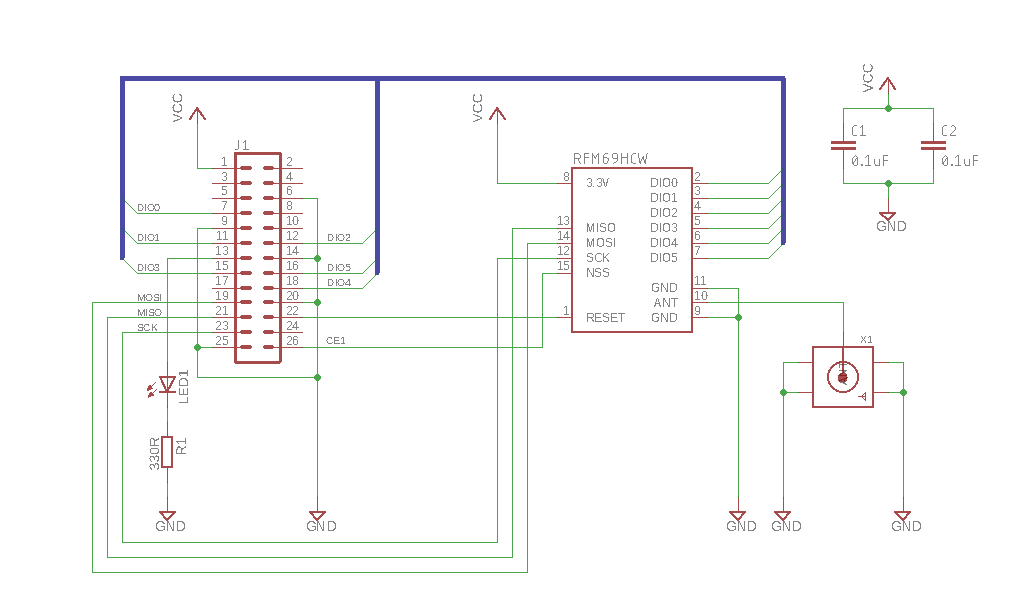
In addition you'll want to purchase a 433Mhz antenna with an SMA connector which will cost an extra couple of Euros, or you can simply solder a 50ohm 173mm wire if you want to omit the expensive SMA connector.
The pinouts for the module then correspond to the following physical and GPIO pins:
| RFM69 Pin | Physical | GPIO Pin | Description |
|---|---|---|---|
| MISO | 21 | SPI_MISO | SPI Master In Slave Out |
| MOSI | 19 | SPI_MOSI | SPI Master Out Slave In |
| SCK | 23 | SPI_CLK | SPI Clock |
| NSS | 26 | SPI_CE1 | SPI Chip Select CE1 |
| RESET | 22 | GPIO25 | Module Reset |
| DIO0 | 7 | GPIO4 | Data In Out 0 |
| DIO1 | 11 | GPIO17 | Data In Out 1 |
| DIO2 | 12 | GPIO18 | Data In Out 2 |
| DIO3 | 15 | GPIO22 | Data In Out 3 |
| DIO4 | 18 | GPIO24 | Data In Out 4 |
| DIO5 | 16 | GPIO23 | Data In Out 5 |
In addition there's a connection for an LED on physical pin 13, which can be programmed to be GPIO17 or GPIO27 depending on the model of Raspberry Pi you have.
Once you've constructed the PCB you can plug it in and communicate with it on the SPI bus. In order to install and/or run the command-line tool, use the following:
  bash% cd $GOPATH/src/github.com/djthorpe/sensors
  bash% go (run|install) cmd/rfm69.go
(more information on the module here shortly)
License
Copyright 2016-2018 David Thorpe All Rights Reserved
Licensed under the Apache License, Version 2.0 (the "License"); you may not use this file except in compliance with the License. You may obtain a copy of the License at http://www.apache.org/licenses/LICENSE-2.0
Unless required by applicable law or agreed to in writing, software distributed under the License is distributed on an "AS IS" BASIS, WITHOUT WARRANTIES OR CONDITIONS OF ANY KIND, either express or implied. See the License for the specific language governing permissions and limitations under the License.
 Documentation

Documentation

Index 
- Constants
- Variables
- type BME280
- type BME280Filter
- type BME280Mode
- type BME280Oversample
- type BME280Standby
- type ENER314
- type MiHome
- type MiHomeMode
- type OTDataType
- type OTEvent
- type OTManufacturer
- type OTMessage
- type OTParameter
- type OTRecord
- type OpenThings
- type RFM69
- type RFMAFCMode
- type RFMAFCRoutine
- type RFMDataMode
- type RFMLNAGain
- type RFMLNAImpedance
- type RFMMode
- type RFMModulation
- type RFMPacketCRC
- type RFMPacketCoding
- type RFMPacketFilter
- type RFMPacketFormat
- type RFMRXBWCutoff
- type RFMRXBWFrequency
- type RFMTXStart
- type TSL2561
- type TSL2561Gain
- type TSL2561IntegrateTime
Constants 
const (
	RFM_RXBW_FREQUENCY_OOK_1P3   = RFM_RXBW_FREQUENCY_FSK_2P6
	RFM_RXBW_FREQUENCY_OOK_1P6   = RFM_RXBW_FREQUENCY_FSK_3P1
	RFM_RXBW_FREQUENCY_OOK_2P0   = RFM_RXBW_FREQUENCY_FSK_3P9
	RFM_RXBW_FREQUENCY_OOK_2P6   = RFM_RXBW_FREQUENCY_FSK_5P2
	RFM_RXBW_FREQUENCY_OOK_3P1   = RFM_RXBW_FREQUENCY_FSK_6P3
	RFM_RXBW_FREQUENCY_OOK_3P9   = RFM_RXBW_FREQUENCY_FSK_7P8
	RFM_RXBW_FREQUENCY_OOK_5P2   = RFM_RXBW_FREQUENCY_FSK_10P4
	RFM_RXBW_FREQUENCY_OOK_6P3   = RFM_RXBW_FREQUENCY_FSK_12P5
	RFM_RXBW_FREQUENCY_OOK_7P8   = RFM_RXBW_FREQUENCY_FSK_15P6
	RFM_RXBW_FREQUENCY_OOK_10P4  = RFM_RXBW_FREQUENCY_FSK_20P8
	RFM_RXBW_FREQUENCY_OOK_12P5  = RFM_RXBW_FREQUENCY_FSK_25P0
	RFM_RXBW_FREQUENCY_OOK_15P6  = RFM_RXBW_FREQUENCY_FSK_31P3
	RFM_RXBW_FREQUENCY_OOK_20P8  = RFM_RXBW_FREQUENCY_FSK_41P7
	RFM_RXBW_FREQUENCY_OOK_25P0  = RFM_RXBW_FREQUENCY_FSK_50P0
	RFM_RXBW_FREQUENCY_OOK_31P3  = RFM_RXBW_FREQUENCY_FSK_62P5
	RFM_RXBW_FREQUENCY_OOK_41P7  = RFM_RXBW_FREQUENCY_FSK_83P3
	RFM_RXBW_FREQUENCY_OOK_50P0  = RFM_RXBW_FREQUENCY_FSK_100P0
	RFM_RXBW_FREQUENCY_OOK_62P5  = RFM_RXBW_FREQUENCY_FSK_125P0
	RFM_RXBW_FREQUENCY_OOK_83P3  = RFM_RXBW_FREQUENCY_FSK_166P7
	RFM_RXBW_FREQUENCY_OOK_100P0 = RFM_RXBW_FREQUENCY_FSK_200P0
	RFM_RXBW_FREQUENCY_OOK_125P0 = RFM_RXBW_FREQUENCY_FSK_250P0
	RFM_RXBW_FREQUENCY_OOK_166P7 = RFM_RXBW_FREQUENCY_FSK_333P3
	RFM_RXBW_FREQUENCY_OOK_200P0 = RFM_RXBW_FREQUENCY_FSK_400P0
	RFM_RXBW_FREQUENCY_OOK_250P0 = RFM_RXBW_FREQUENCY_FSK_500P0
)
const (
	BME280_PRESSURE_SEALEVEL float64 = 1013.25
)
Sealevel pressure approximation
Variables 
var (
	ErrNoDevice           = errors.New("Missing or invalid hardware device")
	ErrSampleSkipped      = errors.New("Sampling skipped or not enabled")
	ErrUnexpectedResponse = errors.New("Unexpected response from sensor")
	ErrDeviceTimeout      = errors.New("Device timeout")
	ErrMessageCorruption  = errors.New("Message Corrupt")
	ErrMessageCRC         = errors.New("CRC Error")
)
Functions 
This section is empty.
Types 
type BME280 
type BME280 interface {
	gopi.Driver

	// Get Version
	ChipIDVersion() (uint8, uint8)

	// Get Mode
	Mode() BME280Mode

	// Return IIR filter co-officient
	Filter() BME280Filter

	// Return standby time
	Standby() BME280Standby

	// Return oversampling values osrs_t, osrs_p, osrs_h
	Oversample() (BME280Oversample, BME280Oversample, BME280Oversample)

	// Return current measuring and updating value
	Status() (bool, bool, error)

	// Return the measurement duty cycle (minimum duration between subsequent readings)
	// in normal mode
	DutyCycle() time.Duration

	// Reset
	SoftReset() error

	// Set BME280 mode
	SetMode(mode BME280Mode) error

	// Set Oversampling
	SetOversample(osrs_t, osrs_p, osrs_h BME280Oversample) error

	// Set Filter
	SetFilter(filter BME280Filter) error

	// Set Standby mode
	SetStandby(t_sb BME280Standby) error

	// Return raw sample data for temperature, pressure and humidity
	// Temperature in Celcius, Pressure in hPa and humidity in
	// %age
	ReadSample() (float64, float64, float64, error)

	// Return altitude in meters for given pressure
	AltitudeForPressure(atmospheric, sealevel float64) float64
}
type BME280Filter 
type BME280Filter uint8
const (
	BME280_FILTER_OFF BME280Filter = 0x00
	BME280_FILTER_2   BME280Filter = 0x01
	BME280_FILTER_4   BME280Filter = 0x02
	BME280_FILTER_8   BME280Filter = 0x03
	BME280_FILTER_16  BME280Filter = 0x04
	BME280_FILTER_MAX BME280Filter = 0x07
)
BME280 Filter Co-efficient
func (BME280Filter) String 
func (f BME280Filter) String() string
type BME280Mode 
type BME280Mode uint8
const (
	BME280_MODE_SLEEP   BME280Mode = 0x00
	BME280_MODE_FORCED  BME280Mode = 0x01
	BME280_MODE_FORCED2 BME280Mode = 0x02
	BME280_MODE_NORMAL  BME280Mode = 0x03
	BME280_MODE_MAX     BME280Mode = 0x03
)
BME280 Mode
func (BME280Mode) String 
func (m BME280Mode) String() string
type BME280Oversample 
type BME280Oversample uint8
const (
	BME280_OVERSAMPLE_SKIP BME280Oversample = 0x00
	BME280_OVERSAMPLE_1    BME280Oversample = 0x01
	BME280_OVERSAMPLE_2    BME280Oversample = 0x02
	BME280_OVERSAMPLE_4    BME280Oversample = 0x03
	BME280_OVERSAMPLE_8    BME280Oversample = 0x04
	BME280_OVERSAMPLE_16   BME280Oversample = 0x05
	BME280_OVERSAMPLE_MAX  BME280Oversample = 0x07
)
BME280 Oversampling value
func (BME280Oversample) String 
func (o BME280Oversample) String() string
type BME280Standby 
type BME280Standby uint8
const (
	BME280_STANDBY_0P5MS  BME280Standby = 0x00
	BME280_STANDBY_62P5MS BME280Standby = 0x01
	BME280_STANDBY_125MS  BME280Standby = 0x02
	BME280_STANDBY_250MS  BME280Standby = 0x03
	BME280_STANDBY_500MS  BME280Standby = 0x04
	BME280_STANDBY_1000MS BME280Standby = 0x05
	BME280_STANDBY_10MS   BME280Standby = 0x06
	BME280_STANDBY_20MS   BME280Standby = 0x07
	BME280_STANDBY_MAX    BME280Standby = 0x07
)
BME280 Standby time
func (BME280Standby) String 
func (t BME280Standby) String() string
type MiHomeMode 
type MiHomeMode uint
const (
	MIHOME_MODE_NONE    MiHomeMode = iota
	MIHOME_MODE_MONITOR            // FSK
	MIHOME_MODE_CONTROL            // OOK
	MIHOME_MODE_MAX     = MIHOME_MODE_CONTROL
)
func (MiHomeMode) String 
func (m MiHomeMode) String() string
type OTDataType 
type OTDataType uint8
const (
	// OTDataType
	OT_DATATYPE_UDEC_0  OTDataType = 0x00
	OT_DATATYPE_UDEC_4  OTDataType = 0x01
	OT_DATATYPE_UDEC_8  OTDataType = 0x02
	OT_DATATYPE_UDEC_12 OTDataType = 0x03
	OT_DATATYPE_UDEC_16 OTDataType = 0x04
	OT_DATATYPE_UDEC_20 OTDataType = 0x05
	OT_DATATYPE_UDEC_24 OTDataType = 0x06
	OT_DATATYPE_STRING  OTDataType = 0x07
	OT_DATATYPE_DEC_0   OTDataType = 0x08
	OT_DATATYPE_DEC_8   OTDataType = 0x09
	OT_DATATYPE_DEC_16  OTDataType = 0x0A
	OT_DATATYPE_DEC_24  OTDataType = 0x0B
	OT_DATATYPE_ENUM    OTDataType = 0x0C
	OT_DATATYPE_FLOAT   OTDataType = 0x0F
)
func (OTDataType) String 
func (t OTDataType) String() string
type OTManufacturer 
type OTManufacturer uint8
const (
	// OTManufacturer - see http://www.o-things.com/
	OT_MANUFACTURER_NONE        OTManufacturer = 0x00
	OT_MANUFACTURER_SENTEC      OTManufacturer = 0x01
	OT_MANUFACTURER_HILDERBRAND OTManufacturer = 0x02
	OT_MANUFACTURER_ENERGENIE   OTManufacturer = 0x04
	OT_MANUFACTURER_MAX                        = OT_MANUFACTURER_ENERGENIE
)
func (OTManufacturer) String 
func (m OTManufacturer) String() string
type OTParameter 
type OTParameter uint8
const (
	// OTParameter
	OT_PARAM_NONE              OTParameter = 0x00
	OT_PARAM_ALARM             OTParameter = 0x21
	OT_PARAM_DEBUG_OUTPUT      OTParameter = 0x2D
	OT_PARAM_IDENTIFY          OTParameter = 0x3F
	OT_PARAM_SOURCE_SELECTOR   OTParameter = 0x40
	OT_PARAM_WATER_DETECTOR    OTParameter = 0x41
	OT_PARAM_GLASS_BREAKAGE    OTParameter = 0x42
	OT_PARAM_CLOSURES          OTParameter = 0x43
	OT_PARAM_DOOR_BELL         OTParameter = 0x44
	OT_PARAM_ENERGY            OTParameter = 0x45
	OT_PARAM_FALL_SENSOR       OTParameter = 0x46
	OT_PARAM_GAS_VOLUME        OTParameter = 0x47
	OT_PARAM_AIR_PRESSURE      OTParameter = 0x48
	OT_PARAM_ILLUMINANCE       OTParameter = 0x49
	OT_PARAM_LEVEL             OTParameter = 0x4C
	OT_PARAM_RAINFALL          OTParameter = 0x4D
	OT_PARAM_APPARENT_POWER    OTParameter = 0x50
	OT_PARAM_POWER_FACTOR      OTParameter = 0x51
	OT_PARAM_REPORT_PERIOD     OTParameter = 0x52
	OT_PARAM_SMOKE_DETECTOR    OTParameter = 0x53
	OT_PARAM_TIME_AND_DATE     OTParameter = 0x54
	OT_PARAM_VIBRATION         OTParameter = 0x56
	OT_PARAM_WATER_VOLUME      OTParameter = 0x57
	OT_PARAM_WIND_SPEED        OTParameter = 0x58
	OT_PARAM_GAS_PRESSURE      OTParameter = 0x61
	OT_PARAM_BATTERY_LEVEL     OTParameter = 0x62
	OT_PARAM_CO_DETECTOR       OTParameter = 0x63
	OT_PARAM_DOOR_SENSOR       OTParameter = 0x64
	OT_PARAM_EMERGENCY         OTParameter = 0x65
	OT_PARAM_FREQUENCY         OTParameter = 0x66
	OT_PARAM_GAS_FLOW_RATE     OTParameter = 0x67
	OT_PARAM_RELATIVE_HUMIDITY OTParameter = 0x68
	OT_PARAM_CURRENT           OTParameter = 0x69
	OT_PARAM_JOIN              OTParameter = 0x6A
	OT_PARAM_RF_QUALITY        OTParameter = 0x6B
	OT_PARAM_LIGHT_LEVEL       OTParameter = 0x6C
	OT_PARAM_MOTION_DETECTOR   OTParameter = 0x6D
	OT_PARAM_OCCUPANCY         OTParameter = 0x6F
	OT_PARAM_REAL_POWER        OTParameter = 0x70
	OT_PARAM_REACTIVE_POWER    OTParameter = 0x71
	OT_PARAM_ROTATION_SPEED    OTParameter = 0x72
	OT_PARAM_SWITCH_STATE      OTParameter = 0x73
	OT_PARAM_TEMPERATURE       OTParameter = 0x74
	OT_PARAM_VOLTAGE           OTParameter = 0x76
	OT_PARAM_WATER_FLOW_RATE   OTParameter = 0x77
	OT_PARAM_WATER_PRESSURE    OTParameter = 0x78
	OT_PARAM_3PHASE_POWER1     OTParameter = 0x79
	OT_PARAM_3PHASE_POWER2     OTParameter = 0x7A
	OT_PARAM_3PHASE_POWER3     OTParameter = 0x7B
	OT_PARAM_3PHASE_POWER      OTParameter = 0x7C
)
func (OTParameter) String 
func (p OTParameter) String() string
type OTRecord 
type OTRecord interface {
	Name() OTParameter
	Type() OTDataType
	StringValue() (string, error)
}
type OpenThings 
type RFM69 
type RFM69 interface {
	gopi.Driver

	// Mode, Data Mode and Modulation
	Mode() RFMMode
	DataMode() RFMDataMode
	SetMode(device_mode RFMMode) error
	SetDataMode(data_mode RFMDataMode) error
	Modulation() RFMModulation
	SetModulation(modulation RFMModulation) error

	// Bitrate & Frequency
	Bitrate() uint
	FreqCarrier() uint
	FreqDeviation() uint
	SetBitrate(bits_per_second uint) error
	SetFreqCarrier(hertz uint) error
	SetFreqDeviation(hertz uint) error

	// Listen Mode and Sequencer
	SetSequencer(enabled bool) error
	SequencerEnabled() bool
	SetListenOn(value bool) error
	ListenOn() bool

	// Packets
	PacketFormat() RFMPacketFormat
	PacketCoding() RFMPacketCoding
	PacketFilter() RFMPacketFilter
	PacketCRC() RFMPacketCRC
	SetPacketFormat(packet_format RFMPacketFormat) error
	SetPacketCoding(packet_coding RFMPacketCoding) error
	SetPacketFilter(packet_filter RFMPacketFilter) error
	SetPacketCRC(packet_crc RFMPacketCRC) error

	// Addresses
	NodeAddress() uint8
	BroadcastAddress() uint8
	SetNodeAddress(value uint8) error
	SetBroadcastAddress(value uint8) error

	// Payload & Preamble
	PreambleSize() uint16
	PayloadSize() uint8
	SetPreambleSize(preamble_size uint16) error
	SetPayloadSize(payload_size uint8) error

	// Encryption Key & Sync Words for Packet mode
	AESKey() []byte
	SetAESKey(key []byte) error
	SyncWord() []byte
	SetSyncWord(word []byte) error
	SyncTolerance() uint8
	SetSyncTolerance(bits uint8) error

	// AFC
	AFC() uint
	AFCMode() RFMAFCMode
	AFCRoutine() RFMAFCRoutine
	SetAFCRoutine(afc_routine RFMAFCRoutine) error
	SetAFCMode(afc_mode RFMAFCMode) error
	TriggerAFC() error

	// Low Noise Amplifier Settings
	LNAImpedance() RFMLNAImpedance
	LNAGain() RFMLNAGain
	LNACurrentGain() (RFMLNAGain, error)
	SetLNA(impedance RFMLNAImpedance, gain RFMLNAGain) error

	// Channel Filter Settings
	RXFilterFrequency() RFMRXBWFrequency
	RXFilterCutoff() RFMRXBWCutoff
	SetRXFilter(RFMRXBWFrequency, RFMRXBWCutoff) error

	// FIFO
	FIFOThreshold() uint8
	SetFIFOThreshold(fifo_threshold uint8) error
	ReadFIFO(ctx context.Context) ([]byte, error)
	WriteFIFO(data []byte) error
	ClearFIFO() error

	// Payload
	ReadPayload(ctx context.Context) ([]byte, bool, error)
	WritePayload(data []byte, repeat uint) error

	// Measurements
	MeasureTemperature(calibration float32) (float32, error)
	MeasureRSSI() (float32, error)
}
type RFMAFCMode 
type RFMAFCMode uint8
const (
	// Automatic Frequency Correction Mode
	RFM_AFCMODE_OFF       RFMAFCMode = 0x00 // AFC is performed only when triggered
	RFM_AFCMODE_ON        RFMAFCMode = 0x01 // AFC register is not cleared before a new AFC phase
	RFM_AFCMODE_AUTOCLEAR RFMAFCMode = 0x03 // AFC register is cleared before a new AFC phase
	RFM_AFCMODE_MASK      RFMAFCMode = 0x03
)
func (RFMAFCMode) String 
func (m RFMAFCMode) String() string
type RFMAFCRoutine 
type RFMAFCRoutine uint8
const (
	// Automatic Frequency Correction Routine
	RFM_AFCROUTINE_STANDARD RFMAFCRoutine = 0x00 // Standard AFC Routine
	RFM_AFCROUTINE_IMPROVED RFMAFCRoutine = 0x01 // Improved AFC Routine
	RFM_AFCROUTINE_MASK     RFMAFCRoutine = 0x01
)
func (RFMAFCRoutine) String 
func (r RFMAFCRoutine) String() string
type RFMDataMode 
type RFMDataMode uint8
const (
	// RFM69 Data Mode
	RFM_DATAMODE_PACKET            RFMDataMode = 0x00
	RFM_DATAMODE_CONTINUOUS_NOSYNC RFMDataMode = 0x02
	RFM_DATAMODE_CONTINUOUS_SYNC   RFMDataMode = 0x03
	RFM_DATAMODE_MAX               RFMDataMode = 0x03
)
func (RFMDataMode) String 
func (m RFMDataMode) String() string
type RFMLNAGain 
type RFMLNAGain uint8
const (
	// Low Noise Amplifier Gain
	RFM_LNA_GAIN_AUTO RFMLNAGain = 0x00 // Gain set by internal AGC Loop
	RFM_LNA_GAIN_G1   RFMLNAGain = 0x01 // Highest gain
	RFM_LNA_GAIN_G2   RFMLNAGain = 0x02 // Highest gain minus 6dB
	RFM_LNA_GAIN_G3   RFMLNAGain = 0x03 // Highest gain minus 12dB
	RFM_LNA_GAIN_G4   RFMLNAGain = 0x04 // Highest gain minus 24dB
	RFM_LNA_GAIN_G5   RFMLNAGain = 0x05 // Highest gain minus 36dB
	RFM_LNA_GAIN_G6   RFMLNAGain = 0x06 // Highest gain minus 48dB
	RFM_LNA_GAIN_MAX  RFMLNAGain = 0x07 // Gain mask
)
func (RFMLNAGain) String 
func (v RFMLNAGain) String() string
type RFMLNAImpedance 
type RFMLNAImpedance uint8
const (
	// Low Noise Amplifier Impedance
	RFM_LNA_IMPEDANCE_50  RFMLNAImpedance = 0x00 // 50 Ohms
	RFM_LNA_IMPEDANCE_100 RFMLNAImpedance = 0x01 // 100 Ohms
	RFM_LNA_IMPEDANCE_MAX RFMLNAImpedance = 0x01
)
func (RFMLNAImpedance) String 
func (v RFMLNAImpedance) String() string
type RFMModulation 
type RFMModulation uint8
const (
	// RFM69 Modulation
	RFM_MODULATION_FSK        RFMModulation = 0x00 // 00000 FSK no shaping
	RFM_MODULATION_FSK_BT_1P0 RFMModulation = 0x01 // 01000 FSK Guassian filter, BT=1.0
	RFM_MODULATION_FSK_BT_0P5 RFMModulation = 0x02 // 10000 FSK Gaussian filter, BT=0.5
	RFM_MODULATION_FSK_BT_0P3 RFMModulation = 0x03 // 11000 FSK Gaussian filter, BT=0.3
	RFM_MODULATION_OOK        RFMModulation = 0x08 // 00001 OOK no shaping
	RFM_MODULATION_OOK_BR     RFMModulation = 0x09 // 01001 OOK Filtering with f(cutoff) = BR
	RFM_MODULATION_OOK_2BR    RFMModulation = 0x0A // 01010 OOK Filtering with f(cutoff) = 2BR
	RFM_MODULATION_MAX        RFMModulation = 0x0A
)
func (RFMModulation) String 
func (m RFMModulation) String() string
type RFMPacketCRC 
type RFMPacketCRC uint8
const (
	// RFM69 Packet CRC
	RFM_PACKET_CRC_OFF           RFMPacketCRC = 0x00 // CRC off
	RFM_PACKET_CRC_AUTOCLEAR_OFF RFMPacketCRC = 0x01 // CRC on
	RFM_PACKET_CRC_AUTOCLEAR_ON  RFMPacketCRC = 0x02 // CRC on
)
func (RFMPacketCRC) String 
func (c RFMPacketCRC) String() string
type RFMPacketCoding 
type RFMPacketCoding uint8
const (
	// RFM69 Packet coding
	RFM_PACKET_CODING_NONE       RFMPacketCoding = 0x00 // No Packet Coding
	RFM_PACKET_CODING_MANCHESTER RFMPacketCoding = 0x01 // Manchester
	RFM_PACKET_CODING_WHITENING  RFMPacketCoding = 0x02 // Whitening
	RFM_PACKET_CODING_MAX        RFMPacketCoding = 0x03 // Mask
)
func (RFMPacketCoding) String 
func (c RFMPacketCoding) String() string
type RFMPacketFilter 
type RFMPacketFilter uint8
const (
	// RFM69 Packet filtering
	RFM_PACKET_FILTER_NONE      RFMPacketFilter = 0x00 // Promiscious mode
	RFM_PACKET_FILTER_NODE      RFMPacketFilter = 0x01 // Matches Node
	RFM_PACKET_FILTER_BROADCAST RFMPacketFilter = 0x02 // Matches Node or Broadcast
	RFM_PACKET_FILTER_MAX       RFMPacketFilter = 0x03 // Mask
)
func (RFMPacketFilter) String 
func (f RFMPacketFilter) String() string
type RFMPacketFormat 
type RFMPacketFormat uint8
const (
	// RFM69 Packet format
	RFM_PACKET_FORMAT_FIXED    RFMPacketFormat = 0x00 // Fixed Packet Format
	RFM_PACKET_FORMAT_VARIABLE RFMPacketFormat = 0x01 // Variable Packet Format
)
func (RFMPacketFormat) String 
func (f RFMPacketFormat) String() string
type RFMRXBWCutoff 
type RFMRXBWCutoff uint8
const (
	RFM_RXBW_CUTOFF_16    RFMRXBWCutoff = 0x00
	RFM_RXBW_CUTOFF_8     RFMRXBWCutoff = 0x01
	RFM_RXBW_CUTOFF_4     RFMRXBWCutoff = 0x02
	RFM_RXBW_CUTOFF_2     RFMRXBWCutoff = 0x03
	RFM_RXBW_CUTOFF_1     RFMRXBWCutoff = 0x04
	RFM_RXBW_CUTOFF_0P5   RFMRXBWCutoff = 0x05
	RFM_RXBW_CUTOFF_0P25  RFMRXBWCutoff = 0x06
	RFM_RXBW_CUTOFF_0P125 RFMRXBWCutoff = 0x07
	RFM_RXBW_CUTOFF_MAX   RFMRXBWCutoff = RFM_RXBW_CUTOFF_0P125
)
func (RFMRXBWCutoff) String 
func (v RFMRXBWCutoff) String() string
type RFMRXBWFrequency 
type RFMRXBWFrequency uint8
const (
	RFM_RXBW_FREQUENCY_FSK_2P6   RFMRXBWFrequency = 2<<3 | 7
	RFM_RXBW_FREQUENCY_FSK_3P1   RFMRXBWFrequency = 1<<3 | 7
	RFM_RXBW_FREQUENCY_FSK_3P9   RFMRXBWFrequency = 0<<3 | 7
	RFM_RXBW_FREQUENCY_FSK_5P2   RFMRXBWFrequency = 2<<3 | 6
	RFM_RXBW_FREQUENCY_FSK_6P3   RFMRXBWFrequency = 1<<3 | 6
	RFM_RXBW_FREQUENCY_FSK_7P8   RFMRXBWFrequency = 0<<3 | 6
	RFM_RXBW_FREQUENCY_FSK_10P4  RFMRXBWFrequency = 2<<3 | 5
	RFM_RXBW_FREQUENCY_FSK_12P5  RFMRXBWFrequency = 1<<3 | 5
	RFM_RXBW_FREQUENCY_FSK_15P6  RFMRXBWFrequency = 0<<3 | 5
	RFM_RXBW_FREQUENCY_FSK_20P8  RFMRXBWFrequency = 2<<3 | 4
	RFM_RXBW_FREQUENCY_FSK_25P0  RFMRXBWFrequency = 1<<3 | 4
	RFM_RXBW_FREQUENCY_FSK_31P3  RFMRXBWFrequency = 0<<3 | 4
	RFM_RXBW_FREQUENCY_FSK_41P7  RFMRXBWFrequency = 2<<3 | 3
	RFM_RXBW_FREQUENCY_FSK_50P0  RFMRXBWFrequency = 1<<3 | 3
	RFM_RXBW_FREQUENCY_FSK_62P5  RFMRXBWFrequency = 0<<3 | 3
	RFM_RXBW_FREQUENCY_FSK_83P3  RFMRXBWFrequency = 2<<3 | 2
	RFM_RXBW_FREQUENCY_FSK_100P0 RFMRXBWFrequency = 1<<3 | 2
	RFM_RXBW_FREQUENCY_FSK_125P0 RFMRXBWFrequency = 0<<3 | 2
	RFM_RXBW_FREQUENCY_FSK_166P7 RFMRXBWFrequency = 2<<3 | 1
	RFM_RXBW_FREQUENCY_FSK_200P0 RFMRXBWFrequency = 1<<3 | 1
	RFM_RXBW_FREQUENCY_FSK_250P0 RFMRXBWFrequency = 0<<3 | 1
	RFM_RXBW_FREQUENCY_FSK_333P3 RFMRXBWFrequency = 2<<3 | 0
	RFM_RXBW_FREQUENCY_FSK_400P0 RFMRXBWFrequency = 1<<3 | 0
	RFM_RXBW_FREQUENCY_FSK_500P0 RFMRXBWFrequency = 0<<3 | 0
	RFM_RXBW_FREQUENCY_MAX       RFMRXBWFrequency = 0x1F
)
func (RFMRXBWFrequency) String 
func (v RFMRXBWFrequency) String() string
type RFMTXStart 
type RFMTXStart uint8
const (
	// RFM69 TX Start Condition
	RFM_TXSTART_FIFOLEVEL    RFMTXStart = 0x00 // When FIFO threshold is exceeded
	RFM_TXSTART_FIFONOTEMPTY RFMTXStart = 0x01 // When FIFO is not empty
	RFM_TXSTART_MAX          RFMTXStart = 0x01 // Mask
)
func (RFMTXStart) String 
func (v RFMTXStart) String() string
type TSL2561 
type TSL2561 interface {
	gopi.Driver

	// Get Version
	ChipIDVersion() (uint8, uint8)

	// Get Gain
	Gain() TSL2561Gain

	// Get Integrate Time
	IntegrateTime() TSL2561IntegrateTime

	// Set Gain
	SetGain(TSL2561Gain) error

	// Set Integrate Time
	SetIntegrateTime(TSL2561IntegrateTime) error

	// Read Luminosity Value in Lux
	ReadSample() (float64, error)
}
type TSL2561Gain 
type TSL2561Gain uint8
const (
	TSL2561_GAIN_1   TSL2561Gain = 0x00
	TSL2561_GAIN_16  TSL2561Gain = 0x01
	TSL2561_GAIN_MAX TSL2561Gain = 0x01
)
func (TSL2561Gain) String 
func (g TSL2561Gain) String() string
type TSL2561IntegrateTime 
type TSL2561IntegrateTime uint8
const (
	TSL2561_INTEGRATETIME_13P7MS TSL2561IntegrateTime = 0x00
	TSL2561_INTEGRATETIME_101MS  TSL2561IntegrateTime = 0x01
	TSL2561_INTEGRATETIME_402MS  TSL2561IntegrateTime = 0x02
	TSL2561_INTEGRATETIME_MAX    TSL2561IntegrateTime = 0x03
)
func (TSL2561IntegrateTime) String 
func (t TSL2561IntegrateTime) String() string
 Source Files
 Directories

Directories

| Path | Synopsis |
|---|---|
|
cmd
|
|
|
bme280
command
Interacts with the BME280 sensor over the I2C bus
|
Interacts with the BME280 sensor over the I2C bus |
|
ener314
command
Interacts with the Energenie ENER314 over GPIO
|
Interacts with the Energenie ENER314 over GPIO |
|
mihome_client
command
|
|
|
mihome_gateway
command
|
|
|
mihomectrl
command
Control Energenie MiHome devices
|
Control Energenie MiHome devices |
|
mihomereset
command
Control Energenie MiHome devices
|
Control Energenie MiHome devices |
|
rfm69
command
Interacts with the RFM69 device
|
Interacts with the RFM69 device |
|
rpc
command
|
|
|
tsl2561
command
Interacts with the BME280 sensor over the I2C bus
|
Interacts with the BME280 sensor over the I2C bus |
|
hw
|
|
|
protocol
|
|
|
sys
|
|