

 README





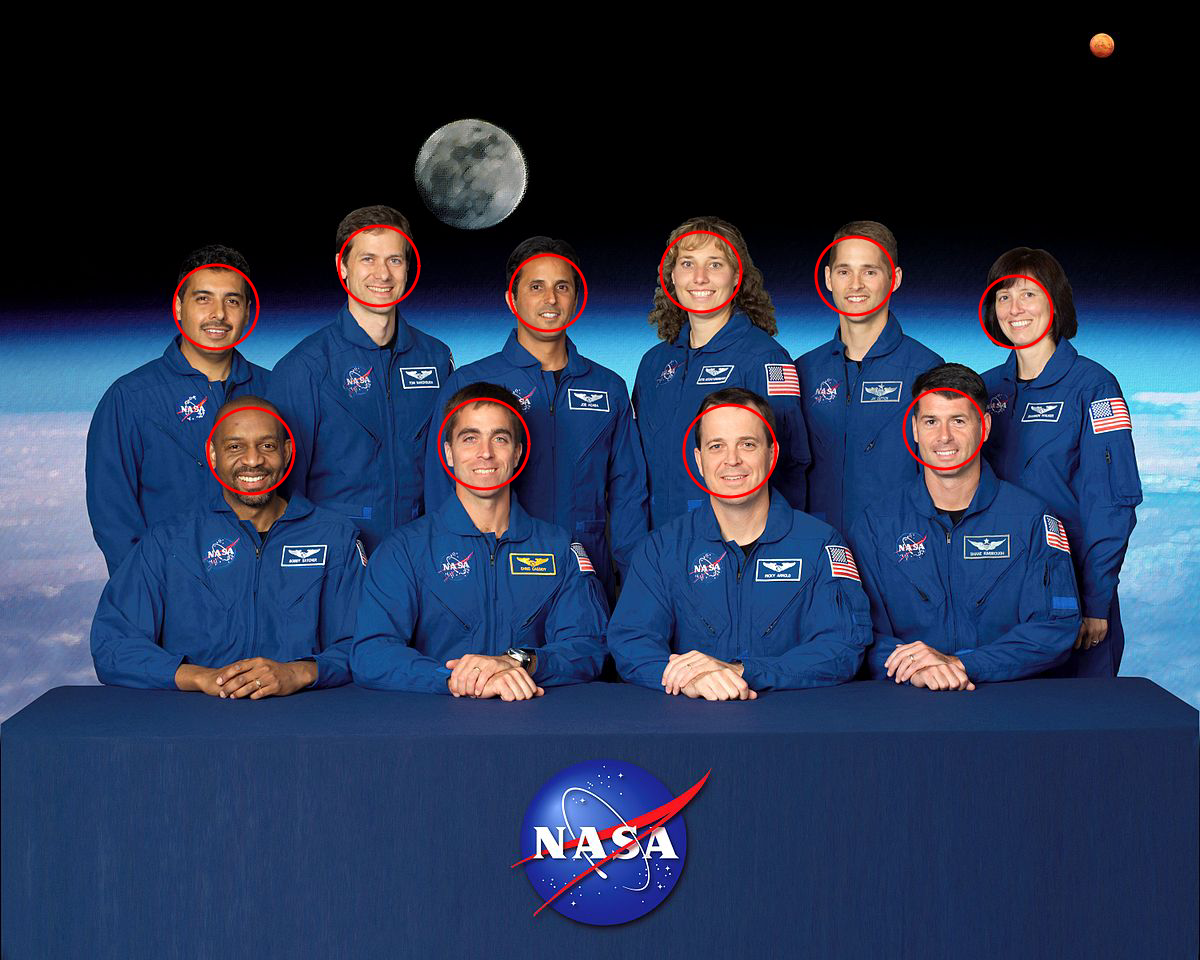
Pigo is a pure Go face detection, pupil/eyes localization and facial landmark points detection library based on the Pixel Intensity Comparison-based Object detection paper.
| Rectangle face marker | Circle face marker |
|---|---|
 |
 |
Motivation
The reason why this library has been developed is because all of the currently existing solutions for face and facial landmark points detections the Go ecosystem are purely bindings, wrappers to other C/C++ libraries like OpenCV or dlib, but calling a C program through cgo introduces unnecessary latencies and produces a significant trade-off in terms of performance. Also, in many cases installing OpenCV on various platforms is cumbersome.
Key features
- Does not require OpenCV or any 3rd party modules to be installed
- High processing speed
- There is no need for image preprocessing prior to detection
- There is no need for the computation of integral images, image pyramid, HOG pyramid or any other similar data structure
- The face detection is based on pixel intensity comparison encoded in the binary file tree structure
- Fast detection of in-plane rotated faces
- The cascade files are directly embedded into the generated binary file
- Pupils/eyes localization
- Facial landmark points detection
- Webassembly support 🎉
Todo
- Object detection and description
Real time face detection
Native support
The library does not require any additional modules or third party applications to be installed, although if you you wish to try out the real time native Go webcam examples you might need to install a couple of dependencies required by the Gio library.
Head over to this section https://gioui.org/#installation to check all the required dependencies.
The Pion library is used to access the webcam. For all the required dependencies check the project repository. For Windows and MacOS all the codecs should be available by default. On Linux based systems you might need to install additional dependencies.
Using Pigo as shared library
The Pigo library can be incorporated into other languages in case C linking is supported by the targeted language. The examples in the python folder are proof of concepts of how Pigo can be embedded as a shared object into a Python program.
Head over to this subtopic for more details.
Pupils / eyes localization
Starting from v1.2.0 Pigo supports pupils/eyes localization capabilities also. The implementation is based on Eye pupil localization with an ensemble of randomized trees.
Check out this real time demo: https://github.com/esimov/pigo/tree/master/examples/puploc

Facial landmark points detection
v1.3.0 marks a new milestone in the library evolution, Pigo being able to detect facial landmark points. The implementation is based on Fast Localization of Facial Landmark Points.
Check out this real time demo: https://github.com/esimov/pigo/tree/master/examples/facial_landmark

WASM (Webassembly) support 🎉
Starting from version v1.4.0 the library has been ported to WASM. This proves the library's real time face detection capabilities, constantly producing ~60 FPS.
WASM demo
To run the wasm demo select the wasm folder and type make. This will automatically open a new tab in the web browser and start capturing the detected faces.
For more details check this subpage: https://github.com/esimov/pigo/tree/master/wasm.
For more awesome WASM demos using the Pigo library check this repo: https://github.com/esimov/pigo-wasm-demos.
Install
Install Go, set your GOPATH, and make sure $GOPATH/bin is on your PATH.
$ go install github.com/esimov/pigo/cmd/pigo@latest
API
Below is a minimal example of using the face detection API.
Prior invoking the cascade classifier function the source image should be converted to grayscale mode, which returns a slice containing the row, column, the scale and the detection score.
src, err := pigo.GetImage("/path/to/image")
if err != nil {
	log.Fatalf("Cannot open the image file: %v", err)
}

pixels := pigo.RgbToGrayscale(src)
cols, rows := src.Bounds().Max.X, src.Bounds().Max.Y

cParams := pigo.CascadeParams{
	MinSize:     20,
	MaxSize:     1000,
	ShiftFactor: 0.1,
	ScaleFactor: 1.1,

	ImageParams: pigo.ImageParams{
		Pixels: pixels,
		Rows:   rows,
		Cols:   cols,
		Dim:    cols,
	},
}

// Unpack the facefinder binary file. This will return the number of cascade trees,
// the tree depth, the threshold and the prediction from tree's leaf nodes.
classifier := pigo.Unpack()

faceAngle := 0.0 // cascade rotation angle. 0.0 is 0 radians and 1.0 is 2*pi radians

// Run the classifier over the obtained leaf nodes and return the detection results.
// The result contains quadruplets representing the row, column, scale and detection score.
dets := classifier.RunCascade(cParams, faceAngle)

// Calculate the intersection over union (IoU) of two clusters.
dets = classifier.ClusterDetections(dets, 0.2)
Usage
A command line utility is bundled into the library.
$ pigo -in input.jpg -out out.jpg
Supported flags:
$ pigo --help

┌─┐┬┌─┐┌─┐
├─┘││ ┬│ │
┴  ┴└─┘└─┘

Go (Golang) Face detection library.
    Version: 1.5.1

  -angle float
        0.0 is 0 radians and 1.0 is 2*pi radians
  -flploc
        Activate facial landmark points localization
  -in string
        Source image (default "-")
  -iou float
        Intersection over union (IoU) threshold (default 0.15)
  -json string
        Output the detection points into a json file
  -mark
        Mark detected eyes (default true)
  -marker string
        Detection marker: rect|circle|ellipse (default "rect")
  -max int
        Maximum size of face (default 1000)
  -min int
        Minimum size of face (default 20)
  -out string
        Destination image (default "-")
  -puploc
        Activate pupils/eyes localization
  -scale float
        Scale detection window by percentage (default 1.15)
  -shift float
        Shift detection window by percentage (default 0.15)
Note: The library automatically embeds the cascade files required for pupil/eyes localization and facial landmark points detection.
CLI command examples
You can also use the stdin and stdout pipe commands:
$ cat input/source.jpg | pigo > -in - -out - >out.jpg
in and out default to - so you can also use:
$ cat input/source.jpg | pigo >out.jpg
$ pigo -out out.jpg < input/source.jpg
Using the empty string as value for the -out flag will skip the image generation part. This, combined with the -json flag will encode the detection results into the specified json file. You can also use the pipe - value combined with the -json flag to output the detection coordinates to the standard (stdout) output.
Detection of in-plane rotated faces
The library can also detect in-plane rotated faces. For this you need to use the -angle parameter provided in the CLI application. The command below will generate the following result:
$ pigo -in input.jpg -out output.jpg -angle=0.8 -iou=0.01
| Input file | Output file |
|---|---|
 |
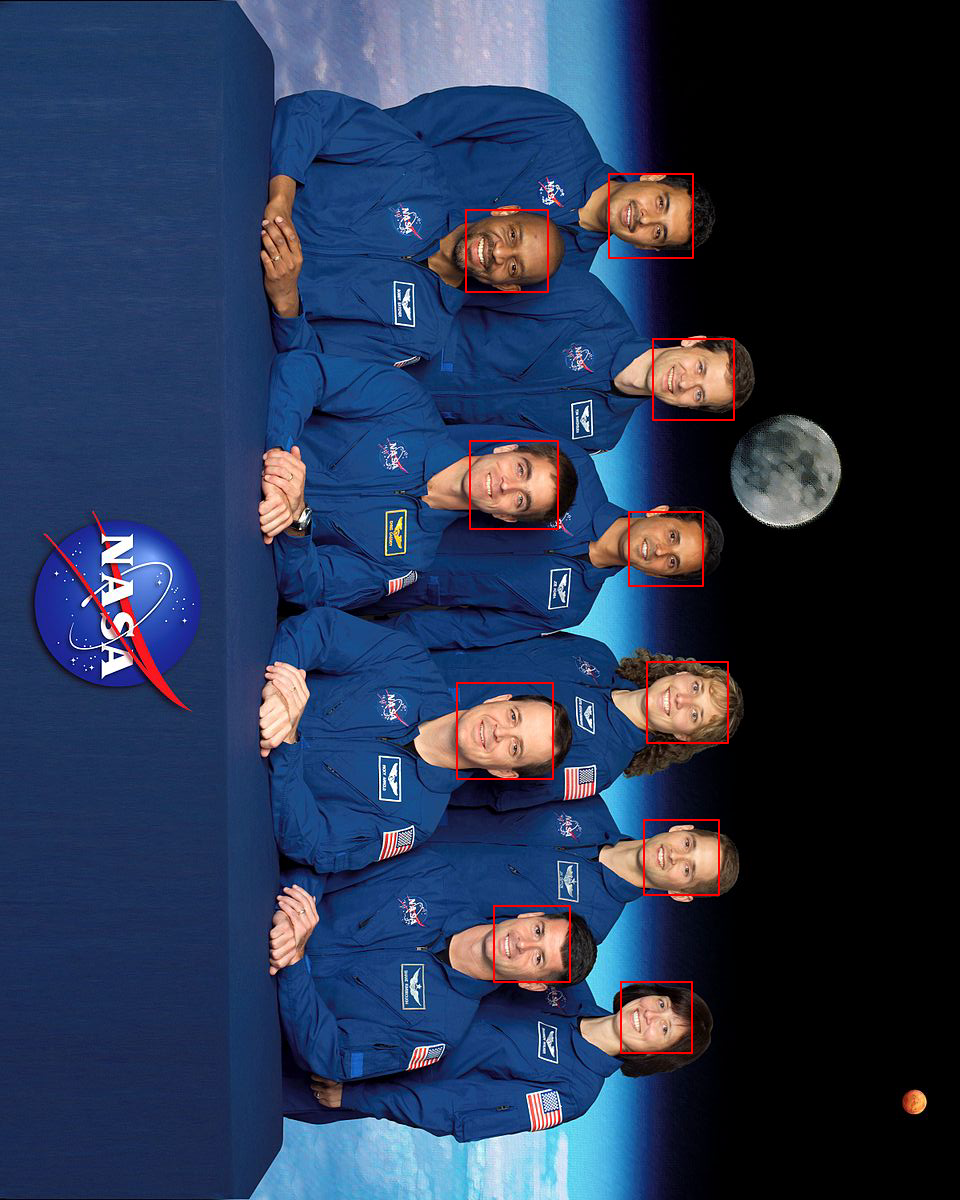 |
Note: In case of in plane rotated faces the angle value should be adapted to the provided image.
Running the library as a shared object (SO/DLL)
The examples from the python folder are meant to show how the library can be integrated into other languages, like in this case, Python.
How does it works?
From the Python script we access the webcam, converts the pixel data to a byte array and through cgo we transfer the results as a shared object to the Go program where the core face detection is happening. But as you can imagine this operation is not cost effective, resulting in lower frame rates and higher latency.
Releases
In case you don't have it installed or do not want to install Go, you can obtain the binary file from the releases folder.
The library can be accessed as a snapcraft function too.

Benchmark results
Below are the benchmark results obtained running Pigo against GoCV using the same conditions.
    BenchmarkGoCV-4   	       3	 414122553 ns/op	     704 B/op	       1 allocs/op
    BenchmarkPIGO-4   	      10	 173664832 ns/op	       0 B/op	       0 allocs/op
    PASS
    ok  	github.com/esimov/gocv-test	4.530s
The code used for the above test can be found under the following link: https://github.com/esimov/pigo-gocv-benchmark
Author
- Endre Simo (@simo_endre)
License
Copyright © 2019 Endre Simo
This software is distributed under the MIT license. See the LICENSE file for the full license text.
 Directories

| Path | Synopsis |
|---|---|
|
cmd
|
|
|
pigo
command
|
|
|
examples
|
|
|
native/facedet
command
|
|
|
native/facial_landmark
command
|
|
|
native/puploc
command
|
|
|
python/blinkdet
command
|
|
|
python/facedet
command
|
|
|
python/facial_landmark
command
|
|
|
python/masquerade
command
|
|
|
python/puploc
command
|
|
|
python/talk_detector
command
|
|
|
python/web
command
|
|
|
Package pigo is a lightweight pure Go face detection, pupil/eyes localization and facial landmark points detection library based on Pixel Intensity Comparison-based Object detection paper (https://arxiv.org/pdf/1305.4537.pdf).
|
Package pigo is a lightweight pure Go face detection, pupil/eyes localization and facial landmark points detection library based on Pixel Intensity Comparison-based Object detection paper (https://arxiv.org/pdf/1305.4537.pdf). |
|
http
command
|