

 README

README

Masked Fastmail
A simple CLI tool for managing Fastmail masked email aliases.
Easily create new aliases for websites and manage existing ones.
This project is still under development and may contain bugs. It's a personal project and not in any way affiliated with Fastmail.
Features
- Get or create masked email addresses for domains
- Aliases are automatically copied to clipboard
- Enable, disable and delete aliases
Usage
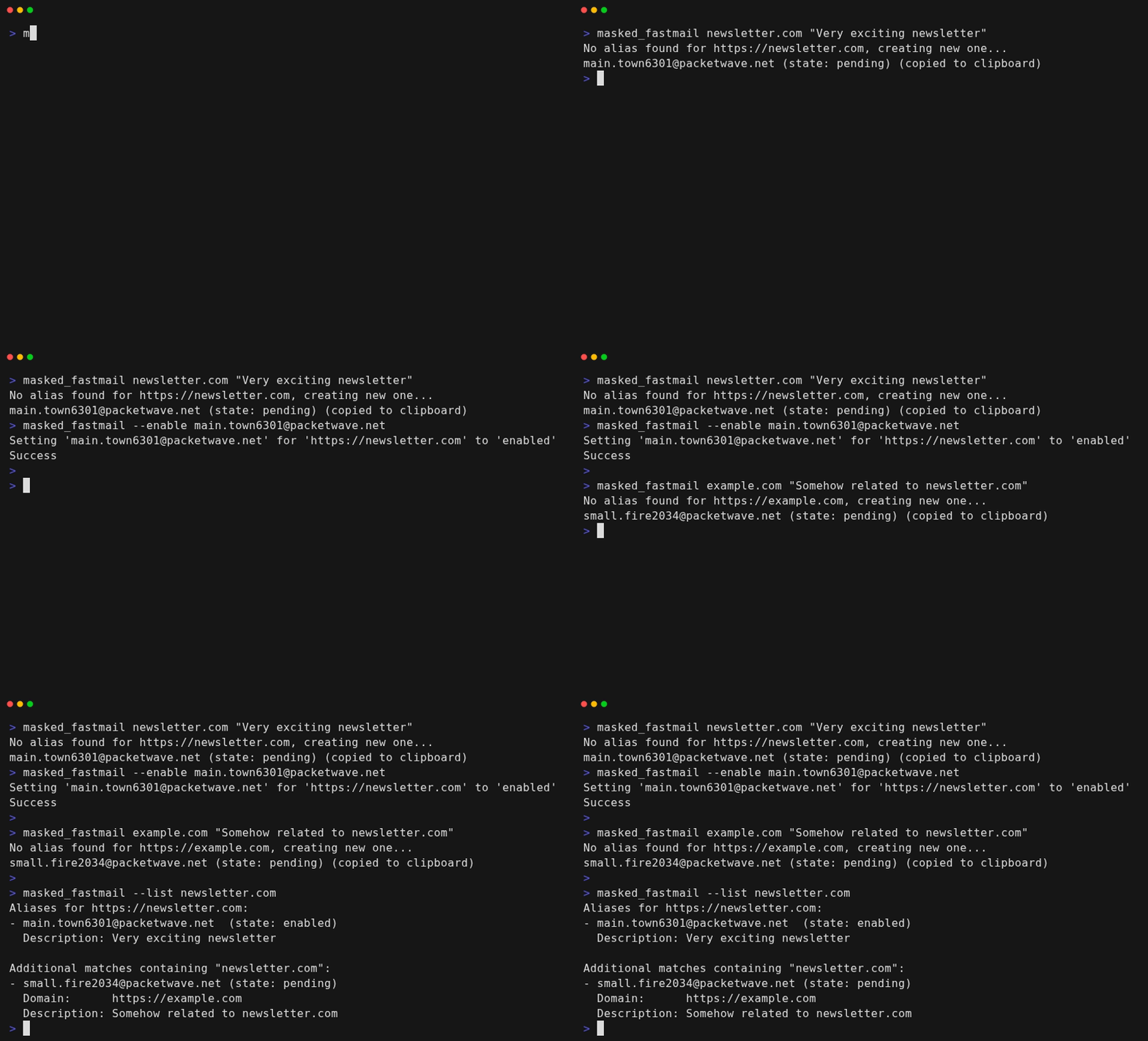
Usage:
  masked_fastmail <url>   (no flags)
  manage_fastmail <alias> [flags]

Flags:
      --delete    delete alias (bounce messages)
  -d, --disable   disable alias (send to trash)
  -e, --enable    enable alias
  -h, --help      show this message
  -v, --version   show version information
The following environment variables must be set:
export FASTMAIL_ACCOUNT_ID=your_account_id
export FASTMAIL_API_KEY=your_api_key
Examples
Get or create alias
A new alias will only be created if one does not already exist. In either case, the alias is automatically copied to the clipboard.[^1]
[^1]: Copying is done with Clipboard for Go and should work on all platforms.
masked_fastmail example.com
Enable an existing alias
New Fastmail aliases are initialized to pending, and are set to enabled once they receive their first email.
However, they get automatically deleted if no email is received within 24 hours.
Some services may not send a timely welcome email, in which case it's helpful to manually enable the alias.
masked_fastmail --enable user.1234@fastmail.com
Disable an alias
This causes all new new emails to be moved to trash.
masked_fastmail --disable user.1234@fastmail.com
Installation
Option 1: Download a pre-built binary
Download the latest release from the releases page.
Option 2: Use go install
go install github.com/fredrmb/masked_fastmail@latest
You can verify the installation and check the version by running:
masked_fastmail --version
The binary will be installed to $GOBIN (or $GOPATH/bin, or ~/go/bin if neither is set). Make sure this directory is in your PATH.
Option 3: Build from source
- Clone the repository
- Run
./build.sh(includes version information) orgo build -o masked_fastmail
Prerequisites
- Go 1.22+
- Fastmail API credentials
API documentation
- The API documentation can be found at https://www.fastmail.com/dev/
- It's also helpful to review the JMAP protocol
Development
Prerequisites
- Go 1.22+ (see Installation for details)
- VHS (for generating demo GIF)
Building and running
Build the binary:
./build.sh
Or build without version information:
go build -o masked_fastmail
The build.sh script automatically sets version information from git (version tag, commit hash, and build date), which will be displayed when running ./masked_fastmail --version.
Run with debug output
Run with debug output to see raw API requests and responses:
./masked_fastmail --debug example.com
Generating demo GIF
The demo.gif is generated using VHS. Install VHS and run:
vhs cassette.tape
This will generate a new demo.gif file based on the commands in cassette.tape.
Publishing a release
Releases are automatically built and published using GoReleaser via GitHub Actions when a version tag is pushed.
To create a new release:
-
Create and push a version tag (must follow semantic versioning):
git tag v1.2.3 git push origin v1.2.3 -
The GitHub workflow will automatically:
- Build binaries for Linux, Windows, and macOS (amd64 and arm64)
- Create a GitHub release with the changelog
- Attach all build artifacts to the release
Tag format: vMAJOR.MINOR.PATCH (e.g., v1.0.0). Pre-release tags are also supported (e.g., v1.0.0-alpha).
Note about go install and version info
When installed via go install, version information is automatically embedded in the source code as part of the release process. This means go install github.com/fredrmb/masked_fastmail@latest will include:
- Version: Release tag (e.g.,
v1.2.3) - Commit: Short commit hash of the tagged release
- Build date: Timestamp when the release was created
The version information is extracted using the following priority:
- Ldflags (from
build.shor GoReleaser) - takes precedence if set - VCS build settings - commit/date when building from git repo (always current for local builds)
- Go build info - version tag from module metadata
- Embedded version info (from
version_info.go, updated during release workflow) - used when VCS info is unavailable (e.g.,go installfrom remote module)
License
BSD 3-Clause License
 Documentation
 Source Files