




 README

README


Getting Started
This package contains an example project / scaffolding for FSM.
The example included in this repository follows the classic turnstile state machine:
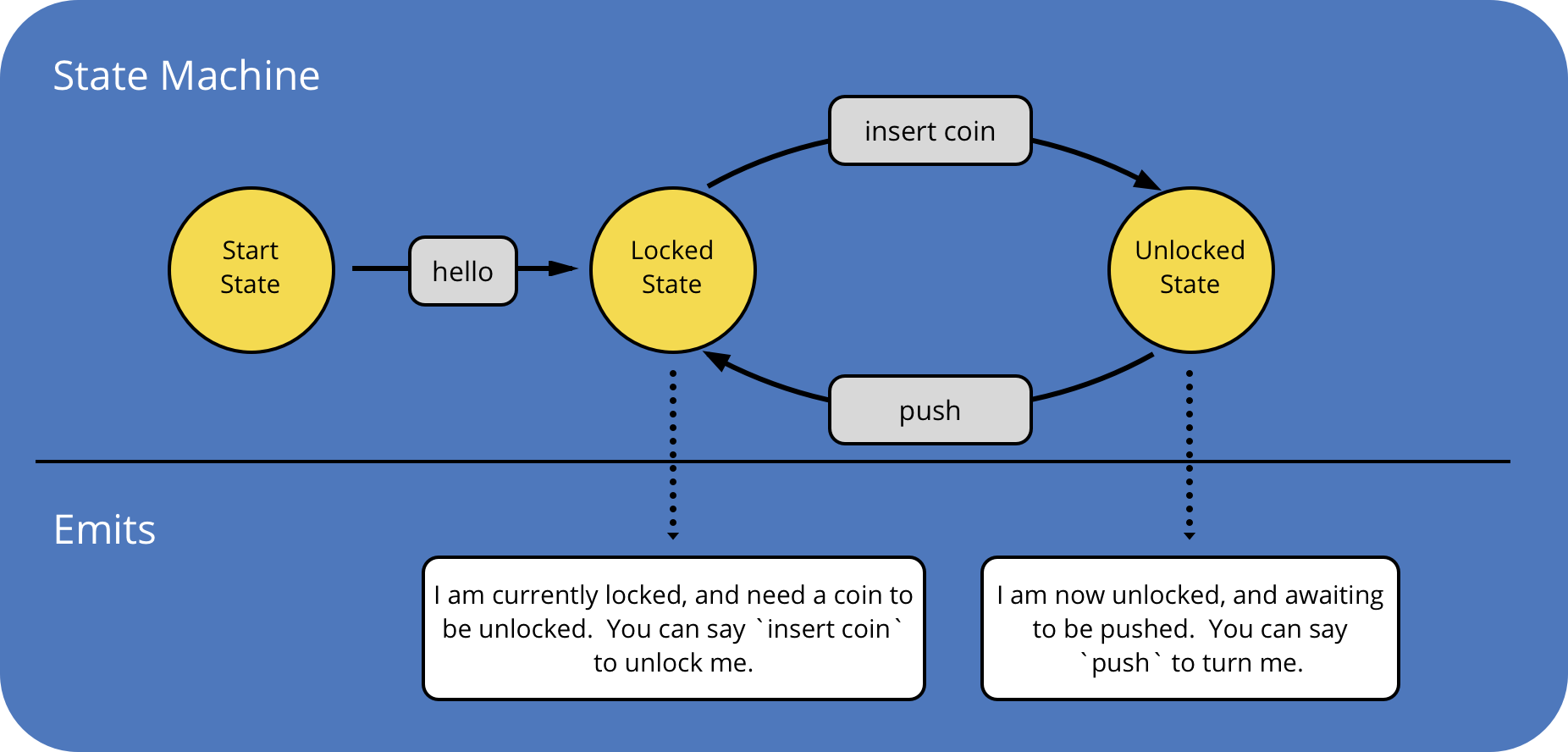
Setting Up
The first thing you're going to want to do is clone down the repository to the location you would like your project to exist. This should be somewhere in your $GOPATH.
After you've cloned it down, you're going to need to update the package on this line that references a nested package within this repo. It will need to be updated to reflect the location where you cloned the repository.
Building & Running
After your project is set up as specified in the above section, you'll need to install dependencies.
Assuming you have dep installed, you can run the following command in the root of the repository:
dep ensure
Now you can build and run the project.
go build -o bot && ./bot
Understanding FSM
In order to successfully build something with FSM, you must understand three fundamental concepts:
Finite State Machines
[A finite-state machine] is an abstract machine that can be in exactly one of a finite number of states at any given time. The FSM can change from one state to another in response to some external inputs; the change from one state to another is called a transition. An FSM is defined by a list of its states, its initial state, and the conditions for each transition.
Wikipedia
The FSM library was built as purely against the definition of a formal finite-state machine as possible, so the Wikipedia definition holds true for this library.
Looking at the diagram at the top of this README, the entire diagram is the State Machine.
States
States are individual nodes within a StateMachine that represent a meaningful point in the machine.
When a Traverser enters a State, its EntryAction is immediately called.
Looking at the diagram at the top of this README, states are the yellow circles.
Transitions
Transitions are the elements that make it possible for a traverser to switch their state as they traverse the state machine.
A Transition is defined in each state. This describes how to handle incoming data for a state.
If that data tells you that the Traverser should switch states, just return the appropriate BuildState function.
If the data tells you that you should not switch states, return nothing and the ReentryAction will be called, which is a great opportunity to reprompt for a response that will keep the conversation flowing.
Looking at the diagram at the top of this README, transitions are the black arrows.
Beyond the CLI
If you're building a more serious bot, you're more likely going to want to use something other than fsm/cli as your deployment target, and fsm/cache-store as your data store.
All FSM targets can be viewed here.
All FSM stores can be viewed here.
View their respective READMEs for usage information.
License
 Documentation

Documentation


There is no documentation for this package.
 Source Files
 Directories