

 README

README






[!WARNING] g0efilter is in active development and its configuration may change often.
g0efilter is a lightweight container designed to filter outbound (egress) traffic from attached container workloads. Run g0efilter alongside your workloads and attach them to its network namespace to enforce a simple IP and domain allowlist policy.
How it works
- Attach containers to g0efilter using
network_mode: "service:g0efilter"in Docker Compose. - A policy file defines the allowed IPs/CIDRs and domains.
- Using nftables, g0efilter (when in HTTPS filter mode) allows traffic to specified IPs/CIDRs or redirects outbound HTTP (port 80) and HTTPS (port 443) to local services.
- These local services check the HTTP Host header or TLS SNI extension in the ClientHello and allow or block connections according to the policy.
- Filtering behaviour depends on the selected mode: https (default) or dns.
- The optional g0efilter-dashboard displays real-time traffic and enforcement actions.
[!NOTE] Attached containers share g0efilter’s network namespace.
g0efilter listens onHTTP_PORT(default8080) andHTTPS_PORT(default8443) for inspection.
Avoid binding these ports in attached containers or change them via environment variables.
HTTPS/Host Header filtering behaviour (default)
- All IPs listed in the policy file bypass any redirection.
- In HTTPS mode (default), traffic to ports 80 and 443 is redirected to local services that check the HTTP Host header or TLS SNI against the policy file, anything not matching is blocked by nftables.
DNS filtering behaviour
- All IPs listed in the policy file bypass any redirection.
- In DNS mode, traffic to port 53 is redirected to an internal DNS server that only resolves domains that match the policy. Non-policy domains simply fail to resolve, but direct IP connections are allowed (no default deny), so this mode can potentially be bypassed.
Dashboard container
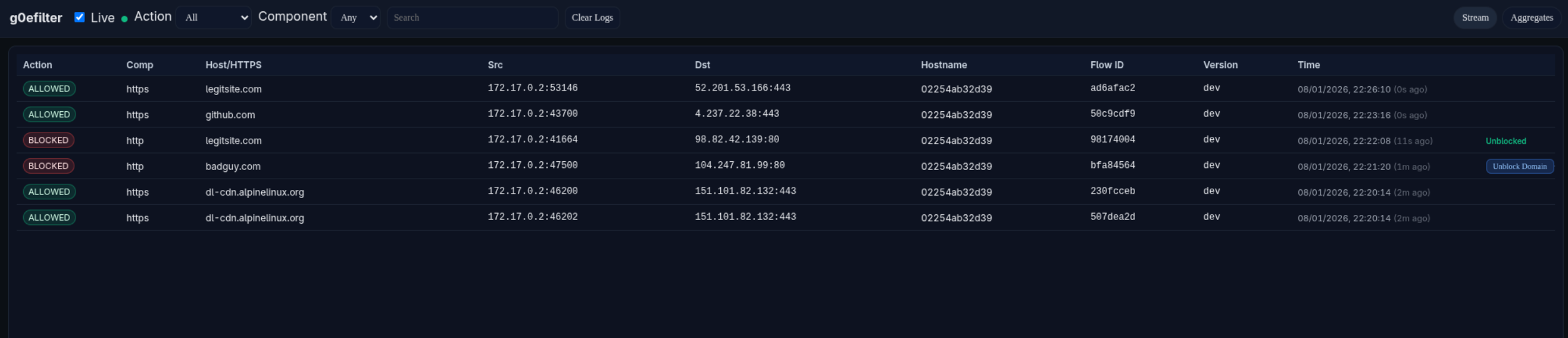
The optional g0efilter-dashboard container runs a small web UI on port 8081 (by default). If DASHBOARD_HOST and DASHBOARD_API_KEY are set, the g0efilter container will ship logs to the dashboard.
Example Dashboard Screenshot:
Quick Start
Refer to the examples.
Example policy.yaml
allowlist:
  ips:
    - "1.1.1.1"
    - "192.168.0.0/16"
    - "10.1.1.1"
  domains:
    - "github.com"
    - "*.alpinelinux.org"
Environment variables
g0efilter
| Variable | Description | Default |
|---|---|---|
LOG_LEVEL |
Log level (INFO, DEBUG, etc.) | INFO |
HOSTNAME |
To identify which endpoint is sending the logs | unset |
HTTP_PORT |
Local HTTP port | 8080 |
HTTPS_PORT |
Local HTTPS port | 8443 |
POLICY_PATH |
Path to policy file inside container | /app/policy.yaml |
FILTER_MODE |
https (TLS SNI/HTTP Host) or dns (DNS name filtering) |
https |
DNS_PORT |
DNS listen port | 53 |
DNS_UPSTREAMS |
Upstream DNS servers (comma-separated) | 127.0.0.11:53 |
DASHBOARD_HOST |
Dashboard URL for log shipping | unset |
DASHBOARD_API_KEY |
API key for dashboard authentication | unset |
DASHBOARD_QUEUE_SIZE |
Queue size for buffering logs before sending to dashboard. Logs are dropped if queue is full | 1024 |
LOG_FILE |
Optional path for persistent log file | unset |
NFLOG_BUFSIZE |
Netfilter log buffer size | 96 |
NFLOG_QTHRESH |
Netfilter log queue threshold | 50 |
NOTIFICATION_HOST |
Gotify server URL for security alert notifications | unset |
NOTIFICATION_KEY |
Gotify application key for authentication | unset |
NOTIFICATION_BACKOFF_SECONDS |
Rate limit backoff period for duplicate alerts | 60 |
g0efilter-dashboard
| Variable | Description | Default |
|---|---|---|
PORT |
Address/port the dashboard listens on (HTTP UI + API). Can be just a port (8081) or address+port (:8081) |
:8081 |
API_KEY |
API key used to authenticate incoming log data from the g0efilter container. Must match DASHBOARD_API_KEY |
unset |
LOG_LEVEL |
Log level (INFO, DEBUG, etc.) |
INFO |
BUFFER_SIZE |
In-memory buffer size for events. Controls how many events can be queued before dropping | 5000 |
READ_LIMIT |
Maximum number of events returned per read/API request | 500 |
SSE_RETRY_MS |
Server-Sent Events (SSE) client retry interval in milliseconds | 2000 |
RATE_RPS |
Maximum average requests per second (rate-limit) | 50 |
RATE_BURST |
Maximum burst size for rate-limiting (in requests) | 100 |
Dashboard Reverse Proxy Suggestion
I would recommended to place the g0efilter-dashboard behind a reverse proxy such as Traefik with the following controls:
Public Endpoints (no authentication required):
GET /health- Health check endpoint for monitoring/load balancers
API Key Protected Endpoints:
POST /api/v1/logs- Log ingestion from g0efilter containers (protected byAPI_KEYenvironment variable)
SSO/Authentication Protected Endpoints:
GET /- Dashboard web UIGET /api/v1/logs- Read logsGET /api/v1/events- Server-Sent Events streamDELETE /api/v1/logs- Clear logs- All other dashboard routes
Example Configuration Pattern:
Configure your reverse proxy to:
- Allow
/healthpublicly for health checks - Bypass SSO/OIDC middleware for
POST /api/v1/logs(allows g0efilter containers to authenticate with API key instead) - Require SSO/OIDC middleware for all other routes (UI and read operations)
This ensures:
- g0efilter containers can ship logs using the API key
- Dashboard UI access is protected by some sort of auth middleware (eg PocketID, Authelia, Authentik etc).
- Monitoring systems can check health without authentication
- Unauthorized users cannot view sensitive traffic logs
Example Traefik Configuration
If using Traefik as a reverse proxy, here's an example of a working yaml based configuration using two routers to handle different authentication requirements:
http:
  routers:
    g0efilter-ingest-router:
      entryPoints:
        - websecure
      rule: "Host(`g0efilter.example.com`) && ((PathPrefix(`/api/v1/logs`) && Method(`POST`)) || PathPrefix(`/health`))"
      service: g0efilter-dash-service
      middlewares:
        - security-headers
        - ratelimit
      tls:
        certResolver: letsencrypt
        domains:
          - main: "example.com"
            sans:
              - "*.example.com"

    g0efilter-dash-router:
      entryPoints:
        - websecure
      rule: "Host(`g0efilter.example.com`)"
      service: g0efilter-dash-service
      middlewares:
        - security-headers
        - ratelimit
        - auth-oidc  # Your auth middleware
      tls:
        certResolver: letsencrypt
        domains:
          - main: "example.com"
            sans:
              - "*.example.com"

  services:
    g0efilter-dash-service:
      loadBalancer:
        servers:
          - url: "http://g0efilter-dashboard:8081"
How it works:
g0efilter-ingest-router: MatchesPOST /api/v1/logsand/health- no SSO requiredg0efilter-dash-router: Matches all other requests to the dashboard - requires SSO/OIDC authentication- The more specific ingest router rule takes precedence for API calls and health checks
- All other traffic (UI, reads, etc.) goes through the dashboard router with SSO protection
Example docker-compose.yaml
services:
  g0efilter:
    image: docker.io/g0lab/g0efilter:latest
    container_name: g0efilter
    volumes:
      - ./policy.yaml:/app/policy.yaml:ro
    cap_drop:
      - ALL
    cap_add:
      - NET_ADMIN # Required for nftables modification
    security_opt:
      - no-new-privileges
    # Host-exposed port for dashboard (dashboard runs in same netns)
    ports:
      - 8081:8081 # Dashboard port
    read_only: true
    restart: always
    env_file:
      - .env

  g0efilter-dashboard:
    image: docker.io/g0lab/g0efilter-dashboard:latest
    container_name: g0efilter-dashboard
    # optional - custom user
    # user: 1000:1000
    cap_drop:
      - ALL
    security_opt:
      - no-new-privileges
    read_only: true
    env_file:
      - .env.dashboard
    network_mode: "service:g0efilter"
    restart: always
    depends_on: [g0efilter]

  example-container:
    image: alpine:latest
    container_name: example-container
    command: >
      sh -c "apk add --no-cache curl && tail -f /dev/null"
    network_mode: "service:g0efilter"
    depends_on: [g0efilter]
License
This project is licensed under the MIT License - see the LICENSE file for details.
 Directories

Directories

| Path | Synopsis |
|---|---|
|
cmd
|
|
|
g0efilter
command
Package main is the entrypoint for g0efilter.
|
Package main is the entrypoint for g0efilter. |
|
g0efilter-dashboard
command
Package main runs the g0efilter dashboard HTTP server.
|
Package main runs the g0efilter dashboard HTTP server. |
|
internal
|
|
|
alerting
Package alerting provides notification capabilities for security events.
|
Package alerting provides notification capabilities for security events. |
|
dashboard
Package dashboard provides the web UI and HTTP API server.
|
Package dashboard provides the web UI and HTTP API server. |
|
filter
Package filter provides network filtering utilities.
|
Package filter provides network filtering utilities. |
|
logging
Package logging provides logging helpers.
|
Package logging provides logging helpers. |
|
nftables
Package nftables provides nftables integration.
|
Package nftables provides nftables integration. |
|
policy
Package policy parses and validates the allowlist policy file.
|
Package policy parses and validates the allowlist policy file. |
|
safeio
Package safeio provides helpers to safely drain and close readers.
|
Package safeio provides helpers to safely drain and close readers. |