

 README

README




[!NOTE] Portions of this project were developed with the assistance of AI tools.
[!WARNING] g0efilter is in active development and its configuration may change often.
g0efilter is a lightweight container that filters outbound (egress) traffic from attached container workloads. Run it alongside your workloads, attach them with network_mode: "service:g0efilter", and enforce an IP and domain policy without terminating TLS.
Features
- Egress filtering by IP/CIDR and domain, default-deny with an allowlist
- Flexible domain patterns: exact names, wildcards anywhere (
*.example.com,bucket.*.r2.example.com), and regex (/cache-[0-9]+\.example\.com/) - Three filter modes:
https(SNI/Host inspection),dns(resolution filtering),dns-strict(resolution filtering plus kernel connection-time enforcement) - Default-allow (denylist) mode: allow everything except listed domains/IPs
- Learning mode: observe without blocking and auto-build the allowlist
- Audit mode: dry-run a policy; would-be blocks are logged, nothing breaks
- Process attribution: flow logs can carry the owning PID/command (opt-in)
- Live policy reloading, real-time dashboard, remote unblock, Gotify notifications
Quick start
Create a policy directory:
mkdir -p policy
Add policy/policy.yaml:
allowlist:
  ips:
    - '1.1.1.1'
  domains:
    - 'github.com'
    - '*.alpinelinux.org'
Run g0efilter and attach a workload to its network namespace:
services:
  g0efilter:
    image: docker.io/g0lab/g0efilter:latest
    volumes:
      - ./policy/:/app/policy/
    cap_drop:
      - ALL
    cap_add:
      - NET_ADMIN       # nftables
      - NET_RAW         # SO_MARK dialer
      - SETUID          # entrypoint drops to a non-root user (nobody) at startup;
      - SETGID          # these are used only then, not by the running process
      - SETPCAP
      - CHOWN
    security_opt:
      - no-new-privileges

  example-container:
    image: docker.io/alpine/curl:latest
    command: sh -c "sleep infinity"
    network_mode: "service:g0efilter"
See examples for ready-to-run compose files and policies. The container runs as a non-root user (nobody) by default - see Running as a non-root user to customise the uid/gid or run as root.
How it works
Attached containers share g0efilter's network namespace. Traffic to allowlisted IPs/CIDRs passes through directly; everything else is handled by the selected FILTER_MODE.
| Mode | Checks domains at | Blocks hardcoded IPs? | Best for |
|---|---|---|---|
https |
Connection time via TLS SNI / HTTP Host inspection | Yes, unless IP allowlisted | Web-heavy workloads needing precise domain control |
dns |
DNS resolution time | No | Lightweight broad filtering |
dns-strict |
DNS plus kernel connection-time enforcement | Yes | Strong default-deny egress control |
See docs/modes.md for detailed flow diagrams and mode-specific limits.
[!NOTE] Attached containers must not bind to ports used by g0efilter:
HTTP_PORT(65080),HTTPS_PORT(65443), andDNS_PORT(65053) in dns modes.
Policy
allowlist:
  ips:
    - '1.1.1.1'
    - '192.168.0.0/16'
  domains:
    - 'github.com'                                 # exact
    - '*.alpinelinux.org'                          # wildcard, any subdomain level
    - 'bucket.*.r2.cloudflarestorage.com'          # wildcard works mid-name too
    - '/cache-[0-9]+\.example\.com/'              # regex (single-quote it in YAML)
Each * matches one or more characters including dots. Regex entries are slash-delimited, matched case-insensitively against the whole hostname (anchoring is automatic), and compiled with Go's linear-time RE2 engine. Ready-made example policies live in examples/policy/.
The policy file live-reloads: edits apply without restarting the container. Mount the policy directory, not the single file, or editors that use atomic save will silently break reloads:
volumes:
  - ./policy/:/app/policy/   # correct
# NOT: - ./policy.yaml:/app/policy.yaml
Environment variables (ALLOWLIST_IPS, ALLOWLIST_DOMAINS, ...) can replace the policy file and take precedence when set. See docs/policy.md for policy modes and docs/configuration.md for environment variables.
Common modes
Set default_action: allow in the policy file to invert the model: traffic passes unless it matches the denylist. Useful for containers that need broad internet access but should be kept away from analytics/telemetry endpoints or the LAN. An explicit allowlist match always overrides the denylist.
LEARNING_MODE=true runs g0efilter observe-only: nothing is blocked and every domain (or destination IP when no SNI/Host is present) not already covered is appended to the policy file. Run it for a representative period, prune the result, then switch back to enforcement.
ENFORCE=audit is a dry run for an existing policy: would-be-blocked traffic is allowed through and logged with the AUDIT action (visible in the dashboard), so you can preview a policy's impact before enforcing it. Unlike learning mode, nothing is written to the policy file.
PROCESS_INFO=true enriches flow logs with the owning process (pid, process_name, cmdline, executable), resolved via /proc and cached per flow. This requires g0efilter to share a PID namespace with the client processes (host deploy, pid: host, or shareProcessNamespace: true); in a plain network-only sidecar the fields degrade to process_name=unknown.
GitHub Actions
g0efilter can filter egress from GitHub Actions runners. The action starts the g0efilter container with host networking, so all traffic from the job and later steps is inspected.
jobs:
  build:
    runs-on: ubuntu-latest
    steps:
      - name: Filter egress
        uses: g0lab/g0efilter@v0
        with:
          egress-policy: block   # or 'audit' to log without blocking
          allowed-domains: |
            *.npmjs.org
            registry.npmjs.org

      - uses: actions/checkout@v7
See docs/github-actions.md for inputs, baseline allow rules, and runner limitations.
Dashboard
The optional g0efilter-dashboard container serves a web UI on port 8081. Set DASHBOARD_HOST and DASHBOARD_API_KEY on g0efilter to ship logs to it.
The web UI is protected by a built-in login by default (AUTH_MODE=session). If you don't set ADMIN_PASSWORD_HASH (a bcrypt hash from g0efilter-dashboard hash-password), a random admin password is generated and logged once on first startup; recover it later with the reset-password subcommand. Set AUTH_MODE=none to instead rely on a reverse proxy, or forward to trust an authenticating proxy header. Set DB_PATH (with a writable volume) to persist sessions, API keys and unblock state. See docs/configuration.md for details.
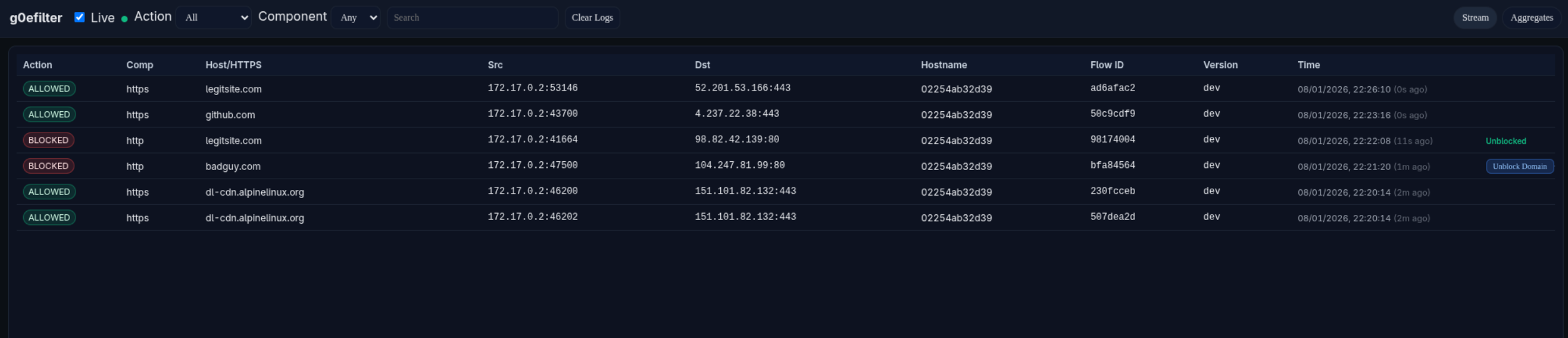
Remote unblock lets administrators unblock domains/IPs from the dashboard UI. Instances poll for approved requests and apply them via live reload. It is disabled by default. To enable it, set ENABLE_REMOTE_UNBLOCK=true on g0efilter along with DASHBOARD_HOST and DASHBOARD_API_KEY. See docs/remote-unblock.md for setup, endpoints, and a Traefik example.
Fleet control uses bounded HTTP long-poll reconciliation rather than a WebSocket-only protocol. See the dashboard control-plane plan for the transport decisions and migration sequence.
[!WARNING] Do not enable remote unblock with
AUTH_MODE=noneunlessPOST /api/v1/unblocksis protected by reverse-proxy authentication. Anyone who can reach that endpoint can modify your allowlist. With the defaultAUTH_MODE=sessionit requires a logged-in session (or a valid API key).
Example docker-compose.yaml
services:
  g0efilter:
    image: docker.io/g0lab/g0efilter:latest
    container_name: g0efilter
    volumes:
      - ./policy/:/app/policy/   # directory mount, see Policy section
    cap_drop:
      - ALL
    cap_add:
      - NET_ADMIN                # nftables
      - NET_RAW                  # SO_MARK dialer
      - SETUID                   # drop to a non-root user (nobody) at startup;
      - SETGID                   # override with PUID/PGID, or PUID=0 to stay root
      - SETPCAP
      - CHOWN
    security_opt:
      - no-new-privileges
    ports:
      - 8081:8081                # dashboard (runs in the same netns)
    read_only: true
    restart: always
    env_file:
      - .env

  g0efilter-dashboard:
    image: docker.io/g0lab/g0efilter-dashboard:latest
    container_name: g0efilter-dashboard
    cap_drop:
      - ALL
    security_opt:
      - no-new-privileges
    read_only: true
    env_file:
      - .env.dashboard
    network_mode: "service:g0efilter"
    restart: always

  example-container:
    image: docker.io/alpine/curl:latest
    command: sh -c "sleep infinity"
    network_mode: "service:g0efilter"
Documentation
Verifying container signatures
Images are signed with Cosign keyless signing. To
keep the image repositories clean, signatures are stored in a dedicated repo rather than
alongside the images, so point cosign at it with COSIGN_REPOSITORY:
COSIGN_REPOSITORY=docker.io/g0lab/signatures \
cosign verify g0lab/g0efilter:latest \
  --certificate-identity-regexp=https://github.com/g0lab/g0efilter \
  --certificate-oidc-issuer=https://token.actions.githubusercontent.com \
  -o text
(Repeat with g0lab/g0efilter-dashboard:latest for the dashboard image.)
License
MIT, see LICENSE.
 Directories

Directories

| Path | Synopsis |
|---|---|
|
Package main is the entrypoint for g0efilter.
|
Package main is the entrypoint for g0efilter. |
|
alerting
Package alerting provides notification capabilities for security events.
|
Package alerting provides notification capabilities for security events. |
|
filter
Package filter provides network filtering utilities.
|
Package filter provides network filtering utilities. |
|
g0efilter
Package g0efilter contains the g0efilter application wiring and run loop.
|
Package g0efilter contains the g0efilter application wiring and run loop. |
|
netutil
Package netutil provides the SO_MARK dialer that lets g0efilter's own outbound traffic (proxy upstreams, dashboard shipping, notifications) bypass its nftables rules.
|
Package netutil provides the SO_MARK dialer that lets g0efilter's own outbound traffic (proxy upstreams, dashboard shipping, notifications) bypass its nftables rules. |
|
nftables
Package nftables provides nftables integration.
|
Package nftables provides nftables integration. |
|
policy
Package policy parses and validates the allowlist policy file.
|
Package policy parses and validates the allowlist policy file. |
|
procinfo
Package procinfo resolves the process that owns a local socket by walking /proc, for log enrichment.
|
Package procinfo resolves the process that owns a local socket by walking /proc, for log enrichment. |
|
safeio
Package safeio provides helpers to safely drain and close readers.
|
Package safeio provides helpers to safely drain and close readers. |
|
telemetry
Package telemetry ships filter decision events to the dashboard and raises alerts.
|
Package telemetry ships filter decision events to the dashboard and raises alerts. |
|
Package main is the entrypoint for g0efilter-dashboard.
|
Package main is the entrypoint for g0efilter-dashboard. |
|
model
Package model holds the dashboard domain types shared by the HTTP layer and storage implementations.
|
Package model holds the dashboard domain types shared by the HTTP layer and storage implementations. |
|
server
Package server provides the web UI and HTTP API server.
|
Package server provides the web UI and HTTP API server. |
|
store
Package store provides SQLite-backed persistence for the dashboard, using an Ent client for queries and Atlas-generated versioned migrations.
|
Package store provides SQLite-backed persistence for the dashboard, using an Ent client for queries and Atlas-generated versioned migrations. |
|
ui
Package ui embeds the built dashboard frontend so the server can serve it.
|
Package ui embeds the built dashboard frontend so the server can serve it. |
|
shared
|
|
|
actions
Package actions defines shared action and filter mode constants used across multiple internal packages without introducing import cycles.
|
Package actions defines shared action and filter mode constants used across multiple internal packages without introducing import cycles. |
|
logging
Package logging provides a zerolog-backed slog logger with human-readable terminal output.
|
Package logging provides a zerolog-backed slog logger with human-readable terminal output. |