

 README

README

mimetype
A package for detecting MIME types and extensions based on magic numbers
Goroutine safe, extensible, no C bindings


Features
- fast and precise MIME type and file extension detection
- long list of supported MIME types
- possibility to extend with other file formats
- common file formats are prioritized
- text vs. binary files differentiation
- no external dependencies
- safe for concurrent usage
Install
go get github.com/gabriel-vasile/mimetype
Usage
mtype := mimetype.Detect([]byte)
// OR
mtype, err := mimetype.DetectReader(io.Reader)
// OR
mtype, err := mimetype.DetectFile("/path/to/file")
fmt.Println(mtype.String(), mtype.Extension())
See the runnable Go Playground examples.
Caution: only use libraries like mimetype as a last resort. Content type detection
using magic numbers is slow, inaccurate, and non-standard. Most of the times
protocols have methods for specifying such metadata; e.g., Content-Type header
in HTTP and SMTP.
FAQ
Q: My file is in the list of supported MIME types but it is not correctly detected. What should I do?
A: Some file formats (often Microsoft Office documents) keep their signatures towards the end of the file. Try increasing the number of bytes used for detection with:
mimetype.SetLimit(1024*1024) // Set limit to 1MB.
// or
mimetype.SetLimit(0) // No limit, whole file content used.
mimetype.DetectFile("file.doc")
If increasing the limit does not help, please open an issue.
Tests
In addition to unit tests, mimetype_tests compares the library with libmagic for around 50 000 sample files. Check the latest comparison results here.
Benchmarks
Benchmarks are performed when a PR is open. The results can be seen on the workflows page. Performance improvements are welcome but correctness is prioritized.
Structure
mimetype uses a hierarchical structure to keep the MIME type detection logic. This reduces the number of calls needed for detecting the file type. The reason behind this choice is that there are file formats used as containers for other file formats. For example, Microsoft Office files are just zip archives, containing specific metadata files. Once a file has been identified as a zip, there is no need to check if it is a text file, but it is worth checking if it is an Microsoft Office file.
To prevent loading entire files into memory, when detecting from a reader or from a file mimetype limits itself to reading only the header of the input.
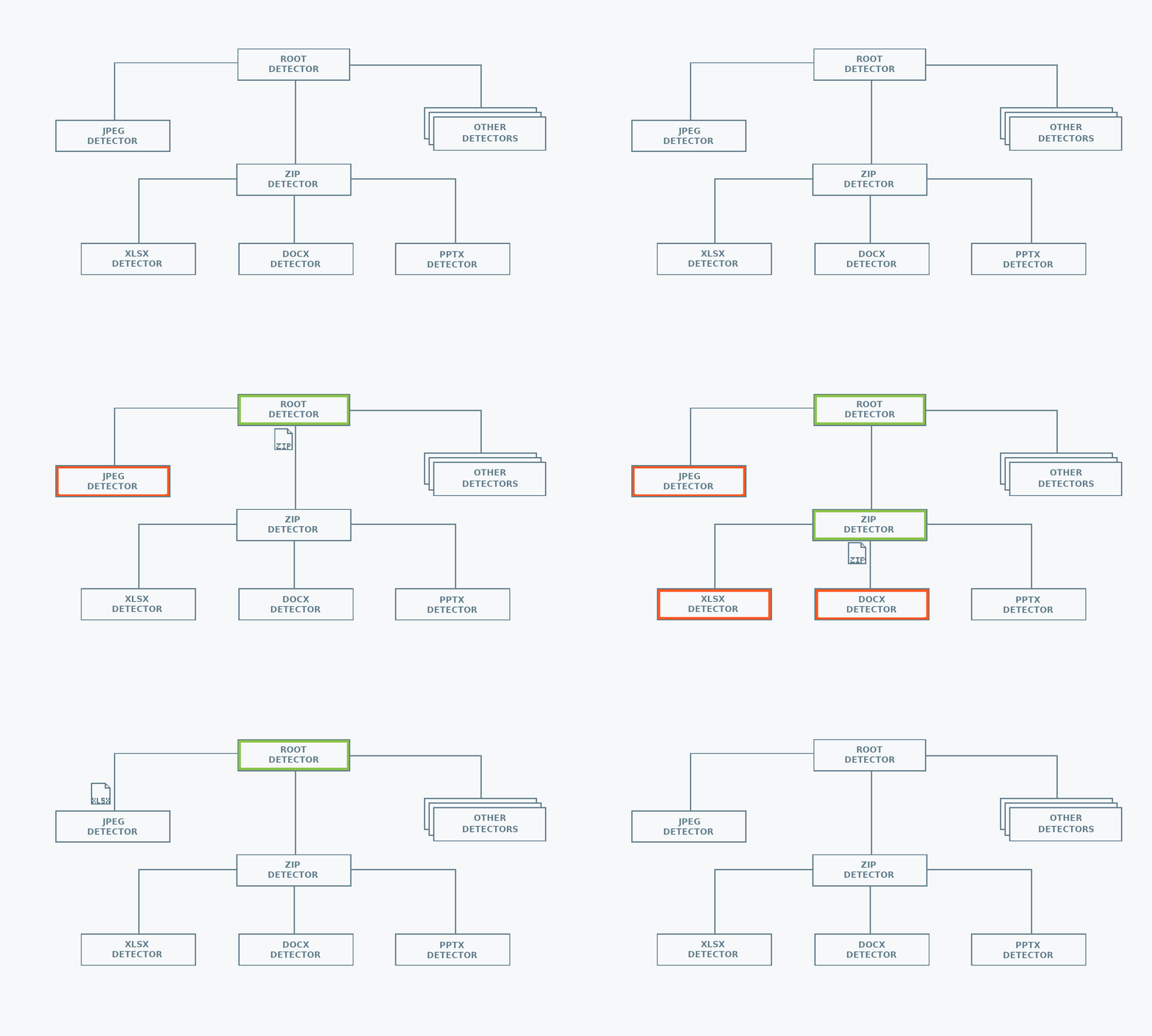
Contributing
Contributions are never expected but very much welcome. mimetype_tests shows which file formats are most often misidentified and can help prioritise. When submitting a PR for detection of a new file format, please make sure to add a record to the list of testcases in mimetype_test.go. For complex files a record can be added in the testdata directory.
 Documentation

Documentation

Overview 
Package mimetype uses magic number signatures to detect the MIME type of a file.
File formats are stored in a hierarchy with application/octet-stream at its root. For example, the hierarchy for HTML format is application/octet-stream -> text/plain -> text/html.
Example (Detect) 
package main

import (
	"bytes"
	"fmt"
	"os"

	"github.com/gabriel-vasile/mimetype"
)

func main() {
	testBytes := []byte("This random text has a MIME type of text/plain; charset=utf-8.")

	mtype := mimetype.Detect(testBytes)
	fmt.Println(mtype.Is("text/plain"), mtype.String(), mtype.Extension())

	mtype, err := mimetype.DetectReader(bytes.NewReader(testBytes))
	fmt.Println(mtype.Is("text/plain"), mtype.String(), mtype.Extension(), err)

	mtype, err = mimetype.DetectFile("a nonexistent file")
	fmt.Println(mtype.Is("application/octet-stream"), mtype.String(), os.IsNotExist(err))
}
Output:
true text/plain; charset=utf-8 .txt
true text/plain; charset=utf-8 .txt <nil>
true application/octet-stream true
Example (DetectReader) 
Pure io.Readers (meaning those without a Seek method) cannot be read twice. This means that once DetectReader has been called on an io.Reader, that reader is missing the bytes representing the header of the file. To detect the MIME type and then reuse the input, use a buffer, io.TeeReader, and io.MultiReader to create a new reader containing the original, unaltered data.
If the input is an io.ReadSeeker instead, call input.Seek(0, io.SeekStart) before reusing it.
package main

import (
	"bytes"
	"fmt"
	"io"

	"github.com/gabriel-vasile/mimetype"
)

// Pure io.Readers (meaning those without a Seek method) cannot be read twice.
// This means that once DetectReader has been called on an io.Reader, that reader
// is missing the bytes representing the header of the file.
// To detect the MIME type and then reuse the input, use a buffer, io.TeeReader,
// and io.MultiReader to create a new reader containing the original, unaltered data.
//
// If the input is an io.ReadSeeker instead, call input.Seek(0, io.SeekStart)
// before reusing it.
func main() {
	testBytes := []byte("This random text has a MIME type of text/plain; charset=utf-8.")
	input := bytes.NewReader(testBytes)

	mtype, recycledInput, err := recycleReader(input)

	// Verify recycledInput contains the original input.
	text, _ := io.ReadAll(recycledInput)
	fmt.Println(mtype, bytes.Equal(testBytes, text), err)
}

// recycleReader returns the MIME type of input and a new reader
// containing the whole data from input.
func recycleReader(input io.Reader) (mimeType string, recycled io.Reader, err error) {
	// header will store the bytes mimetype uses for detection.
	header := bytes.NewBuffer(nil)

	// After DetectReader, the data read from input is copied into header.
	mtype, err := mimetype.DetectReader(io.TeeReader(input, header))
	if err != nil {
		return
	}

	// Concatenate back the header to the rest of the file.
	// recycled now contains the complete, original data.
	recycled = io.MultiReader(header, input)

	return mtype.String(), recycled, err
}
Output:
text/plain; charset=utf-8 true <nil>
Example (Extend) 
Use Extend to add support for a file format which is not detected by mimetype.
https://www.garykessler.net/library/file_sigs.html and https://github.com/file/file/tree/master/magic/Magdir have signatures for a multitude of file formats.
package main

import (
	"bytes"
	"fmt"

	"github.com/gabriel-vasile/mimetype"
)

func main() {
	foobarDetector := func(raw []byte, limit uint32) bool {
		return bytes.HasPrefix(raw, []byte("foobar"))
	}

	mimetype.Lookup("text/plain").Extend(foobarDetector, "text/foobar", ".fb")
	mtype := mimetype.Detect([]byte("foobar file content"))

	fmt.Println(mtype.String(), mtype.Extension())
}
Output:
text/foobar .fb
Example (TextVsBinary) 
Considering the definition of a binary file as "a computer file that is not a text file", they can differentiated by searching for the text/plain MIME in their MIME hierarchy.
package main

import (
	"fmt"

	"github.com/gabriel-vasile/mimetype"
)

func main() {
	testBytes := []byte("This random text has a MIME type of text/plain; charset=utf-8.")
	detectedMIME := mimetype.Detect(testBytes)

	isBinary := true
	for mtype := detectedMIME; mtype != nil; mtype = mtype.Parent() {
		if mtype.Is("text/plain") {
			isBinary = false
		}
	}

	fmt.Println(isBinary, detectedMIME)
}
Output:
false text/plain; charset=utf-8
Example (Whitelist) 
package main

import (
	"fmt"

	"github.com/gabriel-vasile/mimetype"
)

func main() {
	testBytes := []byte("This random text has a MIME type of text/plain; charset=utf-8.")
	allowed := []string{"text/plain", "application/zip", "application/pdf"}
	mtype := mimetype.Detect(testBytes)

	if mimetype.EqualsAny(mtype.String(), allowed...) {
		fmt.Printf("%s is allowed\n", mtype)
	} else {
		fmt.Printf("%s is now allowed\n", mtype)
	}
}
Output:
text/plain; charset=utf-8 is allowed
Index 
Examples 
Constants 
This section is empty.
Variables 
This section is empty.
Functions 
func EqualsAny ¶ added in v1.1.0
EqualsAny reports whether s MIME type is equal to any MIME type in mimes. MIME type equality test is done on the "type/subtype" section, ignores any optional MIME parameters, ignores any leading and trailing whitespace, and is case insensitive.
func Extend ¶ added in v1.3.0
func Extend(detector func(raw []byte, limit uint32) bool, mime, extension string, aliases ...string)
Extend adds detection for other file formats. It is equivalent to calling Extend() on the root MIME type "application/octet-stream".
func SetLimit ¶ added in v1.2.0
func SetLimit(limit uint32)
SetLimit sets the maximum number of bytes read from input when detecting the MIME type. Increasing the limit provides better detection for file formats which store their magical numbers towards the end of the file: docx, pptx, xlsx, etc. During detection data is read in a single block of size limit, i.e. it is not buffered. A limit of 0 means the whole input file will be used.
Types 
type MIME ¶ added in v1.0.0
type MIME struct {
	// contains filtered or unexported fields
}
MIME struct holds information about a file format: the string representation of the MIME type, the extension and the parent file format.
func Detect 
Detect returns the MIME type found from the provided byte slice.
The result is always a valid MIME type, with application/octet-stream returned when identification failed.
func DetectFile 
DetectFile returns the MIME type of the provided file.
The result is always a valid MIME type, with application/octet-stream returned when identification failed with or without an error. Any error returned is related to the opening and reading from the input file.
func DetectReader 
DetectReader returns the MIME type of the provided reader.
The result is always a valid MIME type, with application/octet-stream returned when identification failed with or without an error. Any error returned is related to the reading from the input reader.
DetectReader assumes the reader offset is at the start. If the input is an io.ReadSeeker you previously read from, it should be rewinded before detection:
reader.Seek(0, io.SeekStart)
func Lookup ¶ added in v1.4.0
Lookup finds a MIME object by its string representation. The representation can be the main MIME type, or any of its aliases.
func (*MIME) Extend ¶ added in v1.4.0
func (m *MIME) Extend(detector func(raw []byte, limit uint32) bool, mime, extension string, aliases ...string)
Extend adds detection for a sub-format. The detector is a function returning true when the raw input file satisfies a signature. The sub-format will be detected if all the detectors in the parent chain return true. The extension should include the leading dot, as in ".html".
func (*MIME) Extension ¶ added in v1.0.0
Extension returns the file extension associated with the MIME type. It includes the leading dot, as in ".html". When the file format does not have an extension, the empty string is returned.
func (*MIME) Is ¶ added in v1.0.0
Is checks whether this MIME type, or any of its aliases, is equal to the expected MIME type. MIME type equality test is done on the "type/subtype" section, ignores any optional MIME parameters, ignores any leading and trailing whitespace, and is case insensitive.
func (*MIME) Parent ¶ added in v1.0.0
Parent returns the parent MIME type from the hierarchy. Each MIME type has a non-nil parent, except for the root MIME type.
For example, the application/json and text/html MIME types have text/plain as their parent because they are text files who happen to contain JSON or HTML. Another example is the ZIP format, which is used as container for Microsoft Office files, EPUB files, JAR files, and others.
 Source Files
 Directories

Directories

| Path | Synopsis |
|---|---|
|
internal
|
|
|
magic
Package magic holds the matching functions used to find MIME types.
|
Package magic holds the matching functions used to find MIME types. |
|
markup
Package markup implements functions for extracting info from HTML and XML documents.
|
Package markup implements functions for extracting info from HTML and XML documents. |
|
scan
Package scan has functions for scanning byte slices.
|
Package scan has functions for scanning byte slices. |