

 README

README

hrs
Timesheets for your agent. A CLI backed by SQLite that any AI agent can call to log structured work entries from any directory.
Why
I was tired of getting to the end of each day after context-switching between a dozen priorities and feeling like every day was an armed robbery where my time was the prize. I needed a way to recall what I actually worked on.
I started with a markdown file archive and a TUI wrapper, but three things broke that approach:
- Blind writes — Claude would attempt to write directly to the markdown file, fail, and waste a tool-use cycle.
- File locking — multiple agents running concurrently would clobber each other's writes.
- Sandboxing — guardrails that prevent agents writing outside the project directory meant they couldn't reach a shared worklog at all.
So I built a CLI backed by SQLite. Any agent calls hrs log from any directory, entries go into a single database, and markdown files are rendered as a view. No daemon, no config.
Install
Download a binary from GitHub Releases (macOS and Linux, amd64/arm64):
tar xzf hrs_*_darwin_arm64.tar.gz
sudo mv hrs /usr/local/bin/
Or via Go (requires $(go env GOPATH)/bin on your PATH):
go install github.com/heuwels/hrs@latest
Or build from source (no CGo, no C compiler needed):
git clone https://github.com/heuwels/hrs
cd hrs
go build -o hrs .
Usage
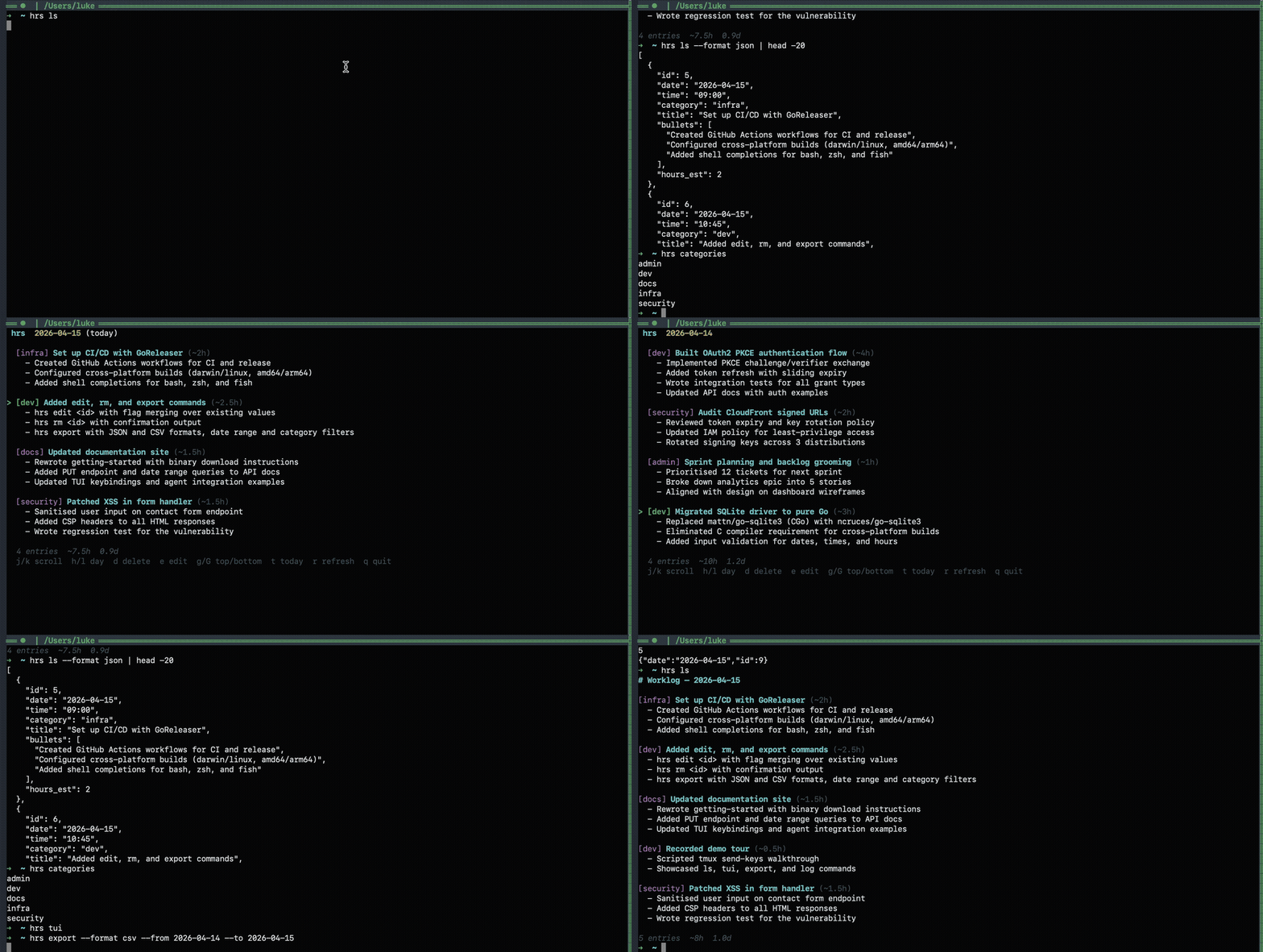
hrs log -c dev -t "built auth flow" -b "oauth2 pkce;token refresh;tests" -e 3
hrs ls                               # print today's entries
hrs ls 2026-04-14                    # print a specific date
hrs tui                              # interactive explorer (vim keys)
That's it. DB auto-creates at ~/.hrs/hrs.db. Override with HRS_DB env var or --db flag.
All commands
hrs log     -c dev -t "title" -b "bullets" -e 2   # log an entry
hrs ls      [date]                                  # list entries (color TTY, markdown piped)
hrs ls      --from 2026-04-01 --to 2026-04-15      # date range query
hrs ls      --format json --category dev            # JSON output, category filter
hrs tui     [date]                                  # interactive TUI
hrs edit    <id> -t "new title" -e 3                # update an entry
hrs rm      <id>                                    # delete an entry
hrs export  --format csv --from 2026-04-01          # export as JSON or CSV
hrs ls      --ticket PROMO --from 2026-01-01        # filter entries by goal/strategy ticket
hrs categories                                      # list all categories
hrs serve   [--port 9746]                           # start API server
hrs migrate --dir ~/old-worklogs/                   # import markdown files
hrs docs                                            # serve documentation site
hrs version                                         # print version
Bullets are separated by semicolons. The --dir flag controls where markdown files are rendered.
Environment variables
| Variable | Default | Description |
|---|---|---|
HRS_DB |
~/.hrs/hrs.db |
SQLite database path |
HRS_DIR |
~/.hrs/ |
Markdown output directory |
HTTP server (optional)
Most users only need the CLI. The HTTP server is useful when:
- Agents can't shell out — browser extensions, sandboxed runtimes, or custom tool-use frameworks that only support HTTP
- Webhook integrations — pipe events from CI, deployment tools, or monitoring into your worklog
- Remote logging — log from a different machine on your network (bind to
0.0.0.0instead of127.0.0.1)
hrs serve & # start on localhost:9746
The CLI auto-detects the server — if it's running, hrs log routes through it. If not, it writes directly to SQLite. No config needed either way.
API
POST /entries
curl -X POST http://localhost:9746/entries -d '{
  "category": "dev",
  "title": "Built authentication flow",
  "bullets": [
    "Implemented OAuth2 PKCE flow",
    "Added token refresh logic",
    "Wrote integration tests"
  ],
  "hours_est": 3
}'
date and time default to now if omitted. Validation: date must be YYYY-MM-DD, time HH:MM, hours_est 0-24, category/title/bullets non-empty.
PUT /entries/{id}
Update an existing entry. Same fields as POST.
GET /entries
GET /entries?date=2026-04-13              # single date (default: today)
GET /entries?from=2026-04-01&to=2026-04-15  # date range
GET /entries?from=2026-04-01&category=dev   # with category filter
Returns JSON array of entries.
DELETE /entries/{id}
Remove an entry by ID.
GET /schema
Returns field names, types, and descriptions so agents can self-discover the API without hardcoded instructions:
{
  "endpoints": [
    {
      "method": "POST",
      "path": "/entries",
      "fields": [
        {"name": "category", "type": "string", "required": true, "description": "Work category, e.g. dev, security, admin"},
        {"name": "title", "type": "string", "required": true, "description": "Concise label for the work performed"},
        {"name": "bullets", "type": "[]string", "required": true, "description": "Terse, outcome-focused bullet points"},
        {"name": "hours_est", "type": "number", "required": false, "description": "Estimated person-hours without AI assistance"},
        {"name": "date", "type": "string", "required": false, "description": "YYYY-MM-DD, defaults to today"},
        {"name": "time", "type": "string", "required": false, "description": "HH:MM, defaults to now"}
      ]
    },
    {"method": "PUT", "path": "/entries/{id}", "description": "Update an existing entry"},
    {"method": "GET", "path": "/entries", "description": "List entries with date, from/to, category params"},
    {"method": "DELETE", "path": "/entries/{id}", "description": "Delete an entry"}
  ]
}
GET /health
Returns {"status": "ok"}.
Markdown output
Each POST syncs a YYYY-MM-DD.md file in --dir:
# Worklog — 2026-04-13

## 14:30 - [dev] Built authentication flow (~3h)
- Implemented OAuth2 PKCE flow
- Added token refresh logic
- Wrote integration tests

---
## Daily Summary
- Entries: 1
- Est. person-hours (without AI): 3h
- Est. person-days: 0.4d (assuming 8h/day)
Agent integration
Add something like this to your CLAUDE.md (or equivalent agent instructions). Here's how we use it:
## Work Logging

All agent sessions MUST log significant work to the shared worklog.

### When to log:
- Any task that took more than 2-3 minutes
- Writing, modifying, or reviewing code
- Creating, updating, or reviewing PRs
- Bug fixes, security work, documentation
- Research that produced findings

**Rule of thumb:** Can you write 2+ bullet points? Then log it.

### How to log:

Log with `hrs log`. Run `hrs log -h` to discover the flags.

Or via HTTP if sandboxed:

```bash
curl -s -X POST http://localhost:9746/entries -d '{
  "category": "dev",
  "title": "Short description of work",
  "bullets": ["What was accomplished", "Key outcomes"],
  "hours_est": 2
}'
```

### Important:
- **Log proactively** — don't wait to be asked
- **Log during work** — not just at the end of the session
- **Be generous** — when in doubt, log it
Ticket references and reporting
Goals and strategies can carry a ticket_ref — a free-form string pointing at an external work item (Promotheus, Jira, Linear, GitHub, anything). hrs ls --ticket PROMO and hrs export --ticket PROMO then return every entry linked (through a goal) to a goal or strategy whose ticket matches that prefix:
hrs strategy add -t "ship pat creation" --ticket PROMO-150
hrs goals add -s 1 --ticket PROMO-151 "filament ui"
hrs log -c dev -t "filament wired up" -b "form;validation;tests" -e 4
hrs goals done <goal_id> -e <entry_id>

# at claim time
hrs export --ticket PROMO --from 2026-01-01 --to 2026-12-31 --format csv
The R&D motivation: tag any goal or strategy that represents experimental development with the relevant ticket, link entries as you complete goals, then export by ticket prefix to produce a defensible timesheet for the claim. See docs/goals.md for the full rules (matching, inheritance, clearing).
A note on hours estimates
The hours_est field asks the AI to estimate how long the work would take a competent developer without AI assistance. This is useful for understanding throughput, but take it with a grain of salt — AI agents tend to overstate the complexity of tasks they've completed. A "~4h" estimate for something that took 3 minutes of wall clock time is flattering but not always realistic. The daily summaries roll these up into person-hours and person-days which makes for a nice story, just don't use it to plan your next sprint.
Design
- Single static binary — server, CLI, TUI, and docs site all in one
- Pure Go, no CGo — cross-compiles to macOS and Linux without a C toolchain
- SQLite with WAL mode — handles concurrent agent writes
net/httpstdlib server — one goroutine per request- BubbleTea TUI with vim keybindings
- Embedded documentation site (
hrs docsor/docs/on the server) - Markdown files are a rendered view, SQLite is the source of truth
- ~1500 lines of Go (plus ~300 lines of tests)
License
MIT
 Documentation

Documentation


There is no documentation for this package.
 Source Files