




 README

README

fmesh-export
Export an F-Mesh mesh as data or as a diagram. One Go module, one package per format:
| Format | Package | Render with |
|---|---|---|
| JSON | json |
any JSON tool; unmarshal into json.Mesh / json.Cycle |
| YAML | yaml |
any YAML tool; unmarshal into yaml.Mesh / yaml.Cycle |
| Graphviz DOT | dot |
dot -Tpng, edotor.net |
| Mermaid | mermaid |
GitHub markdown, mermaid.live |
| D2 | d2 |
d2, play.d2lang.com |
| PlantUML | plantuml |
plantuml -tpng, plantuml.com server |
Every exporter implements export.Exporter,
the interface in this module's root package, so one format can replace another.
Install
go get github.com/hovsep/fmesh-export/<format> # e.g. /mermaid
Usage
Every format has the same shape:
import "github.com/hovsep/fmesh-export/mermaid"

e := mermaid.New() // options go here, e.g. mermaid.WithDirection("TB")

// ... build and seed fm ...

static, err := e.Export(fm) // the structure
if err != nil {
    return err
}

ri, err := fm.Run(ctx)
if err != nil {
    return err
}
for _, c := range ri.Cycles.All() {
    frame, err := e.ExportCycle(fm, c) // the structure, colored by the results of cycle c
    if err != nil {
        return err
    }
    // ... write frame ...
}
New(opts...)creates an exporter. It cannot fail.Export(fm)returns the structure: components, ports, pipes, descriptions.ExportCycle(fm, c)returns the structure in the state of one cycle. Components are colored by their activation result. A component with no result inchad no input.- An invalid option (for example an unknown direction) is returned as an error by
ExportandExportCycle. - Options set one thing on top of the defaults. Anything you do not set keeps its default. See each package's README.
- An exporter holds only its options. Reuse one value for many meshes.
- An exporter never changes the mesh. Equal meshes give byte-identical output.
Streaming: one frame per cycle while the mesh runs
fmesh.WithCyclesHistoryLimit keeps only the last cycles in ri.Cycles. To get every cycle, or to
see frames while the mesh runs, export from an AfterCycle hook:
e := mermaid.New()
fm.SetupHooks(func(h *fmesh.Hooks) {
    h.AfterCycle(func(ctx context.Context, cc *fmesh.CycleContext) error {
        frame, err := e.ExportCycle(cc.FMesh, cc.Cycle)
        if err != nil {
            return err
        }
        // ... write or send frame ...
        return nil
    })
})
Any format through one interface
Code that does not care about the format can take an export.Exporter:
import "github.com/hovsep/fmesh-export" // package export

func save(e export.Exporter, fm *fmesh.FMesh) ([]byte, error) {
    return e.Export(fm)
}

save(dot.New(), fm)
save(json.New(), fm)
Live examples
After a merge, CI renders the showcase mesh in internal/cmd/showcase
(fan-out, fan-in, an error and a wait) in each diagram format the merge touched, and shows the
pictures on the run's summary page. One workflow per format: DOT, Mermaid,
D2, PlantUML.
| Format | Structure | Run replay |
|---|---|---|
| DOT | 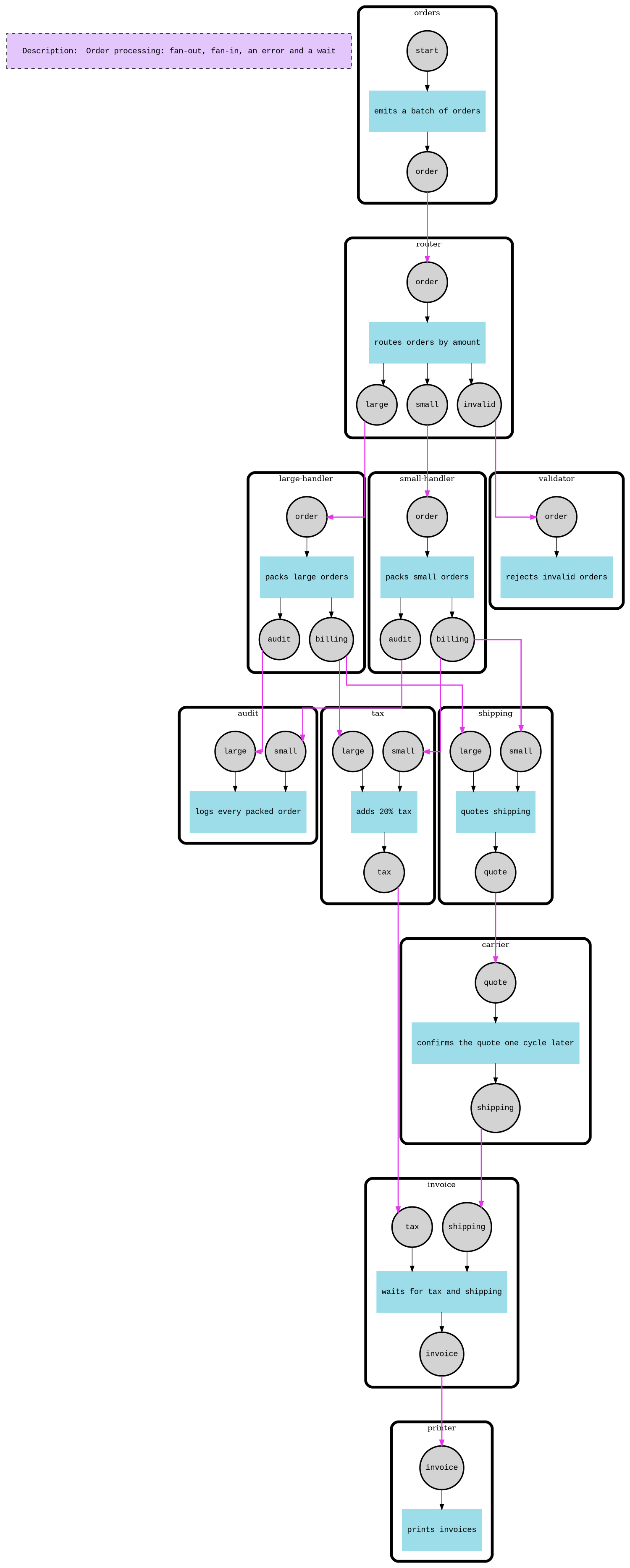 |
 |
| Mermaid | 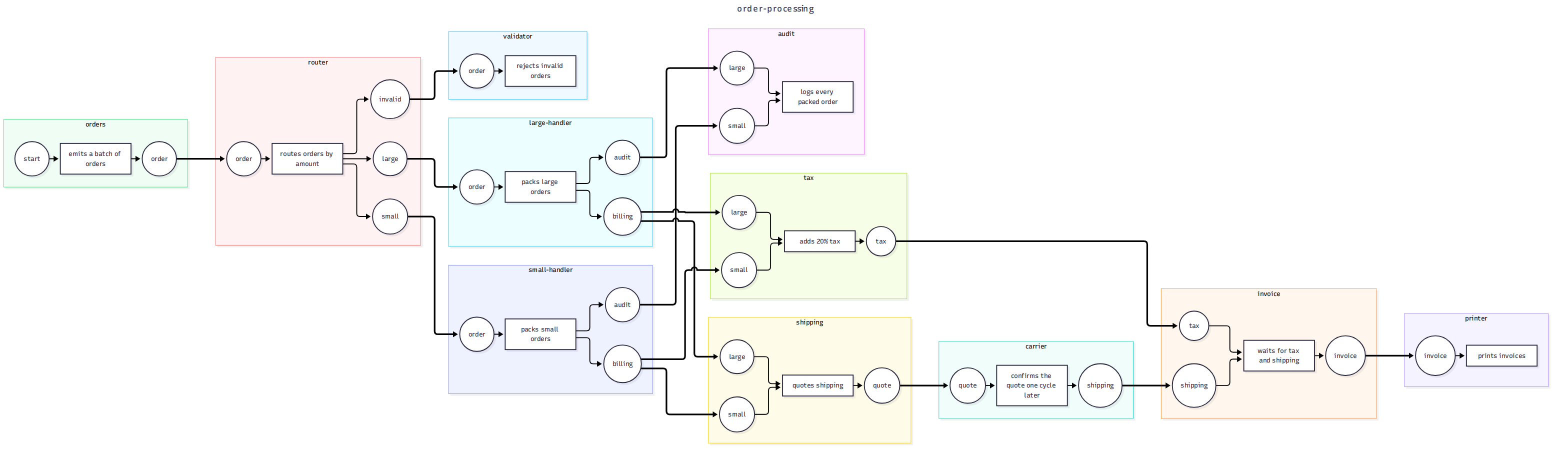 |
 |
| D2 | 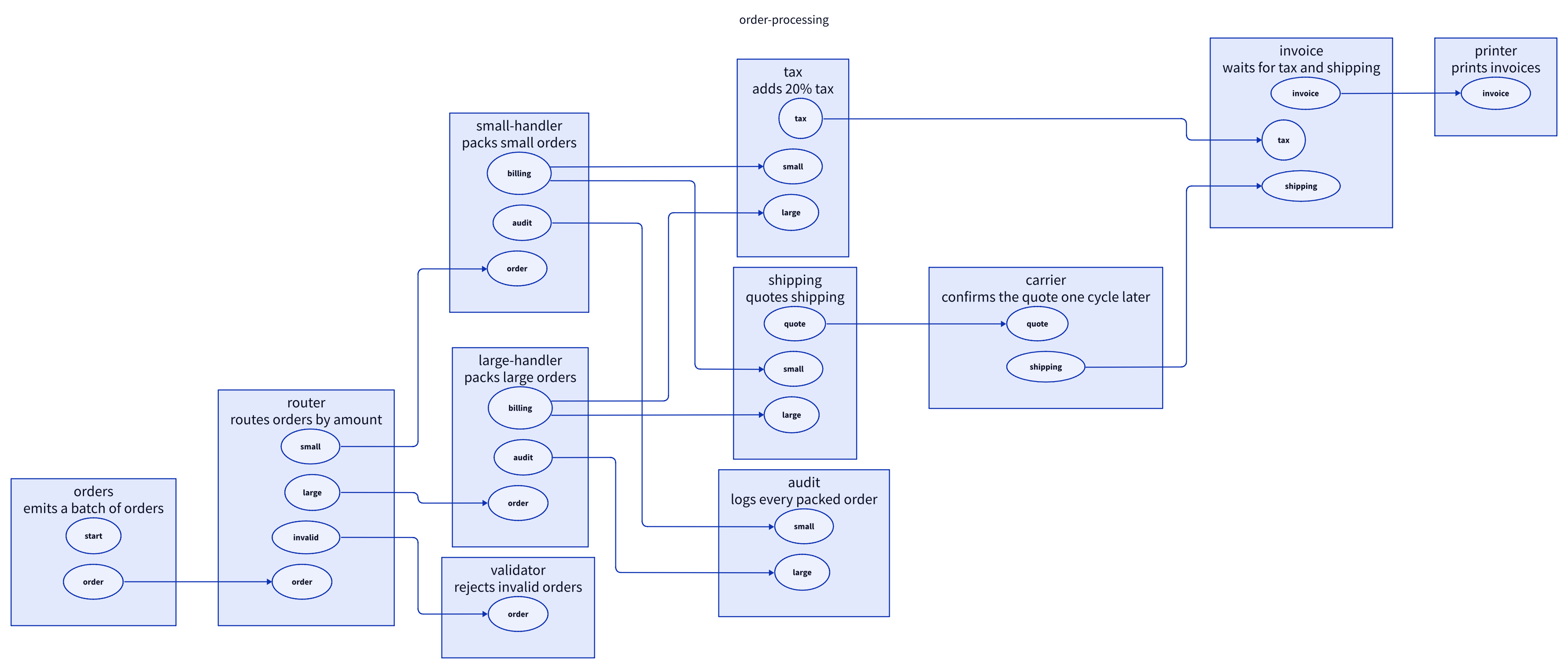 |
 |
| PlantUML |  |
 |
Run it locally: go run ./internal/cmd/showcase -format d2 out.
Writing a new exporter
Copy the d2 package: it is a complete exporter with the full set of tests. A new data
format is smaller: build the documents with internal/doc and only encode them (add the format's
struct tags to the types there). A new format xyz needs:
-
A package
xyz/withxyz.go,xyz_test.goand aREADME.md. -
The shared shape, the same as every other format:
type Exporter struct{...}that holds only the options.type Option func(*Exporter), and single options that change one thing on top of the defaults. No config struct that replaces everything.func New(opts ...Option) *Exporter. It cannot fail.Export(fm *fmesh.FMesh) ([]byte, error)for the structure.ExportCycle(fm *fmesh.FMesh, c *cycle.Cycle) ([]byte, error)for one cycle.var _ export.Exporter = (*Exporter)(nil), so the compiler checks the interface.
-
Rendering through
fm.Walk(visitor). ImplementVisitMesh,VisitComponent,VisitPortandVisitPipe. Rules:- Never change the mesh.
- Keep no state in the
Exporterbetween calls. Put per-export state in the visitor. - Check the options in
ExportandExportCycle, and return an error for a bad one. - The output must be byte-identical for equal meshes.
- Use generated IDs (
c1,p2, ...) and put names only in quoted, escaped labels. - In a cycle graph, a component with no result had no input (
ActivationCodeNoInput).
-
Tests:
- one exact expected output for
Export; - cycle colors and an error text for
ExportCycle; - determinism;
- awkward names (quotes, dots, colons, newlines);
- each option, and option checks in both
ExportandExportCycle; - one
Exporterreused for two meshes; ExportCyclefrom anAfterCyclehook gives one frame per cycle.
The
d2tests cover all of these. - one exact expected output for
-
The showcase: add the format to
formatsininternal/cmd/showcase. -
CI (diagram formats only; data formats have nothing to render): copy
.github/workflows/d2.ymltoxyz.yml, and add anxyz)case to the "Install renderer" and "Render images" steps ofrender.yml. Pin the renderer version and check its SHA-256 there. -
Docs: add a row to the format table and the live-example table above.
Run make check before you open a pull request. The PR's checks upload the rendered images as an
artifact, so you can look at your format before it is merged.
Contributing
See CONTRIBUTING.md.
License
See LICENSE.
 Documentation

Documentation

Overview 
Package export defines the interface every exporter in this module implements; each format is a subpackage. Hold an Exporter to pick a format at run time, or to write your own.
Index 
Constants 
This section is empty.
Variables 
var ErrNilCycle = errors.New("export: cycle is nil")
ErrNilCycle is returned by ExportCycle when the cycle is nil.
var ErrNilMesh = errors.New("export: mesh is nil")
ErrNilMesh is returned by Export and ExportCycle when the mesh is nil.
Functions 
This section is empty.
Types 
type Exporter 
type Exporter interface {
	// Export renders the mesh structure: components, ports and pipes. A nil
	// mesh is ErrNilMesh.
	Export(fm *fmesh.FMesh) ([]byte, error)

	// ExportCycle renders the structure together with the results of one
	// cycle of a run, e.g. one from RuntimeInfo.Cycles or from an AfterCycle
	// hook. A component with no result in the cycle had no input. A nil mesh
	// is ErrNilMesh, and a nil cycle is ErrNilCycle.
	ExportCycle(fm *fmesh.FMesh, c *cycle.Cycle) ([]byte, error)
}
Exporter renders a mesh in one format. An exporter only reads the mesh, and its output is deterministic: equal meshes export byte-identical documents.
 Source Files
 Directories

Directories

| Path | Synopsis |
|---|---|
|
Package d2 provides Exporter, which exports an fmesh mesh as D2 diagram source: the structure, or the structure in the state of one cycle with components colored by their activation result.
|
Package d2 provides Exporter, which exports an fmesh mesh as D2 diagram source: the structure, or the structure in the state of one cycle with components colored by their activation result. |
|
Package dot provides Exporter, which exports an fmesh mesh as a Graphviz DOT graph: the structure, or the structure in the state of one cycle.
|
Package dot provides Exporter, which exports an fmesh mesh as a Graphviz DOT graph: the structure, or the structure in the state of one cycle. |
|
internal
|
|
|
cmd/showcase
command
Command showcase builds and runs an order-processing mesh, then writes its graphs in one export format to a directory: static.<ext> and one cycle-NNN.<ext> per cycle.
|
Command showcase builds and runs an order-processing mesh, then writes its graphs in one export format to a directory: static.<ext> and one cycle-NNN.<ext> per cycle. |
|
doc
Package doc builds the documents that data-format exporters encode: the mesh structure, and the structure with one cycle's results.
|
Package doc builds the documents that data-format exporters encode: the mesh structure, and the structure with one cycle's results. |
|
Package json exports a mesh as indented JSON: its structure, or its state in one cycle.
|
Package json exports a mesh as indented JSON: its structure, or its state in one cycle. |
|
Package mermaid provides Exporter, which exports an fmesh mesh as a Mermaid flowchart: the structure, or the structure in the state of one cycle with components colored by their activation result.
|
Package mermaid provides Exporter, which exports an fmesh mesh as a Mermaid flowchart: the structure, or the structure in the state of one cycle with components colored by their activation result. |
|
Package plantuml provides Exporter, which exports an fmesh mesh as a PlantUML component diagram: the structure, or the structure in the state of one cycle with components colored by their activation result.
|
Package plantuml provides Exporter, which exports an fmesh mesh as a PlantUML component diagram: the structure, or the structure in the state of one cycle with components colored by their activation result. |
|
Package yaml exports a mesh as YAML: its structure, or its state in one cycle.
|
Package yaml exports a mesh as YAML: its structure, or its state in one cycle. |