

 README

README

gh-lazydispatch
Interactive GitHub Workflow Dispatcher (standalone or with the GH CLI)
Installation
GH CLI Extension
Note: Requires a GitHub Release with precompiled binaries. For development, see local install instructions.
gh extension install kyleking/gh-lazydispatch
Homebrew
brew install kyleking/tap/gh-lazydispatch
Go Install
go install github.com/kyleking/gh-lazydispatch/cmd/gh-lazydispatch@latest
Development
mise install && hk install --mise
mise run ci
See CONTRIBUTING.md for full development workflow.
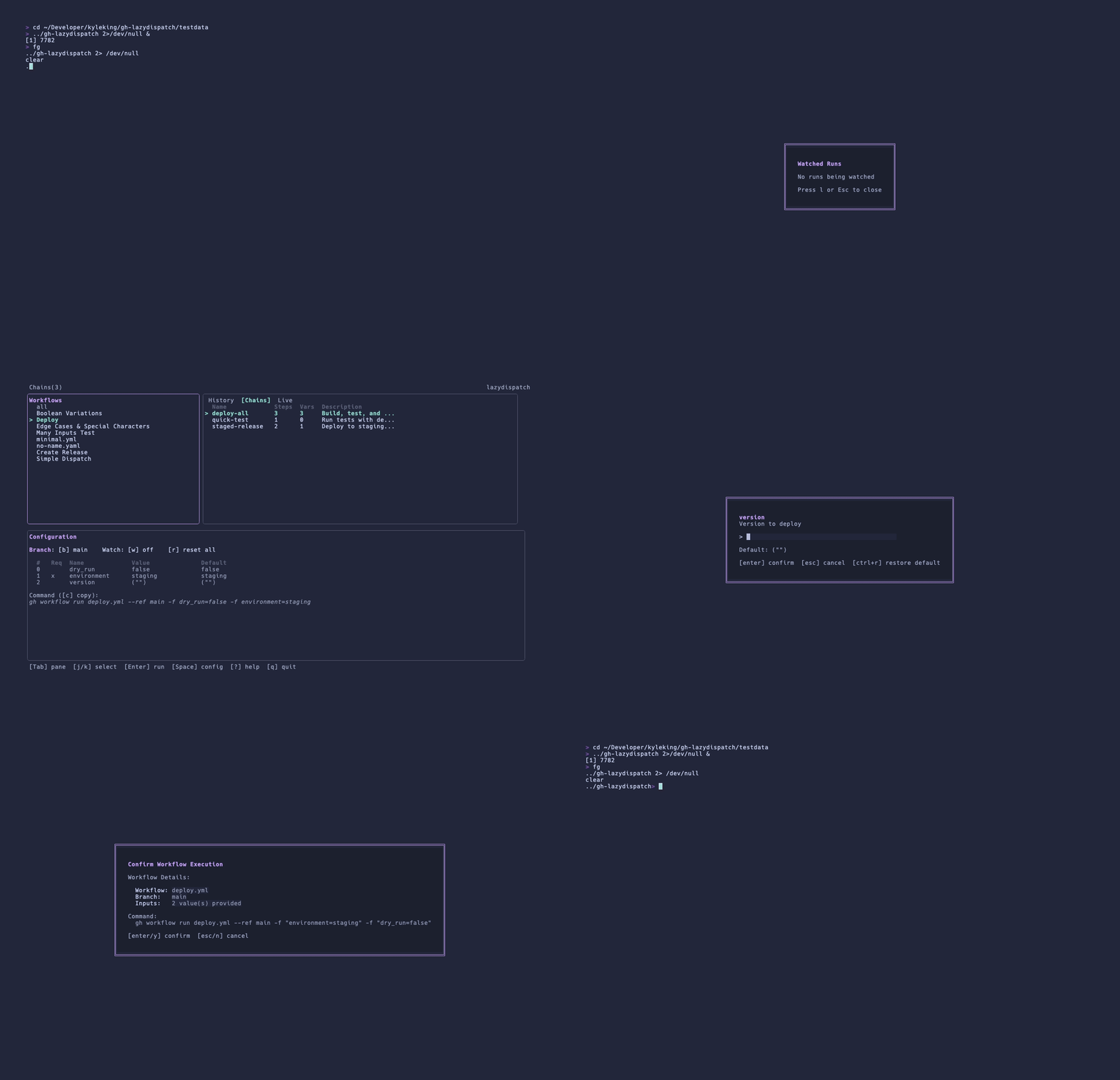

Features
- Fuzzy search for workflow selection
- Interactive input configuration for workflow_dispatch inputs
- Branch selection with frecency-based sorting
- Watch mode for real-time workflow run updates
- Frecency-based workflow history tracking
- Workflow chains for multi-step deployments
- Log viewer with filtering, search, and real-time streaming
- Tabbed right panel (History, Chains, Live runs)
- Theme support (Catppuccin)
- Command preview before execution
See Also
gh-dispatch is a CLI-based alternative that supports both workflow_dispatch and repository_dispatch with JSON payloads via command-line flags. Use gh-dispatch for scripting, CI integration, or repository_dispatch events; use lazydispatch for interactive exploration, frecency-based history, and guided input configuration.
Other alternatives:
- chrisgavin/gh-dispatch - Interactive CLI for dispatching workflows with progress tracking
- gh workflow run - Built-in
ghcommand with basic interactive prompts - nektos/act - Run GitHub Actions locally in Docker (different use case: local testing vs remote dispatch)
Usage
Navigate to a directory with a Git repository containing GitHub Actions workflows:
cd your-project

# If installed as gh extension:
gh lazydispatch

# If installed as standalone:
lazydispatch
The tool will discover all workflows with workflow_dispatch triggers and present them in an interactive TUI.
Keyboard Shortcuts
Navigation
| Key | Action |
|---|---|
Tab / Shift+Tab |
Switch between panes |
h / l |
Switch tabs (when right panel focused) |
j / k or Up / Down |
Navigate within pane |
Enter |
Select / Execute workflow |
Space |
Select workflow and jump to config |
Esc |
Deselect / Close modal |
Configuration
| Key | Action |
|---|---|
b |
Select branch |
w |
Toggle watch mode |
1-9, 0 |
Edit input by number |
/ |
Filter inputs |
c |
Copy command to clipboard |
r |
Reset all inputs to defaults |
Live Runs
| Key | Action |
|---|---|
d |
Clear selected run |
D |
Clear all completed runs |
Log Viewer
| Key | Action |
|---|---|
l |
Open log viewer (from chain status or history) |
Tab / Shift+Tab |
Switch between step tabs |
f |
Cycle filter (all / errors / warnings) |
/ |
Search logs |
n / N |
Next / previous search match |
i |
Toggle case sensitivity |
o |
Open run in browser |
q / Esc |
Close log viewer |
General
| Key | Action |
|---|---|
? |
Show help |
q, Ctrl+C |
Quit |
Environment Variables
CATPPUCCIN_THEME- Override theme (latte/macchiato)
Workflow Chains
Chains let you execute multiple workflows in sequence with configurable wait conditions and failure handling. Define chains in .github/lazydispatch.yml:
version: 1
chains:
  deploy-all:
    description: Build, test, and deploy to all environments
    steps:
      - workflow: build.yml
        wait_for: success      # Wait for successful completion (default)
        on_failure: abort      # Stop chain on failure (default)
      - workflow: test.yml
        wait_for: completion   # Wait for any completion (success or failure)
        on_failure: continue   # Continue even if this step fails
      - workflow: deploy.yml
        wait_for: none         # Don't wait, dispatch immediately
        inputs:
          environment: production
          version: v1.0.0

  quick-test:
    description: Run tests with default settings
    steps:
      - workflow: test.yml
Chain Options
| Option | Values | Default | Description |
|---|---|---|---|
wait_for |
success, completion, none |
success |
When to proceed to next step |
on_failure |
abort, skip, continue |
abort |
What to do when step fails |
inputs |
map | - | Override workflow inputs |
Accessing Chains
- Press
Tabto focus the right panel - Press
lto switch to the Chains tab - Navigate with
j/kand pressEnterto execute
The status bar shows Chains(N) when chains are configured, and Chain: name (step/total) during execution.
Log Viewer
View workflow run logs directly in the TUI with filtering, search, and real-time streaming.
Accessing Logs
- From Chain Status: Press
lafter a chain completes or fails - From History: Select a history entry and press
l
Features
- Step Navigation: Logs are organized by workflow step with tabs
- Filtering: Cycle through all/errors/warnings with
f - Search: Press
/to search,n/Nto navigate matches - Live Streaming: Logs update in real-time for active runs
- Error Focus: When opened from a failed chain, automatically filters to errors
Requirements
Log viewing requires gh CLI to be installed and authenticated:
gh auth login
Recording the Demo
Generate the demo GIFs using VHS:
# Main demo
vhs < .github/assets/demo.tape

# Chains demo
vhs < .github/assets/chains-demo.tape
Maintenance
Updating Dependencies
Update Go version, dependencies, and GitHub Actions:
# Update Go version in go.mod (check https://go.dev/dl/ for latest)
# Then update dependencies
go get -u ./... && go mod tidy && go test ./...

# Update GitHub Actions in .github/workflows/*.yml
# Check for latest versions at:
# - https://github.com/actions/checkout/releases
# - https://github.com/actions/setup-go/releases
# - https://github.com/golangci/golangci-lint/releases
# - https://github.com/goreleaser/goreleaser-action/releases
Verification
# Run full CI
mise run ci

# Check test coverage
go test -coverprofile=coverage.out ./...
go tool cover -func=coverage.out | grep total

# Verify no regressions
go test -race ./...
Roadmap
See ROADMAP.md for planned features (markdown log export, error-pattern detection, timeline view) and deferred ideas.
 Directories

Directories

| Path | Synopsis |
|---|---|
|
cmd
|
|
|
branch-demo
command
Command branch-demo is a standalone harness for exercising the branch selector modal.
|
Command branch-demo is a standalone harness for exercising the branch selector modal. |
|
gh-lazydispatch
command
Command gh-lazydispatch is a TUI gh extension for dispatching and watching GitHub Actions workflows.
|
Command gh-lazydispatch is a TUI gh extension for dispatching and watching GitHub Actions workflows. |
|
internal
|
|
|
app
Package app implements the main Bubbletea application for the interactive workflow dispatcher TUI.
|
Package app implements the main Bubbletea application for the interactive workflow dispatcher TUI. |
|
browser
Package browser provides cross-platform browser opening functionality.
|
Package browser provides cross-platform browser opening functionality. |
|
chain
Package chain provides workflow chain execution and template interpolation.
|
Package chain provides workflow chain execution and template interpolation. |
|
config
Package config provides configuration file parsing and management for workflow dispatch chains.
|
Package config provides configuration file parsing and management for workflow dispatch chains. |
|
demo
Package demo provides demo mode functionality for branch selection workflows.
|
Package demo provides demo mode functionality for branch selection workflows. |
|
errors
Package chainerr defines custom error types for workflow chain execution and GitHub API operations.
|
Package chainerr defines custom error types for workflow chain execution and GitHub API operations. |
|
exec
Package exec provides command execution with mocking support for testing.
|
Package exec provides command execution with mocking support for testing. |
|
frecency
Package frecency provides frequency and recency-based scoring for workflow history.
|
Package frecency provides frequency and recency-based scoring for workflow history. |
|
git
Package git provides Git operations for branch discovery and management.
|
Package git provides Git operations for branch discovery and management. |
|
github
Package github provides a client for interacting with GitHub API operations.
|
Package github provides a client for interacting with GitHub API operations. |
|
logs
Package logs provides workflow run log fetching, caching, filtering, and streaming functionality.
|
Package logs provides workflow run log fetching, caching, filtering, and streaming functionality. |
|
rule
Package rule provides parsing and validation of workflow input validation rules.
|
Package rule provides parsing and validation of workflow input validation rules. |
|
runner
Package runner provides workflow execution functionality using the GitHub CLI.
|
Package runner provides workflow execution functionality using the GitHub CLI. |
|
testutil
Package testutil provides testing utilities, fixtures, and mocks for unit tests.
|
Package testutil provides testing utilities, fixtures, and mocks for unit tests. |
|
ui
Package ui provides shared UI styling and components for the TUI application.
|
Package ui provides shared UI styling and components for the TUI application. |
|
ui/modal
Package modal provides modal dialogs for user interactions in the TUI application.
|
Package modal provides modal dialogs for user interactions in the TUI application. |
|
ui/panes
Package panes provides the main UI panes for workflow, history, and configuration views.
|
Package panes provides the main UI panes for workflow, history, and configuration views. |
|
ui/theme
Package theme provides color theme detection and management for the TUI.
|
Package theme provides color theme detection and management for the TUI. |
|
validation
Package validation provides input validation and history-based suggestions for workflow inputs.
|
Package validation provides input validation and history-based suggestions for workflow inputs. |
|
watcher
Package watcher provides workflow run monitoring and status tracking functionality.
|
Package watcher provides workflow run monitoring and status tracking functionality. |
|
workflow
Package workflow provides discovery and parsing of GitHub Actions workflow files.
|
Package workflow provides discovery and parsing of GitHub Actions workflow files. |