

 README

README

Repo Dashboard
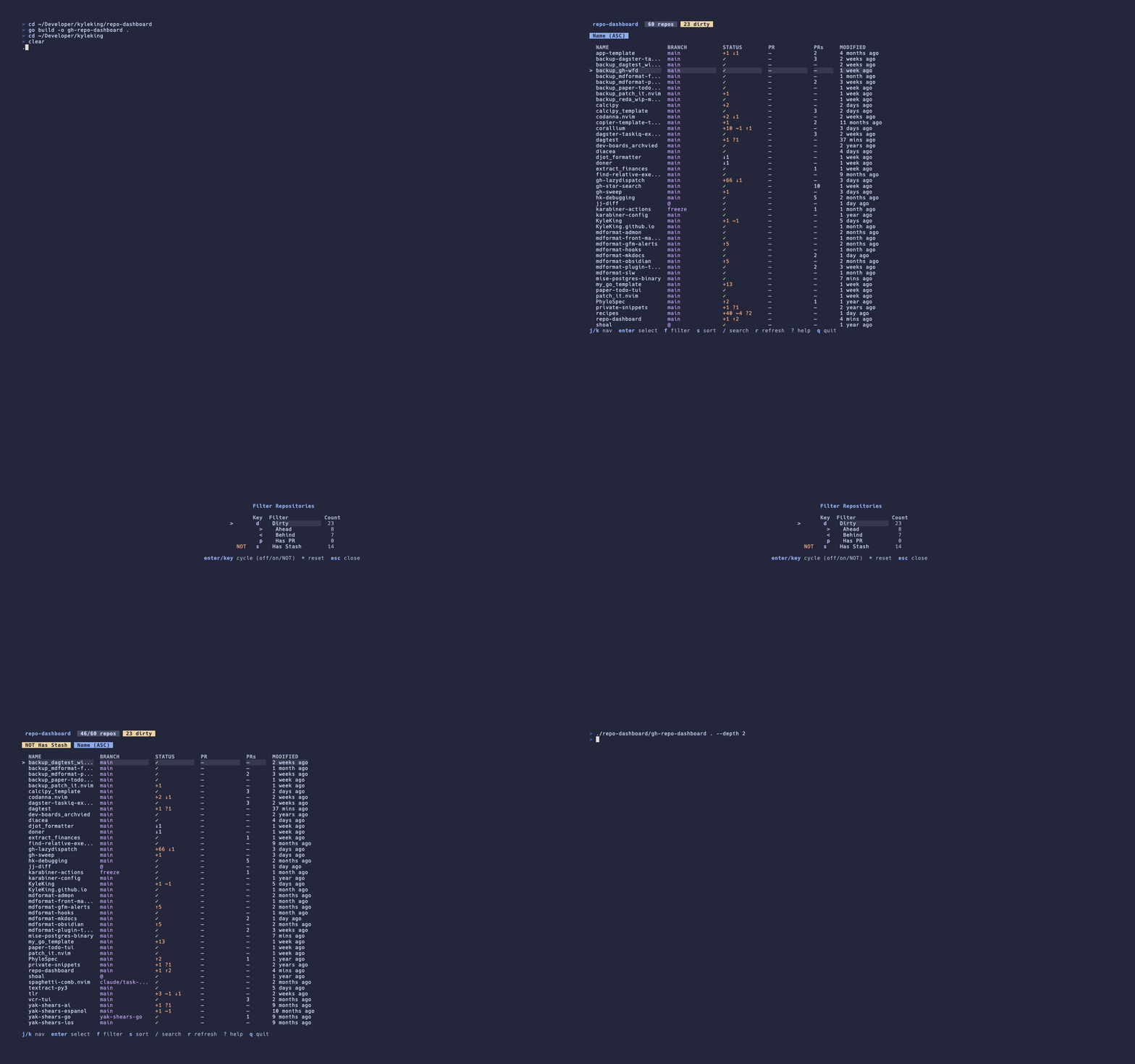
K9s-inspired TUI for managing multiple git and jj repositories with GitHub PR integration.
Installation
As a GitHub CLI extension:
gh extension install kyleking/gh-repo-dashboard
With Homebrew:
brew install --cask kyleking/tap/gh-repo-dashboard
Or build from source:
go build -o gh-repo-dashboard ./cmd/gh-repo-dashboard
Usage
# Scan the config-file scan_paths, or with no config the enclosing repo
# (walking up from the current directory), or the current directory itself
gh repo-dashboard

# Scan specific directories
gh repo-dashboard ~/projects ~/work

# Limit scan depth
gh repo-dashboard -depth 2 ~/Developer

# Print repo summaries as JSON instead of launching the TUI
# (uses only cached GitHub data, so PR fields may be omitted)
gh repo-dashboard --cli ~/projects

# JSON output with fresh GitHub PR data (invokes gh per repo)
gh repo-dashboard --cli --fresh ~/projects

# Narrow JSON output by a predicate expression
gh repo-dashboard --cli --filter 'dirty and has_notes' ~/projects

# Run :command lines headlessly from a file (or - for stdin)
gh repo-dashboard --script maintenance.txt ~/projects
Script files hold one :command per line (the leading : is optional); blank
lines and # comments are skipped:
# fetch everything that is behind, then report
:fetch behind
:filter dirty
Configuration
An optional TOML config at $XDG_CONFIG_HOME/gh-repo-dashboard/config.toml
(defaulting to ~/.config/gh-repo-dashboard/config.toml) sets defaults so you
can launch from anywhere without arguments. Flags and positional paths take
precedence over the config file.
# Directories scanned when no paths are passed on the command line
scan_paths = ["~/Developer", "~/work"]

# Default for -depth
depth = 2

# Per-repo notes filenames checked at each repo root; every match is shown
notes_filenames = [".doing", "doing.md", "doing.txt", "TODO.md"]

# Lifetime of cached GitHub data (PRs, workflow runs), in minutes
cache_ttl_minutes = 5
All keys are optional; a missing file means built-in defaults.
Supported Version Control Systems
- Git: Full support for git repositories
- Jujutsu (jj): Best-effort support for jj repositories (both colocated and non-colocated); jj's CLI output formats still change between releases, so some fields may be missing on newer jj versions
The dashboard automatically detects the VCS type and uses appropriate operations. Colocated repositories (having both .git and .jj) are treated as jj repositories.
Requirements:
- Go 1.25+ (for building)
- git CLI (if managing git repos)
- jj CLI (if managing jj repos)
- gh CLI (GitHub CLI) - optional, for PR features with both git and jj repos
Keybindings
Navigation
| Key | Action |
|---|---|
j / down |
Move down |
k / up |
Move up |
g |
Go to top |
G |
Go to bottom |
enter / space |
Select / drill down |
esc / backspace |
Go back |
q |
Quit |
Views
| Key | Action |
|---|---|
? |
Help |
/ |
Search |
: |
Command mode (:filter, :fetch, :history, ...) |
@: |
Repeat the last :command |
f |
Filter modal |
s |
Sort modal |
R |
Reverse sort |
r |
Refresh |
Detail View
| Key | Action |
|---|---|
tab |
Next tab |
h / left |
Previous tab |
l / right |
Next tab |
Actions
| Key | Action |
|---|---|
o |
Open PR in browser |
c |
Copy (branch/PR/path) |
Batch Operations
| Key | Action |
|---|---|
F |
Fetch all (filtered repos) |
P |
Prune remote branches (filtered repos, git only) |
C |
Cleanup merged branches (filtered repos) |
Status Symbols
Repository Status
+N- N staged changes*N- N unstaged changes?N- N untracked files!N- N conflicted files$N- N stashed changesWN- N worktrees/workspaces
Ahead/Behind
^N- N commits ahead of tracking branchvN- N commits behind tracking branch
Workflow Status (GitHub Actions)
oN- N successful workflow runsxN- N failed workflow runs-N- N skipped workflow runs~N- N pending/in-progress workflow runs
Features
Core Functionality
- Multi-VCS Support: Works with both git and jj repositories
- Progressive Loading: Data loads concurrently as it becomes available
- TTL Caching: Intelligent caching for PR information, workflow status, and VCS operations
- GitHub Integration: Pull request info, status checks, and workflow runs via gh CLI
Filtering & Sorting
- Multi-Filter Support: Combine multiple filters with AND logic
- Filter Modes: all, dirty, ahead, behind, has_pr, has_stash, has_notes
- Predicates: Expressions like
:filter dirty and has_prin command mode - Sort Modes: name, modified, status, branch (all reversible)
- Fuzzy Search: Real-time search with similarity matching
Repository Management
- Batch Operations: Fetch, prune, and cleanup across filtered repositories
- Squash-Merge Cleanup: Detects branches whose merged PRs were squashed (via gh) and deletes them safely, with
:cleanup --dry-runpreview - Per-Repo Notes: Any
.doing/doing.md/doing.txt/TODO.mdfiles found at a repo root (filenames configurable) show as a count badge in the list, a quick first-line preview (vto toggle), and a detail tab with each file's full content - Worktree Detection: Git worktrees and jj workspaces
- Stash Tracking: Git stash monitoring (jj doesn't use stashes)
- Branch Details: View branches, PRs, commits, workflow runs, and modified files
User Experience
- Vim-Style Keybindings: Familiar navigation, operators × text objects (
Fdrfetches dirty repos),@:repeat - Command Mode:
:filter,:fetch,:sort,:select where <predicate>,:history, and more with tab completion - Automation:
--cliJSON output with--filter,--scriptheadless command runs, TOML config with saved scan paths - Help Modal: Complete keybinding reference
- Catppuccin Theme: Dark theme with minimal color usage
Batch Operations
Perform maintenance tasks across multiple repositories simultaneously:
Fetch All (F)
Updates remote refs for all filtered repositories.
- Git:
git fetch --all --prune - JJ:
jj git fetch --all-remotes
Prune Remote (P)
Cleans up stale remote branch references.
- Git:
git remote prune origin - JJ: No-op (jj handles this automatically during fetch)
Cleanup Merged Branches (C, :cleanup)
Deletes local branches/bookmarks that have been merged into main/master, plus
branches squash-merged via a pull request (detected by comparing the branch tip
against merged PR head OIDs from gh).
- Git: Deletes true-merges with
git branch -dand verified squash-merges withgit branch -D, skipping the current branch and any branch checked out in a worktree - JJ: Deletes bookmarks that are ancestors of main, plus verified
squash-merged bookmarks, via
jj bookmark delete :cleanup --dry-run [predicate]previews what would be deleted without deleting anything
Usage:
- Apply filters to select repositories (e.g., filter by "dirty" or search for specific repos)
- Press
F,P, orCto run the batch operation, or run:cleanup --dry-runto preview first - View real-time progress and results in the modal
- Operations run sequentially across all filtered repositories
Safety:
- Batch operations only work in the repository list view
- Only operate on currently filtered/visible repositories
- Each operation shows success/failure status with detailed messages
- Failed operations don't stop the batch (continues to next repo)
Troubleshooting
- PR and workflow columns are blank: the
ghCLI is missing or unauthenticated. Rungh auth status, andgh auth loginif needed. Everything else works withoutgh - Rows for jj repositories show errors: the
jjCLI is not installed. Install it, or scan paths without jj repositories; colocated repos (both.gitand.jj) are read via jj - Nothing is listed on launch: with no arguments and no config file the dashboard scans the repository enclosing the current directory. Pass parent directories as arguments (
gh repo-dashboard ~/projects) or setscan_pathsin the config file - Stale PR data: cached GitHub data lives for
cache_ttl_minutes(default 5). Pressrto refresh, or use--freshwith--cli
Development
Running Tests
# Run all tests
go test ./...

# Run with verbose output
go test -v ./...

# Run specific package
go test -v ./internal/filters/...

# Run with coverage
go test -coverprofile=coverage.out ./...
go tool cover -html=coverage.out

# Run with race detector
go test -race ./...
Recording the Demo
Generate demo GIF using VHS:
vhs < .github/assets/demo.tape
See CONTRIBUTING.md for more details on VHS setup and recording.
Alternatives
Multi-Repository TUIs
Git-Scope - Similar tool built with Bubble Tea.
| Feature | repo-dashboard | Git-Scope |
|---|---|---|
| VCS Support | Git + Jujutsu (jj) | Git only |
| GitHub Integration | PR details, checks, status via gh CLI | Contribution graphs |
| Filtering | 6 modes (dirty, ahead, behind, has_pr, has_stash, all) | Dirty filter + pagination |
| Batch Operations | Fetch all, prune remote, cleanup merged branches | None |
| Search | Fuzzy search | Fuzzy search by name/path/branch |
| Additional Features | Worktrees/workspaces, stash tracking, PR opening | Editor launch, disk usage, timeline view |
Other Multi-Repository Tools
- Gita - CLI tool to manage multiple git repositories with custom groups and batch operations
- gitbatch - Manage your git repositories in one place with interactive TUI
- mgitstatus - Show uncommitted, untracked, and unpushed changes for multiple repos
- Mani - Go-based CLI with YAML configuration, built-in TUI, batch operations, and parallel command execution
Single-Repository TUIs
- lazygit - Simple terminal UI for git commands
- GitUI - Blazing fast terminal UI for git written in Rust
- Gitu - TUI Git client inspired by Magit
License
MIT
 Directories

Directories

| Path | Synopsis |
|---|---|
|
cmd
|
|
|
gh-repo-dashboard
command
Package main implements gh-repo-dashboard: K9s-inspired Bubble Tea TUI for managing multiple git and jj repositories
|
Package main implements gh-repo-dashboard: K9s-inspired Bubble Tea TUI for managing multiple git and jj repositories |
|
internal
|
|
|
app
Package app implements the Bubble Tea TUI model, update, and view for gh-repo-dashboard.
|
Package app implements the Bubble Tea TUI model, update, and view for gh-repo-dashboard. |
|
batch
Package batch runs repo operations (fetch, prune, cleanup) over multiple repos concurrently.
|
Package batch runs repo operations (fetch, prune, cleanup) over multiple repos concurrently. |
|
cache
Package cache provides a generic in-memory TTL cache used to avoid redundant gh/git/jj calls across TUI refreshes.
|
Package cache provides a generic in-memory TTL cache used to avoid redundant gh/git/jj calls across TUI refreshes. |
|
cli
Package cli implements the non-interactive --cli mode that prints repo summaries as JSON instead of launching the TUI.
|
Package cli implements the non-interactive --cli mode that prints repo summaries as JSON instead of launching the TUI. |
|
config
Package config loads the optional TOML config file, applied below flags and above built-in defaults.
|
Package config loads the optional TOML config file, applied below flags and above built-in defaults. |
|
copier
Package copier reads a repo's .copier-answers.yml and compares its installed template commit against the template's latest upstream semver tag.
|
Package copier reads a repo's .copier-answers.yml and compares its installed template commit against the template's latest upstream semver tag. |
|
discovery
Package discovery walks configured base paths to find git and jj repositories.
|
Package discovery walks configured base paths to find git and jj repositories. |
|
filters
Package filters implements repo list filtering, fuzzy search, and sorting.
|
Package filters implements repo list filtering, fuzzy search, and sorting. |
|
github
Package github wraps the gh CLI to fetch pull request and workflow run data.
|
Package github wraps the gh CLI to fetch pull request and workflow run data. |
|
models
Package models defines the domain types shared across the repo dashboard: repos, branches, pull requests, and the filter/sort state used to display them.
|
Package models defines the domain types shared across the repo dashboard: repos, branches, pull requests, and the filter/sort state used to display them. |
|
ui/styles
Package styles defines the Catppuccin-derived color palette and lipgloss styles shared across the TUI's views.
|
Package styles defines the Catppuccin-derived color palette and lipgloss styles shared across the TUI's views. |
|
vcs
Package vcs abstracts git and jj repository operations behind a common Operations interface.
|
Package vcs abstracts git and jj repository operations behind a common Operations interface. |