

 README

README

go-cloud-k8s-shell



Overview 🚀
go-cloud-k8s-shell provides secure, web-based shell access to containers running within a Kubernetes cluster. It's a Go microservice featuring a web frontend built with TypeScript and Bun, utilizing xterm.js for the terminal interface and WebSockets for communication.
This tool is designed for interacting securely with Kubernetes environments, offering essential command-line utilities within the container for testing, debugging, and managing cluster resources.
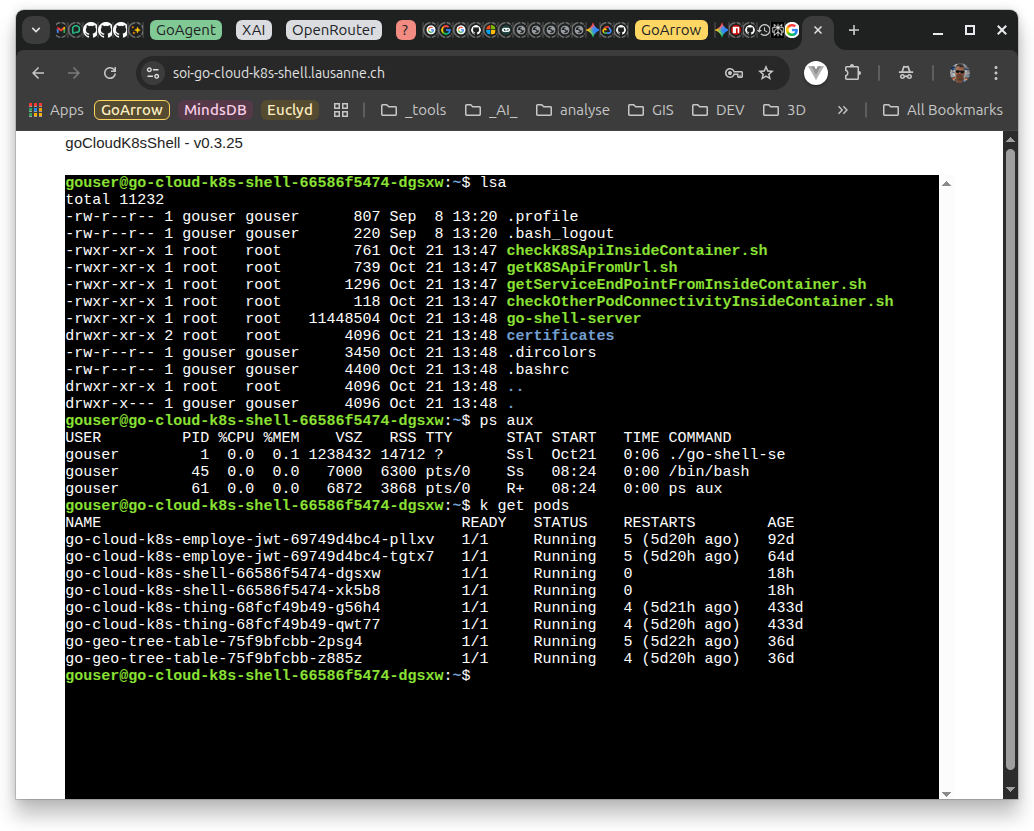
✨ Features
- Web-Based Terminal: Access a shell environment directly from your browser using xterm.js.
- Secure Connection: Uses WebSockets for real-time communication, secured with JWT authentication.
- Kubernetes Integration: Includes scripts and utilities (
kubectl,curl,jq, network tools) for interacting with the K8s API and other services within the cluster. - Containerized: Deployed as a Docker container, with provided Kubernetes manifests for easy deployment.
- Authentication: Simple JWT-based login system.
- Configuration: Managed via environment variables and Kubernetes ConfigMaps/Secrets.
- Security Focused:
- Runs as a non-root user within the container.
- Includes vulnerability scanning using Trivy in the CI pipeline and deployment scripts.
- Applies Kubernetes security contexts and Pod Security Standards (Restricted profile).
- Provides scripts related to Docker privilege escalation awareness and mitigation.
- CI/CD: GitHub Actions workflows for testing, vulnerability scanning, and Docker image publishing.
🛠️ Technology Stack
- Backend: Go
- Frontend: TypeScript, Bun, xterm.js & addons
- Communication: WebSockets
- Authentication: JSON Web Token JWT
- Containerization: Docker or better under Linux : Podman or NerdCtl
- Orchestration: Kubernetes K3S
- Security scanner Trivy
🏁 Getting Started
Prerequisites
- Go (version specified in
go.mod) - Bun (for frontend development)
- Docker or nerdctl
- kubectl
- Access to a Kubernetes cluster
Building the Project
-
Backend:
# From the root directory go build -o go-shell-server ./cmd/server -
Frontend:
cd cmd/server/front bun install bun run build cd ../../.. -
Docker Image: Use the provided
scripts/01_build_image.shscript or run Docker/nerdctl directly:# Using nerdctl (adjust DOCKER_BIN in script if needed) ./scripts/01_build_image.sh # Or directly (replace variables): # nerdctl build --build-arg APP_REVISION=$(git describe --dirty --always) --build-arg BUILD=$(date -u '+%Y-%m-%d_%I:%M:%S%p') -t ghcr.io/your-repo/go-cloud-k8s-shell:latest .
Running Locally (requires backend build)
-
Set necessary environment variables (copy
.env_sampleto.envand configure). -
Run the backend server:
# Using the script to load .env ./scripts/execWithEnv.sh ./go-shell-server # Or manually exporting variables and running # export $(cat .env | xargs) && ./go-shell-server -
Access the frontend via
http://localhost:<PORT>(default 9999 or specified in.env).
🚢 Deployment
Docker
Run the pre-built image (available on ghcr.io/lao-tseu-is-alive/go-cloud-k8s-shell):
docker run -p 9999:9999 --rm -it ghcr.io/lao-tseu-is-alive/go-cloud-k8s-shell:latest
Kubernetes
-
Configuration: Adapt Kubernetes manifests in the
deployments/directory(go-testing, go-production, go-testing_soi). Pay attention to:-
Namespace configuration (
namespace.yml). -
Resource Quotas and Limit Ranges.
-
Secrets and ConfigMaps for environment variables (JWT secrets, admin credentials, etc.). Example creation script for Sealed Secrets:
deployments/go-testing_soi/createAppSecrets.sh. -
Persistent Volume Claims (PVC) configuration (
longhorn-pvc.yml,k3s-local-path-pvc.yml, etc.). -
Ingress resources for external access (
ingress.yaml,ingress-go-cloud-k8s-shell.yaml). TLS secrets might be needed (createTLSSecret.sh).
-
-
Deployment Script: Use the
scripts/02_deploy_to_k8s.shscript after building and pushing the image to your registry. This script:-
Retrieves app info (getAppInfo.sh).
-
Pulls the specified image version if not found locally.
-
Substitutes variables (
APP_NAME,APP_VERSION,GO_CONTAINER_REGISTRY_PREFIX) into the deployment template (k8s-deployment_template.yml). -
Runs Trivy scans on the image and Kubernetes manifest.
-
Applies the generated deployment manifest to the specified namespace (go-testing by default).
-
Checks rollout status and displays pods/services.
-
-
Manual Deployment:
-
Apply namespace, RBAC, ConfigMap, Secret, PVC manifests first.
-
Apply the deployment and service manifest (e.g.,
deployments/go-testing/deployment.yml). -
Use
kubectl apply -f <manifest_file> -n <namespace>. -
Consider using Kustomize for production environments (
deployments/go-production/).
-
💡 Usage Examples
Once deployed and accessed via the web UI:
-
Login: Use the credentials configured via environment variables/secrets.
-
Shell Interaction: You'll have access to a standard bash shell within the container.
-
Kubernetes Interaction:
-
List Pods in Namespace: kubectl get pods -n $MY_POD_NAMESPACE
-
Check API Access: ./checkK8SApiInsideContainer.sh
-
Get K8s API Data: ./getK8SApiFromUrl.sh /api/v1/nodes
-
Discover Service Endpoints: ./getServiceEndPointFromInsideContainer.sh
-
Test Connectivity to Another Service: ./checkOtherPodConnectivityInsideContainer.sh (Assumes go-cloud-k8s-info-service is deployed in the same namespace)
-
you can check with curl another service already deployed like this :
curl "http://${GO_CLOUD_K8S_INFO_SERVICE_SERVICE_HOST}:${GO_CLOUD_K8S_INFO_SERVICE_SERVICE_PORT_HTTP}" -
or with this shorter version :
curl "http://go-cloud-k8s-info-service:${GO_CLOUD_K8S_INFO_SERVICE_SERVICE_PORT_HTTP}"
- in those two previous example, we use the service exposed by the kubernetes yaml deployment in go-cloud-k8s-info
you can also run :
./getServiceEndPointFromInsideContainer.sh
this script gives an example of service discovery using the kubernetes api
🏗️ Development
Scripts
The scripts/ directory contains various utility scripts:
-
00_build_go_test.sh: Runs Go tests and generates coverage reports.
-
01_build_image.sh: Builds the Docker image locally using nerdctl.
-
02_deploy_to_k8s.sh: Deploys the application to Kubernetes.
-
getAppInfo.sh: Extracts application name and version from pkg/version/version.go.
-
tag_new_release.sh: Creates and pushes a new Git tag based on the version in the code.
-
scan_image_security.sh, scan_k8s_security.sh: Run Trivy security scans.
-
checkK8SApiInsideContainer.sh, getK8SApiFromUrl.sh, etc.: Utilities for K8s interaction within the container.
Testing
Run Go tests using:
./scripts/00_build_go_test.sh
# or
go test -coverprofile coverage.out ./...
Coverage reports are uploaded to Codecov via GitHub Actions.
CI/CD
GitHub Actions workflows are configured for:
-
Testing (go-test.yml): Runs Go tests on push/pull requests to main.
-
Docker Build & Publish (docker-publish.yml): Builds and pushes the Docker image to GHCR on new version tags (v*..). Includes Cosign key generation steps (create_github_cosign_keys.sh) for image signing (though signing itself isn't explicitly shown in the workflow).
-
Vulnerability Scanning (cve-trivy-scan.yml): Scans the Docker image using Trivy on push/pull requests to main and uploads results.
-
SonarCloud Integration : The project is configured for analysis with SonarCloud (sonar-project.properties).
🔒 Security
-
Non-Root Container: The Dockerfile defines a non-root user gouser.
-
Minimal Permissions: Kubernetes RBAC roles (pod-reader-role, service-reader-role) grant necessary read permissions.
-
Restricted Pod Security Standard: The go-testing namespace enforces the restricted PSS profile.
-
Vulnerability Scanning: Trivy is used for image and configuration scanning. See .trivyignore for explicitly ignored findings.
-
Secure Coding Practices: Code analysis is performed via SonarCloud.
-
JWT Authentication: Protects the WebSocket endpoint.
Dockerfile Security: Uses specific Go and Alpine base image versions. Installs necessary tools securely. Applies file permissions and capabilities settings.
More info :
- Nerdctl is a Docker-compatible CLI for containerd, with support for Compose
- Checkov is a static code analysis tool for scanning infrastructure as code (IaC)
- Kube-bench
- Falco runtime security for hosts, containers, Kubernetes and the cloud.
🤝 Contributing
Contributions are welcome! Please follow standard Git practices (forking, feature branches, pull requests). Ensure tests pass and adhere to code quality standards.
📜 License
This project is licensed under the MIT License - see the LICENSE file for details.
 Directories