

 README

README

ELB Verification Tool “gelbo”
What is “gelbo”?
- A web server
- Implemented using Go language’s net/http package.
- Designed to run on the ELB target instances (mainly ALB/CLB).
- Displays various controls and information depending on the specified path and query string.
- A Docker container
- You can use it if you have a Docker environment (EC2, ECS, etc.).
- The container image is published in the Public ECR [https://gallery.ecr.aws/h0g2h5b7/gelbo].
- The image size (after compression) is only 10MB.
- When to use (Examples)
- Maintain a specified CPU/memory usage rate to verify an Auto Scaling’s scaling policy.
- Resource control (cpu/memory) function
- Check the behavior of application-based sticky sessions.
- Response header control (addheader/delheader) function
- Check the routing bias.
- Request information confirmation or statistics confirmation function
- Delay response only on a specified target (or ELB node) in AZ-1a.
- If condition specification function AND Response control (sleep/size/status/chunk) function
- Maintain a specified CPU/memory usage rate to verify an Auto Scaling’s scaling policy.
Installation methods
- Run the below comment in a Docker environment.
- If you specify '--restart=always', it automatically starts up when the process goes down.
docker run -d --restart=always -p 80:80 -p 443:443 -p 50051:50051 -p 50052:50052 --name gelbo public.ecr.aws/h0g2h5b7/gelbo
- Other execution examples:
# Stop the container
docker stop gelbo
# Delete the container
docker rm gelbo
# Update the container image
docker pull public.ecr.aws/h0g2h5b7/gelbo
Example of using gelbo on Amazon Linux 2 or 2023
- Run docker run after installing Docker.
- The following is an example of describing the necessary preprocessing in the userdata (script) and running ec2 run-instances.
- Note: The hop limit is changed in the metadata option, specifying “HttpPutResponseHopLimit=2” to enable retrieving the session token from the Docker container in the IMDSv2 environment.
# Create a script file for userdata
cat << EOS > userscript.txt
#!/bin/bash
RES=1
# Retry the docker installation process becuase it can fail sometimes
for cnt in { 1..12 }
do
  if [ \$RES -ne 0 ]; then
    yum install -y docker | grep -q "Nothing to do"
    RES=\$?
    sleep 5
  fi
done
systemctl start docker.service
systemctl enable docker.service
usermod -a -G docker ec2-user

docker run -d --restart=always -p 80:80 -p 443:443 -p 50051:50051 -p 50052:50052 --name gelbo public.ecr.aws/h0g2h5b7/gelbo
EOS

# Specify the above sript file and launch the EC2 instance
aws ec2 run-instances --region ap-northeast-1 \
    --user-data file://userscript.txt \
    --image-id ami-012345678901234567  --instance-type t3.micro \
    --key-name ${KEYPAIR_NAME} --security-group-ids ${SG_ID} \
    --metadata-options "HttpEndpoint=enabled,HttpTokens=required,HttpPutResponseHopLimit=2"
- To run it directly on an EC2 instance (Linux) instead of Docker, execute the below after logging into the EC2 instance.
- Extract and run gelbo binary from the Docker image.
# Extract the gelbo binary from the Docker image
IMAGE_NAME=public.ecr.aws/h0g2h5b7/gelbo
FILEPATH=/app/gelbo
CONTAINER_ID=`docker create $IMAGE_NAME`
docker cp $CONTAINER_ID:$FILEPATH .
docker rm $CONTAINER_ID

# Disable Docker startup if necessary
sudo systemctl stop docker.service
sudo systemctl disable docker.service

# Start gelbo
nohup sudo ./gelbo >> gelbo.log 2>&1 &
Command-line Options
Currently, gelbo supports the following options:
-
-http {http port number}
- The port to use for the HTTP protocol (default: 80)
-
-https {https port number}
- The port to use for the HTTPS protocol (default: 443)
-
-grpc {gRPC port number}
- The port to use for the gRPC protocol (default: 50051)
-
-grpcs {gRPC over TLS port number}
- The port to use for the gRPC protocol over TLS (default: 50052)
-
-timeout {timeout seconds}
- The keep-alive timeout value. (default: 65).
- TCP connection will be disconnected after the specified time.
- TCP connection will be kept alive if the value is 0 (gelbo will not disconnect).
-
-interval {interval seconds}
- TCP keep-alive probe interval value. (default: 15).
- TCP keep-alive probe is not sent if the value is 0.
-
-wsping {WebSocket ping frame transmission interval (seconds))
- The interval to send Ping frames to the client on the WebSocket connection (default: 30).
- Specify a value greater than 0.
-
-wsping {WebSocket PING frame transmission interval (seconds))
- The interval to send PING frames to the client on the WebSocket connection (default: 30).
- Specify a value greater than 0.
-
-grpcping {gRPC PING frame transmission interval (seconds)}
- The interval to send PING frames to the client on the gRPC connection (default: 30)
- Specify 0 to not send PING frames
-
-grpcmaxrecvsize {Maximum receivable size (bytes)}
- Maximum message size that the gRPC server can receive (default: 4194304 = 4 MB)
-
-grpcmaxsendsize {Maximum sendable size (bytes)}
- Maximum message size that the gRPC server can send (default: 4194304 = 4 MB)
-
-exec
- Enables the arbitrary command execution feature.
-
-proxy
- Specify to support Proxy Protocol v1/v2 communication (retrieves the client IP address from the Proxy Protocol header).
- (Background) Even when enabled, it can also handle non-Proxy Protocol communication, but there are rare cases where communication delays (sudden delays of tens of seconds) occur when Proxy Protocol is enabled. Therefore, it is an option and is disabled by default. Enable it when you need to use Proxy Protocol.
-
-nolog
- Specify to not output logs.
-
Specify these options at the end of the docker run command as below:
docker run -d --restart=always -p 80:80 --name gelbo public.ecr.aws/h0g2h5b7/gelbo -timeout 120 -exec -nolog
Functions
Request Information Confirmation
- Displays details of the requests the target receives (refer to the below parts in blue).
% curl "gelbo-xxxxxxxxx.ap-northeast-1.elb.amazonaws.com/?key1=value1&key2=value2"
{
  "host": {
    "name": "ip-172-31-27-115.ap-northeast-1.compute.internal",
    "ip": "172.31.27.115",
    "az": "ap-northeast-1d",
    "type": "t3.small"
  },
  "resource": {
    (snip)
  },
  "request": {
    "protocol": "http",
    "method": "GET",
    "path": "/",
    "querystring": "key1=value1&key2=value2",
    "header": {
      "Accept": "*/*",
      "Host": "gelbo-xxxxxxxxx.ap-northeast-1.elb.amazonaws.com",
      "User-Agent": "curl/7.64.1",
      "X-Amzn-Trace-Id": "Root=1-60d04f82-14983854025af6ac3e1ff49e",
      "X-Forwarded-For": "203.0.113.145, 172.31.39.211",
      "X-Forwarded-Port": "80",
      "X-Forwarded-Proto": "http"
    },
    "clientip": "203.0.113.145",
    "proxy1ip": "172.31.39.211",
    "lasthopip": "172.31.23.250"
    "targetip": "172.17.0.2"
  },
  "direction": {
    (snip)
  }
}
Description
- Displays the protocol, method, headers, path, and query string of the request.
- You can find the information in the request field: protocol, method, path, querystring, header.
- The protocol values and descriptions:
- http - HTTP
- https - HTTP over TLS
- h2c - HTTP/2
- h2 - HTTP/2 over TLS
- Displays various IP addresses:
- clientip: the IP address of the request origin.
- It retrieves the client’s IP address from the X-Forwarded-For header. If the X-Forwarded-For header is not available, it retrieves the IP address of the connection origin.
- proxy1ip ~ proxy3ip: the IP addresses of the proxy servers between the clientip and lasthopip (displays up to three IP addresses).
- Displayed in a multi-tier configuration, for example ALB.
- In the following configuration, the IP address of each node is the value in the corresponding field:
- Client (clientip) → ALB1 (proxy1ip) → nginx (proxy2ip) → ALB2 (lasthopip) → gelbo (targetip)
- lasthopip: the IP address of the Last Hop proxy server.
- When using ALB/CLB, if there is X-Forwarded-For header, it retrieves the IP address of the connection origin (the private IP address of the ELB node).
- targetip: the IP address of the target.
- When using Docker, it retrieves the IP address of the container. Refer to host.ip for the IP address of the EC2 instance host.
- clientip: the IP address of the request origin.
- Displays the contents of the certificate in .request.mtlscert field, If a header for mTLS (“X-Amzn-Mtls-Clientcert” or “X-Amzn-Mtls-Clientcert-Leaf”) is included.
- command e.x.)
curl --key client_key.pem --cert client_cert.pem "https://{gelbo domain}/" | jq -r .request.mtlscert - output in a format similar to result of
openSSL x509 -text -noout -in {cert_file}
- command e.x.)
- Displays the host information:
- Displays the name and IP address of the host in host.name and host.ip.
- Displays host.az (AvailabilityZone) and host.type (InstanceType) if the information can be retrieved from IMDS (169.254.169.254),
- In case of running gelbo as a Docker container and IMDSv1 is not available, you can set the HopLimit to 2 to retrieve the information from IMDSv2:
aws ec2 modify-instance-metadata-options --instance-id {instance ID} --http-put-response-hop-limit 2
Response Control (sleep/size/status/chunk)
- Responds according to sleep (response delay time), size (response size), and status (status code), chunk (chunked transfer) specified in the query string.
% curl "gelbo-xxxxxxxxx.ap-northeast-1.elb.amazonaws.com/?size=1000-2000&sleep=500-4000&status=60"
{
    (snip)
  "direction": {
    "input": {
      "sleep": "500-4000",
      "size": "1000-2000",
      "status": "60"
    },
    "result": {
      "sleep": "2158",
      "size": "1993",
      "status": "invalid"
    }
  }
}


WW3JmB8siYgY5Ijbh4RyTlQU2UfTGvoPfu1fHDeDJo8TbxLP4NqHvRyS966Q2BI1iDaZlkpegDR4mOnKhx8wvpgNTUcFkrLtwbf
L4jGiMXWdk36Ll9BtgOe29YlL9Ktwciqv2SpLutyvcpjdPujhyoEiBiUfXrRspItbx99oQUBEb3yd5BOauhCg1YdbdaFVpcVUTs
(〜Add random characters to the end of the response to reach the specified size.〜)
Description
- sleep=minimum[-maximum]
- Responds after the specified millisecond duration sleep.
- Uses a random value within the specified range.
- size=minimum[-maximum]
- Responds with response size in the specified number of bytes.
- Adds random characters to the end of the JSON response to reach the specified size.
- Uses a random value within the specified range.
- status=specified status code within the range of 100 to 999
- Responds with the specified status code.
- chunk=on
- Same as specifying "1", "t", "true" instead of "on".
- Responds data chunked (Transfer-Encoding: chunked)
- Only supports HTTP/1.1
- direction.result
- Responds "invalid" if you specify an unexpected value (not a number of hyphen).
- In the example above, 60 is not a valid value for the status, so the response is "invalid".
- Displays a randomly determined value if a range is specified.
- Responds "invalid" if you specify an unexpected value (not a number of hyphen).
Resource Control (cpu/memory)
- Maintains the resource (cpu/memory) usage rate at the value specified in the query string.
% curl "gelbo-xxxxxxxxx.ap-northeast-1.elb.amazonaws.com/?cpu=70&memory=50"
{
    (snip)
  "resource": {
    "cpu": {
      "target": 70,
      "current": 71
    },
    "memory": {
      "target": 50,
      "current": 48.384333048418725
    }
  },
    (snip)
Description
- cpu=0~100
- Maintains the specified usage rate.
- resource.cpu.target is the value specified in the query string.
- resource.cpu.current is the current usage rate.
- memory=0~100
- Maintains the specified usage rate “as much as possible".
- resource.memory.target is the value specified in the query string.
- resource.memory.current is the current usage rate.
- Things to keep in mind
- If you set memory=100, it will crash (memory allocation failure).
- Resource Control may not work if you use ECS (Fargate), because the resource usage in the container and the usage rate observed on the ECS side may differ depending on the resource.
- For example, cpu=20 may be 100% on the CloudWatch metrics. Adjust the value according to the actual usage to get the desired performance.
Response Header Control (addheader/delheader)
- You can add/remove response headers.
% curl -vs "gelbo-xxxxxxxxx.ap-northeast-1.elb.amazonaws.com/?addheader=`echo -n 'Set-Cookie: sticky=1' | jq -s -R -r @uri`" > /dev/null

> GET /?addheader=Set-Cookie%3A%20sticky%3D1 HTTP/1.1
> Host: gelbo-xxxxxxxxx.ap-northeast-1.elb.amazonaws.com
> User-Agent: curl/7.64.1
> Accept: */*
>
< HTTP/1.1 200 OK
< Date: Fri, 25 Jun 2021 09:44:18 GMT
< Content-Type: application/json
< Content-Length: 987
< Connection: keep-alive
< Set-Cookie: sticky=1

% curl -vs "gelbo-xxxxxxxxx.ap-northeast-1.elb.amazonaws.com/?delheader=`echo -n 'Set-Cookie' | jq -s -R -r @uri`" > /dev/null

> GET /?addheader=Set-Cookie%3A%20sticky%3D1 HTTP/1.1
> Host: gelbo-xxxxxxxxx.ap-northeast-1.elb.amazonaws.com
> User-Agent: curl/7.64.1
> Accept: */*
>
< HTTP/1.1 200 OK
< Date: Fri, 25 Jun 2021 09:44:18 GMT
< Content-Type: application/json
< Content-Length: 987
< Connection: keep-alive
Description
- addheader=: the header to include in the response header after the addheader= parameter.
- Included in all subsequent responses until it is removed by delheader.
- Use “jq -s -R -r @uri” because URL encoding is required.
- Because some browsers, such as Chrome, do not encode semicolons, you can use curl + jq as shown in the example above as a safe approach.
- delheader=: the header to delete.
- You can use this to verify the behavior of application-based sticky sessions,etc.
“if condition” Specification
- You can use an if statement to specify the target out of multiple targets under ELB to execute size/cpu,etc.
% curl "gelbo-xxxxxxxxx.ap-northeast-1.elb.amazonaws.com/?sleep=100-3000&ifaz=ap-northeast-1a&ifaz=ap-northeast-1c"
{
  "host": {
    "name": "ip-172-31-27-115.ap-northeast-1.compute.internal",
    "ip": "172.31.27.115",
    "az": "ap-northeast-1a",
    "type": "t3.small"
  },
  (snip)

  "direction": {
    "input": {
      "sleep": "100-3000",
      "ifaz": "ap-northeast-1a or ap-northeast-1c"
    },
    "result": {
      "sleep": "1627",
      "ifaz": "matched"
    }
  }
}
Description
- Available if conditions:
- ifclientip, ifproxy1ip, ifproxy2ip, ifproxy3ip, iflasthopip, iftargetip, ifhostip, ifhost, ifaz, iftype
- You can specify IPv4 / IPv6 addresses for the IP addresses (if use IPv6, exclude the brackets [ ]).
- You can specify multiple, different if conditions. In this case, it's AND evaluation.
- You can specify multiple, same if conditions. In this case, it's OR evaluation.
- Executes the specified processing when all conditions are met.
- In the example above, if the target is running in ap-northeast-1a or ap-northeast-1c, it will sleep for 100–3000 milliseconds (randomly determined).
- You can find the result of the condition evaluation (matched or unmatched) under direction.result.
Arbitrary Command Execution
- You can execute arbitrary commands from the container.
% curl "127.0.0.1/exec/?cmd=`echo -n 'apk update' | jq -s -R -r @uri`"
〜
OK: 13888 distinct packages available

% curl "127.0.0.1/exec/?cmd=`echo -n 'apk add curl' | jq -s -R -r @uri`"
〜
(3/4) Installing libcurl (7.77.0-r0)
(4/4) Installing curl (7.77.0-r0)
Executing busybox-1.32.1-r6.trigger
OK: 8 MiB in 19 packages

% curl "127.0.0.1/exec/?cmd=`echo -n 'curl 169.254.169.254/latest/meta-data/hostname' | jq -s -R -r @uri`"
ip-172-31-42-159.ap-northeast-1.compute.internal
Description
- /exec/?cmd={arbitrary command} allows you to execute arbitrary commands on the container.
- In the example above, it installs curl and then uses curl to make a request to the IMDS to retrieve the hostname.
- Because URL encoding is required with curl, it uses ‘jq -s -R -r @uri’.
- Because it's based on Alpine, there are few initial installed commands available. Refer to the example and install the necessary commands as needed.
- You can use this to check the environment variables passed to the container in ECS, or to check the connectivity from the container to the outside.
- From a security perspective, be aware of the following when using this function:
- This function is disabled by default. Start it up by specifying the -exec option only when you need to.
- Restrict access origins and minimize permissions to retrieve IAM credentials from IMDS to prevent facilitating attacks or leaking credentials.
- Commands containing the string “credentials/” will not be executed.
Stopping the container
- You can stop the container.
% curl "gelbo-xxxxxxxxx.ap-northeast-1.elb.amazonaws.com/stop/"
<html>
<head><title>502 Bad Gateway</title></head>
<body>
<center><h1>502 Bad Gateway</h1></center>
</body>
</html>
Description
- Stop the container by using /stop/.
- Restart automatically if you specify '--restart=always' when running docker run.
- You can use this to intentionally bring down the process at any time, such as when verifying the behavior of Auto Scaling self-healing.
Statistics Confirmation
- Displays the cumulative request count and bytes sent/received, the current TCP connection count and active requests.
% curl "gelbo-xxxxxxxxx.ap-northeast-1.elb.amazonaws.com/monitor/"

{
  "created_at": "2021-06-28T07:49:03Z",
  "updated_at": "2021-06-28T09:39:13Z",
  "request_count": 313,
  "sent_bytes": "1.3 GB",
  "received_bytes": "323.1 MB",
  "cpu": 0.0,
  "memory": 17.5,
  "active_conns": 0,
  "total_conns": 2,
  "elbs": {
    "172.31.24.142": {
      "created_at": "2021-06-28T07:49:20Z",
      "updated_at": "2021-06-28T09:39:07Z",
      "request_count": 156,
      "sent_bytes": "536.8 MB",
      "received_bytes": "160.4 MB",
      "cpu": 0.0,
      "memory": 0.0,
      "active_conns": 0,
      "total_conns": 0
    },
    "172.31.43.209": {
      "created_at": "2021-06-28T07:49:20Z",
      "updated_at": "2021-06-28T09:39:07Z",
      "request_count": 157,
      "sent_bytes": "787.2 MB",
      "received_bytes": "162.7 MB",
      "cpu": 0.0,
      "memory": 0.0,
      "active_conns": 0,
      "total_conns": 2
    }
  }
}
Description
- /monitor/ displays the following information for the target (or for each ELB node it went through):
- request_count - the number of requests
- sent_bytes - the response size (excluding the header)
- received_bytes - the request size (excluding the header)
- total_conns - the number of TCP connections (e.g. keep-alive)
- active_conns - the number of active requests
- The IP addresses under "elbs" represent the ELB nodes.
- Displayed in a human-readable format (e.g. "787.2 MB") by default, but you can specify "?raw" in the query string to get the raw data.
- You can use this to check the distribution (bias) of the requests.
Logging
- Outputs the access logs in JSON format to standard output (example output below):
{"reqtime":"2022-08-24T06:47:01.413296059Z","proto":"http","method":"POST","path":"/","qstr":"size=100-10000000&sleep=3-10000","clientip":"203.0.113.146","srcip":"172.31.37.32","srcport":32914,"reqsize":12386935,"size":1228766,"status":200,"time":"2022-08-24T06:47:08.593322118Z","duration":7180,"reuse":0}
{"reqtime":"2022-08-24T06:47:09.268519354Z","proto":"http","method":"GET","path":"/","qstr":"size=100-100000&sleep=3-10000","clientip":"203.0.113.146","srcip":"172.31.37.32","srcport":60888,"reqsize":0,"size":90553,"status":200,"time":"2022-08-24T06:47:14.118517026Z","duration":4849,"reuse":0}
{"reqtime":"2022-08-24T06:47:31.002643657Z","proto":"http","method":"GET","path":"/albhealth","qstr":"","clientip":"172.31.25.244","srcip":"172.31.25.244","srcport":10088,"reqsize":0,"size":676,"status":200,"time":"2022-08-24T06:47:31.002735857Z","duration":0,"reuse":0}
Description
- The logged fields include:
- reqtime - request received time
- proto - protocol, same as the "protocol" in 'Request Information Confirmation' section
- method - method
- path - path
- qstr - query string
- clientip - client IP address (retrieved from X-Forwarded-For header if present)
- srcip - source IP address
- srcport - source port
- reqsize - request size (excluding the header)
- size - response size (excluding the header)
- status - status code
- time - response time
- duration - time elapsed until response (in millisecond)
- reuse - ・・・number of times the same connection was reused
- Refer to the logs using ‘docker logs gelbo -f -n10’, etc. when using Docker containers.
- Use the -nolog option to disable log output (to avoid heavy I/O load. etc.).
Environment Variable (Value) Confirmation
- Displays the values of the environment variables.
% curl "gelbo-xxxxxxxxx.ap-northeast-1.elb.amazonaws.com/env/?key=ECS_CONTAINER_METADATA_URI_V4&key=HOME"
http://169.254.170.2/v4/2612bc9219074b7ba718fbac6bd2bb98-3303031112
/root
Description
- /env/?key={environment variable name} displays the value of the specified environment variable.
- You can specify multiple key parameters (as shown in the example above).
- You can specify different environment variables in the ECS task checking them switching during a blue/green deployment, etc.
WebSocket
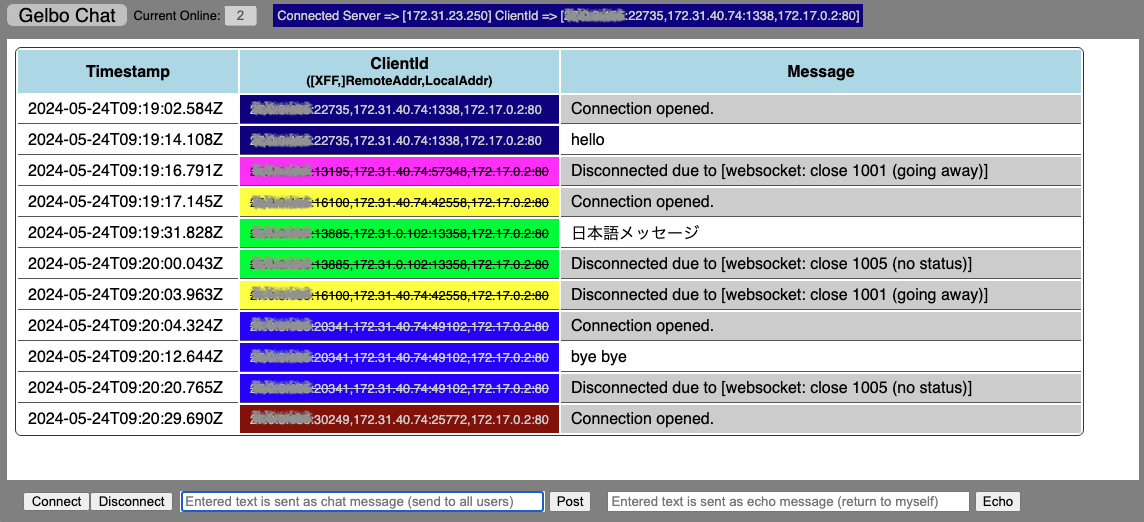
- This is a chat function using WebSocket.
Description
- Accessing http[s]://{domain}/chat/ downloads the HTML of the chat screen, and the JavaScript processing will start the WebSocket communication.
- The WebSocket connection destination will automatically become http[s]://{domain}/ws/.
- Display items:
- Current Online - the current number of connections
- Connected Server - the IP address of the WebSocket server
- ClientId - a string that identifies the connected client
- It is a concatenated string of [X-Forwarded-For,]RemoteAddr,LocalAddr separated by commas.
- For easy identification, each ClientId is displayed in a different color.
- When the WebSocket communication ends, the ClienId is struck through.
- You can specify the interval (in seconds) for sending Ping frames with the -wsping option.
- Specify a value smaller than the ELB idle timeout. If you specify a larger value, the connection is terminated by the ELB if there is no message sent or received during the idle timeout period.
- Button actions:
- Connect - starts the WebSocket connection when not connected.
- Disconnect - disconnects the existing WebSocket connection.
- Post - sends the text entered in the left text field. This is distributed to other connected clients (chat function).
- Echo - sends the text entered in the right text field. The same message is returned only to the client (echo function).
- Logged fields:
- conntime - connection start time
- proto - protocol, same as the "protocol" in 'Request Information Confirmation' section
- clientip - client IP address (retrieved from X-Forwarded-For header if present)
- srcip - source IP address
- srcport - source port
- readtime - time of server receiving message from client (not recorded when sending messages)
- writetime - time of server sending message to client (not recorded when receiving messages)
- msgsize - message size (in bytes)
- error - error message (recorded only when an error occurs)
gRPC
- Functions as a gRPC server and can send and receive messages with clients using the gRPC protocol.
Description
- By default, grpc (plaintext) listens on port 50051, and grpcs (over TLS) listens on port 50052. (These can be changed with the -grpc / -grpcs options respectively)
- For message transmission and reception, use grpcurl or implement your own client. (The following execution examples use grpcurl)
- The Protocol Buffers definition file implemented in gelbo can be downloaded with
curl -O http[s]://{domain}/files/gelbo.proto
- The Protocol Buffers definition file implemented in gelbo can be downloaded with
- Available methods:
- elbgrpc.GelboService.Unary / elbgrpc.GelboService.ClientStream / elbgrpc.GelboService.ServerStream / elbgrpc.GelboService.BidiStream
- The above 4 methods correspond to the 4 communication methods (Unary / Client streaming / Server streaming / Bidirectional streaming) as their names suggest
- Request parameters:
- All parameters except chunk and status can be used in the same way as HTTP[S] requests
- Parameters added for gRPC:
- addtrailer=trailer to include in subsequent responses
- Included in all subsequent responses until removed by deltrailer
- deltrailer=trailer name to delete
- code=arbitrary status code in the range 0 to 16
- Responds with the specified status code
- repeat=minimum[-maximum]
- Responds to the client the specified number of times
- Uses a random value within the specified range.
- Can be used for communication methods that have streams from server to client (Server streaming / Bidirectional streaming)
- dataonly=on
- Same as specifying "1", "t", "true" instead of "on".
- Responds with only the data field. Suggest to use in combination with the size field
- noop=on
- Same as specifying "1", "t", "true" instead of "on".
- No Operation, meaning no response is returned
- addtrailer=trailer to include in subsequent responses
- elbgrpc.GelboService.Code{gRPC status code}Sleep{milliseconds}
- Processes the status code (0~16) or milliseconds included in the method name and responds. (For example, specifying Code3Sleep2000 will respond with status code 3 [INVALID_ARGUMENT] after 2 seconds)
- For a list of status codes, please refer to here
- Please use this by specifying it in the health check path for ALB health check behavior verification
- You can also specify only Code{gRPC status code} or only Sleep{milliseconds}
- The above 5 methods become the method names when specifying with grpcurl. The actual method name (= when specifying the path in ALB listener
rules or health checks) is in the format /package.service/method. (Example:
/elbgrpc.GelboService/Unary)
- elbgrpc.GelboService.Unary / elbgrpc.GelboService.ClientStream / elbgrpc.GelboService.ServerStream / elbgrpc.GelboService.BidiStream
- Logged fields:
- opentime - stream start time
- recvtime - message receive time
- sendtime - message send time
- closetime - stream end time
- proto - protocol. Either grpc or grpcs
- mode - communication method. Either unary, client, server, or bidirect
- method - full method name (in the format
/package.service/method) - params - parameters specified in the request message
- action - Either open / recv / recv_end (end of transmission from client) / send / close. Recorded only other than Unary
- clientip - client IP address (retrieved from X-Forwarded-For header if available)
- srcip - source IP address
- srcport - source port
- code - status code
- reqsize - message receive size
- size - message send size
- duration - time elapsed until response (in milliseconds). Recorded only for Unary
- error - error message (recorded only when an error occurs)
Execution Examples
[Unary] Request by specifying sleep / size / addheader
% curl -kO https://gelbo-xxxxxxxxx.ap-northeast-1.elb.amazonaws.com/files/gelbo.proto
% grpcurl -v -proto gelbo.proto -d '{"sleep":"0-1000","size":"50-100","addheader":"x-custom: gelbo"}' -insecure gelbo-xxxxxxxxx.ap-northeast-1.elb.amazonaws.com:443 elbgrpc.GelboService.Unary

Resolved method descriptor:
rpc Unary ( .elbgrpc.GelboRequest ) returns ( .elbgrpc.GelboResponse );

Request metadata to send:
(empty)

Response headers received:
content-type: application/grpc
date: Fri, 13 Jun 2025 07:07:57 GMT
x-custom:  gelbo

Response contents:
{
  "host": {
    "name": "ip-172-31-23-250.ap-northeast-1.compute.internal",
    "ip": "172.31.23.250",
    "az": "ap-northeast-1d",
    "type": "t3.small"
  },
  "resource": {
    "cpu": {},
    "memory": {
      "current": 23.89207711561455
    }
  },
  "request": {
    "protocol": "grpc",
    "method": "/elbgrpc.GelboService/Unary",
    "header": [
      ":authority: gelbo-xxxxxxxxx.ap-northeast-1.elb.amazonaws.com",
      "content-type: application/grpc",
      "grpc-accept-encoding: gzip",
      "user-agent: grpcurl/1.9.3 grpc-go/1.61.0",
      "x-amzn-tls-cipher-suite: TLS_AES_128_GCM_SHA256",
      "x-amzn-tls-version: TLSv1.3",
      "x-amzn-trace-id: Root=1-684bce4d-731d570154f499794dbae564",
      "x-forwarded-for: 203.0.113.145",
      "x-forwarded-port: 443",
      "x-forwarded-proto: https"
    ],
    "clientip": "203.0.113.145",
    "lasthopip": "172.31.36.136",
    "targetip": "172.17.0.2"
  },
  "direction": {
    "input": [
     "addheader: x-custom: gelbo",
     "size: 50-100",
     "sleep: 0-1000"
    ],
    "result": [
     "addheader: x-custom: gelbo",
     "size: 91",
     "sleep: 237"
    ]
  },
 "data": "wScMPbBIk1RiyVwq6lviuRvDEDkFFliy1ApLJpIZBVpw9RGN53kys7rdYS6UDSDRIwYxWA0WGLthrtEh5U9XTK18tt3"
}

Response trailers received:
(empty)
Sent 1 request and received 1 response
- You can display header and trailer information by adding the -v option
- Download the Protocol Buffers definition file and specify it with the -proto option
- If you don't specify a definition file with the -proto option, it will first access the reflection API (
/grpc.reflection.v1.ServerReflection/ServerReflectionInfo) to obtain method definition information provided by the gRPC server - If the client needs to access the reflection API and you're restricting paths (methods) with ALB listener rules, you also need to allow the reflection API path
- If you don't specify a definition file with the -proto option, it will first access the reflection API (
- Adds a random string of the number of bytes specified by size as the data field. By specifying the dataonly parameter, you can control the response size by excluding fields other than data
[ClientStream] Send multiple messages from clients
% grpcurl -v -rpc-header 'x-custom: test' -d '{"sleep":"1000"}{"dataonly":"on","size":"20"}' -insecure gelbo-xxxxxxxxx.ap-northeast-1.elb.amazonaws.com:443 elbgrpc.GelboService.ClientStream

Resolved method descriptor:
rpc ClientStream ( stream .elbgrpc.GelboRequest ) returns ( .elbgrpc.GelboResponse );

Request metadata to send:
x-custom: test

Response headers received:
content-type: application/grpc
date: Fri, 13 Jun 2025 07:48:49 GMT

Response contents:
{
  "data": "0bUnMQe3PMEXLjYN1pH0"
}

Response trailers received:
(empty)
Sent 2 requests and received 1 response
- You can specify headers to send to the server with the -rpc-header option
- For Client streaming communication, gelbo processes based on the content of the last message. Messages sent before that are ignored
- In the above example, the {"sleep":"1000"} message is ignored
[ServerStream] Respond to multiple messages from the server
% grpcurl -v -d '{"repeat":"2","sleep":"0-30000"}' -insecure gelbo-xxxxxxxxx.ap-northeast-1.elb.amazonaws.com:443 elbgrpc.GelboService.ServerStream

Resolved method descriptor:
rpc ServerStream ( .elbgrpc.GelboRequest ) returns ( stream .elbgrpc.GelboResponse );

Request metadata to send:
(empty)

Response headers received:
content-type: application/grpc
date: Fri, 13 Jun 2025 07:57:34 GMT

Response contents:
{
    (snip)
  "direction": {
    "input": [
     "repeat: 2",
     "sleep: 0-30000"
    ],
    "result": [
     "repeat: 2",
     "sleep: 23815"
    ]
  }
}

Response contents:
{
    (snip)
  "direction": {
    "input": [
     "repeat: 2",
     "sleep: 0-30000"
    ],
    "result": [
     "repeat: 2",
     "sleep: 4926"
    ]
  }
}

Response trailers received:
(empty)
Sent 1 request and received 2 responses
- Since repeat is set to 2, it responds with 2 messages using streams
- For each message, it sleeps for a randomly determined time within the 0-30000 range specified by sleep before responding with the message
[BidiStream] Send and receive multiple messages
% grpcurl -v -d '{"dataonly":"t","sleep":"3000"}{}{"repeat":"3","sleep":"0-2000"}{"noop":"t"}' -insecure gelbo-xxxxxxxxx.ap-northeast-1.elb.amazonaws.com:443 elbgrpc.GelboService.BidiStream

Resolved method descriptor:
rpc BidiStream ( stream .elbgrpc.GelboRequest ) returns ( stream .elbgrpc.GelboResponse );

Request metadata to send:
(empty)

Response headers received:
content-type: application/grpc
date: Fri, 13 Jun 2025 10:41:05 GMT

Response contents:
{
  "host": {
    "name": "ip-172-31-23-250.ap-northeast-1.compute.internal",
    "ip": "172.31.23.250",
    "az": "ap-northeast-1d",
    "type": "t3.small"
  },
  "resource": {
    "cpu": {},
    "memory": {
      "current": 23.58432921717136
    }
  },
  "request": {
    "protocol": "grpc",
    "method": "/elbgrpc.GelboService/BidiStream",
    "header": [
      ":authority: gelbo-xxxxxxxxx.ap-northeast-1.elb.amazonaws.com",
      "content-type: application/grpc",
      "grpc-accept-encoding: gzip",
      "user-agent: grpcurl/1.9.3 grpc-go/1.61.0",
      "x-amzn-tls-cipher-suite: TLS_AES_128_GCM_SHA256",
      "x-amzn-tls-version: TLSv1.3",
      "x-amzn-trace-id: Root=1-684c0041-5b94970c5984439e732b65b3",
      "x-forwarded-for: 203.0.113.145:19192",
      "x-forwarded-port: 443",
      "x-forwarded-proto: https"
    ],
    "clientip": "203.0.113.145",
    "lasthopip": "172.31.1.127",
    "targetip": "172.17.0.2"
  },
  "direction": {}
}

Response contents:
{
    (snip)
  "direction": {
    "input": [
      "repeat: 3",
      "sleep: 0-2000"
    ],
    "result": [
      "repeat: 3",
      "sleep: 261"
    ]
  }
}

Response contents:
{
    (snip)
  "direction": {
    "input": [
      "repeat: 3",
      "sleep: 0-2000"
    ],
    "result": [
      "repeat: 3",
      "sleep: 1798"
    ]
  }
}

Response contents:
{
    (snip)
  "direction": {
    "input": [
      "repeat: 3",
      "sleep: 0-2000"
    ],
    "result": [
      "repeat: 3",
      "sleep: 768"
    ]
  }
}

Response contents:
{}

Response trailers received:
(empty)
Sent 4 requests and received 5 responses
- On the server side, each message is processed in parallel, and the processing results are responded to in parallel (responses are not necessarily in the order messages were received)
- In the above example, 4 messages are sent, but since there are messages containing repeat (3 specified = 2 additional response messages) and noop (no response), the number of response messages becomes 5 (4 + 2 - 1)
Other Functions
- Supports Proxy Protocol v1/v2 (specify -proxy when starting up).
- v1 can be enabled on CLB , and v2 can be enabled on NLB.
- Outputs the specified text in gelbo’s standard output and standard error output if you specify stdout and stderr in the query string.
- Example: /?stdout=foo&stderr=bar
- Consider using the -nolog option as needed.
- Docker images are compatible with amd64 / arm64 architectures.
 Documentation

Documentation

Overview 
this code implements the h2c part of HTTP/2.
The h2c protocol is the non-TLS secured version of HTTP/2 which is not available from net/http.
refs:
- https://github.com/veqryn/h2c
- https://cs.opensource.google/go/x/net/+/internal-branch.go1.19-vendor:http2/h2c/h2c.go
``` Copyright 2013 The Gorilla WebSocket Authors. All rights reserved. Use of this source code is governed by a BSD-style license that can be found in the LICENSE file. ``` // refs https://github.com/gorilla/websocket/tree/main/examples/chat // LICENSE: https://github.com/gorilla/websocket/blob/main/LICENSE
 Source Files
 Directories