

 README

README

OpsCart Watcher
Kubectl shows resources. Lens shows state. OpsCart shows what deserves your attention.




Read-only · No agents · No cloud credentials · Deploy in 30 seconds
What in this cluster deserves attention right now?
kubectl    →  shows resources
Grafana    →  shows metrics
Lens       →  shows cluster state
OpsCart    →  shows what deserves attention first
Why OpsCart?
A healthy dashboard does not always mean a healthy cluster.
Metrics tell you whether your services are meeting SLOs. OpsCart tells you which operational problems have quietly accumulated over weeks — crash-looping pods, image pull failures, privileged containers, missing NetworkPolicies, orphaned PVCs, and cost waste — none of which trigger a metrics alert.
Instead of dozens of dashboards, you get a prioritized list of what deserves attention first.
Designed for platform engineers managing Kubernetes clusters who want fast operational triage without deploying agents or modifying workloads.
Quick Start
Helm (Recommended)
helm install opscart-watcher ./helm/opscart-watcher \
  --namespace opscart-system \
  --create-namespace

kubectl port-forward -n opscart-system svc/opscart-watcher 8080:80
open http://localhost:8080
Incident history persists on a PVC by default — see the chart README for storage options and minikube-specific notes. The raw manifest below is a quickstart; the Helm chart is canonical.
kubectl
kubectl apply -f https://raw.githubusercontent.com/opscart/opscart-k8s-watcher/main/deploy/dashboard.yaml
kubectl port-forward -n opscart-system svc/opscart-watcher 8080:80
open http://localhost:8080
Developer Build
git clone https://github.com/opscart/opscart-k8s-watcher.git
cd opscart-k8s-watcher
go build -o opscart-dashboard ./cmd/opscart-dashboard
./opscart-dashboard --cluster my-cluster --port 8080
Features
Operational Triage
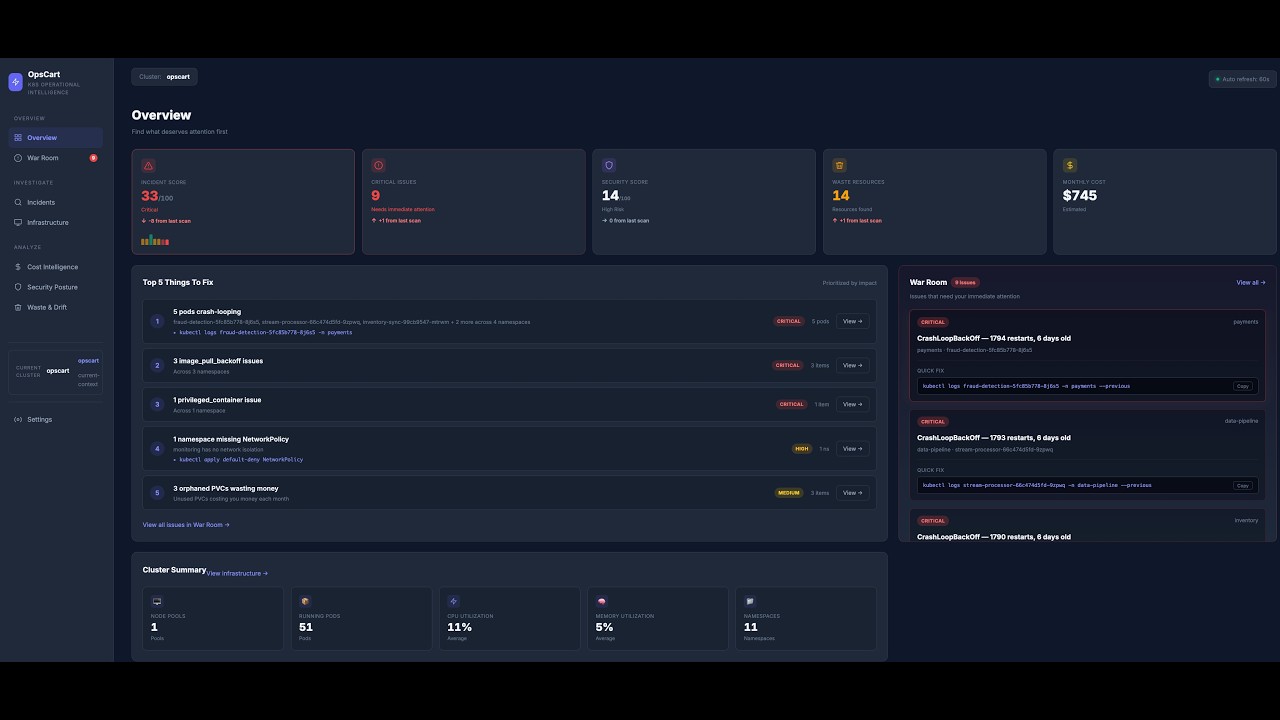
Incident Score — A single 0–100 score derived from crash loops, image pull failures, security posture, waste, and network policy gaps. Trend arrows and a 7-point sparkline show whether the cluster is getting better or worse.
War Room — Every critical incident in one view, prioritized by severity. Each card shows the issue type, namespace, age, restart count, and a ready-to-run kubectl command. One click opens a full investigation.
Investigation — One click from detection to investigation. Every incident includes:
- OpsCart Assessment: what the pattern means and estimated investigation time
- Incident Timeline: an operational journal — first detected, restart milestones, severity changes, resolved/reoccurred — persisted across pod restarts
- Evidence: severity, first detected, restart count, state, age, owner
- Blast Radius: replicas down, sibling pod health, services routing to the workload, ingress exposure, namespace-wide health, and a customer-impact heuristic (internal vs. possible external traffic)
- Recommended Investigation: numbered steps with High / Medium / Low confidence and specific kubectl commands
- Recent Events: last 10 events filtered to this pod
- Related Resources: ConfigMaps, Secrets, PVCs referenced by the pod spec
Incidents — All War Room issues in a full-page grid, grouped by Critical and High Severity.
Operational Insights
Security Posture — CIS Kubernetes Benchmark v1.8 scoring. Failed controls shown first, risk breakdown by category, prioritized remediation actions.
Waste & Drift — Zombie pods, orphaned PVCs with storage size and age, zero-replica workloads, abandoned namespaces.
Cost Intelligence — Node pool cost breakdown, namespace allocation, reserved instance savings. No cloud credentials needed — Azure pricing is embedded at build time.
Platform
Operational Memory — OpsCart remembers what happened. A lightweight local database tracks cluster snapshots, incident lifecycle (detected → milestones → resolved → reopened) as an append-only event journal, and scan metadata. Powers trend arrows, sparklines, incident age, and the per-incident timeline. Backed by SQLite, persisted on a PVC that survives pod restarts and helm uninstall.
Helm Chart — Full Helm chart with configurable values, PVC-backed persistence, read-only RBAC, and non-root security context. See the chart README for persistence options, minikube notes, and all values.
Agentless — Runs as a single container. No sidecars, no DaemonSets, no node access, no cloud credentials.
Security
| Property | Detail |
|---|---|
| Base image | scratch — no OS, no shell, no package manager |
| User | Non-root (UID 65534) |
| Binary | CGO_ENABLED=0, statically compiled, -trimpath |
| CVE scan | 0 vulnerabilities (Trivy) |
| Cluster permissions | Read-only ClusterRole (get, list only) |
| Mutations | None — never modifies cluster state |
| External calls | None — no telemetry, no phone-home |
# Audit it yourself
trivy image ghcr.io/opscart/opscart-dashboard:latest
kubectl describe clusterrole opscart-dashboard
How It Compares
| Tool | Primary Question |
|---|---|
| kubectl | What resources exist? |
| Lens / k9s | What is running right now? |
| Grafana | Are metrics within thresholds? |
| Kubecost | Where is money being spent? |
| OpsCart | What deserves attention first? |
OpsCart is not a replacement for these tools. It is the triage layer that tells you which questions to ask of your observability stack.
Helm Configuration
See helm/opscart-watcher/README.md for the full values reference, persistence configuration, and environment-specific notes (minikube, multi-node, local images).
CLI Reference
go build -o opscart-scan ./cmd/opscart-scan

./opscart-scan emergency --cluster prod      # War Room from terminal
./opscart-scan security --cluster prod       # CIS scoring
./opscart-scan waste --cluster prod          # Waste detection
./opscart-scan cloud-costs --cluster prod    # Azure cost analysis
./opscart-scan network --cluster prod        # Network policy gaps
./opscart-scan report --cluster prod         # HTML report
Coming Next
- Restart acceleration in assessments ("22% increase since yesterday")
- Root cause confidence scoring (deterministic, evidence-based)
- Related incidents (cross-incident correlation within a namespace)
- Slack and Teams notifications
Disclaimer
Awareness tool — not for formal compliance auditing. Use kube-bench for official CIS compliance. Azure cost estimates are based on public retail pricing and vary with EA/MACC agreements.
Author: Shamsher Khan — opscart.com · IEEE Senior Member · DZone Core Member
License: MIT
 Directories

Directories

| Path | Synopsis |
|---|---|
|
cmd
|
|
|
opscart-dashboard
command
|
|
|
opscart-scan
command
|
|
|
pkg
|
|
|
analyzer
Save this as: pkg/analyzer/cis_scorer.go
|
Save this as: pkg/analyzer/cis_scorer.go |
|
kube
Package kube holds small Kubernetes API helpers shared across scanner and analyzer packages.
|
Package kube holds small Kubernetes API helpers shared across scanner and analyzer packages. |