

 README





Rotari is a single-user, daemonless job queue and execution manager for command batches. It runs jobs on workstations, over SSH, or through Slurm, PBS, LSF, and SGE.
Rotari is designed for researchers and supports simple dependencies, arrays, and
matrix jobs. If you've used Kaldi's or
ESPnet's run.pl/queue.pl, the basic idea should
feel familiar.
The documentation site covers installation, concepts, command reference, and running rotari on clusters, with short videos of each feature. AI agents: use the documentation index to find relevant guides, or the full documentation for the complete set.
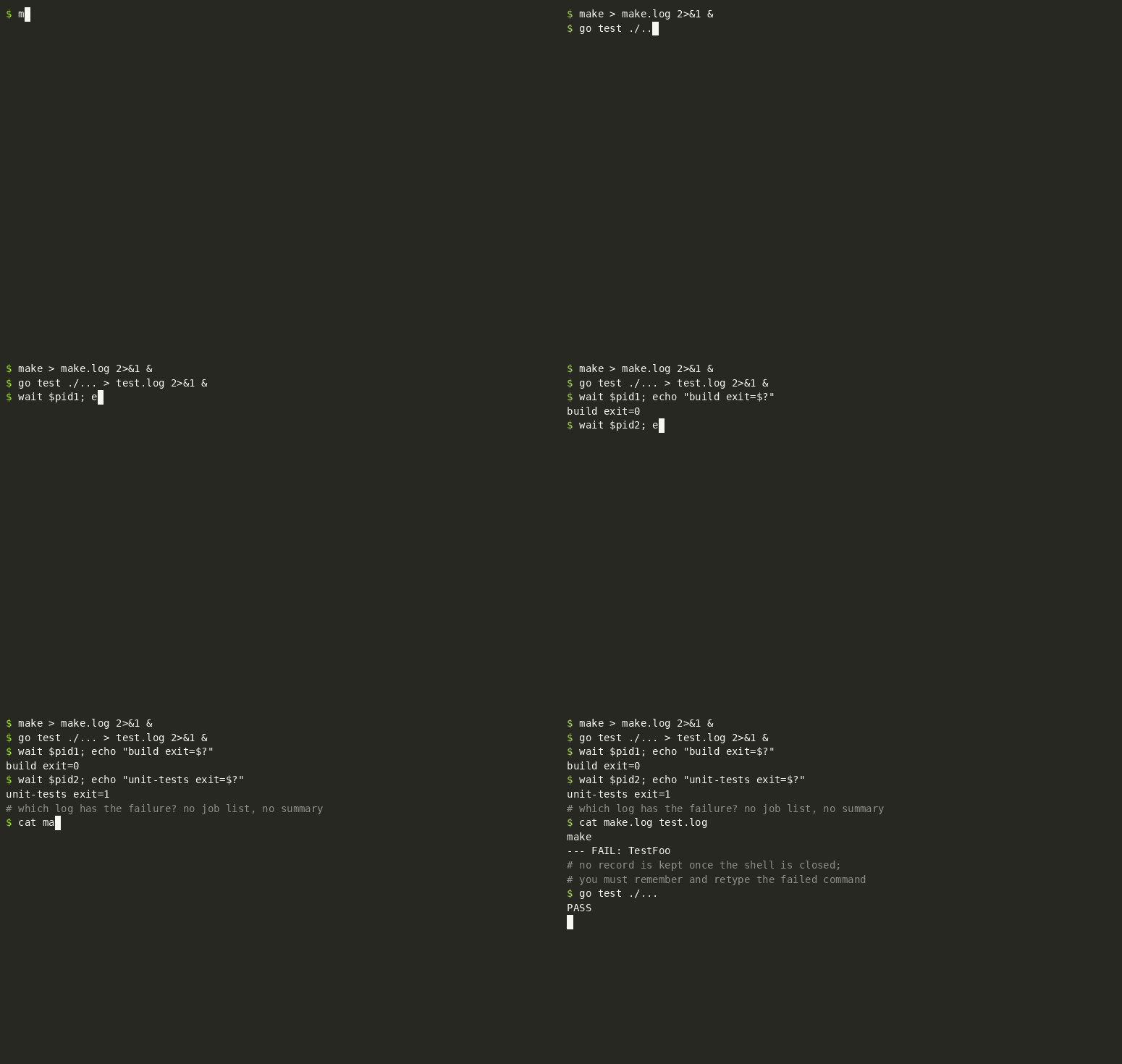
| Plain shell (background jobs) | rotari |
|---|---|
 |
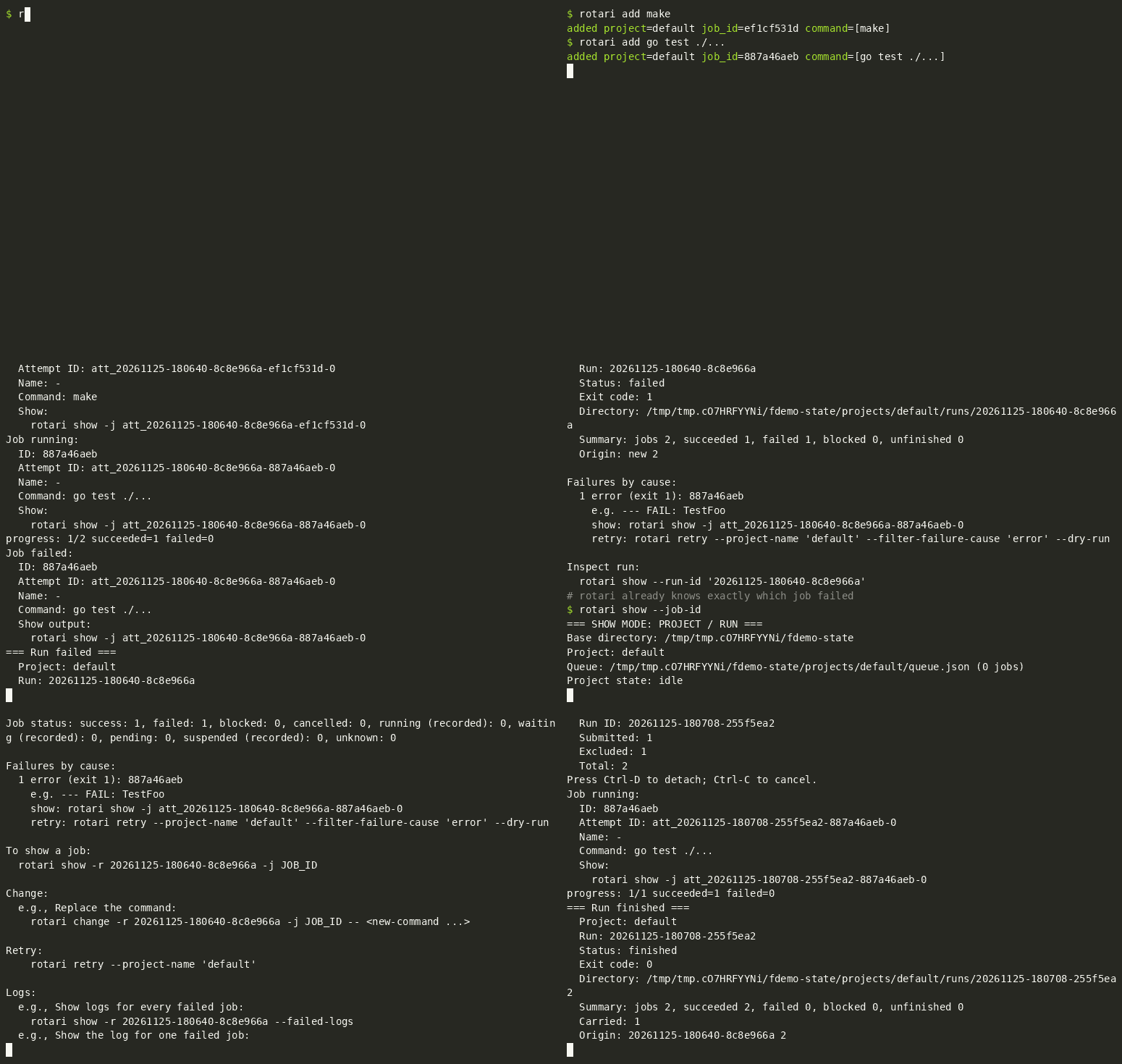 |
Manage jobs, logs, and outputs in one place
- A web UI for every run. Follow job status, browse logs, and inspect artifacts in one place.
- Logs stay organized and easy to find. Logs are kept with each workspace, without choosing a log path for every job, and runs can be explored across workspaces.
- Retry only what needs work. Rerun failed or unfinished jobs while keeping successful results.
- Easily switch execution backends. Run jobs locally, over SSH, or on Slurm and other schedulers.
- Know when jobs finish. Get browser notifications or send updates to Slack.
- Follow outputs from command to artifact. Rotari detects likely artifacts from job commands and lets you inspect their contents in the Web UI.
- For people and AI agents. Submit jobs, follow logs, and inspect outputs with rotari.
How is rotari different?
Rotari covers a narrow need, and other tools may fit yours better: GNU Parallel for one command over many inputs, pueue or task-spooler for a personal queue on one machine, and a workflow engine such as Snakemake, Nextflow, Dagu, or Airflow for a pipeline you share, rerun on new data, or run on a schedule. Comparison with other tools explains what each one does and how rotari differs.
Installation
Prebuilt binaries for Linux and macOS are on the GitHub Releases page; Go is not required:
curl -fsSL https://raw.githubusercontent.com/rotari-dev/rotari/main/scripts/install.sh | sh
This downloads the release binary matching your OS/architecture into
~/.local/bin. Set ROTARI_INSTALL_DIR to override the destination or
ROTARI_VERSION to pin a version.
Other options:
brew install rotari-dev/tap/rotari
# bundles the rotari executable with the Python package
python3 -m pip install --index-url https://rotari-dev.github.io/rotari/simple/ rotari
# With go installed
go install github.com/rotari-dev/rotari/cmd/rotari@latest
Run rotari version to check the installed version. Use
rotari completion install for Bash, Zsh, or Fish; see
Shell completion.
Docker
For the published image, persistent state, and runtime requirements, see the Docker guide.
Choose how to submit jobs
All three approaches use the same rotari queue, run history, and status tools. Choose one way to define jobs; these are alternatives, not steps to complete in sequence:
| Approach | Start here | Best for |
|---|---|---|
| Shell (recommended starting point) | Shell quick start | Adding commands interactively or keeping a batch in a shell script. No new workflow format needed. |
| Manifest | Manifest quick start | Keeping a batch in an editable YAML file, or exporting a run to revise and import later. |
| Python | Python quick start | Submitting jobs from Python code and reading results as Python objects. Jobs still run as commands, not Python functions. |
You can switch approaches later: for example, export a run created from shell commands as a manifest, or import a manifest with the Python client.
Optional workspace setup
To use the same location defaults with any of the three approaches above, run
rotari init from this directory:
# Use the default basedir (.rotari-state) and the default project ("default")
rotari init

# Set a basedir explicitly and the default project ("default")
# rotari init .rotari-state

# Set both the basedir and the default project.
# rotari init .rotari-state sweep
This writes .rotari.toml; the state directory and project are created when
you add jobs. Defaults apply only in this directory, and CLI options or
environment variables override them. See Workspace defaults
for details.
Quick start: Shell
Use rotari add to put commands in the workspace's default project queue.
You can add several variants of a command, as in this example, then use
rotari run to execute the queued jobs and wait for the run to finish.
rotari add python train.py --lr 0.1
rotari add python train.py --lr 0.01
rotari add python train.py --lr 0.001
rotari run
rotari run and rotari retry inherit the caller's environment by default;
pass --env=NONE to suppress it while retaining job --env and rotari
metadata.
To check the workspace and see what is queued or running, use rotari info,
rotari jobs, and rotari show:
rotari info
rotari jobs
rotari show
info summarizes the current locations, project, and run status.
jobs gives a compact status overview across projects.
show provides details for a project, run, or job, including captured output
logs and saved results.
Use rotari projects to list projects, rotari runs to list runs, and
rotari basedirs to list registered state directories. rotari show inspects
the selected project, run, job, or attempt; when project selection is
ambiguous, it points to rotari projects.
If you want a run to continue in the background, start it asynchronously:
rotari run --async
If a run has failed jobs, inspect their logs and retry failed or unfinished work; successful jobs are reused:
# Show logs for failed jobs in the selected project.
rotari show -p sweep --failed-logs
# Start a new run for failed and unfinished jobs; successful jobs are reused.
rotari retry -p sweep
Some options have a short form: -p is equivalent to --project-name. This
guide uses either form. For options available to each command, see the
short option list in the CLI reference.
Use --depends-on NAME to run a job only after a prerequisite job or stage
succeeds:
rotari add --job-name prepare ./prepare.sh
rotari add --job-name train --depends-on prepare ./train.sh
Use --depends-on-finished NAME for aggregation or cleanup jobs that should
run once the prerequisite finishes, whatever its result. See
Dependencies and stages for stages and
multiple prerequisites.
See Projects, queues, runs, and state for project selection and state layout, Inspect for status and logs, Recovering failed runs for retries, Running and controlling jobs for starting and waiting for runs, Executors and schedulers for execution backends, and Array and matrix jobs for task expansion and matrix combinations.
Quick start: Manifest
If you prefer a file you can review and edit, save this as experiment.yaml:
version: 1
jobs:
  - name: train-small
    command: [python, train.py, --lr, "0.1"]
  - name: train-large
    command: [python, train.py, --lr, "0.01"]
Import the file into a project queue and run it:
rotari import -p sweep experiment.yaml
rotari run -p sweep
rotari show -p sweep
Use rotari export --template for a starter file, or export an existing run
to edit and re-import it. See Workflow manifests for
export, import options, and result reuse.
Quick start: Python
Install the Python client, which includes the rotari executable on supported platforms. It submits command argument lists through the CLI:
from rotari import Rotari

rotari = Rotari(project="sweep")
rotari.add(["python", "train.py", "--lr", "0.1"])
rotari.run()
result = rotari.show()
The client can also exchange manifests as dictionaries. See the Python API reference for available methods and options.
Examples
Start with the basic example for direct commands,
sh -c, and command options:
./examples/basic.sh
The examples guide has independent, no-argument
scripts for job dependencies, artifact candidates, arrays, retrying failed
work, async runs, Slurm, workflow manifests, and diagnosis. All examples use
rotari's normally resolved state directory and switch projects rather than
creating a basedir for each example. Slurm needs a configured cluster. To fix
a failed job and accept another job's result in an exported workflow, run
./examples/workflow-reconcile.sh. See
Workflow manifests for the details.
Local web UI
Start the local web status UI separately from the job runner:
rotari web
rotari web --allow-exec
--allow-exec also lets the UI launch TensorBoard, Jupyter, and other
registered commands against artifacts; see
Launching commands.
See the web demo for a read-only UI using generated example data. For remote access, authentication, and read-only mode, see the Web UI guide, the FAQ, and Security model.
 Directories

| Path | Synopsis |
|---|---|
|
cmd
|
|
|
rotari
command
Command rotari provides the CLI, background server, Web adapter, and user-facing formatting for Rotari.
|
Command rotari provides the CLI, background server, Web adapter, and user-facing formatting for Rotari. |
|
Package conformance checks invariants from contracts/README.md against the built rotari binary and its Web API, from outside the code.
|
Package conformance checks invariants from contracts/README.md against the built rotari binary and its Web API, from outside the code. |
|
internal
|
|
|
archtest
Package archtest checks the Go package boundary rules in contracts/00-overview.md against the import graph.
|
Package archtest checks the Go package boundary rules in contracts/00-overview.md against the import graph. |
|
artifact
Package artifact discovers artifact candidates: file and directory references that can be found statically in a job's definition.
|
Package artifact discovers artifact candidates: file and directory references that can be found statically in a job's definition. |
|
artifactsource
Package artifactsource reads the configuration files that artifact discovery inspects.
|
Package artifactsource reads the configuration files that artifact discovery inspects. |
|
attachment
Package attachment coordinates live CLI clients of one run.
|
Package attachment coordinates live CLI clients of one run. |
|
basedirregistry
Package basedirregistry indexes state directories for discovery.
|
Package basedirregistry indexes state directories for discovery. |
|
bugreport
Package bugreport collects the evidence a rotari bug report needs: the build, the host and filesystem, configuration, the supervisor log, and the state files of a run, with secrets removed.
|
Package bugreport collects the evidence a rotari bug report needs: the build, the host and filesystem, configuration, the supervisor log, and the state files of a run, with secrets removed. |
|
config
Package config finds and parses rotari's config files.
|
Package config finds and parses rotari's config files. |
|
diagnose
Package diagnose provides rule-based job failure diagnosis.
|
Package diagnose provides rule-based job failure diagnosis. |
|
doclinks
Package doclinks checks relative links in the repository's Markdown documentation.
|
Package doclinks checks relative links in the repository's Markdown documentation. |
|
executor
Package executor defines job execution contracts and scheduler adapters.
|
Package executor defines job execution contracts and scheduler adapters. |
|
jobcontrol
Package jobcontrol cancels, suspends, and resumes a project's running jobs.
|
Package jobcontrol cancels, suspends, and resumes a project's running jobs. |
|
jobfilter
Package jobfilter holds the conditions that --filter-* options add to a job selection.
|
Package jobfilter holds the conditions that --filter-* options add to a job selection. |
|
joblist
Package joblist lists recent job attempts across a base directory's projects: running jobs of active runs and jobs that finished within a time window.
|
Package joblist lists recent job attempts across a base directory's projects: running jobs of active runs and jobs that finished within a time window. |
|
jobstatus
Package jobstatus resolves job outcomes from persisted run state.
|
Package jobstatus resolves job outcomes from persisted run state. |
|
launcher
Package launcher runs the commands a user registered for artifacts and owns their processes.
|
Package launcher runs the commands a user registered for artifacts and owns their processes. |
|
mcp
Package mcp exposes rotari state through the Model Context Protocol.
|
Package mcp exposes rotari state through the Model Context Protocol. |
|
model
Package model defines Rotari's domain data structures and pure domain rules.
|
Package model defines Rotari's domain data structures and pure domain rules. |
|
project
Package project owns a project's run state and its idle queue edits.
|
Package project owns a project's run state and its idle queue edits. |
|
projectrun
Package projectrun runs one project's queue against its on-disk state.
|
Package projectrun runs one project's queue against its on-disk state. |
|
queueedit
Package queueedit applies edits to a project's queue as pure transformations.
|
Package queueedit applies edits to a project's queue as pure transformations. |
|
queueops
Package queueops performs the queue and run-history edits that the CLI, the Web UI, and the supervisor share: add, change, remove, copy, and deleting runs.
|
Package queueops performs the queue and run-history edits that the CLI, the Web UI, and the supervisor share: add, change, remove, copy, and deleting runs. |
|
report
Package report formats a run's or a job's record as Markdown for the people and agents who read it: the run's sources and notes, a table of its jobs with the environment values that tell them apart and their last log lines, then each job's notes, command, rule diagnoses, and bounded log excerpt.
|
Package report formats a run's or a job's record as Markdown for the people and agents who read it: the run's sources and notes, a table of its jobs with the environment values that tell them apart and their last log lines, then each job's notes, command, rule diagnoses, and bounded log excerpt. |
|
resolve
Package resolve turns command-line selectors into the base directory, project, run, and job they name.
|
Package resolve turns command-line selectors into the base directory, project, run, and job they name. |
|
run
Package run owns run planning and orchestration.
|
Package run owns run planning and orchestration. |
|
runlineage
Package runlineage compares two runs of a project: which jobs were added or removed, how each job's definition changed, and how its result moved, such as a failure that was fixed.
|
Package runlineage compares two runs of a project: which jobs were added or removed, how each job's definition changed, and how its result moved, such as a failure that was fixed. |
|
runlist
Package runlist collects the runs that `rotari runs` lists, across state directories: which runs are listed, their lifecycle and client status, and their order.
|
Package runlist collects the runs that `rotari runs` lists, across state directories: which runs are listed, their lifecycle and client status, and their order. |
|
runregistry
Package runregistry indexes where each run lives.
|
Package runregistry indexes where each run lives. |
|
runview
Package runview loads a run's persisted snapshot and resolves its displayed job statuses for read-side consumers such as the CLI and Web UI.
|
Package runview loads a run's persisted snapshot and resolves its displayed job statuses for read-side consumers such as the CLI and Web UI. |
|
server
Package server implements the background server's transport and lifetime.
|
Package server implements the background server's transport and lifetime. |
|
sourcerev
Package sourcerev reads the version-control revision of the directory a job runs from, so a run can record which code it executed.
|
Package sourcerev reads the version-control revision of the directory a job runs from, so a run can record which code it executed. |
|
state
Package state owns Rotari's filesystem-backed project state.
|
Package state owns Rotari's filesystem-backed project state. |
|
supervisor
Package supervisor performs the project work behind the background server's requests for one base directory: starting synchronous and asynchronous runs, and cancelling a synchronous run whose client disconnected.
|
Package supervisor performs the project work behind the background server's requests for one base directory: starting synchronous and asynchronous runs, and cancelling a synchronous run whose client disconnected. |
|
tableview
Package tableview reads what the Table viewer shows: a delimited text file or a directory's files as rows of cells, a page at a time, and the image, audio, and video files its cells name.
|
Package tableview reads what the Table viewer shows: a delimited text file or a directory's files as rows of cells, a page at a time, and the image, audio, and video files its cells name. |
|
web
Package web builds Web-facing projections of Rotari state.
|
Package web builds Web-facing projections of Rotari state. |
|
workflowstate
Package workflowstate applies workflow manifests to a project's saved state: it reads saved runs as sources for reconciling a manifest, and imports a manifest into a project's queue under a project.Guard.
|
Package workflowstate applies workflow manifests to a project's saved state: it reads saved runs as sources for reconciling a manifest, and imports a manifest into a project's queue under a project.Guard. |