

 README

README

TickTask
TickTask (tt) is a simple command line todo and task logging tool. Based on the todo.txt format, this tool is designed to help you keep track of the time you spend on tasks in as simple and unobtrusive way as possible.
Note: I built the original version of this tool for my own use in about a day or so while on paternity leave. It is not feature complete, and some features may not be implemented yet. I will be adding features as I need/want them, and as I have time to work on this project.
Features
- Simple command line interface
- Local profile management (automatically apply filters to queries and new tasks)
- Task Git synchronization
- Backend is based on todo.txt format
- Time tracking for tasks
- Cross platform - Windows, MacOS, Linux (in theory, not tested beyond Linux)
Usage
Below is rough planned usage for the tool. However, it is under active development, and I may not update this very regularly. But, because it uses cobra for the command line interface, the best way to see the currently available commands is to run tt help.
A simple todo and task logging tool using the command line.
Based on the todo.txt format, this tool is designed to help
you keep track of the time you spend on tasks in as simple
and unobtrusive way as possible.

Usage:
  tt [command]

Available Commands:
  add         Add tasks / todo to the database
  archive     Archive done todos older than a specified date
  close       Mark a task as complete
  completion  Generate the autocompletion script for the specified shell
  config      View the current configuration
  edit        Edit the todo.txt file
  git         Manage git repository
  help        Help about any command
  list        List all tasks
  log         Add time spent to a todo
  priority    Set the priority of a task
  profile     Manage local profiles
  remove      Remove tasks / todo from the file
  reopen      Reopen a completed task
  sync        Sync changes with the remote repository
  todo        List all incomplete tasks

Flags:
  -C, --config string    Alternate configuration file to use
  -h, --help             help for tt
  -N, --no-profile       Ignore the active profile
  -P, --profile string   Override the active profile

Use "tt [command] --help" for more information about a command.
Examples
Below are some examples of how to use the tool - again, some of these features may not be implemented yet, and the syntax may change.
# Add a new task
tt add write a better readme for +TickTask

# List all tasks
tt list

# Log time spent on a task
tt log 1 1h30m
Todo.txt format
Below is the format of a todo.txt file. This is the format that TickTask uses to store tasks, with the addition of time tracking information in the form of time:0s special key value tags.
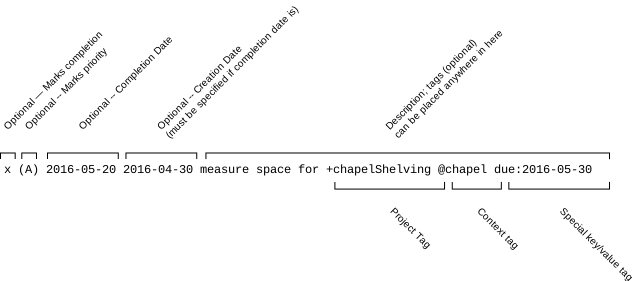
- Image from: https://github.com/todotxt/todo.txt
Building
To build the tool, you will need to have Go installed on your system. You can then clone the repository and build the tool using the following commands:
$ git clone https://github.com/SoarinFerret/ticktask.git
$ cd ticktask
$ go build -ldflags="-s -w" ./cmd/tt
Special Thanks
This is fortunately / unfortunately not the first cli todo tool I have used or written. I have been inspired by the following tools and projects:
- Commitment Clock (not public) - I wrote this as a basic time tracking tool, that eventually evolved into a todo app as well. Unfortunately, I decided to kill it due to the sqlite3 requirement. Copying a sqlite3 db around was a pain.
- Dstask - A task tracker / todo app I used briefly. The lack of time tracking was a deal breaker for me.
- Provided inspiration for the git synchronization and context management (renamed profile) features.
- Todo.txt - I like the simplicity of this format and the tools that have been built around it. I just extended it to include time tracking.
- go-todotxt - A go library for parsing todo.txt files. This library handles the parsing of todo.txt files in this project.
License
This project is licensed under the MIT License - see the LICENSE file for details.
 Directories