

 README

README

ghproj

Add GitHub Issues and Pull Requests to GitHub Projects.
Motivation
I manage a lot of OSS projects, so I have to handle a lot of issues and pull requests. So I want to manage them using a GitHub Project.
I've developed this tool to gather issues and pull requests of all my OSS in a single GitHub Project. By executing this tool periodically by GitHub Actions schedule event, you can add issues and projects to GitHub Projects automatically.
Blog Post
Environment variables
GITHUB_TOKEN: (Required) GitHub access tokenGHPROJ_CONFIG: Configuration file pathGHPROJ_CONFIG_TEXT: Configuraiton content. This is useful if you want to manage the configuration in a GitHub Actions Workflow fileGITHUB_GRAPHQL_URL: GraphQL API URL. Defaults to GitHub.com. Set this to use a different GitHub instance. Example:https://github.company.com/api/graphql
GitHub Access token
ghproj needs a GitHub access token.
You need to pass a token via environment variable GITHUB_TOKEN.
There are two options.
- (Recommendation) If you use GitHub Organization Project, you can use a
GitHub App - If you use GitHub User Project, you can use a
classic personal access token
GitHub App is much safer than classic personal access token, so we recommend the option 1.
GitHub Actions token is unavailable to manage GitHub Projects.
fine-grained personal access token is unavailable because it doesn't support GitHub Projects.
https://github.com/orgs/community/discussions/36441
There are also some APIs that do not yet support the fine-grained permission model, that we'll be adding support for in time:
- Packages
- Projects
- Notifications
GitHub App is unavailable for GitHub User Projects because the permission of GitHub User Project isn't supported.
1. GitHub App
Permissions:
Repository permissions:metadata: read-onlyOrganization permissions:Projects: Read and write
Installed repositories:
Please install the GitHub App into only a repository where ghproj is executed via GitHub Actions.
If you want to handle issues and pull requests of private repositories, permissions Pull Requests: read-only and Issues: read-only are also necessary, and you need to install the GitHub App into repositories.
2. classic personal access token
The scope read:org and project are required.
Configuration
\.?ghproj\.yaml
e.g.
entries:
  - query: |
      is:open
      archived:false
      -project:suzuki-shunsuke/5
      -label:create
      owner:szksh-lab
      owner:lintnet
    expr: |
      (! Item.Repo.IsFork) &&
      (Item.Title != "Dependency Dashboard") &&
      ! (Item.Repo.Name startsWith "homebrew-") &&
      ! (Item.Repo.Name startsWith "test-")
    project_id: PVT_kwHOAMtMJ84AQCf4
entries: The list of entries.
Each entry has the following fields:
project_id(string, required): GitHub Project id which issues and pull requests are added. You can get your project id using GitHub CLIgh project list
gh project list
action: For now, onlyarchiveis supported. Ifactionisarchive, the project items are archived. Ifarchiveis set,queryis unavailablequery: A query to search issues and pull requests which are added to a GitHub Project. Ifactionisarchive,queryis unavailable.queryis used as GitHub GraphQL API'ssearchquery'squeryargumentexpr: An expression to filter the search result. expr-lang/expr is used. The expression is evaluated per item. The evaluation result must be a boolean. If the result isfalse, the item is excluded.expris optional
Item:
{
  "Title": "issue or pull request title",
  "Repo": {
    "Owner": "repository owner name",
    "Name": "repository name",
    "IsArchived": false,
    "IsFork": false
  }
}
Archive items
You can archive items by ghproj add command.
- Add an entry with
action: archive
ghproj.yaml
entries:
  - expr: |
      Item.Repo.IsArchived
    action: archive
    project_id: PVT_kwHOAMtMJ84AQCf4
- Run
ghproj add
ghproj add
Unfortunately, GitHub GraphQL API doesn't support searching items using query.
So the setting query is unavailable.
Instead, ghproj lists all items in a given project and filters them by an expression written in expr.
The expression is evaluated by item, and the item is archived if the evaluation result is true.
e.g. Archive items if repositories are archived:
  - expr: |
      Item.Repo.IsArchived
If expr isn't set, all items are archived.
In the expression, a variable Item is available.
Item:
{
  "State": "CLOSED",
  "Title": "issue or pull request title",
  "Labels": ["enhancement"],
  "Open": false,
  "Author": "octokit",
  "Repo": {
    "Owner": "repository owner name",
    "Name": "repository name",
    "IsArchived": false,
    "IsFork": false
  }
}
JSON Schema
- ghproj.json
- https://raw.githubusercontent.com/suzuki-shunsuke/ghproj/refs/heads/main/json-schema/ghproj.json
If you look for a CLI tool to validate configuration with JSON Schema, ajv-cli is useful.
ajv --spec=draft2020 -s json-schema/ghproj.json -d ghproj.yaml
Input Complementation by YAML Language Server
# yaml-language-server: $schema=https://raw.githubusercontent.com/suzuki-shunsuke/ghproj/refs/heads/main/json-schema/ghproj.json
Run ghproj by GitHub Actions
The workflow is executed periodically by GitHub Actions schedule event, and issues and pull requests are added to the GitHub Project.
Comparison
There are several other ways to add issues and pull requests to GitHub Projects.
- built-in automation
- GitHub Actions' issues and pull requests events
1. built-in automation
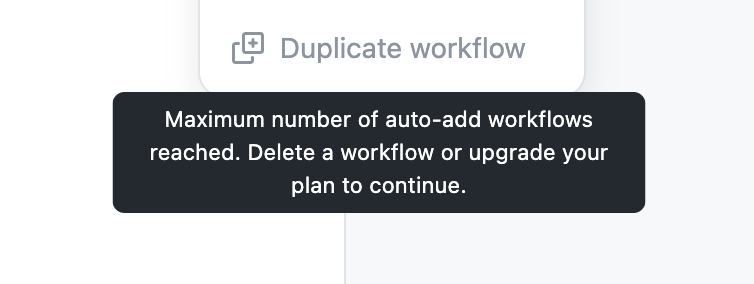
Using built-in automation, you can add issues and pull requests to GitHub Projects wihout codes, but there are several drawback.
- You have to create a workflow per repository. This is bothersome
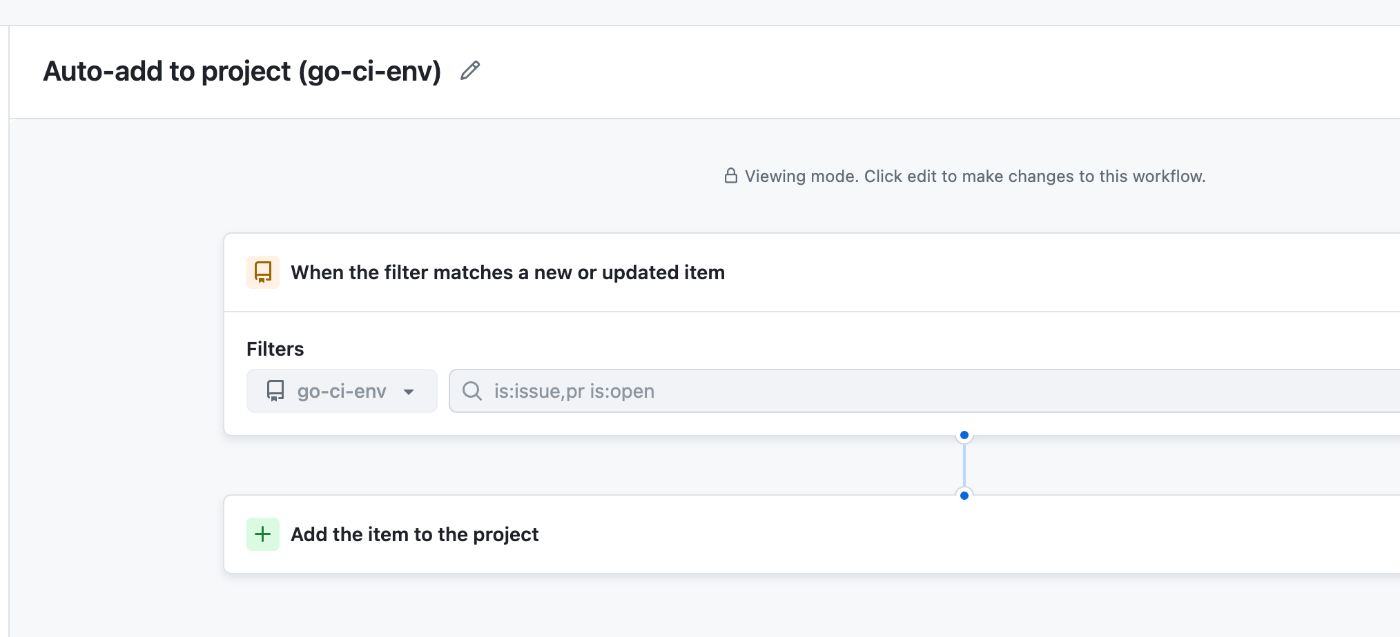
- You can create only five (this limit seems to depend on the plan) workflows, which means you can handle issues and pull requests of only five repositories
2. GitHub Actions' issues and pull requests events
You can run GitHub Actions workflows via issues and pull requests events and add them to GitHub Projects.
GitHub provides an official action for this.
https://github.com/marketplace/actions/add-to-github-projects
The drawback of this approach is that you have to add workflows to all repositories you want to handle. You have to maintain those workflows. This is bothersome. And you have to pass secrets to all workflow runs, which means you have to manage secrets properly.
 Directories