 The highest tagged major version is


 README

README

github-comment



CLI to create a GitHub comment with GitHub REST API
$ github-comment post -template test

$ github-comment exec -- go test ./...
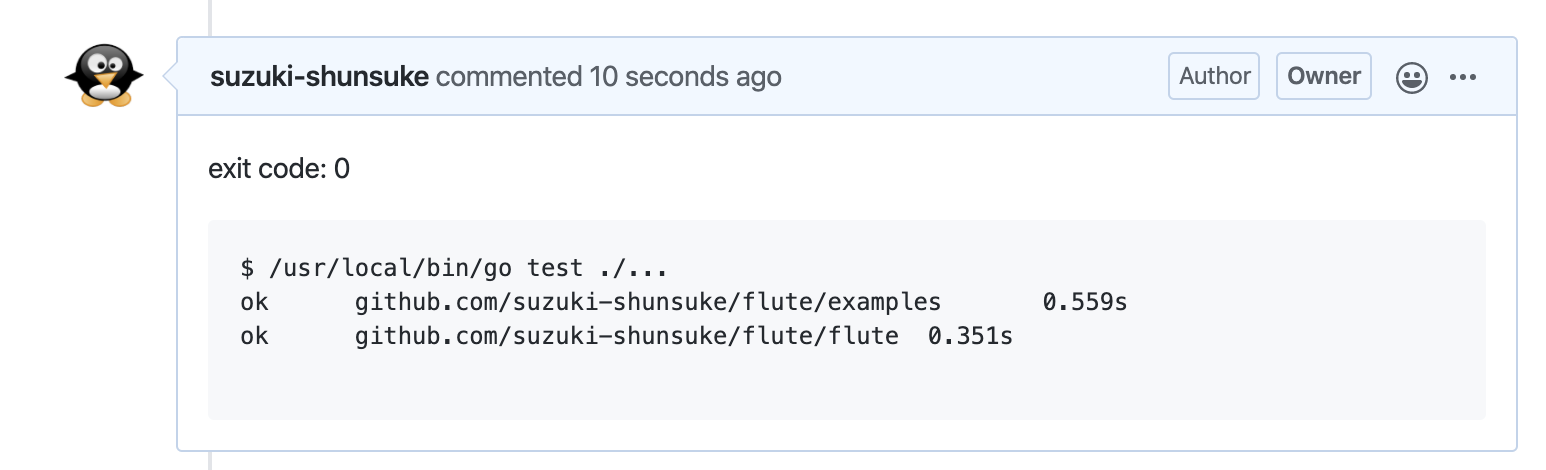
Note
- Currently,
github-commentdoesn't support GitHub Enterprise
Install
Please download a binary from the release page.
$ github-comment --version
$ github-comment --help
Getting Started
Please prepare a GitHub access token. https://github.com/settings/tokens
github-comment provides three subcommands.
- init: generate a configuration file template
- post: create a comment
- exec: execute a shell command and create a comment according to the command result
post
Let's create a simple comment. Please change the parameter properly.
$ github-comment post -token <your GitHub personal access token> -org suzuki-shunsuke -repo github-comment -pr 1 -template test
https://github.com/suzuki-shunsuke/github-comment/pull/1#issuecomment-601501451
You can pass the API token from the environment variable GITHUB_TOKEN or GITHUB_ACCESS_TOKEN too.
Then we sent a comment test to the pull request https://github.com/suzuki-shunsuke/github-comment/pull/1 .
Instead of pull request, we can send a comment to a commit
$ github-comment post -org suzuki-shunsuke -repo github-comment -sha1 36b1ade9740768f3645c240d487b53bee9e42702 -template test
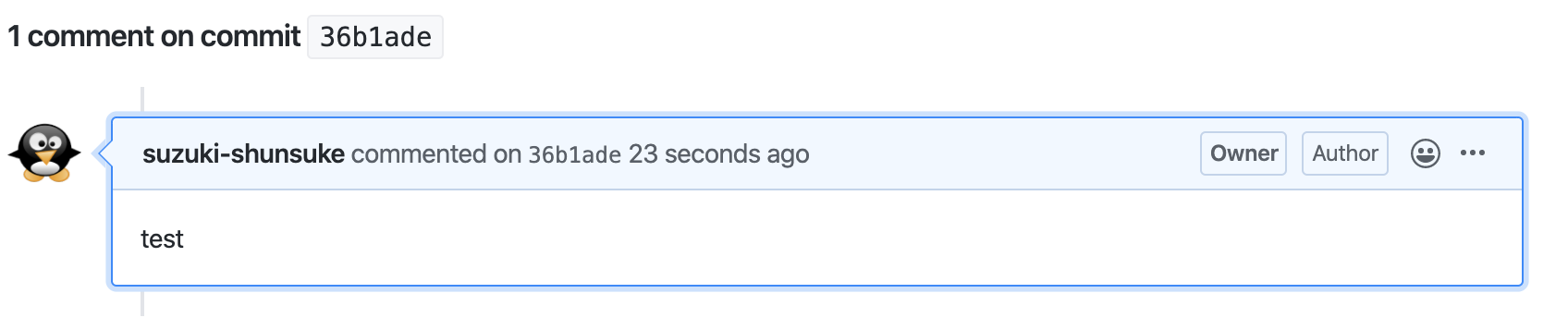
The template is rendered with Go's text/template.
You can write the template in the configuration file.
.github-comment.yml
post:
  default: |
    {{.Org}}/{{.Repo}} test
  hello: |
    hello world
If the argument -template is given, the configuration file is ignored.
We can define multiple templates in the configuration file and specify the template by the argument -template-key (-k).
$ github-comment post -k hello
If -template and -template-key aren't set, the template default is used.
exec
Let's add the following configuration in the configuration file.
exec:
  hello:
    - when: true
      template: |
        exit code: {{.ExitCode}}

        ```
        $ {{.Command}}
        ```

        Stdout:

        ```
        {{.Stdout}}
        ```

        Stderr:

        ```
        {{.Stderr}}
        ```

        CombinedOutput:

        ```
        {{.CombinedOutput}}
        ```
Then run a command and send the result as a comment.
$ github-comment exec -org suzuki-shunsuke -repo github-comment -pr 1 -k hello -- bash -c "echo foo; echo bar >&2; echo zoo"
bar
foo
zoo
https://github.com/suzuki-shunsuke/github-comment/pull/1#issuecomment-601503124
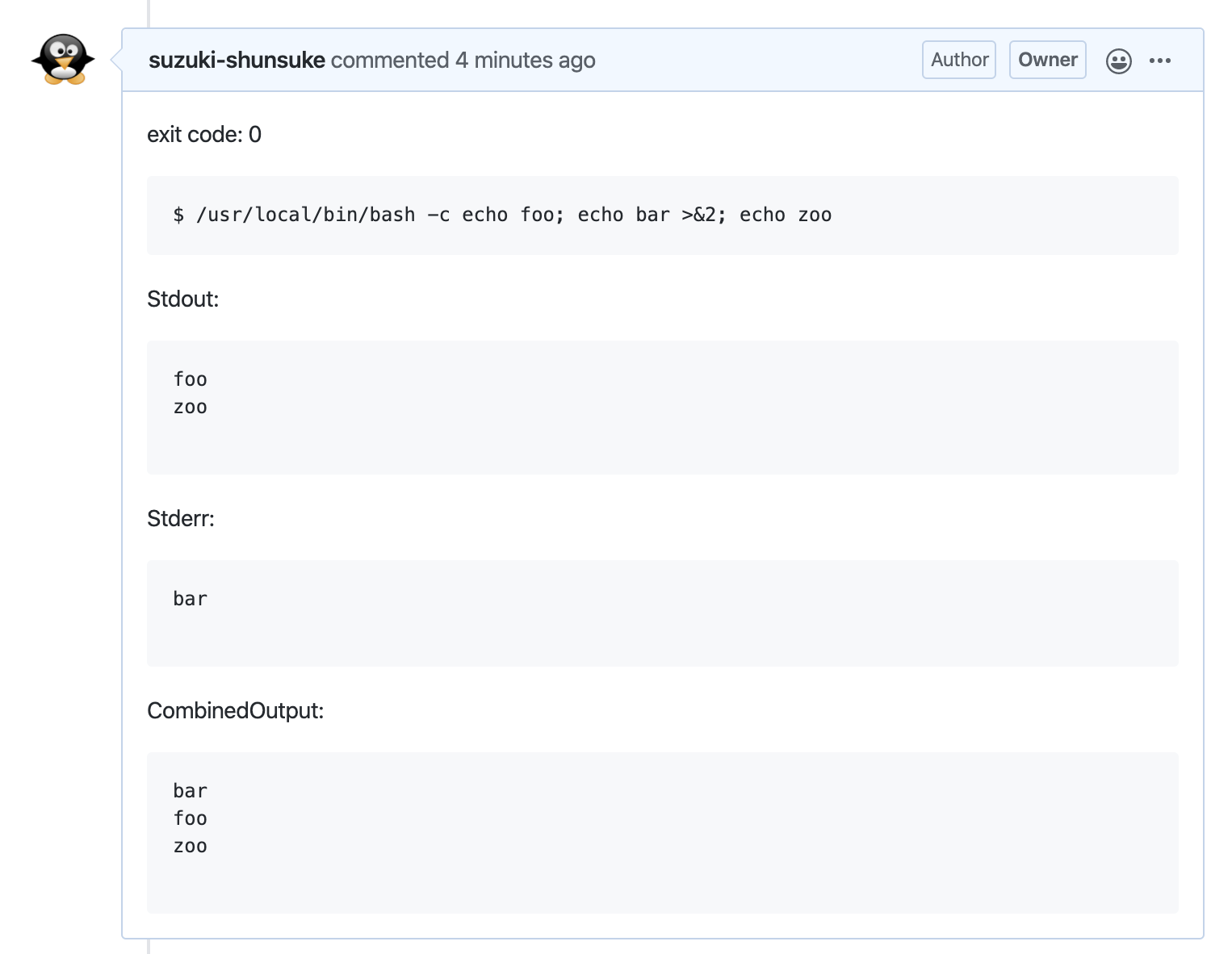
Let's send the comment only if the command is failed. Update the above configuration.
exec:
  hello:
    - when: ExitCode != 0
      template: |
        ...
Run the above command again, then the command wouldn't be created.
If the command is failed, then the comment is created.
$ github-comment exec -org suzuki-shunsuke -repo github-comment -pr 1 -k hello -- curl -f https://github.com/suzuki-shunsuke/not_found
  % Total    % Received % Xferd  Average Speed   Time    Time     Time  Current
                                 Dload  Upload   Total   Spent    Left  Speed
  0     0    0     0    0     0      0      0 --:--:-- --:--:-- --:--:--     0
curl: (22) The requested URL returned error: 404 Not Found
exit status 22
https://github.com/suzuki-shunsuke/github-comment/pull/1#issuecomment-601505610
You can change the template by the command result.
exec:
  hello:
    - when: ExitCode != 0
      template: |
        command is failed
    - when: ExitCode == 0
      template: |
        command is succeeded
By dont_comment, you can define the condition which the message isn't created.
exec:
  hello:
    - when: ExitCode != 0
      dont_comment: true
    - when: true
      template: |
        Hello, world
Usage
$ github-comment help
NAME:
   github-comment - post a comment to GitHub

USAGE:
   github-comment [global options] command [command options] [arguments...]

VERSION:
   1.5.1

COMMANDS:
   post     post a comment
   exec     execute a command and post the result as a comment
   init     scaffold a configuration file if it doesn't exist
   help, h  Shows a list of commands or help for one command

GLOBAL OPTIONS:
   --help, -h     show help (default: false)
   --version, -v  print the version (default: false)
$ github-comment help post
NAME:
   github-comment post - post a comment

USAGE:
   github-comment post [command options] [arguments...]

OPTIONS:
   --org value                     GitHub organization name
   --repo value                    GitHub repository name
   --token value                   GitHub API token [$GITHUB_TOKEN, $GITHUB_ACCESS_TOKEN]
   --sha1 value                    commit sha1
   --template value                comment template
   --template-key value, -k value  comment template key (default: "default")
   --config value                  configuration file path
   --pr value                      GitHub pull request number (default: 0)
   --var value                     template variable
$ github-comment help exec
NAME:
   github-comment exec - execute a command and post the result as a comment

USAGE:
   github-comment exec [command options] [arguments...]

OPTIONS:
   --org value                     GitHub organization name
   --repo value                    GitHub repository name
   --token value                   GitHub API token [$GITHUB_TOKEN, $GITHUB_ACCESS_TOKEN]
   --sha1 value                    commit sha1
   --template value                comment template
   --template-key value, -k value  comment template key (default: "default")
   --config value                  configuration file path
   --pr value                      GitHub pull request number (default: 0)
   --var value                     template variable
Configuration
post: variables which can be used in template
- Org
- Repo
- PRNumber
- SHA1
- TemplateKey
- Vars
exec
The configuration of exec is little more difficult than post, but the template key and template is same as post.
The each template is list which element has the attribute when and template, and dont_comment.
The attribute when is evaluated by the evaluation engine https://github.com/antonmedv/expr , and the result should be boolean.
About expr, please see https://github.com/antonmedv/expr/blob/master/docs/Language-Definition.md too.
When the evaluation result is false the element is ignored, and the first matching element is used.
If dont_comment is true, the comment isn't created.
If no element matches, the comment isn't created without error.
In addition to the variables of post command, the following variables can be used in when and template
- Stdout: the command standard output
- Stderr: the command standard error output
- CombinedOutput: Stdout + Stderr
- Command: https://golang.org/pkg/os/exec/#Cmd.String
- JoinCommand: the string which the command and arguments are joined with the space character
- ExitCode: the command exit code
- Env: the function to get the environment variable https://golang.org/pkg/os/#Getenv
Define reusable template components
templates:
  <template name>: <template content>
post:
  default: |
    {{template "<template name>" .}} ...
Define variables
vars:
  <variable name>: <variable value>
post:
  default: |
    {{.Vars.<variable name>}} ...
The variable can be passed with the option -var <variable name>:<variable value> too.
ex.
$ github-comment post -var name:foo
post command supports standard input to pass a template
Instead of -template, we can pass a template from a standard input.
$ echo hello | github-comment post
Complement options with Platform's built-in Environment variables
The following platforms are supported.
- CircleCI
- GitHub Actions
- Drone
CircleCI
https://circleci.com/docs/2.0/env-vars/#built-in-environment-variables
- org: CIRCLE_PROJECT_USERNAME
- repo: CIRCLE_PROJECT_REPONAME
- pr: CIRCLE_PULL_REQUEST
- revision: CIRCLE_SHA
Drone
https://docs.drone.io/pipeline/environment/reference/
- org: DRONE_REPO_OWNER
- repo: DRONE_REPO_NAME
- pr: DRONE_PULL_REQUEST
- revision: DRONE_COMMIT_SHA1
GitHub Actions
- org: GITHUB_REPOSITORY
- repo: GITHUB_REPOSITORY
- pr: GITHUB_EVENT_PATH
- revision: GITHUB_SHA
AWS CodeBuild
https://docs.aws.amazon.com/codebuild/latest/userguide/build-env-ref-env-vars.html
- org: CODEBUILD_SOURCE_REPO_URL
- repo: CODEBUILD_SOURCE_REPO_URL
- pr: CODEBUILD_SOURCE_VERSION
- revision: CODEBUILD_RESOLVED_SOURCE_VERSION
Configuration file path
The configuration file path can be specified with the --config (-c) option.
If the confgiuration file path isn't specified, the file named .github-comment.yml or .github-comment.yaml would be searched from the current directory to the root directory.
Blog
Written in Japanese. https://techblog.szksh.cloud/github-comment/
 Directories