

 README

README

k6x
Run k6 with extensions as easy as possible
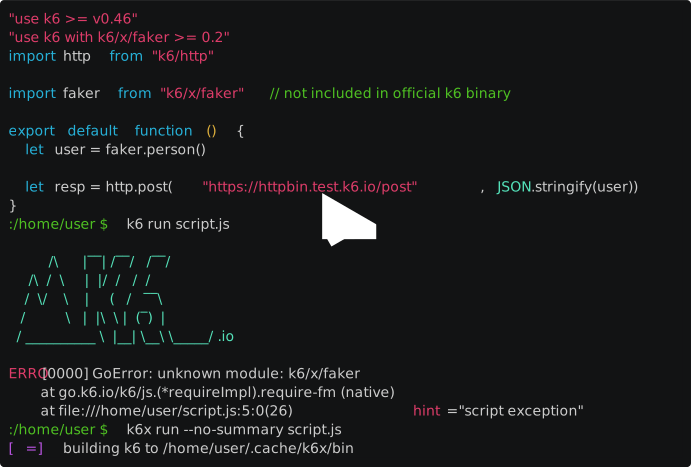
k6x is a k6 launcher that automatically provides k6 with the extensions used by the test. To do this, k6x analyzes the test script and creates a list of required extensions (it also parses the command line to detect output extensions). Based on this list, k6x builds (and caches) the k6 binary and runs it.
The build step uses a Docker Engine (even a remote one), so no other local tools (go, git, docker cli, etc.) are needed, just k6x. If Go language toolkit is installed, the build step uses it instead of Docker Engine. In this case, Docker Engine is not needed and build will be faster.
asciicast (native builder)

asciicast (docker builder)
Prerequisites
- Either a Go language toolkit or a properly configured Docker Engine environment (e.g.
DOCKER_HOSTenvironment variable)
Usage
The k6x command is a drop-in replacement for the k6 command, using exactly the same syntax. For example, running the test script (with top output extension):
k6x run -o top script.js
Display the current version of k6 and included extensions:
k6x version
Note Since the syntax of
k6xis exactly the same ask6, it is convenient to placek6xask6in the command search path (PATH environment variable) or to create an alias for it ask6. Thus, when using the usualk6commands, the custom k6 build will happen automatically if a test script needs it.
Install
Precompiled binaries can be downloaded and installed from the Releases page.
If you have a go development environment, the installation can also be done with the following command:
go install github.com/szkiba/k6x@latest
Extras
Pragma
Version constraints can be specified using the JavaScript "use ..." pragma syntax for k6 and extensions. Put the following lines at the beginning of the test script:
"use k6 >= v0.46"
"use k6 with k6/x/faker > 0.2"
The pragma syntax can also be used for output extensions:
"use k6 with top >= 0.1"
Any number of "use k6" pragmas can be used.
Read the version constraints syntax in the Version Constraints section of the Appendix
Warning Version constraints can reduce the efficiency of the cache, so it is advisable to use them only in justified cases. Even then, it is worth using permissive, upwardly open version constraints instead of specifying a specific version.
Cache
Reusable artifacts (k6 binary, HTTP responses) are stored in the subdirectory k6x under the directory defined by the XDG_CACHE_HOME environment variable. The default of XDG_CACHE_HOME depends on the operating system (Windows: %LOCALAPPDATA%\cache, Linux: ~/.cache, macOS: ~/Library/Caches)
The directory where k6x stores the compiled k6 binary can be specified in the K6X_BIN_DIR environment variable. If it is missing, the .k6x directory is used if it exists in the current working directory, otherwise the k6 binary is stored in the cache directory described above. In addition, the location of the directory used to store k6 can also be specified using the --bin-dir command line option. See the Flags section for more information.
The version command displays the path of the cached k6 executable after the version number.
Note You can avoid rebuilding the k6 binary in the default k6x cache during development if you create a .k6x directory in the current working directory. In this case, k6x will automatically use this local directory to cache the k6 binary.
Flags
The k6 subcommands are extended with some global command line flags related to building and caching the k6 binary.
-
--cleanthe cached k6 binary will be deleted and a new binary will be built -
--dryonly the cached k6 binary will be updated if necessary, the k6 command will not be executed -
--bin-dir paththe directory specified here will be used to cache the k6 binary (it will overwrite the value ofK6X_BIN_DIR)k6x run --bin-dir ./custom-k6 script.js -
--with dependencyyou can specify additional dependencies and version constraints, the form of thedependencyis the same as that used in the"use k6 with"pragma (practically the same as the string after theuse k6 with)k6x run --with k6/x/mock script.js -
--builder lista comma-separated list of builders (default:native,docker), available builders:nativethis builder uses the installed go compiler if available, otherwise the next builder is used without errordockerthis builder uses Docker Engine, which can be local or remote (specified inDOCKER_HOSTenvironment variable)
k6x run --buider docker script.js
Subcommands
Some new subcommands will also appear, which are related to building the k6 binary based on the dependencies included in the test script.
-
buildbuilds k6 based on the dependencies in the test script.Usage: k6x build [flags] [script] Flags: -o, --out name output extension name --bin-dir path folder for custom k6 binary (default: .) --builder list comma separated list of builders (default: native,docker) -h, --help display this help -
depsdisplay of k6 and extension dependencies used in the test scriptUsage: k6x deps [flags] [script] Flags: -o, --out name output extension name --json use JSON output format --resolve print resolved dependencies -h, --help display this help
Help
The new subcommands (build, deps) display help in the usual way, with the --help or -h command line option.
The k6 subcommands (version, run etc) also display help with the --help or -h command line option, so in this case the new k6x launcher flags are displayed before the normal k6 help.
Remote Docker
To use a remote Docker Engine, the DOCKER_HOST environment variable must be set appropriately. To access via a TCP port, simply set the desired value in the form tcp://host:port. For access via SSH port, a value of the format ssh://user@host should be used. In this case, a properly configured ssh client that can connect without user input is also required.
Docker Image
k6x is also available as a docker image on Docker Hub under the name szkiba/k6x.
This docker image can be used as a replacement for the official k6 docker image to run test scripts that use extensions. The basic use of the image is the same as using the official k6 image.
The image automatically provides k6 with the extensions used by the tests. To do this, k6x analyzes the test script and creates a list of required extensions (it also parses the command line to detect output extensions). Based on this list, k6x builds (and caches) the k6 binary and runs it.
The build step is done using the go compiler included in the image. The partial results of the go compilation and build steps are saved to the volume in the /cache path (this is where the go cache and the go module cache are placed). By making this volume persistent, the time required for the build step can be significantly reduced.
The k6x docker builder (--builder docker) also uses this docker image. It creates a local volume called k6x-cache and mounts it to the /cache path. Thanks to this, the docker build runs almost at the same speed as the native build (apart from the first build).
Appendix
How It Works
Feel free to skip this section, it is not required to use k6x.
The test script is converted to CommonJS format with the help of the esbuild go api. In the resulting CommonJS source, the referenced extensions and JavaScript modules are collected using regular expressions. Local JavaScript modules are also processed recursively.
At this point, if the k6 binary stored in the cache contains the expected extensions with the appropriate versions, the binary is simply executed with exactly the same arguments that were used to start the k6x command.
The git repository for each extension is determined based on the k6 extension registry. The k6 extension registry is accessed directly from the GitHub repository of the k6 documentation site using the go-github library.
Taking into account the optional version constraints, the appropriate extension version is selected from the git tags of the extension's git repository. Currently, only GitHub repositories are supported, if required, additional repository managers can be supported (eg GitLab).
If the Go compiler is installed, the k6 binary is created using it. Otherwise the custom k6 binary is created using the szkiba/k6x docker image. The Docker Engine API is accessed using the docker go client, so there is no need for a docker cli command and even a remote Docker Engine can be used.
The compiled k6 binary is stored in the cache. This binary will be used as long as the extensions included in it meet the current requirements, taking into account the optional version constraints. In order to increase the efficiency of the cache, the newly built k6 binary will also include the previously used extensions (if they are still included in the registry).
At this point, the k6 binary is executed from the cache with exactly the same arguments that were used to start the k6x command.
You can read more about the development ideas in the Feature Request list.
Limitations
- Reading the script from standard input is not supported (yet)
- Only versions in the latest 100 GitHub tags can be used in constraints
Version Constraints
This section is based on the Masterminds/semver documentation.
Basic Comparisons
There are two elements to the comparisons. First, a comparison string is a list
of space or comma separated AND comparisons. These are then separated by || (OR)
comparisons. For example, ">= 1.2 < 3.0.0 || >= 4.2.3" is looking for a
comparison that's greater than or equal to 1.2 and less than 3.0.0 or is
greater than or equal to 4.2.3.
The basic comparisons are:
=: equal (aliased to no operator)!=: not equal>: greater than<: less than>=: greater than or equal to<=: less than or equal to
Hyphen Range Comparisons
There are multiple methods to handle ranges and the first is hyphens ranges. These look like:
1.2 - 1.4.5which is equivalent to>= 1.2 <= 1.4.52.3.4 - 4.5which is equivalent to>= 2.3.4 <= 4.5
Wildcards In Comparisons
The x, X, and * characters can be used as a wildcard character. This works
for all comparison operators. When used on the = operator it falls
back to the patch level comparison (see tilde below). For example,
1.2.xis equivalent to>= 1.2.0, < 1.3.0>= 1.2.xis equivalent to>= 1.2.0<= 2.xis equivalent to< 3*is equivalent to>= 0.0.0
Tilde Range Comparisons (Patch)
The tilde (~) comparison operator is for patch level ranges when a minor
version is specified and major level changes when the minor number is missing.
For example,
~1.2.3is equivalent to>= 1.2.3, < 1.3.0~1is equivalent to>= 1, < 2~2.3is equivalent to>= 2.3, < 2.4~1.2.xis equivalent to>= 1.2.0, < 1.3.0~1.xis equivalent to>= 1, < 2
Caret Range Comparisons (Major)
The caret (^) comparison operator is for major level changes once a stable
(1.0.0) release has occurred. Prior to a 1.0.0 release the minor versions acts
as the API stability level. This is useful when comparisons of API versions as a
major change is API breaking. For example,
^1.2.3is equivalent to>= 1.2.3, < 2.0.0^1.2.xis equivalent to>= 1.2.0, < 2.0.0^2.3is equivalent to>= 2.3, < 3^2.xis equivalent to>= 2.0.0, < 3^0.2.3is equivalent to>=0.2.3 <0.3.0^0.2is equivalent to>=0.2.0 <0.3.0^0.0.3is equivalent to>=0.0.3 <0.0.4^0.0is equivalent to>=0.0.0 <0.1.0^0is equivalent to>=0.0.0 <1.0.0
 Documentation

Documentation


There is no documentation for this package.
 Source Files
 Directories

Directories

| Path | Synopsis |
|---|---|
|
internal
|
|
|
builder
Package builder contains k6 builder logic.
|
Package builder contains k6 builder logic. |
|
cmd
Package cmd contains the command line tool main parts.
|
Package cmd contains the command line tool main parts. |
|
dependency
Package dependency contains k6 dependency related types.
|
Package dependency contains k6 dependency related types. |
|
resolver
Package resolver contains dependency resolving types and interfaces.
|
Package resolver contains dependency resolving types and interfaces. |