

 README

README

burn



Your Kubernetes cluster is burning money. Find out where.

No agent to deploy. No dashboard to maintain. No YAML to configure. Just install and run.
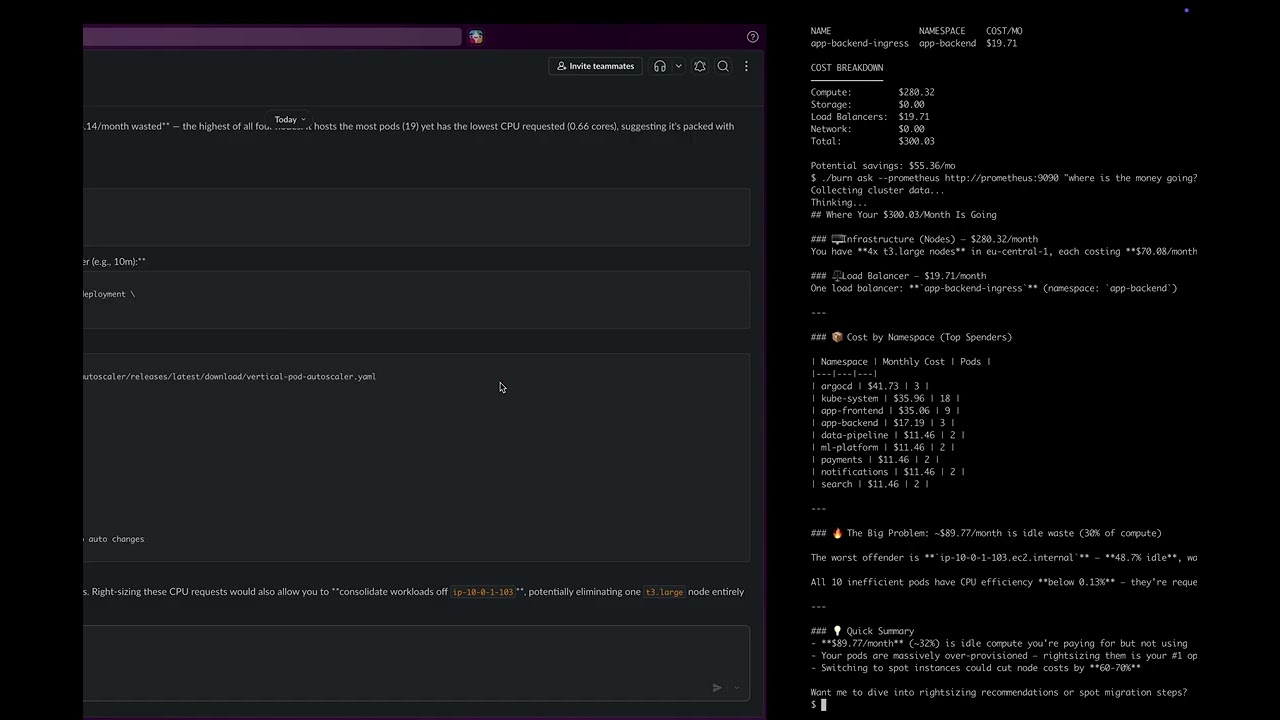
Why burn
- Zero setup —
brew install, run one command, get answers. No cluster agent, no persistent storage, no config files. - Full cost coverage — Compute, storage, load balancers, and GPU costs. Fetches real-time pricing from AWS and Azure APIs.
- AI-powered — Ask questions in plain English, get kubectl commands you can copy-paste.
- Slack-native —
/burnfor instant cost reports./burn ask "..."for AI analysis. - Cloud + on-prem — Works with AWS EKS, Azure AKS, GCP GKE, and on-premise clusters.
- Ingress LB detection — Detects load balancers from both Services and Ingress resources, with hostname deduplication.
- Time-aware —
--period 7dfor weekly averages instead of point-in-time snapshots.
Install
# Homebrew
brew install tanrikuluozlem/burn/burn

# Upgrade
brew upgrade tanrikuluozlem/burn/burn

# Binary
VERSION=$(curl -s https://api.github.com/repos/tanrikuluozlem/burn/releases/latest | grep tag_name | cut -d'"' -f4 | tr -d 'v') && \
curl -L "https://github.com/tanrikuluozlem/burn/releases/latest/download/burn_${VERSION}_$(uname -s | tr '[:upper:]' '[:lower:]')_$(uname -m | sed 's/x86_64/amd64/;s/aarch64/arm64/').tar.gz" | tar xz

# Docker
docker pull ghcr.io/tanrikuluozlem/burn:latest

# Helm
git clone https://github.com/tanrikuluozlem/burn.git
helm install burn ./burn/charts/burn

# Go
go install github.com/tanrikuluozlem/burn/cmd/burn@latest
macOS: If you see a Gatekeeper warning, run:
sudo xattr -d com.apple.quarantine $(which burn)
Quick start
# Cost breakdown (without Prometheus)
burn analyze

# With Prometheus (pass your Prometheus URL)
burn analyze --prometheus http://prometheus:9090

# 7-day average
burn analyze --prometheus http://prometheus:9090 --period 7d

# Drill into a namespace
burn analyze --prometheus http://prometheus:9090 --namespace argocd
NAMESPACE: argocd (3 pods, $41.73/mo)
──────────────────────────────────
POD                 CPU REQ→USED  MEM REQ→USED   COST/MO
argocd-deploy-0001  500m → 28m    512Mi → 299Mi  $13.91
argocd-deploy-0002  500m → 1m     512Mi → 41Mi   $13.91
argocd-deploy-0003  500m → 5m     512Mi → 7Mi    $13.91
AI recommendations
Get cluster-wide or namespace-specific recommendations:
burn analyze --prometheus http://prometheus:9090 --period 7d --ai
burn analyze --prometheus http://prometheus:9090 --namespace app-backend --ai
burn ask --prometheus http://prometheus:9090 "why is argocd so expensive?"
Example: burn analyze --namespace app-backend --period 7d --ai
NAMESPACE: app-backend (3 pods, $17.19/mo)
──────────────────────────────────
POD                      CPU REQ→USED  MEM REQ→USED   COST/MO
app-backend-deploy-0001  200m → <1m    256Mi → 9Mi    $5.73
app-backend-deploy-0002  200m → <1m    256Mi → 9Mi    $5.73
app-backend-deploy-0003  200m → <1m    256Mi → 128Mi  $5.73

RECOMMENDATIONS
───────────────
The app-backend namespace costs $17.19/mo across 3 pods, but CPU efficiency
is critically low at ~0.1% — pods request 200m CPU each while p95 usage
is under 0.31m.

[!!] 1. Rightsize CPU Requests using p95 data
   app-backend-deploy-0001: p95 CPU is 0.22m → recommend 1m (1.5x p95)
   app-backend-deploy-0002: p95 CPU is 0.30m → recommend 1m (1.5x p95)
   app-backend-deploy-0003: p95 MEM is 128Mi (50% eff) — leave as-is
   $ kubectl set resources deployment app-backend -n app-backend \
     --requests=cpu=1m,memory=14Mi --limits=cpu=200m,memory=256Mi

[!!] 2. app-backend-ingress LB ($19.71/mo) costs more than the namespace
   The load balancer alone exceeds the $17.19/mo compute cost.
   If internal-only, switch to ClusterIP to eliminate the LB cost.
   $ kubectl patch svc app-backend-ingress -n app-backend \
     -p '{"spec": {"type": "ClusterIP"}}'

[!] 3. Enable VPA in Recommend Mode
   Prevent over-provisioning from recurring with continuous p95 tracking.
   $ kubectl apply -f vpa-app-backend.yaml
Ask questions in plain English

Requires ANTHROPIC_API_KEY environment variable.
Slack integration
Run burn as a Slack bot:
burn serve --port 8080 --prometheus http://prometheus:9090 --period 7d
| Command | What you get |
|---|---|
/burn |
Full cost report — nodes, namespaces, idle cost, LB, storage |
/burn ns argocd |
Pod-level breakdown for a namespace |
/burn ask "what is the single biggest waste?" |
AI analysis with kubectl commands |

Slack setup
- Create a Slack App at https://api.slack.com/apps
- Add Slash Command:
/burn→ point to your server URL +/slack - Set
SLACK_SIGNING_SECRETandANTHROPIC_API_KEYenvironment variables - Expose the server (e.g., ngrok for testing, load balancer for production)
On-prem and GPU clusters
Burn works with on-premise and GPU clusters. Set your own resource rates:
burn analyze \
  --cpu-price 0.05 \
  --ram-price 0.008 \
  --gpu-price 3.00 \
  --storage-price 0.10
Without custom pricing, cloud-equivalent rates are used as defaults.
How it works
Kubernetes API → nodes, pods, PVCs, services, ingresses
Prometheus     → actual CPU & memory usage (optional)
Cloud Pricing  → real VM, storage, and GPU prices (AWS, Azure, GCP)
         ↓
    Cost Engine → compute, storage, load balancers, GPU, idle detection
         ↓
    CLI / Slack / AI Recommendations
Pricing sources
| Priority | Source | When |
|---|---|---|
| 1 | AWS/Azure pricing API | AWS credentials available — real-time, region-aware |
| 2 | Embedded pricing DB | No credentials — 600+ AWS, 300+ Azure instances, updated weekly |
| 3 | Static fallback | Unknown instance type — estimates based on instance family |
Storage and load balancer costs are fetched from cloud APIs when available, with static fallbacks. Usage-based charges (data processing, LCU) depend on traffic volume and are not included. GPU nodes are detected automatically and priced via ratio-based cost splitting.
Deploy to Kubernetes
Helm
git clone https://github.com/tanrikuluozlem/burn.git
helm install burn ./burn/charts/burn \
  --set prometheus.url=http://prometheus:9090 \
  --set schedule="0 9 * * 1-5"
CronJob (daily Slack reports)
apiVersion: batch/v1
kind: CronJob
metadata:
  name: burn-report
spec:
  schedule: "0 9 * * 1-5"
  jobTemplate:
    spec:
      template:
        spec:
          containers:
          - name: burn
            image: ghcr.io/tanrikuluozlem/burn:latest
            args:
            - analyze
            - --prometheus
            - http://prometheus-server.monitoring:80
            - --period
            - 7d
            - --ai
            - --slack
            env:
            - name: ANTHROPIC_API_KEY
              valueFrom:
                secretKeyRef:
                  name: burn-secrets
                  key: anthropic-api-key
            - name: SLACK_WEBHOOK_URL
              valueFrom:
                secretKeyRef:
                  name: burn-secrets
                  key: slack-webhook-url
          restartPolicy: OnFailure
Configuration
| Variable | Description | Required for |
|---|---|---|
ANTHROPIC_API_KEY |
Claude API key | --ai, ask, serve |
SLACK_WEBHOOK_URL |
Slack webhook URL | --slack |
SLACK_SIGNING_SECRET |
Slack app signing secret | serve |
| Flag | Description |
|---|---|
--cpu-price |
CPU cost per core per hour (on-prem) |
--ram-price |
RAM cost per GiB per hour (on-prem) |
--gpu-price |
GPU cost per unit per hour (on-prem) |
--storage-price |
Storage cost per GiB per month (on-prem) |
Cloud clusters use real pricing automatically. These flags are for on-premise clusters where pricing is not available from a cloud provider.
Development
make build    # Build binary
make test     # Run tests
make lint     # Run linter
License
Apache 2.0 — See LICENSE for details.
 Directories