




 README

README

xui — shadcn 风格的 xcgui 自绘组件




介绍
为 github.com/twgh/xcgui(炫彩界面库)提供一套 shadcn-ui 风格的自绘组件:主题令牌、变体系统、copy-not-install 分发。
┌─────────────────────────────────────────────┐
│  你的应用                                    │
│  ┌───────────────────────────────────────┐  │
│  │ ui/  ← 组件源码归你所有, 随意修改       │  │
│  │   button.go  checkbox.go  input.go …  │  │
│  │   theme.go   ← 你的主题, 改这里换肤    │  │
│  └───────────────────────────────────────┘  │
│              ↑ 依赖              ↑ 拷贝      │
│  github.com/twgh/xui (运行时)   xui CLI     │
│              ↑                              │
│  github.com/twgh/xcgui (行为层)             │
└─────────────────────────────────────────────┘
示例图
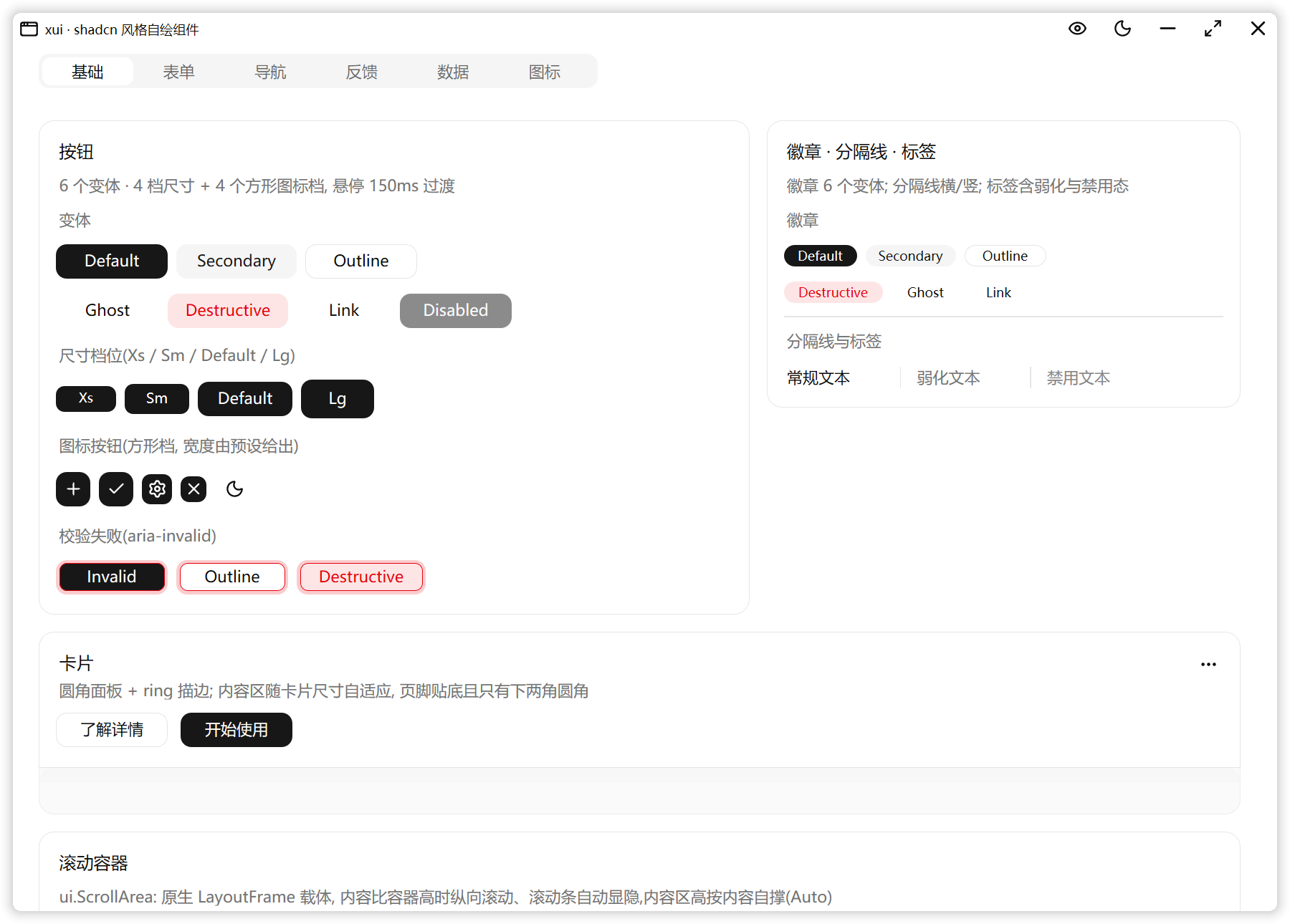
快速开始
新建项目(推荐)
go run github.com/twgh/xui/cmd/xui@latest init -n myapp
cd myapp
go run .
-n 会创建一个完整项目目录:go.mod + main.go(AppWindow + 示例卡片) + README.md +
.gitignore + ui/(theme.go + 基础组件 + DESIGN.md), 并自动执行 go mod tidy 装好
依赖(生成 go.sum)。目录已存在且非空时需加 -f/--force; 想跳过依赖安装(如离线)加
--no-install, 之后手动跑一次 go mod tidy。
已有项目
# 先在你的项目根目录执行(需要 Go 1.18+;项目要先有 go.mod,没有就先 go mod init)
go run github.com/twgh/xui/cmd/xui@latest init
此时 init 只创建 ui/ 目录:写入 theme.go(你的主题文件)、拷入全部基础组件,外加一份
DESIGN.md —— 组件源码的注释里到处是"见 DESIGN 第 N 节",这份自定义指南随源码一起安装在你的项目里:
令牌表、组件解剖、xcgui 踩坑全集、已验证 API 清单都在里面。改组件前先翻它。
package main

import (
    "github.com/twgh/xcgui/app"
    ui "yourmodule/ui" // 换成你的模块路径
)

func main() {
    app.InitOrExit()
    a := app.New(true)                    // Direct2D 渲染
    a.EnableAutoDPI(true).EnableDPI(true) // 跟随系统 DPI
    a.SetPaintFrequency(10)               // hover 过渡 ~60fps

    // 窗口: 圆角阴影 + 自绘标题栏(最小化/最大化/关闭) + 主题化底色, 全部默认配好
    w := ui.NewAppWindow("我的应用", 640, 480)
    content := w.Content()
    content.SetPadding(24, 20, 24, 24) // 内容区留白

    ui.NewButton(0, 0, 0, 0, "确定", content.Handle)
    ui.NewCheckbox(0, 0, 0, 0, "记住我", content.Handle)
    ui.NewInput(0, 0, 0, 0, content.Handle, ui.WithPlaceholder("用户名"))

    w.Show(true)
    a.Run()
    a.Exit()
}
标题栏要加自己的按钮(如切换主题)用 w.AddCaptionButton(icons.IconMoon, func() { ... }),
排在最小化按钮左边; 内容组件纵向排列, 间距由内容容器的 SetSpace 控制。
换肤
组件在绘制时实时读取主题令牌(等价于 CSS 变量),切换主题零成本:
xui.SetTheme(xui.Dark()) // 一行全局换肤
主题文件 ui/theme.go 默认是内置主题的副本(逐字段改即可换肤),也可以照 shadcn 的
:root / .dark 自己写一份 —— 令牌与 CSS 变量一一对应(字段表见 DESIGN.md 3.1)。
组件
| 组件 | 说明 |
|---|---|
| Button | 6 变体(Primary/Secondary/Outline/Ghost/Destructive/Link)× 8 尺寸档(xs/sm/default/lg + 4 个方形图标档),hover/按下/禁用/焦点环/校验失败(WithButtonInvalid);WithIcon 做图标按钮,WithButtonLeadingIcon / WithButtonTrailingIcon 做"图标+文字",WithButtonAlign(Start/Between) 控制整宽按钮的内容对齐(示例里的 justify-start/justify-between)、WithButtonRounded 胶囊、WithButtonExpanded / WithButtonHasPopup 对应弹层触发区、WithButtonLoading 显示 1s/圈旋转的加载图标;cx 传 0 时按文字自动量宽 |
| ButtonGroup | 按钮组(components/buttongroup.go):横向/纵向(WithButtonGroupOrientation)、首尾外角 + 相邻边直角、宽高按内容自撑;可放 Button / Input / ComboBox;NewButtonGroupText 文本块、NewButtonGroupSeparator 分隔条跟随组高;组里嵌组自动 8px 间距 |
| Alert | 提示条:图标 + 标题 + 描述 + 右上动作槽;AlertDefault / AlertDestructive 两变体,标题/描述随宽度自动折行、高度按内容自撑;Action() 里放 Button / Badge |
| Empty | 空状态容器(components/empty.go):图标底板(EmptyMediaIcon, 40px bg-muted 圆角)/无底板媒体 + 标题 + 描述 + 动作区;NewEmpty 的 Header() / Content() / Body() 三个槽位,内边距 24、间距 24、整块居中;不画边框(与上游默认一致),高度自撑,整页空态可 xui.ItemFillHeight 让内容垂直居中 |
| Field | 表单字段布局(components/field.go):NewField + Label / Title / Description / Content / SetInvalid;FieldSet(gap 24)/ FieldGroup(gap 28)/ FieldLegend / FieldSeparator(可带居中文字)/ FieldError(多条去重);垂直/水平取向,校验失败时标签转 destructive;横向 Content 默认 240 宽(嵌套布局只认 Fixed 宽,用 xui.ItemWidth 覆盖) |
| Item | 列表项(components/item.go):NewItem + Media() / Content() / Actions() / Header() / Footer() 槽位;ItemDefault / ItemOutline / ItemMuted 三变体,ItemSizeDefault / ItemSizeSm 两档;ItemMedia(icon 变体 32 底板)/ NewItemTitle / NewItemDescription / NewItemGroup / NewItemSeparator;Content 宽度按媒体/动作实测自动锁成 Fixed |
| Breadcrumb | 面包屑(components/breadcrumb.go):NewBreadcrumb 横向换行列表 + NewBreadcrumbItem / NewBreadcrumbLink(hover 过渡到前景色、OnClick)/ NewBreadcrumbPage / NewBreadcrumbSeparator(可换图标)/ NewBreadcrumbEllipsis;文本自绘、按字体精确量宽 |
| Kbd | 键帽(components/kbd.go):高 20、bg-muted、rounded-sm、text-xs,宽度按文字自适应;NewKbdGroup 组合键间距 4 |
| Skeleton | 骨架屏(components/skeleton.go):bg-accent + 主题圆角 + 2s 脉冲;WithSkeletonCircle 头像、WithSkeletonRadius 自定义圆角、WithSkeletonStatic 关闭动画 |
| Spinner | 加载指示器(components/spinner.go):Loader2 图标 1s/圈旋转,WithSpinnerSize / WithSpinnerMuted / WithSpinnerColorFunc,SetSpinning 开关 |
| Toggle | 双状态按钮(components/toggle.go):ToggleVariantDefault(透明底)/ ToggleVariantOutline(border-input)、ToggleSizeDefault/Sm/Lg(h-9/h-8/h-10);WithTogglePressed 初始选中、WithToggleIcon 行内图标、WithToggleInvalid 校验失败;鼠标/空格/回车切换,支持焦点环与 OnChange |
| ToggleGroup | 切换按钮组(components/toggle.go):NewToggleGroup(parent, WithToggleGroupVariant/Size/Spacing/Multiple) + AddItem(value, text, ...);单选默认同组互斥且可全部取消,Value / SetValue / OnChange,spacing=0 首尾外角(分段控件),spacing 为逻辑像素 |
| Checkbox / Radio | 自绘指示器 + 原生状态管理 |
| Input | 原生 Edit(光标/输入法/选择)+ 自绘壳体与焦点环,占位符随主题;校验失败态 WithInputInvalid;内嵌附加件:WithLeadingIcon / WithPrefixText / WithSuffixText / WithClearButton / WithPasswordToggle(配合 SetPasswordVisible / PasswordVisible) / WithCounter;步进器 WithStepper(min,max,step) + SetNumber / Number / OnStep(支持 −/+ 按钮与 ↑/↓ 键,失焦自动夹取吸附;WithStepperArrows 换成上下三角 = 原生 number 输入框形态,WithStepperAutoHide 让按钮只在悬停/聚焦时出现) |
| Switch / Progress / Slider | 开关 / 进度条 / 滑块;滑块支持自定义值域与步进(WithSliderRange / WithSliderStep) |
| Tabs | 标签页(下划线指示条随活动页滑动),支持纵向堆叠(WithTabsVertical) |
| Collapsible | 可折叠面板(触发区 + 内容区):NewCollapsible 建根容器,BindTrigger 绑定任意 Button 作触发区,内容放进 Content()/ContentStack();展开/收起带 200ms 高度过渡(收起后不占布局),支持初始展开(WithCollapsibleOpen)、禁用与 OnOpenChange |
| ComboBox | 下拉框(列表由独立透明弹出窗口承载, 打开时 100ms 淡入);触发区支持 sm 尺寸(WithComboSize)与校验失败态(WithComboInvalid) |
| Calendar | 月历卡片(全自绘):6×7 固定网格、周起始日可调(WithCalendarWeekStart)、选中实心/今天浅底/悬停过渡;范围选择(WithCalendarRange + WithCalendarOnRangeSelect, 两次点击落区间、端点交换/中段色带, 同 react-day-picker)、多月并排(WithCalendarMonths(1~4))、ISO 周数列(WithCalendarWeekNumbers)、禁用(WithCalendarDisabled + Before/After/Weekend/Dates helper)与预订划线(WithCalendarStrike)、年月可下拉(WithCalendarYearRange)、页脚/预设(WithCalendarFooter / WithCalendarPresets, 自动换行);可独立摆放, 弹层内用 WithCalendarFlat 免双层边框; 尺寸 helper CalWidthFor / CalWidthForWeekNumbers / CalHeightForMonths |
| DatePicker | 日期框:outline 触发区 + 自建阴影弹层(内含 Calendar),下方放不下自动翻到上方;点外部/ESC 关闭,OnChange 回调;范围模式(WithDatePickerRange, 弹层并排两个月, 起点未落终点时保持打开, Range/SetRange/OnRangeChange)、预设按钮(WithDatePickerPresets)、年份范围与禁用日期、可输入形态(WithDatePickerEditable: 可键入 2026-10-22 / 今天 / 3天后, Enter/失焦回写, 右侧日历钮打开弹层) |
| TimePicker | 时间框:outline 触发区 + 弹层内"时/分"两列滚动列表(原生 ListBox 行为,条目自绘);选择即生效,弹层保持打开 |
| Menu | 下拉菜单 / 右键菜单(原生菜单承载行为 + 自绘皮肤):条目 / 勾选 / 单选组 / 子菜单 / 快捷键 / 禁用 / 破坏性 / 文字缩进(MenuInset, 条目/Label/Sub 都可用) / 前置图标(MenuIcon);NewContextMenu(触发区元素, build) 右键触发(每次右键重建菜单, 支持 SetEnabled / OnOpenChange);弹层宽支持 Width 固定、触发区对齐、内容自适应 + 128 下限 |
| Tooltip | 提示气泡(独立透明弹出窗口,不抢焦点) |
| Toast | 通知(窗口内覆盖元素,右下角堆叠):4 种语义类型(success/error/warning/info)+ 动作按钮 + 可选关闭按钮;自动关闭(默认 4s)、悬停暂停、进出场滑入淡入;NewToaster(w.Handle).Success("标题","描述") |
| AppWindow | 主窗口封装:圆角阴影 + 自绘标题栏(最小化/最大化/关闭,双击标题栏最大化/还原,拖动,最大化图标自动切换) + 主题化底色;NewAppWindow("标题", 640, 480) 后往 Content() 里放内容,AddCaptionButton 加标题栏按钮(如切换主题),WithAppWindowNoMinMax 只留关闭 |
| Dialog | 模态对话框:全窗遮罩 + 居中面板,标题/描述(按宽度折行)+ 任意内容 + 页脚按钮;ESC、点击遮罩、右上角 X 关闭,Tab 在对话框内循环;WithDialogScroll 让内容区滚动、头部/页脚固定,BindClose 可把任意控件变成关闭钮 |
| AlertDialog | 警示对话框:必须明确选择(无右上角 X、点遮罩不关闭、ESC 关闭,焦点落在 Cancel);AlertDialogSizeDefault / Small(居中头 + 等宽双列页脚)、WithAlertDialogMedia 图标块(含破坏性配色);AddCancel / AddAction 点击后关闭;与 Dialog 共用遮罩/模糊/焦点陷阱,支持对话框内再叠一层 |
| Table | 数据表格(原生 List 载体 + 全自绘皮肤):表头/行边框/悬浮/选中/主题化细滚动条;列宽支持"占满剩余宽度" |
| Tree | 树形视图(原生 Tree 载体 + 全自绘皮肤):缩进参考线/旋转 chevron/行悬浮选中;叶节点留空槽位文字全树对齐,点击 chevron 展开收起 |
| Pagination | 分页(纯自绘单元素,鼠标驱动):上一页/下一页 + 页码 + 省略号折叠(>7 页),内容居中、当前页为描边态;SetTotal/SetPageSize/SetPage/OnChange |
| ScrollArea | 滚动容器(原生 LayoutFrame 载体):内容比容器高时纵向滚动,内容总大小按子项自动撑开、滚动条自动显隐;主题化细滚动条,内容区 ContentStack() 随便塞;SetContentFill() 切"铺满视口 + 面板吃剩余高度"形态 |
| AspectRatio | 固定宽高比容器: 宽度由布局/布局项决定,高度 = 宽度 / ratio(16:9、1:1、9:16…),宽度变化时自动重算并逐级重排;内容放 Content() 里铺满比例框,SetRatio 运行时切换比例 |
| Label / Card / Badge / Separator | 静态展示组件:Badge 6 变体(含 ghost/link,悬停生效)、Card 支持 sm 尺寸与说明/页脚/卡片头(NewCardHeader 的标题+说明+右上动作区;Card.Footer 页脚内边距随尺寸、内容垂直居中)、Separator 支持垂直 |
交互类组件默认带齐 4 态:正常 / hover / 按下 / 禁用,外加键盘焦点环(静态展示与容器类组件没有按下态)。
hover 带过渡动画(默认 150ms + cubic-bezier(0.4,0,0.2,1),与 tailwind / shadcn 的 transition-*
默认值一致;表格行/树行/菜单条目这类逐项高亮同样有过渡)。过渡由运行时管理(临时开一个 16ms 的
定时器,跑完自动关,静止时零开销;实际帧率受下面的 SetPaintFrequency 节流),组件侧只写一行:
hv := xui.Hover(hEle, st.Hover) + xui.Fade(静止色, 悬停色, hv)。整体时长/开关可调:
xui.SetHoverDuration(200 * time.Millisecond) // 改时长
xui.SetHoverDuration(0)                      // 关掉过渡(立即到位)
想让过渡更顺(约 60fps)只需在 app 初始化里放开 xcgui 默认的 30ms 重绘节流:
a := app.New(true)
a.EnableAutoDPI(true).EnableDPI(true)
a.SetPaintFrequency(10)   // 实测帧率 30.9 → 59.0 fps(见 DESIGN.md 第八节 46)
对话框与提示气泡自带进出场动画(dialog 淡入淡出 100ms、tooltip 淡入+8px 滑入 150ms, 对齐 shadcn/tw-animate-css 的默认值)。自己的弹层要用同款动画时:
// 整组元素淡入/淡出(进度 0→1 进场, 1→0 退场; apply 每帧收到当前进度)
xui.Presence(hWnd, 0, visible, xui.PopupDuration,
    func(v float64) { xui.SetElementsAlpha(v, panel, btn1, btn2) },
    func(v float64) { /* 退场到位后在这里隐藏 */ })

// 异型/阴影弹层小窗: 淡入 + 从 (x, y+dy) 滑到 (x, y)
xui.Presence(hWnd, 0, true, xui.PopupDuration,
    xui.SlideWindowAlpha(hPopup, x, y, 0, dy, 255), nil)
图标
运行时自带一份预处理好的 lucide 图标资源(2130 个,当前版本见 icons.Version),
描边用直通 D2D 几何填充出图(自带抗锯齿)。每个图标一个常量,名字是 lucide 名的驼峰形式:
import "github.com/twgh/xui/icons"

p.Icon(icons.IconEye, &rc, xui.Current().Foreground, 2)   // 常量: 编译期内联, 零体积成本
p.Icon(icons.IconChartScatter, &rc, color, 2)             // 含"填充点"的图标也照渲染

// 名字来自用户输入/配置时按名字取 —— 会把整张资源表链进二进制(实测 +426KB):
p.Icon(icons.Path("eye"), &rc, color, 2)
icons.Has("star"); icons.Names(); icons.Count()           // 查询
也可以直接把 path 数据贴进 Painter.Icon(24 网格,strokeWidth 用 24 网格单位,lucide 默认 2);
手里是整段 SVG(从 heroicons / feather / iconfont 复制来的 <svg viewBox="…"><path d="…"/></svg>)
也交给同一个 Painter.Icon —— 它会自动识别(看首字符是不是 <),提取 path、按 viewBox 归一到
24 网格、按 fill/stroke 判定填充:
p.Icon(svgText, &rc, color, 0)                // 整段 SVG: 0 = 用 SVG 自己的 stroke-width(heroicons 1.5)
paths, sw, err := xui.ParseIconSVG(svgText)   // 想先校验 / 自己缓存归一化结果
组件内部用到的图标同样取 icons.IconXxx:实测"只用常量"的程序体积增量 0 字节(2130 条数据里
只进用到的那条),所以组件、业务代码都推荐用常量。资源与常量由仓库脚本从 lucide 生成(用户无需关心),
转换规则与踩坑见 DESIGN.md 第八节 44。
仓库 demo 的「图标」页可以搜索/翻页浏览整份资源:格子里只画图标(不显示名字), 悬浮出提示气泡显示图标名, 点击把图标名复制到剪贴板。
CLI
xui init -n myapp       # 新建完整项目(自动 go mod tidy; go.mod + main.go + README + ui/)
xui init [ui目录]       # 已有项目: 只写 ui/(theme.go + 基础组件 + DESIGN.md; 已存在则跳过)
xui add button card     # 追加拷贝指定组件(自动带上依赖)
xui add --all           # 拷贝全部组件
xui add card --dry-run  # 只显示将创建/覆盖/跳过的文件, 不写本地
xui add card --view     # 打印组件源码(可加 =card.go 只看某个文件), 不写本地
xui add card --diff     # 与本地文件做逐行 diff, 不写本地
xui update              # 更新已装组件(省略组件名 = ui/ 里已装的全部)
xui update button       # 只更新指定组件(含依赖)
xui list                # 列出可用组件
xui search -q table     # 按组件名搜索(等价于 list -q table)
xui view button         # 打印组件源码
xui info                # 显示 CLI / 项目环境信息
选项:
init -n, --name <项目名>: 新建项目目录(-n myapp等价于在当前目录创建myapp/);init -f, --force: 允许写入非空项目目录(覆盖模板文件, 不动无关文件);init --no-install: 跳过生成后的自动go mod tidy(离线时用);add/update -o, --overwrite: 覆盖本地已修改的组件文件(默认警告并跳过);add/update -p, --path <目录>: 组件目录, 默认ui;add/update -a, --all: 全部组件;add --dry-run: 预览动作, 不写文件;add --view[=文件]/--diff[=文件]: 查看源码 / 与本地对比, 不写文件;list/search -q, --query <词>/-l, --limit <n>/-o, --offset <n>: 过滤、限制数量、跳过前 n 个;- 通用
-c, --cwd <目录>先切工作目录,-s, --silent只打印警告与错误。
组件源码拷进项目后归你所有;add / update 都不会覆盖你本地改过的文件,确认要丢弃本地改动时加 -o/--overwrite。
数据源:默认从仓库 main 分支现拉组件,组件永远最新。想锁 CLI 与组件的版本时,把 @latest
换成具体版本号(如 @v0.1.0)。默认源自动选路:
直连 https://raw.githubusercontent.com/twgh/xui/main
  → Gitee 镜像 https://gitee.com/twgh/xui/raw/main        (国内稳定)
  → GitCode 镜像 https://api.gitcode.com/api/v5/repos/twgh/xui/contents (国内备用)
  → 加速代理 ghfast / gh-proxy                             (兜底)
每个候选的探测就是拉一次 registry.json(6s 超时),第一个通的用它跑完本次命令;全都不通才降级到
CLI 内嵌源码。选路过程逐行打在 stderr 上, 想看清卡在哪一环直接看输出。
拷到一半某个文件拉不到(镜像限速、临时挂起)时, CLI 会按候选顺序换下一个源接着拷并把新源粘住,
不会留下半套 ui/。
环境变量 XUI_REGISTRY 覆盖数据源(写什么就用什么,不再套代理):
XUI_REGISTRY=D:\path\to\xui xui add dialog                    # 本地目录(离线)
XUI_REGISTRY=https://raw.githubusercontent.com/twgh/xui/v0.1.0 xui add dialog   # 锁组件版本(换成实际 tag)
XUI_REGISTRY=https://raw.githubusercontent.com/twgh/xui/main xui add dialog     # 只走直连(跳过镜像与代理)
XUI_REGISTRY=https://gitee.com/twgh/xui/raw/main xui add dialog                # 只走 Gitee 镜像
XUI_REGISTRY=https://api.gitcode.com/api/v5/repos/twgh/xui/contents xui add dialog  # 只走 GitCode 镜像
显式指定 XUI_REGISTRY 时拉取失败会直接报错(便于排查),不静默降级。
设计要点(为什么这样做)
- copy-not-install:组件源码进你的仓库,可改可删,不受上游版本绑架——组件是起点,不是黑盒。
- 行为/视觉分层:xcgui 原生控件当作"无头"层(事件/状态/焦点/输入法),
AddEvent_Paint+drawx只负责外观。 - 绘制时取令牌:组件永不缓存颜色,这是零成本换肤的前提;需要同步给原生 API 的颜色(Edit 文字色、窗口底色)通过
xui.OnThemeChangeFor订阅(元素销毁时自动反注册)。 - 组件文件薄:绘制细节下沉到运行时助手(
xui.Painter);连 hover 过渡这种"要定时器/要生命周期"的脏活也归运行时(xui.Hover/HoverItem/Fade),拷贝文件主要是"变体→令牌映射 + 几笔绘制",降低升级冲突面。 - 交互语义对齐 shadcn 源码:hover 透明度、focus-visible(键盘才显示焦点框)、disabled opacity-50、按压下沉等均逐条对照 shadcn-ui 官方源码实现。
已知约束
-
仅 Windows;渲染模式固定按 Direct2D(
app.New(true))设计。 -
组件坐标使用逻辑像素(
XEle_GetClientRect返回未缩放矩形),框架渲染时统一按窗口 DPI 变换; 自绘不要再乘 DPI(开EnableAutoDPI+EnableDPI即可)。 -
依赖
github.com/twgh/xcgui的新版本:用到xcgui/svgp(图标 path 解析)与xcgui/wapi/d2d(直通 D2D),这两个包从 v1.4.3 起提供 —— v1.4.2 及更早没有,go get到旧版会编译失败。 -
主题切换须在 UI 线程调用
xui.SetTheme。 -
本模块的
go指令是 1.18:即使你用 Go 1.22+ 的工具链,for range的循环变量也按旧语义共享 —— 在循环里给控件注册回调(或起 goroutine)时,循环变量必须先拷一份,否则所有回调都取到最后一次的值:for _, item := range items { item := item // ← 必须有(本模块 go 指令 < 1.22) btn.AddEvent_MouseStay(func(hEle int, pbHandled *bool) int { use(item); return 0 }) }
详见 DESIGN.md。
参考实现(shadcn-ui)
交互语义与视觉以 shadcn-ui 官方源码为准:
- 组件源码:
packages/shadcn/src/registry/**/ui/*.tsx(语义的唯一权威来源) - 主题令牌:
app/globals.css的:root/.dark
本仓库的 demo/ 是按它逐页对照做的视觉验证程序(全组件 + 亮/暗主题),可对照运行。
项目文档
| 文档 | 内容 |
|---|---|
| README.md | 本文:安装 / 用法 / 组件一览 |
| docs/DESIGN.md | 自定义指南(随 xui init 安装为 ui/DESIGN.md):架构原理、主题系统、组件解剖、xcgui 踩坑全集(第八节)、已验证 API 清单 |
| docs/HANDOFF.md | 仓库维护者用:当前进度 / 待办 / 仓库结构 / 常用命令 / 视觉验证工作流 |
| AGENTS.md | 仓库维护者用:AI 会话入口硬规则与文档导航 |
改任何组件的交互前,先看 DESIGN.md 第四节末「与 shadcn 对齐的语义(权威汇总)」,再对照 shadcn-ui 官方源码。
License
 Documentation

Documentation

Overview 
Package xui 为 github.com/twgh/xcgui 提供一套 shadcn 风格的自绘控件运行时: 设计令牌(主题)管理、绘制助手与状态跟踪。
组件源码不由本包提供, 而是通过 xui CLI 拷贝到用户项目的 ui/ 目录下, 组件在绘制时通过 Current() 实时解析主题令牌, 因此切换主题只需 SetTheme + 重绘。
图标: 内置 lucide 资源在 github.com/twgh/xui/icons 子包(每图标一个 IconXxx 常量, 另有 Path(name)); 图标数据统一交给 Painter.Icon —— path 数据与整段 SVG 都吃(自动识别); 想先校验 SVG 用 ParseIconSVG。
注意: 本模块的 go 指令是 1.18 —— 即使在 Go 1.22+ 工具链下, for range 的循环变量也按旧语义**共享**: 在循环里注册回调 / 起 goroutine 时必须先 `v := v` 拷一份, 否则所有回调都取到最后一个值。
Index 
- Constants
- func AlphaFloor() float64
- func AnimationScale() float64
- func AttachWindow(hEle int)
- func BindWindowBackground(hWindow int)
- func DropTransitions(hOwner int)
- func FadeWindowAlpha(hWindow int) func(v float64)
- func FocusedByKeyboard() bool
- func FontHandle(spec FontSpec) int
- func HStack(parent int, ht, space int32) *widget.LayoutEle
- func Hover(hOwner int, active bool) float64
- func HoverDuration() time.Duration
- func HoverItem(hOwner int, index int32, active bool) float64
- func ItemFill(item Item)
- func ItemFillHeight(item Item)
- func ItemFloat(item Item)
- func ItemHeight(item Item, h int32)
- func ItemMargin(item Item, left, top, right, bottom int32)
- func ItemMarginBottom(item Item, m int32)
- func ItemMarginLeft(item Item, m int32)
- func ItemMarginRight(item Item, m int32)
- func ItemMarginTop(item Item, m int32)
- func ItemMinSize(item Item, w, h int32)
- func ItemPosition(item Item, left, top, right, bottom int32)
- func ItemSize(item Item, w, h int32)
- func ItemSwap(item Item)
- func ItemWeight(item Item, weight int32)
- func ItemWidth(item Item, w int32)
- func ItemWrap(item Item)
- func NextPresenceKey() int32
- func NoteKeyboard()
- func NotePointerPress()
- func OnThemeChange(fn func(*Theme)) (unsub func())
- func OnThemeChangeFor(hEle int, fn func(*Theme))
- func ParseIconSVG(svg string) (paths string, strokeWidth float32, err error)
- func Presence(hOwner int, key int32, visible bool, dur time.Duration, ...) float64
- func Pulse(hOwner int, active bool) float64
- func RegisterWindow(hWindow int)
- func SetAnimationScale(f float64)
- func SetElementsAlpha(v float64, hEles ...int)
- func SetHoverDuration(d time.Duration)
- func SetSubtreeAlpha(v float64, hRoots ...int)
- func SetSubtreeAlphaSkipScrollBars(v float64, hRoots ...int)
- func SetTheme(t *Theme)
- func SetWindowAlpha(hWindow int, v float64)
- func SlideWindowAlpha(hWindow int, x, y, dx, dy int32, alpha byte) func(v float64)
- func Spin(hOwner int, active bool) float64
- func TextHeight(text string, hFont int) int32
- func TextWidth(text string, hFont int) int32
- func UnregisterWindow(hWindow int)
- func VStackWeight(parent int, weight, space int32) *widget.LayoutEle
- type Color
- func (c Color) Darken(amount float64) Color
- func (c Color) IsNone() bool
- func (c Color) Lighten(amount float64) Color
- func (c Color) Mix(other Color, t float64) Color
- func (c Color) RGBA() (r, g, b, a byte)
- func (c Color) ScaleAlpha(frac float64) Color
- func (c Color) String() string
- func (c Color) WithAlpha(a byte) Color
- type Corners
- type FontSpec
- type HoverTracker
- type Item
- type Painter
- func (p *Painter) FillRound(rc *xc.RECT, color Color, radius int32)
- func (p *Painter) FillRoundCorners(rc *xc.RECT, color Color, c Corners)
- func (p *Painter) FocusFrame(ring Color, fill Color, radius int32)
- func (p *Painter) FocusFrameCorners(ring Color, fill Color, c Corners)
- func (p *Painter) H() int32
- func (p *Painter) Icon(data string, rc *xc.RECT, color Color, strokeWidth float32, scale ...float32)
- func (p *Painter) IconRotated(data string, rc *xc.RECT, color Color, strokeWidth float32, angle float64, ...)
- func (p *Painter) IconRotatedOffset(data string, rc *xc.RECT, color Color, strokeWidth float32, angle float64, ...)
- func (p *Painter) Line(x1, y1, x2, y2 int32, color Color, lineWidth int32)
- func (p *Painter) RingFrame(ring Color, fill Color, radius int32)
- func (p *Painter) RingFrameCorners(ring Color, fill Color, c Corners)
- func (p *Painter) StrokeRound(rc *xc.RECT, color Color, radius int32, lineWidth int32)
- func (p *Painter) StrokeRoundCorners(rc *xc.RECT, color Color, c Corners, lineWidth int32)
- func (p *Painter) Text(str string, rc *xc.RECT, color Color, align xcc.TextFormatFlag_)
- func (p *Painter) TextCenter(str string, color Color)
- func (p *Painter) TextF(str string, rc *xc.RECTF, color Color, align xcc.TextFormatFlag_)
- func (p *Painter) W() int32
- type State
- type Theme
Constants 
const (
	// PopupDuration 弹层 / 对话框进出场时长(shadcn duration-100)。
	PopupDuration = 100 * time.Millisecond
	// TooltipDuration 提示气泡进出场时长(tw-animate-css 的 animate-in 默认 150ms)。
	TooltipDuration = 150 * time.Millisecond
)
===== 弹层 / 对话框的进出场过渡(presence) =====
与 hover 过渡共用同一套驱动器(见 anim.go): 同一个目标上的多个过渡共用一个定时器, 全部到位自动关掉。区别在于 presence 面向"出现/消失":
- 值仍是 0..1 的进度, 但由 apply 回调每帧落到具体表现上(元素透明度 / 窗口位置 / 窗口 alpha);
- 到位时回调 done(每个条目只调一次), 退场到位后条目被回收;
- 键空间与 hover 隔离(presence 的键内部映射到负数)。
时长与缓动对齐 shadcn / tailwind:
- dialog / dropdown-menu / select 都写的是 duration-100 → PopupDuration(100ms);
- tooltip 没写时长 → tw-animate-css 的 animate-in 默认 150ms;
- 缓动取 CSS 默认的 `ease` = cubic-bezier(0.25,0.1,0.25,1)(animate-in 是 keyframes, 用的是 animation 的默认缓动, 与 transition-* 的 tailwind 默认值 cubic-bezier(0.4,0,0.2,1) 不是同一条)。
const ItemKeep int32 = -1
ItemKeep 是 ItemSize 里表示"这条轴不覆盖"的哨兵(用元素自身尺寸)。
用 -1 而不是 0: 0 是**合法尺寸**(0 宽/高的元素会被排成不可见), 用户可能真要设 0。
Variables 
This section is empty.
Functions 
func AlphaFloor 
func AlphaFloor() float64
AlphaFloor 返回窗口透明度的下限(1/255, 见 SetWindowAlpha 的说明)。 进场前把弹层窗口压到这个值可消除首帧闪现, 又不会触发 alpha=0 的合成停摆。
func AttachWindow 
func AttachWindow(hEle int)
AttachWindow 组件构造时调用, 为组件所在窗口挂接全局服务:
- 登记窗口随主题切换重绘;
- 挂 Tab 键钩子, Tab 后获得的焦点标记为键盘来源。
每个窗口只挂一次, 幂等。
func BindWindowBackground 
func BindWindowBackground(hWindow int)
BindWindowBackground 把窗口底色绑定到主题 Background 令牌, 主题切换时自动更新。必须用 Leave 状态注册填充——窗口绘制时处于 Window_State_Flag_Leave, 用 Nothing(0) 状态注册的填充不会被选中; 且必须先 Clear 清掉默认的白色填充。 必须在 UI 线程调用。窗口关闭时调 UnregisterWindow 一并解绑。
func DropTransitions 
func DropTransitions(hOwner int)
DropTransitions 丢弃 hOwner 上**全部**过渡条目(元素级与窗口级都适用)。
供"宿主生命周期结束 / 弹层被隐藏"的调用方清场: 淡入中途隐藏时, 未到位条目会留在 表里(未 settled), 它们的 apply 会随残留定时器继续执行, 与下一次进场的 apply 打架 (时间框弹层会概率性停在半透明: 淡入中途 hide 后快速重开, fast 路径的 终态与旧条目的 apply 互相覆盖)。调用方负责把相关元素的 alpha 归位到期望的静止态。
func FadeWindowAlpha 
FadeWindowAlpha 返回一个给 Presence 用的 apply 回调: 按进度设置窗口透明度, 并立即重绘该窗口(透明度要绘制才可见)。
func FocusedByKeyboard 
func FocusedByKeyboard() bool
FocusedByKeyboard 报告当前焦点是否来自键盘 Tab。 组件绘制时据此决定是否绘制焦点框(文本输入类无需判断)。
func FontHandle 
FontHandle 返回主题字体对应的炫彩字体句柄, 相同规格全局复用。 组件在构造或主题回调中调用 SetFont(xui.FontHandle(t.FontDefault))。
单位换算: xcgui 字体的 size 单位是 pt(磅, 见 font.NewEX 文档), 渲染尺寸 = pt×DPI/72 物理像素; 主题令牌的 Size 是逻辑像素(= px×DPI/96 物理)。联立得 pt = px×72/96(= ×0.75, 与 DPI 无关)。此前把 14 直接当 pt 传入, 144 DPI 下 渲染出 18.7 逻辑像素的文字(墨迹实测 26-27 物理像素), 全组件文字放大了 1.33×。 pt 只能取整, 14px→11pt=14.67px(+0.67), 12/16px 等恰好取整。
func HStack 
HStack 建一个横向行容器(作为 parent 布局的布局项): 宽度铺满, 高度固定 ht, 子项间距 space, 交叉轴(垂直)居中 —— 行内混合高度的控件靠它对齐。
行内的项按需要声明宽度: Fill 会独占整行, 等分剩余宽度用 xui.ItemWeight。
func Hover 
Hover 取 hOwner 上"元素级"hover 的过渡值(0..1), 并把目标设为 active。 hOwner 既是过渡状态的归属(按句柄登记), 也是动画期间的重绘目标。
func HoverItem 
HoverItem 取 hOwner 上第 index 项的 hover 过渡值(0..1), 用于"逐项悬停"的 载体(原生 List / Tree / ListBox 的行与条目)。active 一般直接来自绘制回调里 观察到的项状态(如 List_Item_State_Stay)。
func ItemFill 
func ItemFill(item Item)
ItemFill 让布局项宽度占满剩余空间(主轴 Fill), 高度不覆盖(用元素自身尺寸)。
注意 Fill 在主轴上会**独占一整行/列**, 兄弟项被挤到下一行; 行内等分剩余空间要用 ItemWeight。
func ItemFillHeight 
func ItemFillHeight(item Item)
ItemFillHeight 让布局项高度占满父级的**剩余空间**(纵向按权重分配), 宽度不覆盖。
注意与宽度方向的 ItemFill 语义不同(实测, 见 DESIGN 第八节 55):
- 宽度 `Fill` = "铺满父级整宽", 竖向链里这样用没问题;
- 高度若也用 `Fill`, 拿到的是**父级整高**(减自身边距), 不是剩余空间 —— 前面还有兄弟项(标题/说明)时就会溢出, 所以这里用 `Weight 1`。
- `Weight` 只在**父级高度确定**时才算得出剩余空间(窗口直属 / Fixed / Weight 父级都行); 父级是 Fill 或 Auto 时会被算成 0 —— 卡片高度是 Auto 时不要用本函数。
func ItemFloat 
func ItemFloat(item Item)
ItemFloat 让布局项"浮动": 在布局方向上**向反方向对齐**(行布局里靠尾, 即 CSS 的 margin-left:auto 效果)。
⚠️ 语义取自 xcgui 文档 "启用浮动, 向反方向对齐", 本项目未实测(demo 里靠 Weight 撑开实现同行靠尾)。
func ItemMargin 
ItemMargin 设置布局项四边外边距(与 CSS margin 同义)。
func ItemMarginBottom 
ItemMarginBottom 设置布局项下边距, 其余三边保持不变。
func ItemMinSize 
ItemMinSize 限制布局项在**缩放类尺寸**(Auto/Fill/Weight/Percent)下的最小宽高, 0 = 不限制。
Fixed 轴不受它影响(固定值就是固定值); 典型用法: Fill 铺满但有下限。
func ItemPosition 
ItemPosition 设置布局项位置偏移(四边)。
⚠️ 语义取自 xcgui 文档 "窗口组件_布局项_置位置", 本项目未实测 —— 用前先写探针确认相对谁偏移。
func ItemSize 
ItemSize 锁定布局项的宽/高为固定像素; 某一轴传 ItemKeep 表示该轴不覆盖(用元素自身尺寸)。
xui.ItemSize(box, 300, 200)           // 两条轴都锁
xui.ItemSize(box, 300, xui.ItemKeep)  // 只锁宽(等价于 ItemWidth)
只锁一条轴时用 ItemWidth / ItemHeight 更清楚; ItemSize 是"两条轴一起传"的场合(值可能是 算出来的, 其中一条按条件才锁)。
func ItemSwap 
func ItemSwap(item Item)
ItemSwap 让布局项在水平/垂直布局切换时交换宽高(及最小宽高)。
⚠️ 语义取自 xcgui 文档 "根据水平垂直布局变换, 交换属性", 本项目未实测。
func ItemWeight 
ItemWeight 让布局项宽度按权重分配剩余空间, 高度不覆盖(用元素自身尺寸)。
func ItemWidth 
ItemWidth 锁定布局项宽度为固定像素, 高度不覆盖(用元素自身尺寸)。
用于设计稿常量宽: 等宽按钮行(`xui.ItemWidth(btn, 96)`)、定宽下拉框/搜索框、定宽表格。 常量要来自设计稿, 不要写成"元素当前多宽"。
func ItemWrap 
func ItemWrap(item Item)
ItemWrap 让布局项强制换行(从该项开始折到下一行/列)。
⚠️ 语义取自 xcgui 文档 "启用换行, 强制换行", 本项目未实测。
func NextPresenceKey 
func NextPresenceKey() int32
NextPresenceKey 分配一个全局唯一的 presence 键。
键在"同一个 hOwner"内必须互不相同: Presence 是幂等的 —— 目标值没变时它不会重启过渡, 也不再调用 apply(过渡由定时器逐帧驱动, 到位后条目就静默了)。若两个不同的弹层复用同一个 键, 第二个弹层的新窗口会**停留在初始状态**(例如 alpha 压在下限 = 完全看不见, 但窗口已经 存在并吞掉点击), 表现为"点了没反应 / 第二次才生效"。用本函数取键即可避免手工计数器撞车 (实测: menu 与 combobox 各自的计数器都从 1 开始, 先开下拉再开菜单 → 菜单全透明)。
func NoteKeyboard 
func NoteKeyboard()
NoteKeyboard 由组件在键盘导航时调用(例如对话框内的 Tab 焦点循环在自行搬焦点前): 随后获得的焦点视为键盘焦点, 组件会绘制焦点框。
func OnThemeChange 
func OnThemeChange(fn func(*Theme)) (unsub func())
OnThemeChange 订阅主题切换。需要把颜色同步给原生 API 的组件 (如 Edit.SetTextColor)用它; 只在绘制回调里取色的组件无需订阅。 返回反注册函数(幂等, 重复调用无副作用)。
func OnThemeChangeFor 
OnThemeChangeFor 订阅主题切换, 并在 hEle 销毁时**自动反注册**。 组件构造函数用它替代裸 OnThemeChange —— 元素/窗口反复创建时, 裸订阅会在全局 订阅表里无限累积, 句柄被复用后还可能把回调刷到无关元素上。 实测: 元素显式 Destroy、随父窗口 CloseWindow 连带销毁、 以及嵌套在子容器里的元素, 都会触发 XE_DESTROY, 所以这条绑定是可靠的。
func ParseIconSVG 
ParseIconSVG 把一整段 SVG 文本转成图标 path 数据。
返回:
- paths: 归一化后的 path(绝对坐标、缩放到 **24x24 网格**、填充子路径带 `!` 前缀、闭合子路径带 `Z`), 可直接喂给 Painter.Icon, 也可以自己缓存起来复用;
- strokeWidth: 建议线宽(**24 网格单位**): 取 SVG 里的 stroke-width(按 viewBox 折算), 没有则 2 (lucide 惯例)。想让调用方决定线宽就忽略它。
支持哪些元素/属性见 svgp 包文档(认 svg/g/path, 继承 fill/stroke/stroke-width; 忽略形状元素与 transform 属性)。
func Presence 
func Presence(hOwner int, key int32, visible bool, dur time.Duration,
	apply, done func(v float64)) float64
Presence 驱动 (hOwner, key) 上的一个进出场过渡并返回当前进度(0..1)。
- visible = true: 进度 0→1(进场); false: 1→0(退场)。
- apply 每帧被调用(UI 线程内、定时器回调里), 用它把进度落到元素透明度 / 窗口位置上;
- done 到位时回调一次(退场到位后条目自动回收, 不需要自己清状态);
- 幂等: 目标不变时只返回当前进度, 可以像 Hover 一样在事件里无脑调用;
- **键在同一 hOwner 内必须唯一**(每个逻辑弹层一个键): 已完成的条目会一直留在表里 (target=1 不回收), 复用键不会重启过渡、也不会再调 apply, 新窗口就停在自己设的初始 状态上。键用 NextPresenceKey() 分配, 不要各组件自己起计数器(见该函数的说明);
- apply 在调用时**立即以当前进度执行一次**, 之后每帧再由定时器驱动 —— 这样即使键撞上 一条已到位的过渡(过渡不会跑), 目标状态也一定会落地(不会出现全透明窗口);
- hOwner 既是过渡值的归属, 也是动画期间的重绘目标(元素或窗口句柄), 每次 tick 都会立即重绘它 —— 改动落在**别的窗口**上时也一样(实测: 弹层窗口的透明度要靠 宿主窗口的重绘带动合成, 见 DESIGN 第八节 47)。
dur 传 0 时用 PopupDuration; 过渡被 SetHoverDuration(0) 全局关掉时立即到位。
func Pulse ¶ added in v0.3.3
Pulse 返回 hOwner 上脉冲动画的相位(0..1), 周期 2s(对齐 tailwind 的 animate-pulse)。active=false 时停止并返回 0。与 Spin 共用同一个重绘定时器, 键空间互不影响(同一个元素可以同时旋转 + 脉冲)。
组件自行把相位映射成透明度: tailwind 的关键帧是 1 → 0.5 → 1, 例如
phase := xui.Pulse(hEle, true)
alpha := 0.75 + 0.25*math.Cos(2*math.Pi*phase)
func RegisterWindow 
func RegisterWindow(hWindow int)
RegisterWindow 登记一个窗口, 主题切换时自动重绘它。 窗口关闭后应调用 UnregisterWindow, 句柄失效会导致 XWnd_Redraw 静默无效(无害但应避免)。
func SetAnimationScale 
func SetAnimationScale(f float64)
SetAnimationScale 按倍率缩放**全部**过渡时长(hover 与弹层进出场都受影响): 1 = 原速, 0 = 立即到位(等于关掉全部过渡), 10 = 慢十倍。
除了"低配机器 / 无障碍关动画", 它主要用于调试: 把 100~150ms 的动画放慢后, 外部截图脚本才能稳定抓到中间帧做像素验收(见 DESIGN 第八节 47)。 必须在 UI 线程调用(与其它 UI 操作同一约束)。
func SetElementsAlpha 
SetElementsAlpha 按进度 v(0..1)设置一组元素的透明度, 供对话框 / 弹层做整组淡入淡出。
元素级透明度是框架在合成阶段乘上去的, 对自绘内容同样有效(实测), 因此这是"让一组自绘元素一起淡入"的最省事办法; 注意它不影响窗口本身的不透明度。
⚠️ 元素透明度**不会级联到子元素**(XEle_SetAlpha 只作用于元素自身的绘制输出, 子元素是独立元素、有自己的 alpha, 实测: 对话框只设 overlay 时, 遮罩和面板底淡了, 标题/输入框等子元素仍全不透明, 前几帧像"文字浮在弹窗上")。整组进出请用 SetSubtreeAlpha。
func SetHoverDuration 
SetHoverDuration 覆盖 hover 过渡时长(默认 150ms)。 传 0 表示关闭过渡: 状态变化立即到位, 不启动定时器(低配机器 / 自动化对比可用)。 必须在 UI 线程调用(与其它 UI 操作同一约束)。
func SetSubtreeAlpha 
SetSubtreeAlpha 按进度 v(0..1)设置一棵元素子树(含根)的透明度。 元素透明度不级联(见 SetElementsAlpha 的说明), "整组一起淡"必须显式逐个设置。
func SetSubtreeAlphaSkipScrollBars ¶ added in v0.3.2
SetSubtreeAlphaSkipScrollBars 同 SetSubtreeAlpha, 但跳过滚动条及其子树。
滚动条的 alpha 是它自己的"悬停显隐"状态(见 components/scrollbar.go 的 showScrollBarOnHover), 不是内容淡入的一部分。弹窗/对话框的整组淡入若把它 一起设成 1, 滚动条会在打开瞬间亮出来, 直到下一次鼠标移动才被显隐逻辑藏掉 —— 表现为"有时候打开就显示滚动条"。滚动条需要淡出时用普通 SetSubtreeAlpha (例如关闭弹窗), 打开时的淡入用本函数。
func SetWindowAlpha 
SetWindowAlpha 按进度 v(0..1)设置窗口整体透明度。
只对创建时带透明类型的窗口有效(异型 / 阴影 / 圆角); 普通窗口 XWnd_SetTransparentAlpha 无效(实测: 只设置 alpha 不改变窗口外观, 也不会自动加上 WS_EX_LAYERED), 这类窗口只能拿位置做动画。
注意: 透明度在窗口**绘制时**才落地 —— 改完不重绘该窗口, 画面会一直停在 上一次绘制时的透明度上(实测踩过)。用 FadeWindowAlpha / SlideWindowAlpha 就带重绘。
func SlideWindowAlpha 
SlideWindowAlpha 返回一个给 Presence 用的 apply 回调: 按进度把窗口从 (x+dx, y+dy) 滑到 (x, y), 同时把窗口透明度设为 alpha×v(见 SetWindowAlpha 的限制)。
坐标是**物理像素**(XWnd_SetWindowPos 直通 Win32, 与 Tooltip 的定位一致)。
func Spin ¶ added in v0.3.0
Spin 返回 hOwner 上持续旋转动画的相位(0..1), active=true 时启动/继续, active=false 时停止并返回 0。周期固定 1s(与 tailwind 的 animate-spin 一致), 由运行时同一个重绘定时器约 60fps 驱动 —— 组件在绘制回调里每帧调用即可, **不要自己起定时器或缓存相位**。
hOwner 是元素时, 动画帧挂到**宿主窗口**上: 同一窗口里的所有 Spin/Pulse 共用 一个定时器, 每帧只重绘动画元素所在的矩形分组(相近/重叠的合并; 逐个元素 XEle_Redraw 会反复触达窗口合成, 更贵, 见 DESIGN 第八节 106); 元素被隐藏 (含祖先页签隐藏/滚出视口/窗口最小化)后自动停表。 hOwner 是窗口时保持旧行为(整窗重绘)。
相位按墙钟时间算(不是逐帧累加), 掉帧时不会走慢; SetAnimationScale(0) 会 冻结旋转(便于截图对比), 恢复后从当前相位继续。
func TextHeight 
TextHeight 量测单行文本的行高(逻辑像素)。同 TextWidth 的坑, 必须给足宽度 + NoWrap。
func TextWidth 
TextWidth 量测**单行**文本的逻辑像素宽度(与绘制同字体; hFont 用 FontHandle 取)。
坑(探针实测, 见 DESIGN.md 第八节 48): `app.GetTextShowRect` 的 width 参数传 0 **不是"不限宽"**, 而是"按一个字符宽折行"——此时返回的 CX 只是一列宽, CY 变成"行数×行高" (3 个汉字会得到 CX=15 / CY=59)。量宽必须给足 width 并加 NoWrap, 此时 CX 就是真实单行宽度 (14px 字号下汉字恰好 15/字, 与绘制结果一致), **不需要任何倍率校正**。
func UnregisterWindow 
func UnregisterWindow(hWindow int)
UnregisterWindow 取消登记窗口: 同时清掉它注册的重绘与底色绑定, 避免窗口销毁后残留失效句柄(主题切换时对失效句柄调 XWnd_* 会弹模态错误框)。
func VStackWeight 
VStackWeight 建一个纵向流容器, 宽度按权重等分**横向父布局**的剩余宽度(做等宽列用, 传 1 = 等分), 高度占满父级, 子项间距 space。
注意高度是 `Fill`(父级整高): 列里装的是"高度自撑(Auto)"的卡片时**别用它**, 要自己拼一个 "Weight 宽 + Auto 高"的列 —— 否则卡片内容区里的整宽控件(原生 Edit/ComboBox/分隔线)会按 卡片宽排版、右边缘压到卡片边框上(实测, 见 DESIGN 第八节 59)。它适合列内是"吃剩余高度"的面板。
Types 
type Color 
type Color uint32
Color 是炫彩界面库使用的 ABGR 颜色(底层 uint32, 由 xc.RGBA 生成)。
const None Color = 0
None 表示"不绘制"。组件解析主题时用它表达透明/缺省, 例如 Ghost 按钮的背景。
func Fade 
Fade 按 t(0~1)在 a(静止态)与 b(悬停态)之间插值, 供 hover 过渡使用。
与 Mix 的差别是**在预乘 alpha 空间插值**(与浏览器 CSS transition 的做法一致): a=None(全透明, RGB 记作 0) → b=Muted 这类"淡入", 直接线性插值会先经历"半透明的 黑灰"(先变脏再变亮), 预乘后是干净的透明度渐变。两端素都是不透明时两者等价。
func Hex 
Hex 解析 Web/CSS 十六进制颜色("#fafafa"、"fafafa"、"#fff"), 透明度默认不透明, 失败时 panic(主题文件是静态数据, 尽早暴露拼写错误)。
func (Color) Mix 
Mix 返回与 other 按 t(0~1)插值的颜色, t=0 即原色。 对应 CSS color-mix(in oklch, a, b t%) 的近似(线性 sRGB 插值)。
func (Color) ScaleAlpha 
WithAlpha 返回同色但指定透明度的副本。 ScaleAlpha 在现有透明度上再乘一个系数, 对应 CSS 的"半透明色再加 /30"这类写法: 例如暗色令牌 input = 白 15%, `bg-input/30` 的最终 alpha = 15% × 30% = 4.5%。 (用 WithAlpha 会直接覆盖成 30%, 实测会明显偏亮)
type Corners ¶ added in v0.3.0
Corners 是四角独立的圆角半径(逻辑像素), 用于按钮组这类"外角圆、内角方"的壳。
func UniformCorners ¶ added in v0.3.0
UniformCorners 返回四角相同的圆角。
type FontSpec 
type FontSpec struct {
	Family string // 字体名, 如 "微软雅黑"、"Segoe UI"
	Size   int32  // 字号(逻辑像素; xcgui 字体单位是 pt, FontHandle 内部按 px×0.75 换算)
	Bold   bool
	Italic bool
}
FontSpec 描述主题中的一套字体方案。组件按需从中选取字段。
type HoverTracker 
type HoverTracker struct {
	// contains filtered or unexported fields
}
HoverTracker 为没有原生 hover 状态反馈的元素(纯 Element 载体的组件) 跟踪鼠标停留状态。基于 AddEvent_MouseStay/MouseLeave 实现。
用法: 组件构造时 tracker := xui.NewHoverTracker(btn.Element), 绘制时读 tracker.Hover()。回调复用(EventBus), 不占 2000 上限。
func NewHoverTracker 
func NewHoverTracker(ele *widget.Element) *HoverTracker
NewHoverTracker 开始跟踪 ele 的鼠标进出。
type Item 
type Item interface {
	LayoutItem_SetWidth(nType xcc.Layout_Size_, nWidth int32) *objectbase.Widget
	LayoutItem_SetHeight(nType xcc.Layout_Size_, nHeight int32) *objectbase.Widget
	LayoutItem_GetMargin(pMargin *xc.RECT) *objectbase.Widget
	LayoutItem_SetMargin(left, top, right, bottom int32) *objectbase.Widget
	LayoutItem_SetMinSize(width, height int32) *objectbase.Widget
	LayoutItem_SetPosition(left, top, right, bottom int32) *objectbase.Widget
	LayoutItem_EnableFloat(bFloat ...bool) *objectbase.Widget
	LayoutItem_EnableWrap(bWrap ...bool) *objectbase.Widget
	LayoutItem_EnableSwap(bEnable ...bool) *objectbase.Widget
}
Item 是"能当布局项用"的元素: 所有 widget 都提升自 objectbase.Widget, 自带 LayoutItem_* 包装。
type Painter 
type Painter struct {
	Draw *drawx.Draw

	Rc    xc.RECT // 元素客户区(逻辑坐标)
	Scale float64 // 物理/逻辑像素比(高 DPI 下 >1)
	// contains filtered or unexported fields
}
Painter 封装绘制回调中的常用操作: 圆角壳、焦点环、边框、状态取色。 组件的 onPaint 一般以 BeginPaint 开头, 以它返回的 Painter 操作。
重要: 绘制坐标系是逻辑像素(DPI=96 基准)。XEle_GetClientRect 返回的 是未缩放的逻辑矩形, 框架在渲染时统一做逻辑→物理变换, 因此这里 不要对尺寸做任何 DPI 预缩放(实测 DPI=144 时缩放会导致双重放大, 指示器撑满元素客户区而被上下裁剪)。
func BeginPaint 
BeginPaint 从元素绘制回调的 hDraw 构造 Painter, 并启用抗锯齿。
func BeginPaintWindow 
BeginPaintWindow 从窗口绘制回调的 hDraw 构造 Painter(填窗口客户区)。
func (*Painter) FillRoundCorners ¶ added in v0.3.0
FillRoundCorners 填充四角半径可不同的圆角矩形。
func (*Painter) FocusFrame 
FocusFrame 绘制 shadcn v4 风格的聚焦态(focus-visible:ring-3 ring-ring/50): 先把元素边缘 [0,3] 区域填 50% 透明焦点色, 调用方随后把正常填充画在 内缩 3px 的矩形上——焦点环完全替代边框。
为什么不用"边框 + 描边环"两层: 元素绘制被裁剪在自身客户区内, 外扩式 圆环不可见; 而内侧描边环与边框叠放会在对边产生不均匀的视觉宽度 (环与边框重合的一侧显窄), 半透明环下还会透出边框黑线。 填充式单层结构没有描边居中/裁剪问题, 四边宽度天然一致。
func (*Painter) FocusFrameCorners ¶ added in v0.3.0
FocusFrameCorners 是四角独立的 FocusFrame(按钮组的外角圆/内角方)。
func (*Painter) Icon 
func (p *Painter) Icon(data string, rc *xc.RECT, color Color, strokeWidth float32, scale ...float32)
Icon 在 rc 内绘制一枚**描边图标**(等比铺满)。
data 两种形态, **自动识别**(跳过前导空白看首字符是不是 `<`):
- **path 数据**: **24x24 网格**的描边型 path, 例如 icons.IconXxx / icons.Path("eye") / 自己拼的 path。子路径想按**填充**画时用 SubPath.Filled 标注(整段 SVG 会自动判定); 非 24 网格的请先把 坐标缩放过去(整段 SVG 则不用, 见下)。
- **整段 SVG**: 从图标站复制来的 `<svg viewBox="…"><path d="…"/></svg>`(heroicons / feather / iconfont…)—— 自动提取 `<path>`、按 viewBox **归一到 24 网格**(任意网格)、按 fill/stroke 判定 填充子路径。归一化结果**按 SVG 原文缓存**(最多 512 条), 每帧只多一次首字符判断。
strokeWidth 用 24 网格单位; 传 <= 0 时: SVG 用它自己的 stroke-width(里面也没有则 2), path 数据按 2(lucide 惯例)。想先校验 SVG 或自己缓存归一化结果, 用 ParseIconSVG。
出图优先走 D2D 几何管线(有抗锯齿, 见 d2dicon.go); 只有 GDI 渲染模式(app.New(false))或 D2D 资源建不出来时才回落到折线描边。
scale(可选, 默认 1)是以绘制方块中心为基准的缩放, 用于"按下变小"这类按压反馈 —— 缩放走渲染目标变换矩阵, 不会击穿几何缓存。折线回落路径忽略它(GDI 侧没有变换)。
func (*Painter) IconRotated ¶ added in v0.3.0
func (p *Painter) IconRotated(data string, rc *xc.RECT, color Color, strokeWidth float32,
	angle float64, scale ...float32)
IconRotated 是 Icon 的旋转版本: angle 为弧度, 以绘制方块中心为基准顺时针旋转 (屏幕坐标 y 向下, 正角即顺时针), 适合加载 spinner。scale 语义同 Icon。 D2D 与 GDI 折线回落都支持旋转。
func (*Painter) IconRotatedOffset ¶ added in v0.3.0
func (p *Painter) IconRotatedOffset(data string, rc *xc.RECT, color Color, strokeWidth float32,
	angle float64, dx, dy int32, scale ...float32)
IconRotatedOffset 在 IconRotated 基础上把图标在**画布物理像素**上再平移 (dx,dy)。 用于高 DPI 下把图标与文字的按下位移对齐到同一物理像素取整(见 DESIGN 第八节 88); GDI 折线回落忽略这两个偏移。
func (*Painter) RingFrame 
RingFrame 与 FocusFrame 同构, 但环带色**按传入值原样**使用(不再统一乘 50%)。 shadcn 的 aria-invalid 环改成 destructive/20(暗色 /40), 与 focus-visible 的 ring-ring/50 不是同一个透明度, 所以需要一个能自定义环带色的入口。
func (*Painter) RingFrameCorners ¶ added in v0.3.0
RingFrameCorners 是四角独立的 RingFrame。
func (*Painter) StrokeRound 
StrokeRound 绘制圆角矩形边框。注意线宽沿路径居中, 外扩约 lineWidth/2, 贴边的描边会被元素边界裁掉, 需要完整可见时请内缩。
func (*Painter) StrokeRoundCorners ¶ added in v0.3.0
StrokeRoundCorners 绘制四角半径可不同的圆角矩形边框(裁剪/线宽语义同 StrokeRound)。
func (*Painter) TextCenter 
TextCenter 在元素中央绘制文字。
type Theme 
type Theme struct {
	Name string // 主题名, 用于调试与主题切换菜单

	// 表面
	Background Color // 窗口底色
	Foreground Color // 默认前景(正文文字)

	// 卡片 / 弹层
	Card              Color
	CardForeground    Color
	Popover           Color // 弹出层(菜单、下拉)底色
	PopoverForeground Color

	// 语义色
	Primary               Color // 主操作色
	PrimaryForeground     Color // 主操作色上的文字
	Secondary             Color // 次要填充
	SecondaryForeground   Color
	Muted                 Color // 弱化填充(输入框底、禁用底)
	MutedForeground       Color // 弱化文字(说明、占位符)
	Accent                Color // 悬停高亮
	AccentForeground      Color
	Destructive           Color // 破坏性操作
	DestructiveForeground Color

	// 边框与焦点环
	Border Color
	Input  Color // 输入控件边框, shadcn 中通常与 Border 相同
	Ring   Color // 焦点环

	// 图表色板(shadcn 的 --chart-1..5)。
	// 组件库本身不画图表, 这两组令牌是给**用户应用**取用的: 主题从 shadcn 机械转译时
	// 一并带过来, 才不会在"换个主题后自己的图表配色不跟着变"。
	// 值与原版一样是灰阶(neutral 预设的 chart 色板无彩度), 顺序 = chart-1..5。
	Chart1 Color
	Chart2 Color
	Chart3 Color
	Chart4 Color
	Chart5 Color

	// 侧边栏(shadcn 的 --sidebar-*): 同样的理由, 供用户应用的自定义侧栏取用。
	// 亮色 = 比页面略亮的中性面, 暗色 = 比页面略亮一档的面; Border 等语义与主色板平行。
	Sidebar                  Color
	SidebarForeground        Color
	SidebarPrimary           Color
	SidebarPrimaryForeground Color
	SidebarAccent            Color
	SidebarAccentForeground  Color
	SidebarBorder            Color
	SidebarRing              Color

	// 圆角(逻辑像素)。shadcn 用 --radius 派生 sm/md/lg/xl, 这里由助手函数计算。
	Radius int32

	// 字体方案
	FontDefault FontSpec
	FontMono    FontSpec
}
Theme 是一套完整的设计令牌, 字段与 shadcn-ui 的 CSS 变量一一对应。 任何 shadcn 社区主题都可以机械转译成本结构体。
组件绘制时必须通过 Current() 实时取令牌, 禁止把颜色缓存到组件字段, 这是主题系统零成本切换的前提。
func Current 
func Current() *Theme
Current 返回当前主题。组件在绘制回调中调用, 无需加锁: 事件回调与 SetTheme 都在 UI 线程, 不会并发竞争。 若在非 UI 线程需要读取, 使用 CurrentSafe。
func (*Theme) IsDark 
IsDark 报告主题底色是否偏暗。 组件需要按 shadcn 的 dark:* 规则换色时用它——shadcn 允许对同一个部件在 亮/暗主题下指定不同令牌(如 switch 的滑块), 而主题结构体里没有"亮暗"标记, 只能按底色亮度推断。
 Source Files

Source Files

 Directories

Directories

| Path | Synopsis |
|---|---|
|
cmd
|
|
|
xui
command
xui CLI: 把组件源码拷贝进用户项目(shadcn 的 copy-not-install 模式)。
|
xui CLI: 把组件源码拷贝进用户项目(shadcn 的 copy-not-install 模式)。 |
|
Package ui 提供 shadcn 风格的 xcgui 自绘组件。
|
Package ui 提供 shadcn 风格的 xcgui 自绘组件。 |
|
xui 组件演示: light/dark 一键换肤 + 全部组件。
|
xui 组件演示: light/dark 一键换肤 + 全部组件。 |
|
Package icons 是 xui 的 lucide 图标资源: 把 lucide-static 的 SVG 预处理成 **一条 path 数据**(24 网格), 直接喂给 xui.Painter.Icon 即可出图。
|
Package icons 是 xui 的 lucide 图标资源: 把 lucide-static 的 SVG 预处理成 **一条 path 数据**(24 网格), 直接喂给 xui.Painter.Icon 即可出图。 |