

 README

README

vtui
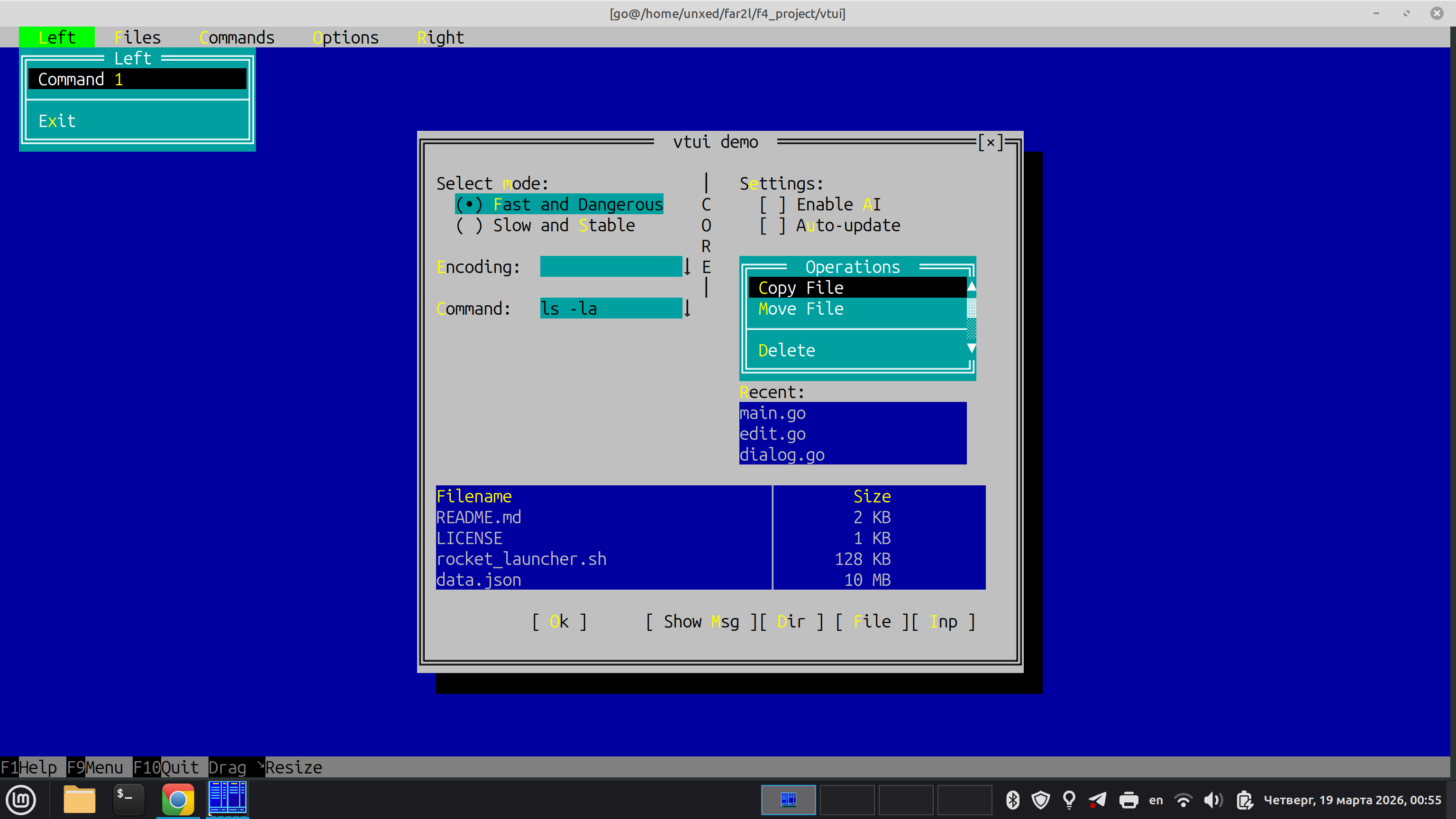
A Stateful, Desktop-Class TUI Framework for Go
vtui is a modern, cross-platform Terminal User Interface (TUI) framework for Go. It is heavily inspired by classic desktop UI paradigms—specifically Turbo Vision (Borland) and the Far Manager internal UI kit.
Unlike modern web-inspired TUI libraries that use Flexbox or Grid layouts, vtui is designed from the ground up for building complex, stateful applications: file managers, database clients, IDEs, and heavy-duty text editors.
Why vtui? (Comparison with tcell/tview)
While tcell is an excellent low-level terminal driver and tview is a great high-level component library, vtui is built with a fundamentally different philosophy:
| Feature | tcell + tview / cview | vtui (this project) |
|---|---|---|
| Abstractions | Driver + Widgets. Low-level canvas with Flexbox-like layout containers. | Application Framework. Full-featured OOP hierarchy (Dialogs, Menus, Focus cycles). |
| Layout Mode | Flexbox/Grid. Modern web-like proportions. | GrowMode (Turbo Vision style). "Rubber" layout with anchors, perfect for pixel-perfect TUI dialogs. |
| Input | Standard Terminfo-based mapping. | vtinput integration. Native support for Kitty/Win32 protocols (distinguishes Ctrl+Enter, Shift+Tab, etc.). |
| Rendering | Full-widget declarative redraw. | ScreenBuf + ShadowBuf. Bitwise diffing. Only changed cells are sent via minimal ANSI sequences. |
| Memory/GC | Standard Go allocations during redraws. | Zero-allocation rendering. Designed to stay GC-silent during the Flush() cycle to eliminate micro-stutters. |
| Input Lag | Standard parsing (can be sensitive to fast bursts). | Event Draining. Optimized for "instant" feel and bracketed paste without flickering. |
When to use vtui:
- You are building a heavy-duty tool where the user spends hours (File Manager, Spreadsheet, Hex Editor).
- You need perfect keyboard support (all modifiers, key-up/key-down events).
- You want the classic UX of Far Manager or Turbo Vision (Movable Windows, Modal Dialogs, Dropdown Menus).
- You need an application architecture that manages Z-ordering and focus cycles automatically.
Core Architecture
1. The Screen Buffer (ScreenBuf)
At the lowest level, vtui uses a strict double-buffering approach.
- The application logic draws to a logical grid of
CharInfocells (which hold 24-bit TrueColor attributes and Unicode characters). - When
Flush()is called,vtuicompares the logical buffer with a "shadow" buffer representing the physical terminal state. - It generates and writes the absolute minimum ANSI escape sequences needed to transition the terminal to the new state. This step is allocation-free.
2. The Frame Manager (FrameManager)
The heart of vtui. It manages a stack (Z-order) of Frame objects.
- Desktop: The bottom layer.
- Panels/Windows: User-defined workspaces.
- Dialogs: Modal popups that trap focus.
- Menus: Context menus or dropdowns that automatically close when losing focus.
The
FrameManagerroutesvtinput.InputEvents to the top-most active frame, handles background repainting viaSaveScreen(saving the content under a dialog to restore them instantly when it closes), and manages global components like theMenuBarandStatusLine.
3. GrowMode Layout
Instead of containers and flex-ratios, widgets within a Dialog are positioned using absolute coordinates and GrowMode flags.
If a dialog is resized, a widget can:
GrowNone: Stay exactly where it is.GrowHiX: Stretch its right edge (e.g., anEditfield expanding to fill width).GrowLoX | GrowHiX | GrowLoY | GrowHiY: Keep its relative distance from the bottom-right corner (e.g., an "OK" button anchored to the bottom).
Built-in Widgets
vtui comes with a standard library of controls that look and feel exactly like Far Manager:
Dialog,BorderedFrame(Single/Double line Win32-style boxes)Button,Checkbox,RadioButtonEdit(Single-line input with scrolling, history, password masking, and text selection)ListBox,ComboBoxTable(Multi-column list with alignment and scrollbars)VMenu(Context menus),MenuBar(Top-level dropdown menus)KeyBar(F1-F12 function key hints at the bottom),StatusLine- Common Dialogs:
ShowMessage,InputBox,SelectFileDialog,SelectDirDialog
Visual Integrity & Testing
vtui uses an automated Layout Validator to ensure that all dialogs follow strict design guidelines: no overlapping elements, proper spacing ("air"), and correct padding from window borders. Every new dialog or window component must include a unit test that calls vtui.AssertLayout. See UI_TESTING.md for detailed instructions and test boilerplate.
Quick Start Example
package main

import (
	"os"
	"github.com/unxed/vtinput"
	"github.com/unxed/vtui"
	"golang.org/x/term"
)

func main() {
	// 1. Enable advanced terminal input
	restore, _ := vtinput.Enable()
	defer restore()

	// 2. Initialize the Screen Buffer
	width, height, _ := term.GetSize(int(os.Stdin.Fd()))
	scr := vtui.NewScreenBuf()
	scr.AllocBuf(width, height)

	// 3. Boot the Frame Manager
	vtui.FrameManager.Init(scr)
	vtui.FrameManager.Push(vtui.NewDesktop())

	// 4. Create a Dialog
	dlg := vtui.NewDialog(0, 0, 40, 10, " Hello vtui ")
	dlg.Center(width, height)
	dlg.ShowClose = true

	// Add an Edit field
	edit := vtui.NewEdit(dlg.X1+2, dlg.Y1+3, 36, "Type here...")
	dlg.AddItem(vtui.NewLabel(dlg.X1+2, dlg.Y1+2, "&Name:", edit))
	dlg.AddItem(edit)

	// Add an OK button
	btn := vtui.NewButton(dlg.X1+16, dlg.Y1+7, "&Ok")
	btn.OnClick = func() {
		vtui.ShowMessage(" Result ", "You typed:\n"+edit.GetText(), []string{"&Close"})
	}
	dlg.AddItem(btn)

	vtui.FrameManager.Push(dlg)

	// 5. Start the event loop
	vtui.FrameManager.Run()
}
Demo app
The repository includes a demo app:
go run ./cmd/test-app
 Documentation

Documentation

Index 
- Constants
- Variables
- func AddStrings(m map[string]string)
- func AssertLayout(t interface{ ... }, c Container)
- func CalcScrollBar(length, topItem, itemsCount int) (caretPos, caretLength int)
- func CleanupStderrLog()
- func ConfigDiskLogging(enabled bool)
- func DebugLog(format string, a ...any)
- func DimColor(attr uint64) uint64
- func DrawScrollBar(scr *ScreenBuf, x, y, length int, topItem, itemsCount int, attr uint64) bool
- func DumpLogsToFile(filename string)
- func ExtractHotkey(s string) rune
- func Far2lInteract(stk *vtinput.Far2lStack, wait bool) *vtinput.Far2lStack
- func GetClipboard() string
- func GetCurrentLogs() []string
- func GetFar2lClipboard() (string, bool)
- func GetIndexBack(attr uint64) uint8
- func GetIndexFore(attr uint64) uint8
- func GetOSClipboard() string
- func GetRGBBack(attr uint64) uint32
- func GetRGBFore(attr uint64) uint32
- func GetVersionInfo() string
- func MathRound(x, y uint64) uint64
- func Max(a, b uint64) uint64
- func Min(a, b uint64) uint64
- func Msg(key string) string
- func ParseAmpersandString(s string) (clean string, hotkey rune, hotkeyPos int)
- func PrepareTerminal() (func(), error)
- func RecordCrash(panicVal any, stack []byte) string
- func RecordEvent(ev string)
- func RedirectStderr(f *os.File) error
- func RegisterHighlighter(p HighlighterProvider)
- func Resume() error
- func RunGogpuHost(cols, rows int, setupApp func()) error
- func RunInGUIWindow(cols, rows int, backend string, setupApp func()) error
- func SanitizeRune(r rune) (rune, int)
- func SetAltScreen(enable bool)
- func SetClipboard(text string)
- func SetDefaultPalette()
- func SetFar2lClipboard(text string) bool
- func SetIndexBack(attr uint64, idx uint8) uint64
- func SetIndexBoth(attr uint64, idxFore, idxBack uint8) uint64
- func SetIndexFore(attr uint64, idx uint8) uint64
- func SetOSClipboard(text string) bool
- func SetRGBBack(attr uint64, rgb uint32) uint64
- func SetRGBBoth(attr uint64, rgbFore uint32, rgbBack uint32) uint64
- func SetRGBFore(attr uint64, rgb uint32) uint64
- func SetupStderrLog()
- func ShowToast(msg string, dur time.Duration)
- func Suspend()
- func TruncateMiddle(s string, maxLen int) string
- func ValidateLayout(c Container) []error
- func WrapText(text string, maxWidth int) []string
- type Alignment
- type AnsiRenderer
- type AppScreen
- type AutoCompleteMenu
- func (ac *AutoCompleteMenu) HasMatches() bool
- func (ac *AutoCompleteMenu) HasShadow() bool
- func (ac *AutoCompleteMenu) ProcessKey(e *vtinput.InputEvent) bool
- func (ac *AutoCompleteMenu) ProcessMouse(e *vtinput.InputEvent) bool
- func (ac *AutoCompleteMenu) SetPosition(x1, y1, x2, y2 int)
- func (ac *AutoCompleteMenu) Show(scr *ScreenBuf)
- func (ac *AutoCompleteMenu) UpdateMatches()
- type Bar
- type BaseFrame
- func (bf *BaseFrame) Close()
- func (bf *BaseFrame) GetKeyLabels() *KeySet
- func (bf *BaseFrame) GetMenuBar() *MenuBar
- func (bf *BaseFrame) GetProgress() int
- func (bf *BaseFrame) GetTitle() string
- func (bf *BaseFrame) GetWindowNumber() int
- func (bf *BaseFrame) HasShadow() bool
- func (bf *BaseFrame) IsAttentionSuppressed() bool
- func (bf *BaseFrame) IsBusy() bool
- func (bf *BaseFrame) IsDone() bool
- func (bf *BaseFrame) IsModal() bool
- func (bf *BaseFrame) RequestFocus() bool
- func (bf *BaseFrame) ResizeConsole(w, h int)
- func (bf *BaseFrame) SetExitCode(code int)
- func (bf *BaseFrame) SetWindowNumber(n int)
- type BaseWindow
- func (bw *BaseWindow) AddItem(item UIElement)
- func (bw *BaseWindow) AddLink(src, target UIElement, action LinkAction)
- func (bw *BaseWindow) Center(scrW, scrH int)
- func (bw *BaseWindow) ChangeSize(nw, nh int)
- func (bw *BaseWindow) GetChildren() []UIElement
- func (bw *BaseWindow) GetData(record any)
- func (bw *BaseWindow) GetFocusedItem() UIElement
- func (bw *BaseWindow) GetTitle() string
- func (bw *BaseWindow) HandleBroadcast(cmd int, args any) bool
- func (bw *BaseWindow) HandleCommand(cmd int, args any) bool
- func (bw *BaseWindow) HasShadow() bool
- func (bw *BaseWindow) MoveRelative(dx, dy int)
- func (bw *BaseWindow) ProcessKey(e *vtinput.InputEvent) bool
- func (bw *BaseWindow) ProcessMouse(e *vtinput.InputEvent) bool
- func (bw *BaseWindow) ResizeConsole(w, h int)
- func (bw *BaseWindow) SetData(record any)
- func (bw *BaseWindow) SetFocus(f bool)
- func (bw *BaseWindow) SetFocusedItem(item UIElement)
- func (bw *BaseWindow) Show(scr *ScreenBuf)
- func (bw *BaseWindow) ToggleZoom()
- func (bw *BaseWindow) Valid(cmd int) bool
- type BorderedFrame
- type Button
- type CellColorableRow
- type CharInfo
- func FillCharInfo(target []CharInfo, data []byte, attr uint64) []CharInfo
- func FillCharInfoWithSelection(target []CharInfo, data []byte, defaultAttr, selAttr uint64, ...) []CharInfo
- func RunesToCharInfo(runes []rune, attr uint64) []CharInfo
- func StringToCharInfo(s string, attr uint64) []CharInfo
- func StringToCharInfoHighlighted(s string, normalAttr, highAttr uint64) ([]CharInfo, rune)
- type CheckGroup
- type Checkbox
- func (cb *Checkbox) DisplayObject(scr *ScreenBuf)
- func (cb *Checkbox) GetData() any
- func (cb *Checkbox) ProcessKey(e *vtinput.InputEvent) bool
- func (cb *Checkbox) ProcessMouse(e *vtinput.InputEvent) bool
- func (cb *Checkbox) SetData(val any)
- func (cb *Checkbox) Show(scr *ScreenBuf)
- func (cb *Checkbox) Toggle()
- type ClipboardAccessManager
- type ColorProfile
- type ComboBox
- func (cb *ComboBox) DisplayObject(scr *ScreenBuf)
- func (cb *ComboBox) Open()
- func (cb *ComboBox) ProcessKey(e *vtinput.InputEvent) bool
- func (cb *ComboBox) ProcessMouse(e *vtinput.InputEvent) bool
- func (cb *ComboBox) SetDisabled(d bool)
- func (cb *ComboBox) SetFocus(f bool)
- func (cb *ComboBox) SetPosition(x1, y1, x2, y2 int)
- func (cb *ComboBox) Show(scr *ScreenBuf)
- func (cb *ComboBox) WantsChars() bool
- type CommandHandler
- type CommandSet
- type Container
- type Coord
- type CursorShape
- type DataControl
- type Desktop
- func (d *Desktop) Close()
- func (d *Desktop) GetProgress() int
- func (d *Desktop) GetTitle() string
- func (d *Desktop) GetType() FrameType
- func (d *Desktop) GetWindowNumber() int
- func (d *Desktop) HandleCommand(cmd int, args any) bool
- func (d *Desktop) HasShadow() bool
- func (d *Desktop) IsBusy() bool
- func (d *Desktop) IsDone() bool
- func (d *Desktop) IsModal() bool
- func (d *Desktop) ProcessKey(e *vtinput.InputEvent) bool
- func (d *Desktop) ProcessMouse(e *vtinput.InputEvent) bool
- func (d *Desktop) RequestFocus() bool
- func (d *Desktop) ResizeConsole(w, h int)
- func (d *Desktop) SetExitCode(code int)
- func (d *Desktop) SetWindowNumber(n int)
- func (d *Desktop) Show(scr *ScreenBuf)
- type DynamicText
- type Edit
- func (e *Edit) AddHistory(text string)
- func (e *Edit) ClearSelection()
- func (e *Edit) DeleteBlock()
- func (e *Edit) DisplayObject(scr *ScreenBuf)
- func (e *Edit) GetData() any
- func (e *Edit) GetText() string
- func (e *Edit) HistoryDown()
- func (e *Edit) HistoryUp()
- func (e *Edit) InsertString(text string)
- func (e *Edit) OpenHistory()
- func (e *Edit) ProcessKey(event *vtinput.InputEvent) bool
- func (e *Edit) ProcessMouse(ev *vtinput.InputEvent) bool
- func (e *Edit) SelectAll()
- func (e *Edit) SetData(val any)
- func (e *Edit) SetText(text string)
- func (e *Edit) Show(scr *ScreenBuf)
- func (e *Edit) Valid(cmd int) bool
- func (e *Edit) WantsChars() bool
- type FSItem
- type FSProvider
- type FilterValidator
- type FocusContainer
- type Frame
- type FrameType
- type GogpuHost
- type GogpuRenderer
- type Group
- func (g *Group) ActivateHotkey(hk rune) bool
- func (g *Group) AddItem(item UIElement)
- func (g *Group) AddLink(src, target UIElement, action LinkAction)
- func (g *Group) CanFocus() bool
- func (g *Group) DisplayObject(scr *ScreenBuf)
- func (g *Group) GetChildren() []UIElement
- func (g *Group) GetData(record any)
- func (g *Group) GetFocusedItem() UIElement
- func (g *Group) HandleBroadcast(cmd int, args any) bool
- func (g *Group) MoveRelative(dx, dy int)
- func (g *Group) OnElementChange(el UIElement)
- func (g *Group) ProcessKey(e *vtinput.InputEvent) bool
- func (g *Group) ProcessMouse(e *vtinput.InputEvent) bool
- func (g *Group) Resize(dx, dy int)
- func (g *Group) SetData(record any)
- func (g *Group) SetDisabled(d bool)
- func (g *Group) SetFocus(f bool)
- func (g *Group) SetFocusedItem(item UIElement)
- func (g *Group) Show(scr *ScreenBuf)
- func (g *Group) TriggerDefaultAction() bool
- func (g *Group) Valid(cmd int) bool
- type GroupBox
- type GrowMode
- type HBoxLayout
- type HelpEngine
- type HelpLink
- type HelpTopic
- type HelpVFS
- type HelpView
- type Highlighter
- type HighlighterProvider
- type HistoryProvider
- type IntRangeValidator
- type KeyBar
- type KeyBarLabels
- type KeySet
- type LangState
- type LayoutError
- type LayoutItem
- type LinkAction
- type ListBox
- type LookupValidator
- type Margins
- type MaskValidator
- type MenuBar
- func (mb *MenuBar) ActivateSubMenu(index int)
- func (mb *MenuBar) DisplayObject(scr *ScreenBuf)
- func (mb *MenuBar) GetItemX(index int) int
- func (mb *MenuBar) HandleCommand(cmd int, args any) bool
- func (mb *MenuBar) ProcessKey(e *vtinput.InputEvent) bool
- func (mb *MenuBar) ProcessMouse(e *vtinput.InputEvent) bool
- func (mb *MenuBar) SetSubMenu(f Frame)
- func (mb *MenuBar) Show(scr *ScreenBuf)
- type MenuBarItem
- type MenuItem
- type MultiColSelectableRow
- type OctalValidator
- type Painter
- func (p *Painter) DrawBox(x1, y1, x2, y2 int, attr uint64, boxType int)
- func (p *Painter) DrawCloseButton(x2, y1 int, offset int, attr uint64)
- func (p *Painter) DrawControlText(x, y int, text string, normAttr, highAttr uint64)
- func (p *Painter) DrawHighlightedText(x, y int, cleanText string, hkPos int, normAttr, highAttr uint64)
- func (p *Painter) DrawLine(x1, y1, x2, y2 int, char rune, attr uint64, connectLeft, connectRight bool)
- func (p *Painter) DrawString(x, y int, text string, attr uint64)
- func (p *Painter) DrawStringHighlighted(x, y int, text string, normAttr, highAttr uint64)
- func (p *Painter) DrawTitle(x1, y1, x2 int, title string, attr uint64)
- func (p *Painter) Fill(x1, y1, x2, y2 int, char rune, attr uint64)
- type ProgressBar
- type RadioGroup
- type Rect
- type RegexValidator
- type ScreenBuf
- func (s *ScreenBuf) AllocBuf(width, height int)
- func (s *ScreenBuf) ApplyColor(x1, y1, x2, y2 int, attributes uint64)
- func (s *ScreenBuf) ApplyShadow(x1, y1, x2, y2 int)
- func (s *ScreenBuf) Dump(w io.Writer)
- func (s *ScreenBuf) FillRect(x1, y1, x2, y2 int, char rune, attributes uint64)
- func (s *ScreenBuf) Flush()
- func (s *ScreenBuf) GetCell(x, y int) CharInfo
- func (s *ScreenBuf) GetCursorPos() (int, int)
- func (s *ScreenBuf) HardReset()
- func (s *ScreenBuf) Height() int
- func (s *ScreenBuf) PopClipRect()
- func (s *ScreenBuf) PushClipRect(x1, y1, x2, y2 int)
- func (s *ScreenBuf) SetCursorPos(x, y int)
- func (s *ScreenBuf) SetCursorShape(shape CursorShape)
- func (s *ScreenBuf) SetCursorVisible(visible bool)
- func (s *ScreenBuf) SetOverlayMode(overlay bool)
- func (s *ScreenBuf) Width() int
- func (s *ScreenBuf) Write(x, y int, text []CharInfo)
- type ScreenObject
- func (so *ScreenObject) CanFocus() bool
- func (so *ScreenObject) FireAction(callback func(), args any) bool
- func (so *ScreenObject) GetFocusLink() UIElement
- func (so *ScreenObject) GetGrowMode() GrowMode
- func (so *ScreenObject) GetHelp() string
- func (so *ScreenObject) GetHotkey() rune
- func (so *ScreenObject) GetId() string
- func (so *ScreenObject) GetKeyLabels() *KeySet
- func (so *ScreenObject) GetMenuBar() *MenuBar
- func (so *ScreenObject) GetOwner() CommandHandler
- func (so *ScreenObject) GetPosition() (int, int, int, int)
- func (so *ScreenObject) GetStateAttr(normIdx, focIdx int) uint64
- func (so *ScreenObject) GetStateAttrs(normIdx, focIdx, highIdx, focHighIdx int) (uint64, uint64)
- func (so *ScreenObject) GetText() string
- func (so *ScreenObject) HandleBroadcast(cmd int, args any) bool
- func (so *ScreenObject) HandleCommand(cmd int, args any) bool
- func (so *ScreenObject) HasShadow() bool
- func (so *ScreenObject) Hide(scr *ScreenBuf)
- func (so *ScreenObject) HitTest(x, y int) bool
- func (so *ScreenObject) IsDisabled() bool
- func (so *ScreenObject) IsFocused() bool
- func (so *ScreenObject) IsLocked() bool
- func (so *ScreenObject) IsVisible() bool
- func (so *ScreenObject) Lock()
- func (so *ScreenObject) NotifyChange()
- func (so *ScreenObject) ProcessKey(key *vtinput.InputEvent) bool
- func (so *ScreenObject) ProcessMouse(mouse *vtinput.InputEvent) bool
- func (so *ScreenObject) ResizeConsole()
- func (so *ScreenObject) SetCanFocus(c bool)
- func (so *ScreenObject) SetDisabled(d bool)
- func (so *ScreenObject) SetFocus(f bool)
- func (so *ScreenObject) SetGrowMode(gm GrowMode)
- func (so *ScreenObject) SetHelp(topic string)
- func (so *ScreenObject) SetId(id string)
- func (so *ScreenObject) SetOwner(owner CommandHandler)
- func (so *ScreenObject) SetPosition(x1, y1, x2, y2 int)
- func (so *ScreenObject) SetText(s string)
- func (so *ScreenObject) SetVisible(v bool)
- func (so *ScreenObject) Show(scr *ScreenBuf)
- func (so *ScreenObject) ShowHelp()
- func (so *ScreenObject) Unlock()
- func (so *ScreenObject) Valid(cmd int) bool
- func (so *ScreenObject) WantsChars() bool
- type ScrollBar
- type ScrollView
- func (sv *ScrollView) DrawScrollBar(scr *ScreenBuf)
- func (sv *ScrollView) EnsureVisible()
- func (sv *ScrollView) GetClickIndex(my int) int
- func (sv *ScrollView) GetContentWidth() int
- func (sv *ScrollView) HandleKey(e *vtinput.InputEvent) bool
- func (sv *ScrollView) HandleMouse(e *vtinput.InputEvent) bool
- func (sv *ScrollView) HandleMouseScroll(e *vtinput.InputEvent) bool
- func (sv *ScrollView) HandleNavKey(vk uint16) bool
- func (sv *ScrollView) InitScrollBar(owner CommandHandler)
- func (sv *ScrollView) MoveRelative(delta int) bool
- func (sv *ScrollView) ScrollBy(delta int)
- func (sv *ScrollView) SetPosition(x1, y1, x2, y2 int)
- func (sv *ScrollView) SetSelectPos(pos int)
- type SelectableRow
- type Separator
- type SmallRect
- type StatusItem
- type StatusLine
- type SurfaceRenderer
- type Table
- type TableColumn
- type TableRow
- type TaskContext
- type Text
- type Toast
- type TreeNode
- type TreeView
- type UIElement
- type VBoxLayout
- type VMenu
- func (m *VMenu) AddItem(item MenuItem)
- func (m *VMenu) AddSeparator()
- func (m *VMenu) ClearDone()
- func (m *VMenu) Close()
- func (m *VMenu) DisplayObject(scr *ScreenBuf)
- func (m *VMenu) GetItemCount() int
- func (m *VMenu) GetProgress() int
- func (m *VMenu) GetTitle() string
- func (m *VMenu) GetType() FrameType
- func (m *VMenu) GetWindowNumber() int
- func (m *VMenu) HasShadow() bool
- func (m *VMenu) IsBusy() bool
- func (m *VMenu) IsDone() bool
- func (m *VMenu) IsModal() bool
- func (m *VMenu) ProcessKey(e *vtinput.InputEvent) bool
- func (m *VMenu) ProcessMouse(e *vtinput.InputEvent) bool
- func (m *VMenu) RequestFocus() bool
- func (m *VMenu) ResizeConsole(w, h int)
- func (m *VMenu) SetExitCode(code int)
- func (m *VMenu) SetWindowNumber(n int)
- func (m *VMenu) Show(scr *ScreenBuf)
- type VText
- type Validator
- type WaylandHost
- func (h *WaylandHost) Axis(w *window.Widget, i *window.Input, time uint32, axis uint32, value float32)
- func (h *WaylandHost) AxisDiscrete(w *window.Widget, input *window.Input, axis uint32, discrete int32)
- func (h *WaylandHost) AxisSource(w *window.Widget, i *window.Input, source uint32)
- func (h *WaylandHost) AxisStop(w *window.Widget, i *window.Input, time uint32, axis uint32)
- func (h *WaylandHost) Button(w *window.Widget, input *window.Input, time uint32, button uint32, ...)
- func (h *WaylandHost) Enter(w *window.Widget, input *window.Input, x float32, y float32)
- func (h *WaylandHost) Focus(w *window.Window, device *window.Input)
- func (h *WaylandHost) Key(win *window.Window, input *window.Input, time uint32, key uint32, ...)
- func (h *WaylandHost) Leave(w *window.Widget, input *window.Input)
- func (h *WaylandHost) Motion(w *window.Widget, input *window.Input, time uint32, x float32, y float32) int
- func (h *WaylandHost) PointerFrame(w *window.Widget, i *window.Input)
- func (h *WaylandHost) Redraw(widget *window.Widget)
- func (h *WaylandHost) Resize(widget *window.Widget, width int32, height int32, pwidth int32, pheight int32)
- func (h *WaylandHost) TouchCancel(w *window.Widget, width int32, height int32)
- func (h *WaylandHost) TouchDown(w *window.Widget, i *window.Input, serial uint32, time uint32, id int32, ...)
- func (h *WaylandHost) TouchFrame(w *window.Widget, i *window.Input)
- func (h *WaylandHost) TouchMotion(w *window.Widget, i *window.Input, time uint32, id int32, x float32, y float32)
- func (h *WaylandHost) TouchUp(w *window.Widget, i *window.Input, serial uint32, time uint32, id int32)
- type WaylandRenderer
- type Window
- func InputBox(title, prompt, defaultText string, onOk func(string)) *Window
- func InputBoxOn(anchor Frame, title, prompt, defaultText string, onOk func(string)) *Window
- func NewCenteredDialog(width, height int, title string) *Window
- func NewDialog(x1, y1, x2, y2 int, title string) *Window
- func NewWindow(x1, y1, x2, y2 int, title string) *Window
- func SelectDirDialog(title string, initialPath string, vfs FSProvider) *Window
- func SelectFileDialog(title string, initialPath string, vfs FSProvider, onOk func(string)) *Window
- func ShowMessage(title string, text string, buttons []string) *Window
- func ShowMessageOn(anchor Frame, title string, text string, buttons []string) *Window
- type X11Host
- type X11Renderer
- type XLatLayoutConfig
- type Xlator
Constants 
const (
	IsFgRGB uint64 = 0x0100 // Flag: Foreground is 24-bit RGB. If false, it's an 8-bit index.
	IsBgRGB uint64 = 0x0200 // Flag: Background is 24-bit RGB. If false, it's an 8-bit index.

	ForegroundIntensity uint64 = 0x0008 // Retained for SGR Bold style
	BackgroundIntensity uint64 = 0x0080 // Retained for style flags

	ExplicitLineBreak uint64 = 0x0400 // Don't concatenate next line if this char is last
	ImportantLineChar uint64 = 0x0800 // Dont skip this character when recomposing

	ForegroundDim       uint64 = 0x1000 // Extra flag for dim text
	CommonLvbStrikeout  uint64 = 0x2000 // Strikeout.
	CommonLvbReverse    uint64 = 0x4000 // Reverse fore/back ground attribute.
	CommonLvbUnderscore uint64 = 0x8000 // Underscore.

	// Deprecated aliases for compatibility
	ForegroundTrueColor = IsFgRGB
	BackgroundTrueColor = IsBgRGB
)
Basic color and attribute constants (matching WinCompat.h)
const (
	CmValid         = iota // 0
	CmQuit                 // Выход из приложения
	CmOK                   // Подтверждение (ОК)
	CmCancel               // Отмена
	CmYes                  // Да
	CmNo                   // Нет
	CmDefault              // Действие по умолчанию (Enter в диалоге)
	CmClose                // Закрыть окно
	CmZoom                 // Развернуть/свернуть окно (F5)
	CmResize               // Изменить размер
	CmNext                 // Следующее окно
	CmPrev                 // Предыдущее окно
	CmHelp                 // Вызов справки (F1)
	CmReceivedFocus        // Фрейм получил focus
	CmReleasedFocus        // Фрейм потерял focus

	CmMenuLeft  = 302
	CmMenuRight = 303
	CmMenuClose = 304

	// CmApp is the starting offset for application-specific commands.
	CmApp = 1000
)
Стандартные идентификаторы команд, общие для всего фреймворка.
const (
	ColMenuText = iota
	ColMenuSelectedText
	ColMenuHighlight
	ColMenuSelectedHighlight
	ColMenuBox
	ColMenuTitle

	ColTableText
	ColTableSelectedText
	ColTableTitle
	ColTableBox
	ColTableColumnTitle

	ColDialogText
	ColDialogHighlightText
	ColDialogBox
	ColDialogBoxTitle
	ColDialogHighlightBoxTitle
	ColDialogEdit
	ColDialogButton
	ColDialogSelectedButton
	ColDialogHighlightButton
	ColDialogHighlightSelectedButton

	ColDesktopBackground
	ColDialogEditUnchanged
	ColDialogEditSelected

	ColKeyBarNum
	ColKeyBarText
	ColMenuBarItem
	ColMenuBarSelected
	ColMenuBarHighlight
	ColMenuBarSelectedHighlight
	ColShadow
	ColHelpText
	ColHelpBold
	ColHelpLink
	ColHelpSelectedLink
	ColHelpBox

	// Helper for array size
	LastPaletteColor
)
Palette indices (mapped to far2l's enum PaletteColors)
const (
	ScrollUpArrow    = '▲' // 0x25B2
	ScrollDownArrow  = '▼' // 0x25BC
	ScrollBlockLight = '░' // 0x2591 (BS_X_B0)
	ScrollBlockDark  = '▓' // 0x2593 (BS_X_B2)
)
Symbols for the scrollbar, similar to Oem2Unicode from far2l
const (
	NoBox = iota
	SingleBox
	DoubleBox
)
BoxType defines the frame style.
const (
	KeyPress        = 2
	KeyRelease      = 3
	ButtonPress     = 4
	ButtonRelease   = 5
	MotionNotify    = 6
	Expose          = 12
	ConfigureNotify = 22
	ClientMessage   = 33

	KeyPressMask        = 1 << 0
	KeyReleaseMask      = 1 << 1
	ButtonPressMask     = 1 << 2
	ButtonReleaseMask   = 1 << 3
	PointerMotionMask   = 1 << 6
	ExposureMask        = 1 << 15
	StructureNotifyMask = 1 << 17

	XIMPreeditNothing = 0x0010
	XIMStatusNothing  = 0x0400
)
X11 Constants
const WideCharFiller = ^uint64(0)
WideCharFiller is a special marker indicating that this cell in ScreenBuf is occupied by the right half of a full-width character (like CJK or Emoji).
Variables 
var (
	GlobalClipboardAccessManager ClipboardAccessManager
	Far2lEnabled                 bool
)
var (
	AppName = "vtui_app"
)
var CrashDirBase string
var DefaultXLatConfigs = []XLatLayoutConfig{
	{
		Name:  "ru:qwerty-йцукен",
		Latin: "qwertyuiop[]asdfghjkl;'zxcvbnm,./QWERTYUIOP{}ASDFGHJKL:\"ZXCVBNM<>?`~@#$^&|",
		Local: "йцукенгшщзхъфывапролджэячсмитьбю.ЙЦУКЕНГШЩЗХЪФЫВАПРОЛДЖЭЯЧСМИТЬБЮ,ёЁ\"№;:?/",

		AfterLatin: map[rune]rune{'/': '.', '?': ','},
		AfterLocal: map[rune]rune{'.': '/', ',': '?'},
	},
}
DefaultXLatConfigs содержит встроенные раскладки по умолчанию. В будущем эту структуру можно будет дополнять из внешнего ini-файла.
var FrameManager = &frameManager{}
FrameManager is the global instance of the frame manager.
var GetTerminalSize = func() (int, int, error) {
	w, h, err := term.GetSize(int(os.Stdout.Fd()))
	if err != nil {
		w, h, err = term.GetSize(int(os.Stdin.Fd()))
	}
	return w, h, err
}
GetTerminalSize is a variable to allow mocking terminal size in tests.
var (
	ManageCursorStyle bool = true
)
var Palette = make([]uint64, LastPaletteColor)
Palette holds the current color attributes for all UI elements.
var ThemePalette [256]uint32
ThemePalette is the host application's 256-color palette for UI indexing.
var UIStrings = struct {
	ButtonBrackets [2]rune
	CloseBrackets  [2]rune
	CloseSymbol    rune
	ZoomSymbol     rune
	DefaultHelp    string
}{
	ButtonBrackets: [2]rune{'[', ']'},
	CloseBrackets:  [2]rune{'[', ']'},
	CloseSymbol:    '×',
	ZoomSymbol:     '↕',
	DefaultHelp:    "Contents",
}
UIStrings holds default strings used by the UI framework itself. The application can overwrite these during initialization for localization.
var XTerm256Palette = [256]uint32{}/* 256 elements not displayed */
XTerm256Palette is the standard 256-color lookup table.
Functions 
func AddStrings 
AddStrings allows an application to add or override strings in the UI.
func AssertLayout 
AssertLayout is a helper for tests to panic or fail if layout is invalid.
func CalcScrollBar 
CalcScrollBar calculates the position and size of the scrollbar thumb. Returns caretPos (offset from the top arrow, from 0) and caretLength (thumb size).
func CleanupStderrLog 
func CleanupStderrLog()
CleanupStderrLog deletes the stderr log file if it is empty.
func ConfigDiskLogging 
func ConfigDiskLogging(enabled bool)
ConfigDiskLogging allows enabling or disabling writing to debug.log on disk. If disabled, logs are still kept in the in-memory ring buffer for crash reports.
func DebugLog 
DebugLog writes a timestamped message to debug.log file. If the file exists at the start of the session, it is rotated (up to 3 files: debug.log, debug.1.log, debug.2.log).
func DimColor 
DimColor reduces the brightness of the foreground color to visually indicate a disabled state.
func DrawScrollBar 
DrawScrollBar draws a vertical scrollbar. x, y - coordinates of the top character (up arrow). length - total scrollbar length (including 2 arrows). topItem - index of the first visible element. itemsCount - total number of elements in the list. attr - color attribute for drawing.
func DumpLogsToFile 
func DumpLogsToFile(filename string)
DumpLogsToFile exports memory logs to a file if a test fails.
func ExtractHotkey 
ExtractHotkey quickly finds the hotkey rune in a string without allocating memory.
func Far2lInteract 
func Far2lInteract(stk *vtinput.Far2lStack, wait bool) *vtinput.Far2lStack
Far2lInteract sends a request to the terminal emulator and optionally waits for a reply.
func GetClipboard 
func GetClipboard() string
GetClipboard retrieves text from the system clipboard.
func GetCurrentLogs 
func GetCurrentLogs() []string
func GetFar2lClipboard 
GetFar2lClipboard attempts to read the clipboard using far2l extensions.
func GetIndexBack 
GetIndexBack extracts the 8-bit background index from attributes.
func GetIndexFore 
func GetOSClipboard 
func GetOSClipboard() string
GetOSClipboard bypasses terminal extensions and reads directly from the OS clipboard.
func GetRGBBack 
GetRGBBack extracts 24-bit RGB background color from attributes (bits 40-63).
func GetRGBFore 
GetRGBFore extracts 24-bit RGB text color from attributes (bits 16-39).
func GetVersionInfo 
func GetVersionInfo() string
GetVersionInfo returns a string containing Git revision and Go version.
func ParseAmpersandString 
StringToCharInfo converts a string into a slice of CharInfo cells, correctly handling double-width characters by inserting WideCharFillers. It currently ignores zero-width characters to keep cell alignment strict. ParseAmpersandString parses a string with ampersands, removes utility &, processes && as &, and returns the clean string, the hotkey, and its position (in runes).
func PrepareTerminal 
func PrepareTerminal() (func(), error)
PrepareTerminal puts the terminal into raw mode, enables advanced input, and switches to the alternate screen buffer. Returns a restore function.
func RecordCrash 
RecordCrash writes the crash details and the in-memory log buffer to a file.
func RecordEvent 
func RecordEvent(ev string)
func RedirectStderr 
func RegisterHighlighter 
func RegisterHighlighter(p HighlighterProvider)
func Resume 
func Resume() error
Resume re-enables raw mode, advanced input, and returns to the alternate screen.
func RunGogpuHost 
func RunInGUIWindow 
RunInGUIWindow detects the available display server (Wayland or X11) and launches the TUI within a native graphical window. If backend is empty, it attempts X11 first (current default), then Wayland.
func SanitizeRune 
SanitizeRune ensures the rune is printable and handles its visual width.
func SetAltScreen 
func SetAltScreen(enable bool)
SetAltScreen allows the application to temporarily switch between the alternate and main screen buffers without leaving raw mode.
func SetClipboard 
func SetClipboard(text string)
SetClipboard copies text to the system clipboard.
func SetDefaultPalette 
func SetDefaultPalette()
SetDefaultPalette initializes the palette with standard Far Manager colors.
func SetFar2lClipboard 
func SetIndexBack 
SetIndexBack sets the 8-bit background index, clearing the IsBgRGB flag.
func SetIndexBoth 
SetIndexBoth sets both foreground and background 8-bit indices at once.
func SetIndexFore 
SetIndexFore sets the 8-bit foreground index, clearing the IsFgRGB flag.
func SetOSClipboard 
SetOSClipboard bypasses terminal extensions and writes directly to the OS clipboard.
func SetRGBBack 
SetRGBBack sets 24-bit RGB background color into attributes, adding BackgroundTrueColor flag.
func SetRGBBoth 
SetRGBBoth sets both RGB colors into attributes at once.
func SetRGBFore 
SetRGBFore sets 24-bit RGB text color into attributes, adding ForegroundTrueColor flag.
func SetupStderrLog 
func SetupStderrLog()
SetupStderrLog redirects standard error to a file in the crash directory. This allows capturing low-level Go runtime fatal errors (like Out Of Memory).
func ShowToast 
ShowToast displays a non-blocking popup message at the top of the screen that disappears after the duration.
func Suspend 
func Suspend()
Suspend fully restores the terminal state (exits raw mode, alternate screen, etc.). Useful when temporarily returning control to the shell or an external program.
func TruncateMiddle 
and replacing them with "...".
func ValidateLayout 
ValidateLayout checks a container for common TUI design mistakes.
Types 
type Alignment 
type Alignment int
Alignment defines how an element is positioned within its layout container.
type AnsiRenderer 
type AnsiRenderer struct {
	// contains filtered or unexported fields
}
AnsiRenderer реализует SurfaceRenderer через ESC-последовательности.
func (*AnsiRenderer) Flush 
func (r *AnsiRenderer) Flush()
func (*AnsiRenderer) Render 
func (r *AnsiRenderer) Render(buf, shadow []CharInfo, w, h int, force bool)
func (*AnsiRenderer) SetCursor 
func (r *AnsiRenderer) SetCursor(x, y int, vis bool, shape CursorShape)
func (*AnsiRenderer) SetPalette 
func (r *AnsiRenderer) SetPalette(pal *[256]uint32)
type AppScreen 
type AppScreen struct {
	Frames        []Frame
	CapturedFrame Frame
	Transparent   bool // Если true, под этим экраном будет рисоваться предыдущий
}
AppScreen represents an isolated workspace with its own frame stack.
func (*AppScreen) GetProgress 
func (*AppScreen) NeedsAttention 
type AutoCompleteMenu 
type AutoCompleteMenu struct {
	Window
	Edit *Edit

	Matches []string
	// contains filtered or unexported fields
}
func NewAutoCompleteMenu 
func NewAutoCompleteMenu(edit *Edit) *AutoCompleteMenu
func (*AutoCompleteMenu) HasMatches 
func (ac *AutoCompleteMenu) HasMatches() bool
func (*AutoCompleteMenu) HasShadow 
func (ac *AutoCompleteMenu) HasShadow() bool
func (*AutoCompleteMenu) ProcessKey 
func (ac *AutoCompleteMenu) ProcessKey(e *vtinput.InputEvent) bool
func (*AutoCompleteMenu) ProcessMouse 
func (ac *AutoCompleteMenu) ProcessMouse(e *vtinput.InputEvent) bool
func (*AutoCompleteMenu) SetPosition 
func (ac *AutoCompleteMenu) SetPosition(x1, y1, x2, y2 int)
func (*AutoCompleteMenu) Show 
func (ac *AutoCompleteMenu) Show(scr *ScreenBuf)
func (*AutoCompleteMenu) UpdateMatches 
func (ac *AutoCompleteMenu) UpdateMatches()
type Bar 
type Bar struct {
	ScreenObject
}
Bar — базовый структурный примитив для однострочных горизонтальных панелей.
func (*Bar) DrawBackground 
DrawBackground заполняет всю полосу бара указанным атрибутом.
func (*Bar) SetPosition 
SetPosition переопределяет метод ScreenObject, чтобы гарантировать высоту в 1 строку.
type BaseFrame 
type BaseFrame struct {
	ScreenObject
	Done                bool
	ExitCode            int
	Modal               bool
	Number              int
	OnResult            func(int)
	Busy                bool
	AttentionSuppressed bool
}
BaseFrame provides a default implementation for the Frame interface. Other frames should embed this to avoid boilerplate.
func (*BaseFrame) GetKeyLabels 
func (*BaseFrame) GetMenuBar 
func (*BaseFrame) GetProgress 
func (*BaseFrame) GetWindowNumber 
func (*BaseFrame) IsAttentionSuppressed 
func (*BaseFrame) RequestFocus 
func (*BaseFrame) ResizeConsole 
func (*BaseFrame) SetExitCode 
func (*BaseFrame) SetWindowNumber 
type BaseWindow 
type BaseWindow struct {
	BaseFrame

	MinW        int
	MinH        int
	ShowClose   bool
	ShowZoom    bool
	SavedBounds *Rect
	// contains filtered or unexported fields
}
BaseWindow provides generic windowing logic (moving, resizing, focus cycle).
func NewBaseWindow 
func NewBaseWindow(x1, y1, x2, y2 int, title string) *BaseWindow
func (*BaseWindow) AddItem 
func (bw *BaseWindow) AddItem(item UIElement)
func (*BaseWindow) AddLink 
func (bw *BaseWindow) AddLink(src, target UIElement, action LinkAction)
AddLink delegates the automation link to the root group.
func (*BaseWindow) Center 
func (bw *BaseWindow) Center(scrW, scrH int)
func (*BaseWindow) ChangeSize 
func (bw *BaseWindow) ChangeSize(nw, nh int)
func (*BaseWindow) GetChildren 
func (bw *BaseWindow) GetChildren() []UIElement
func (*BaseWindow) GetData 
func (bw *BaseWindow) GetData(record any)
GetData populates a struct from UI elements using field names or `vtui` tags.
func (*BaseWindow) GetFocusedItem 
func (bw *BaseWindow) GetFocusedItem() UIElement
func (*BaseWindow) GetTitle 
func (bw *BaseWindow) GetTitle() string
func (*BaseWindow) HandleBroadcast 
func (bw *BaseWindow) HandleBroadcast(cmd int, args any) bool
func (*BaseWindow) HandleCommand 
func (bw *BaseWindow) HandleCommand(cmd int, args any) bool
HandleCommand implements Turbo Vision style command routing for Windows/Dialogs.
func (*BaseWindow) HasShadow 
func (bw *BaseWindow) HasShadow() bool
func (*BaseWindow) MoveRelative 
func (bw *BaseWindow) MoveRelative(dx, dy int)
func (*BaseWindow) ProcessKey 
func (bw *BaseWindow) ProcessKey(e *vtinput.InputEvent) bool
func (*BaseWindow) ProcessMouse 
func (bw *BaseWindow) ProcessMouse(e *vtinput.InputEvent) bool
func (*BaseWindow) ResizeConsole 
func (bw *BaseWindow) ResizeConsole(w, h int)
func (*BaseWindow) SetData 
func (bw *BaseWindow) SetData(record any)
SetData populates UI elements from a struct using field names or `vtui` tags.
func (*BaseWindow) SetFocus 
func (bw *BaseWindow) SetFocus(f bool)
func (*BaseWindow) SetFocusedItem 
func (bw *BaseWindow) SetFocusedItem(item UIElement)
func (*BaseWindow) Show 
func (bw *BaseWindow) Show(scr *ScreenBuf)
func (*BaseWindow) ToggleZoom 
func (bw *BaseWindow) ToggleZoom()
func (*BaseWindow) Valid 
func (bw *BaseWindow) Valid(cmd int) bool
type BorderedFrame 
type BorderedFrame struct {
	ScreenObject

	ColorBoxIdx        int
	ColorTitleIdx      int
	ColorBackgroundIdx int
	ShowClose          bool
	// contains filtered or unexported fields
}
BorderedFrame represents a frame container that can have a title. It embeds ScreenObject for position and visibility management.
func NewBorderedFrame 
func NewBorderedFrame(x1, y1, x2, y2 int, boxType int, title string) *BorderedFrame
NewBorderedFrame creates a new BorderedFrame instance.
func (*BorderedFrame) DisplayObject 
func (f *BorderedFrame) DisplayObject(scr *ScreenBuf)
DisplayObject renders the frame and title using a Painter.
func (*BorderedFrame) GetTitle 
func (f *BorderedFrame) GetTitle() string
func (*BorderedFrame) IsBorderClick 
func (f *BorderedFrame) IsBorderClick(x, y int) bool
IsBorderClick returns true if the coordinates hit the frame border.
func (*BorderedFrame) SetTitle 
func (f *BorderedFrame) SetTitle(title string)
SetTitle sets the title for the frame.
func (*BorderedFrame) Show 
func (f *BorderedFrame) Show(scr *ScreenBuf)
Show saves the background and calls the object's drawing method.
type Button 
type Button struct {
	ScreenObject
	OnClick   func()
	IsDefault bool
}
Button represents an interactive button.
func (*Button) DisplayObject 
func (*Button) ProcessKey 
func (b *Button) ProcessKey(e *vtinput.InputEvent) bool
func (*Button) ProcessMouse 
func (b *Button) ProcessMouse(e *vtinput.InputEvent) bool
type CellColorableRow 
CellColorableRow is an optional interface allowing rows to define custom colors per cell.
type CharInfo 
type CharInfo struct {
	Char       uint64 // Equivalent to union with COMP_CHAR UnicodeChar
	Attributes uint64 // DWORD64 Equivalent Attributes (lower 16 bits are flags, 16-39 are Fore RGB, 40-63 are Back RGB)

} // GrowMode flags for responsive layout resizing (analogous to Turbo Vision)
CharInfo contains a character and its visual attributes (including colors). In far2l, Char (UnicodeChar) is uint64 (COMP_CHAR) to support composite characters. Let's use the same bit length.
func FillCharInfoWithSelection 
func FillCharInfoWithSelection(target []CharInfo, data []byte, defaultAttr, selAttr uint64, fragStartOffset, selMin, selMax int) []CharInfo
FillCharInfoWithSelection combines FillCharInfo and selection highlighting in a single pass.
func RunesToCharInfo 
func StringToCharInfo 
type CheckGroup 
type CheckGroup struct {
	ScreenObject
	Items  []string
	States []bool

	Columns int
	// contains filtered or unexported fields
}
CheckGroup is a cluster of checkboxes managed as a single widget.
func NewCheckGroup 
func NewCheckGroup(x, y, cols int, items []string) *CheckGroup
func (*CheckGroup) DisplayObject 
func (cg *CheckGroup) DisplayObject(scr *ScreenBuf)
func (*CheckGroup) GetData 
func (cg *CheckGroup) GetData() any
func (*CheckGroup) ProcessKey 
func (cg *CheckGroup) ProcessKey(e *vtinput.InputEvent) bool
func (*CheckGroup) ProcessMouse 
func (cg *CheckGroup) ProcessMouse(e *vtinput.InputEvent) bool
func (*CheckGroup) SetData 
func (cg *CheckGroup) SetData(val any)
func (*CheckGroup) Show 
func (cg *CheckGroup) Show(scr *ScreenBuf)
type Checkbox 
type Checkbox struct {
	ScreenObject
	State      int  // 0 - Unchecked, 1 - Checked, 2 - Undefined (3-state)
	ThreeState bool // Enable support for the third state
	OnChange   func(int)
}
Checkbox represents a flag with 2 or 3 states.
func (*Checkbox) DisplayObject 
func (*Checkbox) ProcessKey 
func (cb *Checkbox) ProcessKey(e *vtinput.InputEvent) bool
func (*Checkbox) ProcessMouse 
func (cb *Checkbox) ProcessMouse(e *vtinput.InputEvent) bool
type ClipboardAccessManager 
type ClipboardAccessManager interface {
	Authorize(clientID string) int // 1=Allow, 0=Deny, -1=FallbackLocal
}
ClipboardAccessManager interfaces with the host application to determine if the remote terminal is allowed to interact with the clipboard.
type ColorProfile 
type ColorProfile int
const (
	ColorProfileTrueColor ColorProfile = iota
	ColorProfile256
	ColorProfile16
)
func DetectColorProfile 
func DetectColorProfile() ColorProfile
type ComboBox 
type ComboBox struct {
	ScreenObject
	Edit         *Edit
	Menu         *VMenu
	DropdownOnly bool // If true, manual text entry is not allowed
}
ComboBox combines an edit field and a dropdown menu.
func NewComboBox 
func (*ComboBox) DisplayObject 
func (*ComboBox) ProcessKey 
func (cb *ComboBox) ProcessKey(e *vtinput.InputEvent) bool
func (*ComboBox) ProcessMouse 
func (cb *ComboBox) ProcessMouse(e *vtinput.InputEvent) bool
func (*ComboBox) SetDisabled 
func (*ComboBox) SetPosition 
func (*ComboBox) WantsChars 
type CommandHandler 
type CommandHandler interface {
	HandleCommand(cmd int, args any) bool
	IsLocked() bool
	GetHelp() string
}
CommandHandler defines an object that can process or route commands.
type CommandSet 
type CommandSet struct {
	// contains filtered or unexported fields
}
CommandSet is a collection of command IDs, used to enable/disable groups of actions.
func NewCommandSet 
func NewCommandSet() CommandSet
func (*CommandSet) Clear 
func (cs *CommandSet) Clear()
func (*CommandSet) Disable 
func (cs *CommandSet) Disable(cmd int)
func (*CommandSet) Enable 
func (cs *CommandSet) Enable(cmd int)
func (*CommandSet) IsDisabled 
func (cs *CommandSet) IsDisabled(cmd int) bool
type Container 
type Container interface {
	GetChildren() []UIElement
}
Container is an interface for elements that have child UI elements.
type CursorShape 
type CursorShape int
SurfaceRenderer определяет, как логический буфер CharInfo переносится на экран.
const (
	CursorShapeUnderline CursorShape = iota
	CursorShapeBlock
)
type DataControl 
DataControl is an interface for UI elements that can store and return data.
type Desktop 
type Desktop struct {
	ScreenObject
	// contains filtered or unexported fields
}
Desktop is the root object that draws the background. It is always at the bottom of the frame stack.
func NewDesktop 
func NewDesktop() *Desktop
func (*Desktop) GetProgress 
func (*Desktop) GetWindowNumber 
func (*Desktop) ProcessKey 
func (d *Desktop) ProcessKey(e *vtinput.InputEvent) bool
Desktop doesn't handle any specific keys, but could handle global hotkeys in the future.
func (*Desktop) ProcessMouse 
func (d *Desktop) ProcessMouse(e *vtinput.InputEvent) bool
func (*Desktop) RequestFocus 
func (*Desktop) ResizeConsole 
func (*Desktop) SetExitCode 
func (*Desktop) SetWindowNumber 
type DynamicText 
DynamicText is a label that updates its content every frame via a callback.
func NewDynamicText 
func NewDynamicText(x, y, w int, color uint64, cb func() string) *DynamicText
func (*DynamicText) Show 
func (dt *DynamicText) Show(scr *ScreenBuf)
type Edit 
type Edit struct {
	ScreenObject

	PasswordMode       bool // Mask text with '*'
	HideCursor         bool // If true, suppress blinking cursor even when focused
	ShowHistoryButton  bool // Show a clickable [v] button
	History            []string
	HistoryPos         int
	HistoryLimit       int
	DeduplicateHistory bool
	Command            int
	OnAction           func()
	ColorTextIdx       int
	Validator          Validator
	ColorUnchangedIdx  int
	ColorSelectedIdx   int
	HistoryID          string
	OnTextChange       func(string)
	// contains filtered or unexported fields
}
func NewPasswordEdit 
NewPasswordEdit creates an Edit control that masks input with asterisks.
func (*Edit) AddHistory 
AddHistory adds a string to the beginning of the history, removing duplicates.
func (*Edit) ClearSelection 
func (e *Edit) ClearSelection()
ClearSelection removes any active text selection and resets the clear flag.
func (*Edit) DeleteBlock 
func (e *Edit) DeleteBlock()
func (*Edit) DisplayObject 
func (*Edit) HistoryDown 
func (e *Edit) HistoryDown()
func (*Edit) InsertString 
InsertString inserts text at the current cursor position.
func (*Edit) OpenHistory 
func (e *Edit) OpenHistory()
func (*Edit) ProcessKey 
func (e *Edit) ProcessKey(event *vtinput.InputEvent) bool
func (*Edit) ProcessMouse 
func (e *Edit) ProcessMouse(ev *vtinput.InputEvent) bool
func (*Edit) SelectAll 
func (e *Edit) SelectAll()
SelectAll selects the entire text and sets the clear flag, so the next character typed will replace the content.
func (*Edit) WantsChars 
type FSProvider 
type FSProvider interface {
	GetPath() string
	SetPath(path string) error
	ReadDir(ctx context.Context, path string, onChunk func([]FSItem)) error
	Join(elem ...string) string
	Dir(path string) string
	Base(path string) string
}
FSProvider is a subset of file operations required by UI dialogs. This keeps vtui independent of the actual file manager implementation.
type FilterValidator 
func (*FilterValidator) Error 
func (v *FilterValidator) Error(owner Frame)
func (*FilterValidator) IsValidInput 
func (v *FilterValidator) IsValidInput(s string) bool
func (*FilterValidator) Validate 
func (v *FilterValidator) Validate(s string) bool
type FocusContainer 
type FocusContainer interface {
	GetFocusedItem() UIElement
}
FocusContainer is an interface for UI elements that manage a focusable child.
type Frame 
type Frame interface {
	ProcessKey(e *vtinput.InputEvent) bool
	ProcessMouse(e *vtinput.InputEvent) bool
	Show(scr *ScreenBuf)
	ResizeConsole(w, h int)
	GetType() FrameType
	SetExitCode(code int)
	IsDone() bool
	GetHelp() string
	IsBusy() bool // If true, FrameManager may skip the rendering phase
	HasShadow() bool
	GetKeyLabels() *KeySet
	HandleCommand(cmd int, args any) bool // Turbo Vision style command routing
	HandleBroadcast(cmd int, args any) bool
	Valid(cmd int) bool
	HitTest(x, y int) bool

	// MDI Methods
	GetMenuBar() *MenuBar
	SetPosition(x1, y1, x2, y2 int)
	GetPosition() (x1, y1, x2, y2 int)
	IsModal() bool
	GetWindowNumber() int
	SetWindowNumber(n int)
	RequestFocus() bool
	Close()
	GetTitle() string
	GetProgress() int // Returns 0-100, or -1 if no progress
}
Frame is the interface that all top-level screen objects (windows, dialogs, menus) must implement.
type GogpuRenderer 
type GogpuRenderer struct {
	// contains filtered or unexported fields
}
func NewGogpuRenderer 
func NewGogpuRenderer(host *GogpuHost, face text.Face, cw, ch int) *GogpuRenderer
func (*GogpuRenderer) Flush 
func (r *GogpuRenderer) Flush()
func (*GogpuRenderer) Render 
func (r *GogpuRenderer) Render(buf, shadow []CharInfo, w, h int, force bool)
func (*GogpuRenderer) SetCursor 
func (r *GogpuRenderer) SetCursor(x, y int, visible bool, shape CursorShape)
func (*GogpuRenderer) SetPalette 
func (r *GogpuRenderer) SetPalette(pal *[256]uint32)
type Group 
type Group struct {
	ScreenObject

	WrapFocus bool
	// contains filtered or unexported fields
}
Group is a container for UI elements, handling layout, focus, and event propagation. It implements the UIElement interface, allowing groups to be nested.
func (*Group) ActivateHotkey 
ActivateHotkey finds and activates an element by its hotkey recursively.
func (*Group) AddLink 
func (g *Group) AddLink(src, target UIElement, action LinkAction)
AddLink establishes a declarative connection between two elements.
func (*Group) DisplayObject 
DisplayObject draws all child elements of the group.
func (*Group) GetChildren 
func (*Group) GetFocusedItem 
func (*Group) HandleBroadcast 
HandleBroadcast propagates broadcast events to all children recursively.
func (*Group) MoveRelative 
MoveRelative moves the group and all its children.
func (*Group) OnElementChange 
OnElementChange is called via NotifyChange from children.
func (*Group) ProcessKey 
func (g *Group) ProcessKey(e *vtinput.InputEvent) bool
ProcessKey handles keyboard events, delegating to the focused child or managing focus changes.
func (*Group) ProcessMouse 
func (g *Group) ProcessMouse(e *vtinput.InputEvent) bool
ProcessMouse handles mouse events by hit-testing child elements.
func (*Group) SetDisabled 
func (*Group) SetFocusedItem 
func (*Group) TriggerDefaultAction 
TriggerDefaultAction recursively searches for a default action element and triggers it.
type GroupBox 
type GroupBox struct {
	Group
	Title              string
	ColorBoxIdx        int
	ColorTitleIdx      int
	ColorBackgroundIdx int
}
GroupBox is a decorative titled frame used to visually group elements. It embeds a Group to manage child elements.
func NewGroupBox 
func (*GroupBox) DisplayObject 
type HBoxLayout 
type HBoxLayout struct {
	ScreenObject
	X, Y, W, H      int
	Items           []LayoutItem
	HorizontalAlign Alignment
	Spacing         int
}
HBoxLayout stacks elements horizontally.
func NewHBoxLayout 
func NewHBoxLayout(x, y, w, h int) *HBoxLayout
NewHBoxLayout creates a new horizontal layout manager.
func (*HBoxLayout) Add 
func (h *HBoxLayout) Add(el UIElement, m Margins, align Alignment)
Add appends a UIElement to the horizontal layout.
func (*HBoxLayout) Apply 
func (h *HBoxLayout) Apply()
Apply calculates and sets the coordinates for all added elements.
func (*HBoxLayout) SetPosition 
func (h *HBoxLayout) SetPosition(x1, y1, x2, y2 int)
func (*HBoxLayout) Show 
func (h *HBoxLayout) Show(scr *ScreenBuf)
type HelpEngine 
type HelpEngine struct {
	// contains filtered or unexported fields
}
HelpEngine manages loading and parsing of help files.
var GlobalHelpEngine *HelpEngine
GlobalHelpEngine is the default engine used by the framework for F1 lookups.
func NewHelpEngine 
func NewHelpEngine(v HelpVFS) *HelpEngine
func (*HelpEngine) GetTopic 
func (e *HelpEngine) GetTopic(name string) *HelpTopic
func (*HelpEngine) LoadFile 
func (e *HelpEngine) LoadFile(path string) error
LoadFile reads an .hlf file and populates the topic cache.
type HelpTopic 
type HelpTopic struct {
	Name       string
	Lines      []string
	Links      []HelpLink
	StickyRows int // Number of lines from the top that don't scroll ($ syntax)
}
HelpTopic contains formatted lines and metadata for a single help page.
type HelpVFS 
HelpVFS is a minimal interface needed by HelpEngine to load files. This prevents circular dependencies on the main vfs package.
type HelpView 
type HelpView struct {
	BaseWindow
	// contains filtered or unexported fields
}
func NewHelpView 
func NewHelpView(engine *HelpEngine, startTopic string) *HelpView
func (*HelpView) ProcessKey 
func (hv *HelpView) ProcessKey(e *vtinput.InputEvent) bool
func (*HelpView) ProcessMouse 
func (hv *HelpView) ProcessMouse(e *vtinput.InputEvent) bool
func (*HelpView) SwitchTopic 
type Highlighter 
type Highlighter interface {
	// Highlight processes a line of text.
	// line: text to highlight.
	// prevState: state returned by the previous line (nil for the first line).
	// baseAttr: default text attributes.
	// Returns: attributes for each character and the state for the next line.
	Highlight(line string, prevState any, baseAttr uint64) (attrs []uint64, nextState any)
}
Highlighter defines a capability to provide syntax coloring.
func GetHighlighter 
func GetHighlighter(filename string, content string) Highlighter
type HighlighterProvider 
type HighlighterProvider interface {
	Name() string
	// Match returns true if this provider can handle the file.
	Match(filename string, content string) bool
	// Create generates a new Highlighter instance for a specific file.
	Create(filename string, content string) Highlighter
}
HighlighterProvider defines a factory for highlighters.
type HistoryProvider 
type HistoryProvider interface {
	LoadHistory(id string) []string
	SaveHistory(id string, history []string)
}
HistoryProvider is an interface for external history persistence (e.g. from f4).
var GlobalHistoryProvider HistoryProvider
type IntRangeValidator 
IntRangeValidator checks if input is an integer within [Min, Max].
func (*IntRangeValidator) Error 
func (v *IntRangeValidator) Error(owner Frame)
func (*IntRangeValidator) IsValidInput 
func (v *IntRangeValidator) IsValidInput(s string) bool
func (*IntRangeValidator) Validate 
func (v *IntRangeValidator) Validate(s string) bool
type KeyBar 
type KeyBar struct {
	Bar
	Normal KeyBarLabels
	Shift  KeyBarLabels
	Ctrl   KeyBarLabels
	Alt    KeyBarLabels
	// contains filtered or unexported fields
}
KeyBar implements the bottom row of function key hints.
func (*KeyBar) DisplayObject 
func (*KeyBar) ProcessMouse 
func (kb *KeyBar) ProcessMouse(e *vtinput.InputEvent) bool
func (*KeyBar) SetModifiers 
type KeyBarLabels 
type KeyBarLabels [12]string
KeyBarLabels stores labels for F1-F12 for a specific modifier state.
type KeySet 
type KeySet struct {
	Normal KeyBarLabels
	Shift  KeyBarLabels
	Ctrl   KeyBarLabels
	Alt    KeyBarLabels
}
KeySet represents a full collection of KeyBar labels for all modifier states.
type LangState 
type LangState int
LangState представляет текущее предполагаемое состояние раскладки
type LayoutError 
type LayoutError struct {
	Element1 UIElement
	Element2 UIElement // Optional, for overlap/proximity errors
	Message  string
}
LayoutError represents a specific UI design violation.
func (LayoutError) Error 
func (e LayoutError) Error() string
type LayoutItem 
LayoutItem binds a UIElement to its layout constraints.
type LinkAction 
type LinkAction int
LinkAction defines how a target element reacts to a source element's state change.
const (
	LinkEnableIfChecked LinkAction = iota
	LinkDisableIfChecked
	LinkShowIfChecked
	LinkHideIfChecked
)
type ListBox 
ListBox is a single-column Table for simple string selection.
func NewListBox 
func (*ListBox) GetSelectedIndices 
func (*ListBox) ProcessKey 
func (lb *ListBox) ProcessKey(e *vtinput.InputEvent) bool
func (*ListBox) SelectName 
SelectName searches for an item by its string value and moves the cursor to it.
func (*ListBox) SetPosition 
func (*ListBox) UpdateRows 
func (lb *ListBox) UpdateRows()
type LookupValidator 
LookupValidator checks if input is present in a list of allowed values.
func (*LookupValidator) Error 
func (v *LookupValidator) Error(owner Frame)
func (*LookupValidator) IsValidInput 
func (v *LookupValidator) IsValidInput(s string) bool
func (*LookupValidator) Validate 
func (v *LookupValidator) Validate(s string) bool
type Margins 
type Margins struct {
	Left, Top, Right, Bottom int
}
Margins defines the spacing around a layout element.
type MaskValidator 
MaskValidator enforces a specific input pattern. # - Digit, ? - Letter, & - Letter (Upper), ! - Any (Upper), @ - Any.
func (*MaskValidator) Error 
func (v *MaskValidator) Error(owner Frame)
func (*MaskValidator) IsValidInput 
func (v *MaskValidator) IsValidInput(s string) bool
func (*MaskValidator) Validate 
func (v *MaskValidator) Validate(s string) bool
type MenuBar 
type MenuBar struct {
	Bar
	Items     []MenuBarItem
	SelectPos int
	Active    bool
	// contains filtered or unexported fields
}
func NewMenuBar 
func (*MenuBar) ActivateSubMenu 
ActivateSubMenu creates and pushes a VMenu for the given top-level item index.
func (*MenuBar) DisplayObject 
func (*MenuBar) ProcessKey 
func (mb *MenuBar) ProcessKey(e *vtinput.InputEvent) bool
func (*MenuBar) ProcessMouse 
func (mb *MenuBar) ProcessMouse(e *vtinput.InputEvent) bool
func (*MenuBar) SetSubMenu 
SetSubMenu associates an open VMenu with the bar so it can be auto-closed later.
type MenuBarItem 
type MenuItem 
type MenuItem struct {
	Text      string
	Shortcut  string // Optional right-aligned hotkey hint (e.g. "F3")
	Command   int    // TV-style Command ID to emit when selected
	OnClick   func() // Closure called when selected
	UserData  any
	Separator bool
}
MenuItem represents a single menu item.
type MultiColSelectableRow 
MultiColSelectableRow is an interface for multi-column rows where selection is cell-specific.
type OctalValidator 
type OctalValidator struct {
	MaxDigits int
}
OctalValidator ensures input is a valid octal number (0-7).
func (*OctalValidator) Error 
func (v *OctalValidator) Error(owner Frame)
func (*OctalValidator) IsValidInput 
func (v *OctalValidator) IsValidInput(s string) bool
func (*OctalValidator) Validate 
func (v *OctalValidator) Validate(s string) bool
type Painter 
type Painter struct {
	// contains filtered or unexported fields
}
Painter provides high-level drawing primitives on top of a ScreenBuf.
func NewPainter 
func (*Painter) DrawCloseButton 
DrawCloseButton draws the [x] button on the top right.
func (*Painter) DrawControlText 
DrawControlText renders text that may contain an ampersand for hotkey highlighting.
func (*Painter) DrawHighlightedText 
func (p *Painter) DrawHighlightedText(x, y int, cleanText string, hkPos int, normAttr, highAttr uint64)
DrawHighlightedText draws a pre-parsed string with a specific hotkey position.
func (*Painter) DrawLine 
func (p *Painter) DrawLine(x1, y1, x2, y2 int, char rune, attr uint64, connectLeft, connectRight bool)
DrawLine draws a horizontal line segment, optionally with connectors.
func (*Painter) DrawString 
DrawString draws a raw string with given attributes.
func (*Painter) DrawStringHighlighted 
DrawStringHighlighted draws a string, highlighting the character after the '&' symbol. This is used for dynamic strings that are not stored in a ScreenObject.
type ProgressBar 
type ProgressBar struct {
	ScreenObject
	Percent int
}
ProgressBar displays a completion percentage using block characters.
func NewProgressBar 
func NewProgressBar(x, y, w int) *ProgressBar
func (*ProgressBar) DisplayObject 
func (pb *ProgressBar) DisplayObject(scr *ScreenBuf)
func (*ProgressBar) SetPercent 
func (pb *ProgressBar) SetPercent(p int)
func (*ProgressBar) Show 
func (pb *ProgressBar) Show(scr *ScreenBuf)
type RadioGroup 
type RadioGroup struct {
	ScreenObject
	Items    []string
	Selected int

	OnChange func(int)
	Columns  int
	// contains filtered or unexported fields
}
RadioGroup is a cluster of radio buttons where only one can be selected.
func NewRadioGroup 
func NewRadioGroup(x, y, cols int, items []string) *RadioGroup
func (*RadioGroup) DisplayObject 
func (rg *RadioGroup) DisplayObject(scr *ScreenBuf)
func (*RadioGroup) GetData 
func (rg *RadioGroup) GetData() any
func (*RadioGroup) ProcessKey 
func (rg *RadioGroup) ProcessKey(e *vtinput.InputEvent) bool
func (*RadioGroup) ProcessMouse 
func (rg *RadioGroup) ProcessMouse(e *vtinput.InputEvent) bool
func (*RadioGroup) SetData 
func (rg *RadioGroup) SetData(val any)
func (*RadioGroup) Show 
func (rg *RadioGroup) Show(scr *ScreenBuf)
type Rect 
type Rect struct {
	X1, Y1, X2, Y2 int
}
SmallRect defines a rectangular area in the console. Rect defines a generic rectangle with absolute coordinates.
type RegexValidator 
RegexValidator checks if input matches a regular expression.
func (*RegexValidator) Error 
func (v *RegexValidator) Error(owner Frame)
func (*RegexValidator) IsValidInput 
func (v *RegexValidator) IsValidInput(s string) bool
func (*RegexValidator) Validate 
func (v *RegexValidator) Validate(s string) bool
type ScreenBuf 
type ScreenBuf struct {
	OverlayMode   bool
	ThemePalette  *[256]uint32
	ActivePalette *[256]uint32
	ColorProfile  ColorProfile

	HostPalette      [256]uint32
	HostPaletteValid [256]bool

	Renderer SurfaceRenderer
	Writer   io.Writer // Output destination, defaults to os.Stdout
	// contains filtered or unexported fields
}
ScreenBuf implements double buffering to minimize terminal write operations.
func NewSilentScreenBuf 
func NewSilentScreenBuf() *ScreenBuf
NewSilentScreenBuf creates a ScreenBuf that discards all output. Ideal for unit tests to prevent ANSI sequences from polluting the console.
func (*ScreenBuf) ApplyColor 
ApplyColor applies specified attributes to a rectangular area.
func (*ScreenBuf) ApplyShadow 
ApplyShadow applies a semi-transparent shadow effect to the specified area.
func (*ScreenBuf) Dump 
Dump записывает содержимое буфера в поток в формате, оптимизированном для нейросетей. Сначала идет текстовое превью, затем детальные данные атрибутов с RLE-сжатием.
func (*ScreenBuf) FillRect 
FillRect fills a rectangular area with specified character and attributes.
func (*ScreenBuf) Flush 
func (s *ScreenBuf) Flush()
Flush синхронизирует состояние виртуального буфера с физическим экраном через Renderer.
func (*ScreenBuf) GetCell 
GetCell returns the character and attributes at the specified coordinates. Used primarily for unit tests.
func (*ScreenBuf) GetCursorPos 
GetCursorPos returns the current virtual cursor position.
func (*ScreenBuf) HardReset 
func (s *ScreenBuf) HardReset()
HardReset clears the shadow buffer and forces a complete redraw of the screen. Essential when re-attaching to a new physical terminal.
func (*ScreenBuf) PopClipRect 
func (s *ScreenBuf) PopClipRect()
PopClipRect removes the top clipping rectangle.
func (*ScreenBuf) PushClipRect 
PushClipRect adds a new clipping rectangle by intersecting it with the current one.
func (*ScreenBuf) SetCursorPos 
func (*ScreenBuf) SetCursorShape 
func (s *ScreenBuf) SetCursorShape(shape CursorShape)
func (*ScreenBuf) SetCursorVisible 
func (*ScreenBuf) SetOverlayMode 
SetOverlayMode enables or disables Early Binding of indexed colors to RGB.
type ScreenObject 
type ScreenObject struct {
	X1, Y1, X2, Y2 int

	Id string

	Command int
	// contains filtered or unexported fields
}
ScreenObject is the base class for all visible UI elements, analog of ScreenObject from scrobj.hpp.
func (*ScreenObject) CanFocus 
func (so *ScreenObject) CanFocus() bool
CanFocus returns true if the object can be focused.
func (*ScreenObject) FireAction 
func (so *ScreenObject) FireAction(callback func(), args any) bool
FireAction centralizes the logic for executing an optional callback or emitting the internal Command. It gives priority to the callback.
func (*ScreenObject) GetFocusLink 
func (so *ScreenObject) GetFocusLink() UIElement
func (*ScreenObject) GetGrowMode 
func (so *ScreenObject) GetGrowMode() GrowMode
func (*ScreenObject) GetHelp 
func (so *ScreenObject) GetHelp() string
GetHelp returns the help topic for this object. If the topic is empty, it searches in the owner object.
func (*ScreenObject) GetHotkey 
func (so *ScreenObject) GetHotkey() rune
GetHotkey returns the assigned hotkey rune for the object.
func (*ScreenObject) GetId 
func (so *ScreenObject) GetId() string
func (*ScreenObject) GetKeyLabels 
func (so *ScreenObject) GetKeyLabels() *KeySet
func (*ScreenObject) GetMenuBar 
func (so *ScreenObject) GetMenuBar() *MenuBar
func (*ScreenObject) GetOwner 
func (so *ScreenObject) GetOwner() CommandHandler
func (*ScreenObject) GetPosition 
func (so *ScreenObject) GetPosition() (int, int, int, int)
GetPosition returns current object coordinates.
func (*ScreenObject) GetStateAttr 
func (so *ScreenObject) GetStateAttr(normIdx, focIdx int) uint64
GetStateAttr returns the appropriate color attribute based on focus and disabled states.
func (*ScreenObject) GetStateAttrs 
func (so *ScreenObject) GetStateAttrs(normIdx, focIdx, highIdx, focHighIdx int) (uint64, uint64)
GetStateAttrs returns a pair of attributes (normal and highlight) based on states.
func (*ScreenObject) GetText 
func (so *ScreenObject) GetText() string
func (*ScreenObject) HandleBroadcast 
func (so *ScreenObject) HandleBroadcast(cmd int, args any) bool
func (*ScreenObject) HandleCommand 
func (so *ScreenObject) HandleCommand(cmd int, args any) bool
HandleCommand is the default implementation for command routing. It bubbles the command up to the owner.
func (*ScreenObject) HasShadow 
func (so *ScreenObject) HasShadow() bool
func (*ScreenObject) HitTest 
func (so *ScreenObject) HitTest(x, y int) bool
HitTest returns true if the coordinates fall within the object's bounding box.
func (*ScreenObject) IsDisabled 
func (so *ScreenObject) IsDisabled() bool
IsDisabled returns true if the object is explicitly disabled.
func (*ScreenObject) IsFocused 
func (so *ScreenObject) IsFocused() bool
IsFocused returns the focus state of the object.
func (*ScreenObject) IsLocked 
func (so *ScreenObject) IsLocked() bool
IsLocked returns true if the object or its owner is locked.
func (*ScreenObject) IsVisible 
func (so *ScreenObject) IsVisible() bool
IsVisible returns true if the object is visible.
func (*ScreenObject) Lock 
func (so *ScreenObject) Lock()
Lock increases the lock counter. A locked object is not redrawn.
func (*ScreenObject) NotifyChange 
func (so *ScreenObject) NotifyChange()
NotifyChange informs the owner that the element's data or state has changed.
func (*ScreenObject) ProcessKey 
func (so *ScreenObject) ProcessKey(key *vtinput.InputEvent) bool
ProcessKey (stub) will be overridden in child classes.
func (*ScreenObject) ProcessMouse 
func (so *ScreenObject) ProcessMouse(mouse *vtinput.InputEvent) bool
ProcessMouse is a default empty implementation.
func (*ScreenObject) ResizeConsole 
func (so *ScreenObject) ResizeConsole()
ResizeConsole (stub) will be overridden to react to resizing.
func (*ScreenObject) SetCanFocus 
func (so *ScreenObject) SetCanFocus(c bool)
SetCanFocus sets whether the object can accept focus.
func (*ScreenObject) SetDisabled 
func (so *ScreenObject) SetDisabled(d bool)
SetDisabled enables or disables the object.
func (*ScreenObject) SetFocus 
func (so *ScreenObject) SetFocus(f bool)
SetFocus sets or removes focus from the object.
func (*ScreenObject) SetGrowMode 
func (so *ScreenObject) SetGrowMode(gm GrowMode)
func (*ScreenObject) SetHelp 
func (so *ScreenObject) SetHelp(topic string)
SetHelp sets the help topic for this object.
func (*ScreenObject) SetId 
func (so *ScreenObject) SetId(id string)
func (*ScreenObject) SetOwner 
func (so *ScreenObject) SetOwner(owner CommandHandler)
func (*ScreenObject) SetPosition 
func (so *ScreenObject) SetPosition(x1, y1, x2, y2 int)
SetPosition sets the object's coordinates. Important: this does not trigger a redraw.
func (*ScreenObject) SetText 
func (so *ScreenObject) SetText(s string)
func (*ScreenObject) SetVisible 
func (so *ScreenObject) SetVisible(v bool)
SetVisible manually sets the visibility flag.
func (*ScreenObject) Show 
func (so *ScreenObject) Show(scr *ScreenBuf)
Show makes the object visible.
func (*ScreenObject) ShowHelp 
func (so *ScreenObject) ShowHelp()
ShowHelp triggers the help system for this object. For now, it just logs the topic to the debug log.
func (*ScreenObject) Valid 
func (so *ScreenObject) Valid(cmd int) bool
func (*ScreenObject) WantsChars 
func (so *ScreenObject) WantsChars() bool
type ScrollBar 
type ScrollBar struct {
	ScreenObject
	Value    int
	Min, Max int
	PgStep   int
	OnScroll func(int)
	OnStep   func(int)
	// contains filtered or unexported fields
}
ScrollBar is a standalone UIElement for scrolling (analogous to TScrollBar).
func NewScrollBar 
func (*ScrollBar) ProcessMouse 
func (sb *ScrollBar) ProcessMouse(e *vtinput.InputEvent) bool
type ScrollView 
type ScrollView struct {
	ScreenObject
	TopPos       int
	SelectPos    int
	ItemCount    int
	ViewHeight   int
	Wrap         bool
	IsSelectable func(int) bool

	ShowScrollBar bool
	ScrollBar     *ScrollBar

	MarginTop    int
	MarginBottom int
	MarginLeft   int
	MarginRight  int

	OnSelect func(int)
	OnAction func(int)
}
ScrollView provides standardized scrolling, positioning, and hit-testing for list-based UI elements. It embeds ScreenObject.
func (*ScrollView) DrawScrollBar 
func (sv *ScrollView) DrawScrollBar(scr *ScreenBuf)
func (*ScrollView) EnsureVisible 
func (sv *ScrollView) EnsureVisible()
func (*ScrollView) GetClickIndex 
func (sv *ScrollView) GetClickIndex(my int) int
GetClickIndex returns the data index that was clicked, or -1 if invalid
func (*ScrollView) GetContentWidth 
func (sv *ScrollView) GetContentWidth() int
func (*ScrollView) HandleKey 
func (sv *ScrollView) HandleKey(e *vtinput.InputEvent) bool
func (*ScrollView) HandleMouse 
func (sv *ScrollView) HandleMouse(e *vtinput.InputEvent) bool
func (*ScrollView) HandleMouseScroll 
func (sv *ScrollView) HandleMouseScroll(e *vtinput.InputEvent) bool
func (*ScrollView) HandleNavKey 
func (sv *ScrollView) HandleNavKey(vk uint16) bool
func (*ScrollView) InitScrollBar 
func (sv *ScrollView) InitScrollBar(owner CommandHandler)
func (*ScrollView) MoveRelative 
func (sv *ScrollView) MoveRelative(delta int) bool
MoveRelative shifts the selection by delta and updates TopPos.
func (*ScrollView) ScrollBy 
func (sv *ScrollView) ScrollBy(delta int)
ScrollBy shifts the view and the selection by the same amount, keeping the cursor vertically stable. If the view hits a boundary, the remaining scroll delta is applied to the cursor.
func (*ScrollView) SetPosition 
func (sv *ScrollView) SetPosition(x1, y1, x2, y2 int)
func (*ScrollView) SetSelectPos 
func (sv *ScrollView) SetSelectPos(pos int)
SetSelectPos manually sets the selection index and updates TopPos to keep it visible.
type SelectableRow 
type SelectableRow interface {
	IsSelected() bool
}
Table is a generic control for displaying tabular data. SelectableRow is an optional interface for rows that can be selected.
type Separator 
type Separator struct {
	ScreenObject
	ConnectLeft  bool
	ConnectRight bool
}
Separator represents a horizontal line used to divide sections in a dialog.
func NewSeparator 
func (*Separator) DisplayObject 
type StatusItem 
StatusItem represents a single hotkey hint in the StatusLine.
type StatusLine 
type StatusLine struct {
	Bar
	Items   map[string][]StatusItem
	Default []StatusItem
	// contains filtered or unexported fields
}
StatusLine provides context-sensitive hotkey hints at the bottom of the screen. Analog of TStatusLine from Turbo Vision.
func NewStatusLine 
func NewStatusLine() *StatusLine
func (*StatusLine) DisplayObject 
func (sl *StatusLine) DisplayObject(scr *ScreenBuf)
func (*StatusLine) Show 
func (sl *StatusLine) Show(scr *ScreenBuf)
func (*StatusLine) UpdateContext 
func (sl *StatusLine) UpdateContext(topic string)
UpdateContext changes the active topic and redraws if necessary.
type SurfaceRenderer 
type SurfaceRenderer interface {
	Render(buf, shadow []CharInfo, width, height int, forceRedraw bool)
	SetCursor(x, y int, visible bool, shape CursorShape)
	SetPalette(palette *[256]uint32)
	Flush() // Combined atomic output
}
SurfaceRenderer определяет, как логический буфер CharInfo переносится на экран.
type Table 
type Table struct {
	ScrollView
	Columns []TableColumn
	Rows    []TableRow

	SelectCol        int
	CellSelection    bool
	ShowHeader       bool
	ShowSeparators   bool
	AlwaysShowCursor bool

	ColorTextIdx             int
	ColorSelectedTextIdx     int
	ColorItemSelectTextIdx   int
	ColorItemSelectCursorIdx int
	ColorTitleIdx            int
	ColorBoxIdx              int
}
Table is a generic control for displaying tabular data.
func NewTable 
func NewTable(x, y, w, h int, columns []TableColumn) *Table
func (*Table) DisplayObject 
func (*Table) ProcessKey 
func (t *Table) ProcessKey(e *vtinput.InputEvent) bool
func (*Table) ProcessMouse 
func (t *Table) ProcessMouse(e *vtinput.InputEvent) bool
func (*Table) SetPosition 
type TableColumn 
TableColumn defines the properties of a single table column.
type TaskContext 
type TaskContext struct {
	context.Context
	Cancel context.CancelFunc
}
TaskContext provides a safe environment for background operations to interact with the main UI thread.
func RunAsync 
func RunAsync(worker func(ctx *TaskContext)) *TaskContext
RunAsync starts a background goroutine and provides it with a TaskContext. This is the foundation for background plugins, VFS operations, and heavy logic.
func (*TaskContext) RunOnUI 
func (ctx *TaskContext) RunOnUI(fn func())
RunOnUI safely executes the given function on the main UI thread. This MUST be used for any updates to ScreenObjects (changing text, showing dialogs).
type Text 
type Text struct {
	ScreenObject
	FocusLink UIElement // If a hotkey is set, focus will be passed to this element
	// contains filtered or unexported fields
}
Text represents a simple static text label.
func NewLabel 
NewLabel creates a Text object and links it to a focusable element. This is a convenience wrapper for NewText(x, y, content, color) + FocusLink.
func (*Text) DisplayObject 
func (*Text) GetFocusLink 
type TreeNode 
type TreeNode struct {
	Text     string
	Children []*TreeNode
	Expanded bool
	Data     any
	// contains filtered or unexported fields
}
TreeNode represents a single item in the TreeView.
type TreeView 
type TreeView struct {
	ScrollView
	Root                 *TreeNode
	ShowRoot             bool
	ColorTextIdx         int
	ColorSelectedTextIdx int
	ColorTreeLineIdx     int
	ColorBoxIdx          int
	// contains filtered or unexported fields
}
TreeView displays hierarchical data in an expandable tree structure.
func NewTreeView 
func (*TreeView) DisplayObject 
func (*TreeView) Flatten 
func (t *TreeView) Flatten()
Flatten rebuilds the internal flat list of visible nodes based on expansion state.
func (*TreeView) ProcessKey 
func (t *TreeView) ProcessKey(e *vtinput.InputEvent) bool
func (*TreeView) ProcessMouse 
func (t *TreeView) ProcessMouse(e *vtinput.InputEvent) bool
type UIElement 
type UIElement interface {
	GetPosition() (int, int, int, int)
	SetPosition(int, int, int, int)
	GetGrowMode() GrowMode
	Show(scr *ScreenBuf)
	Hide(scr *ScreenBuf)
	IsVisible() bool
	SetVisible(bool)
	SetFocus(bool)
	IsFocused() bool
	CanFocus() bool
	IsDisabled() bool
	SetDisabled(bool)
	SetOwner(CommandHandler)
	GetOwner() CommandHandler
	GetHotkey() rune
	GetId() string
	GetHelp() string
	ProcessKey(e *vtinput.InputEvent) bool
	ProcessMouse(e *vtinput.InputEvent) bool
	HandleCommand(cmd int, args any) bool
	HandleBroadcast(cmd int, args any) bool
	Valid(cmd int) bool
	HitTest(x, y int) bool
	WantsChars() bool
	GetFocusLink() UIElement
}
UIElement is the interface that all screen objects (widgets, frames, windows) implement.
type VBoxLayout 
type VBoxLayout struct {
	ScreenObject
	X, Y, W, H int
	Items      []LayoutItem
}
VBoxLayout stacks elements vertically.
func NewVBoxLayout 
func NewVBoxLayout(x, y, w, h int) *VBoxLayout
NewVBoxLayout creates a new vertical layout manager.
func (*VBoxLayout) Add 
func (v *VBoxLayout) Add(el UIElement, m Margins, align Alignment)
Add appends a UIElement to the vertical layout.
func (*VBoxLayout) Apply 
func (v *VBoxLayout) Apply()
Apply calculates and sets the coordinates for all added elements.
func (*VBoxLayout) SetPosition 
func (v *VBoxLayout) SetPosition(x1, y1, x2, y2 int)
func (*VBoxLayout) Show 
func (v *VBoxLayout) Show(scr *ScreenBuf)
type VMenu 
type VMenu struct {
	ScrollView

	Items []MenuItem

	OnAction   func(int)
	OnKeyDown  func(*vtinput.InputEvent) bool
	HideShadow bool
	// contains filtered or unexported fields
}
VMenu implements a vertical menu with navigation support.
func (*VMenu) ClearDone 
func (m *VMenu) ClearDone()
ClearDone resets the menu state, allowing it to be shown again.
func (*VMenu) DisplayObject 
DisplayObject renders the frame and menu items.
func (*VMenu) GetItemCount 
func (*VMenu) GetProgress 
func (*VMenu) GetWindowNumber 
func (*VMenu) ProcessKey 
func (m *VMenu) ProcessKey(e *vtinput.InputEvent) bool
ProcessKey processes navigation keys.
func (*VMenu) ProcessMouse 
func (m *VMenu) ProcessMouse(e *vtinput.InputEvent) bool
ProcessMouse handles mouse wheel scrolling and menu item clicks.
func (*VMenu) RequestFocus 
func (*VMenu) ResizeConsole 
func (*VMenu) SetExitCode 
func (*VMenu) SetWindowNumber 
type VText 
type VText struct {
	ScreenObject
	Content string
	Color   uint64
}
VText represents a vertical text label.
func (*VText) DisplayObject 
type Validator 
type Validator interface {
	// Validate checks the final content of the field (e.g. on OK).
	Validate(s string) bool
	// IsValidInput checks if the string is valid while the user is typing.
	// This can be used to block invalid characters or enforce a partial mask.
	IsValidInput(s string) bool
	// Error shows a message box describing the validation failure.
	Error(owner Frame)
}
Validator is an interface for validating string input in Edit controls. It supports both final validation (Validate) and real-time filtering (IsValidInput).
type WaylandHost 
type WaylandHost struct {
	// contains filtered or unexported fields
}
WaylandHost encapsulates the connection to the Wayland compositor.
func (*WaylandHost) AxisDiscrete 
func (*WaylandHost) AxisSource 
func (*WaylandHost) Button 
func (h *WaylandHost) Button(w *window.Widget, input *window.Input, time uint32, button uint32, state wl.PointerButtonState, handler window.WidgetHandler)
func (*WaylandHost) Focus 
func (h *WaylandHost) Focus(w *window.Window, device *window.Input)
Unused Handlers to satisfy interface
func (*WaylandHost) Key 
func (h *WaylandHost) Key(win *window.Window, input *window.Input, time uint32, key uint32, notUnicode uint32, state wl.KeyboardKeyState, handler window.WidgetHandler)
func (*WaylandHost) PointerFrame 
func (h *WaylandHost) PointerFrame(w *window.Widget, i *window.Input)
func (*WaylandHost) Redraw 
func (h *WaylandHost) Redraw(widget *window.Widget)
func (*WaylandHost) TouchCancel 
func (h *WaylandHost) TouchCancel(w *window.Widget, width int32, height int32)
func (*WaylandHost) TouchFrame 
func (h *WaylandHost) TouchFrame(w *window.Widget, i *window.Input)
func (*WaylandHost) TouchMotion 
type WaylandRenderer 
type WaylandRenderer struct {
	// contains filtered or unexported fields
}
WaylandRenderer draws VTUI frames to an image.RGBA, then requests Wayland to flush. Its drawing logic heavily mimics X11Renderer for visual consistency.
func NewWaylandRenderer 
func NewWaylandRenderer(host *WaylandHost, face font.Face) *WaylandRenderer
func (*WaylandRenderer) Flush 
func (r *WaylandRenderer) Flush()
func (*WaylandRenderer) Render 
func (r *WaylandRenderer) Render(buf, shadow []CharInfo, w, h int, forceRedraw bool)
func (*WaylandRenderer) SetCursor 
func (r *WaylandRenderer) SetCursor(x, y int, visible bool, shape CursorShape)
func (*WaylandRenderer) SetPalette 
func (r *WaylandRenderer) SetPalette(pal *[256]uint32)
type Window 
type Window struct {
	BaseWindow
}
Window is a container for UI elements. It can be modal (Dialog) or non-modal.
func InputBoxOn 
InputBoxOn creates a simple one-line text input dialog tied to a specific anchor screen.
func NewCenteredDialog 
NewCenteredDialog creates a modal dialog automatically centered on the screen.
func SelectDirDialog 
func SelectDirDialog(title string, initialPath string, vfs FSProvider) *Window
SelectDirDialog creates a standard directory selection dialog.
func SelectFileDialog 
func SelectFileDialog(title string, initialPath string, vfs FSProvider, onOk func(string)) *Window
SelectFileDialog creates a standard file selection dialog.
func ShowMessageOn 
ShowMessageOn creates a message box targeted to a specific screen (via an anchor frame).
func (*Window) GetProgress 
func (*Window) SetProgress 
type X11Host 
type X11Host struct {
	// contains filtered or unexported fields
}
X11Host encapsulates the connection to the X server and window management.
func NewX11Host 
HYBRID METHOD: We use Xlib as the "source of truth" for input, and XGB for drawing. Raw X11 events often provide incorrect data for groups (keyboard layouts), which cannot be reliably trusted. Robust support for multiple (3 or more) layouts is only possible through native X Input Method (XIM) calls. XGB is used for graphics because it is a pure Go protocol implementation that doesn't block the Go scheduler.
func (*X11Host) RunEventLoop 
func (h *X11Host) RunEventLoop()
type X11Renderer 
type X11Renderer struct {
	// contains filtered or unexported fields
}
func NewX11Renderer 
func NewX11Renderer(host *X11Host, face font.Face) *X11Renderer
func (*X11Renderer) Flush 
func (r *X11Renderer) Flush()
func (*X11Renderer) Render 
func (r *X11Renderer) Render(buf, shadow []CharInfo, w, h int, forceRedraw bool)
func (*X11Renderer) SetCursor 
func (r *X11Renderer) SetCursor(x, y int, visible bool, shape CursorShape)
func (*X11Renderer) SetPalette 
func (r *X11Renderer) SetPalette(pal *[256]uint32)
type XLatLayoutConfig 
type XLatLayoutConfig struct {
	Name       string
	Latin      string
	Local      string
	AfterLatin map[rune]rune
	AfterLocal map[rune]rune
}
XLatLayoutConfig декларативно описывает правила транслитерации между латинской раскладкой и национальной. Архитектура аналогична секциям xlats.ini в far2l.
type Xlator 
type Xlator struct {
	// contains filtered or unexported fields
}
Xlator инкапсулирует логику транслитерации символов между латинской и локальной раскладками
var GlobalXlator *Xlator
GlobalXlator — глобальный экземпляр для прозрачного использования в UI
func (*Xlator) LoadConfigs 
func (x *Xlator) LoadConfigs(configs []XLatLayoutConfig)
LoadConfigs загружает конфигурации раскладок в память.
func (*Xlator) Track 
Track динамически определяет текущую раскладку клавиатуры. Если символ не найден в таблицах алфавитов (например, цифра), контекст не меняется.
func (*Xlator) TranscodeString 
TranscodeString транслитерирует всю строку
 Source Files

Source Files

- ansi_writer.go
- autocomplete.go
- bar.go
- baseframe.go
- basewindow.go
- button.go
- checkbox.go
- checkgroup.go
- clipboard.go
- clipboard_unix.go
- colors.go
- combobox.go
- commands.go
- common_dialogs.go
- crash_report.go
- debug.go
- desktop.go
- dynamictext.go
- edit.go
- far2l_extensions.go
- frame.go
- framemanager.go
- gogpu_host.go
- gogpu_renderer.go
- grid_nav.go
- group.go
- groupbox.go
- gui_api.go
- gui_font.go
- help_engine.go
- help_view.go
- keybar.go
- label.go
- layout.go
- layout_validator.go
- listbox.go
- localization.go
- menubar.go
- painter.go
- palette.go
- progressbar.go
- radiogroup.go
- runewidth.go
- screenbuf.go
- screenobject.go
- scrollbar.go
- scrollview.go
- separator.go
- statusline.go
- strings.go
- symbols.go
- sys_unix.go
- table.go
- tasks.go
- terminal_env.go
- terminal_env_unix.go
- testing.go
- text.go
- text_utils.go
- treeview.go
- types.go
- validator.go
- vmenu.go
- vtext.go
- wayland_host.go
- wayland_renderer.go
- window.go
- x11_host.go
- x11_host_trampoline_stubs.go
- x11_keys.go
- x11_keysym_map_generated.go
- x11_renderer.go
- x11_shm_linux.go
- xlat.go
- xlat_tables.go
 Directories