


 README


Go REST API Boilerplate
Grab it and Go — a best-practice layered structure REST API starter kit in Go with JWT, PostgreSQL, Docker, and Swagger.
🚀 Start building in under 2 minutes • 📚 Fully documented • 🧪 100% tested • 🐳 Docker ready






🎯 Looking to Build a REST API in Go?
You need a REST API project with Go and you're looking for:
- ✨ Best-practice clean architecture that scales with your team
- 🛠️ CLI tools ready to go - migrations, linting, testing, all configured
- 🚀 Production-ready structure - not a toy project, but battle-tested patterns
- 📚 Real documentation - not just comments, but guides and examples
- 🐳 Docker-first development - consistent environments, zero "works on my machine"
- ⚡ Hot-reload that actually works - see changes in 2 seconds, not 20
Stop spending days setting up. This boilerplate gives you everything you need to start building features in minutes, not hours. Real authentication, real database migrations, real tests - all wired up and ready to extend.
Perfect for:
- 🚀 Starting new Go projects without the setup headache
- 📖 Learning Go web development with production-quality examples
- 🏗️ Building APIs that need to scale and be maintained
- 👥 Team projects where consistency and standards matter
🚀 Quick Start
Get your API running in under 2 minutes:
Prerequisites
- Docker and Docker Compose
- Git
💡 Want to run without Docker? See the Manual Setup Guide in the documentation.
One-Command Setup ⚡
git clone https://github.com/vahiiiid/go-rest-api-boilerplate.git
cd go-rest-api-boilerplate
make quick-start
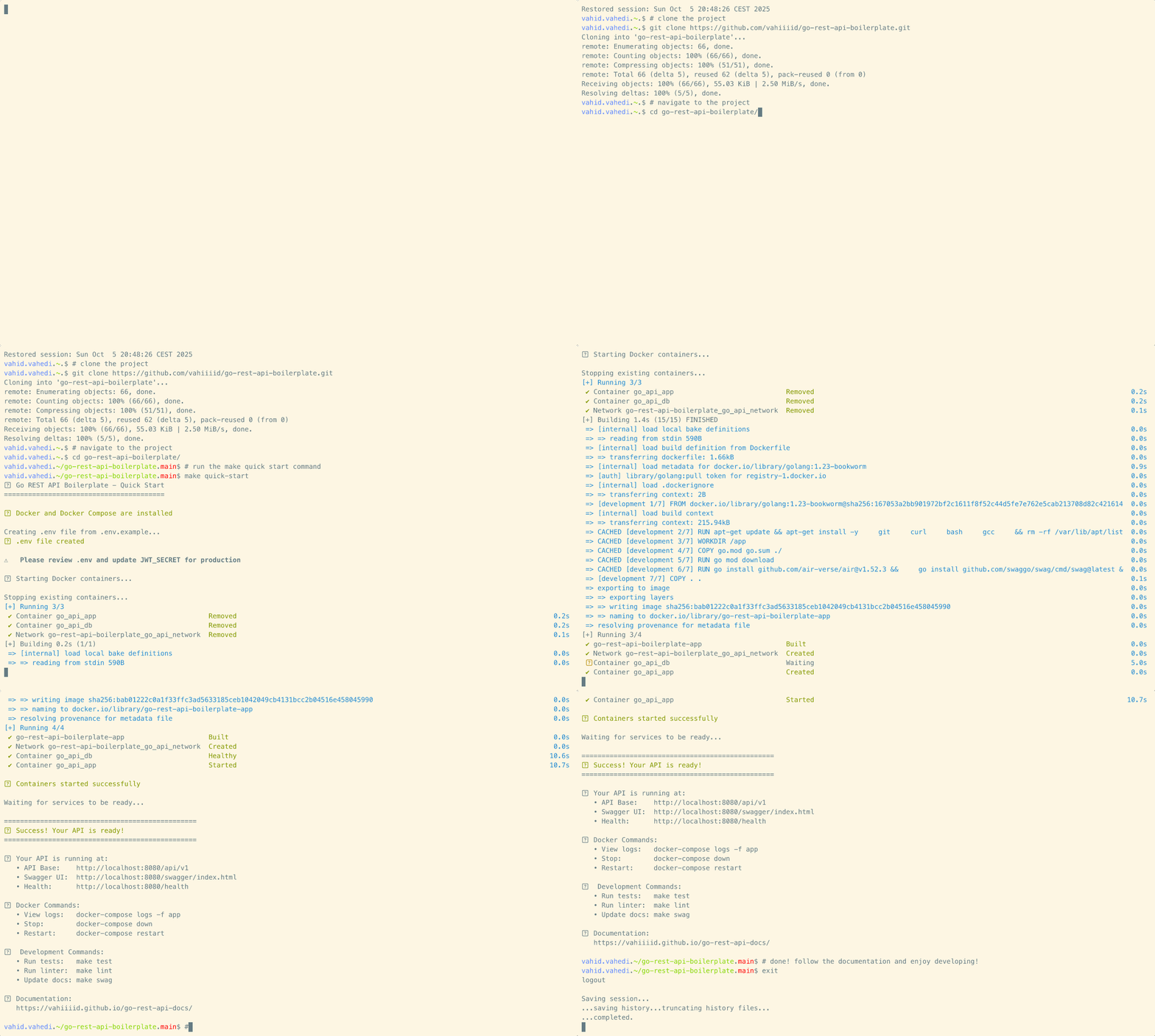
🎉 Done! Your API is now running at:
- API Base URL: http://localhost:8080/api/v1
- Swagger UI: http://localhost:8080/swagger/index.html
- Health Check: http://localhost:8080/health
Explore Your API 🧪
Interactive Swagger Documentation:
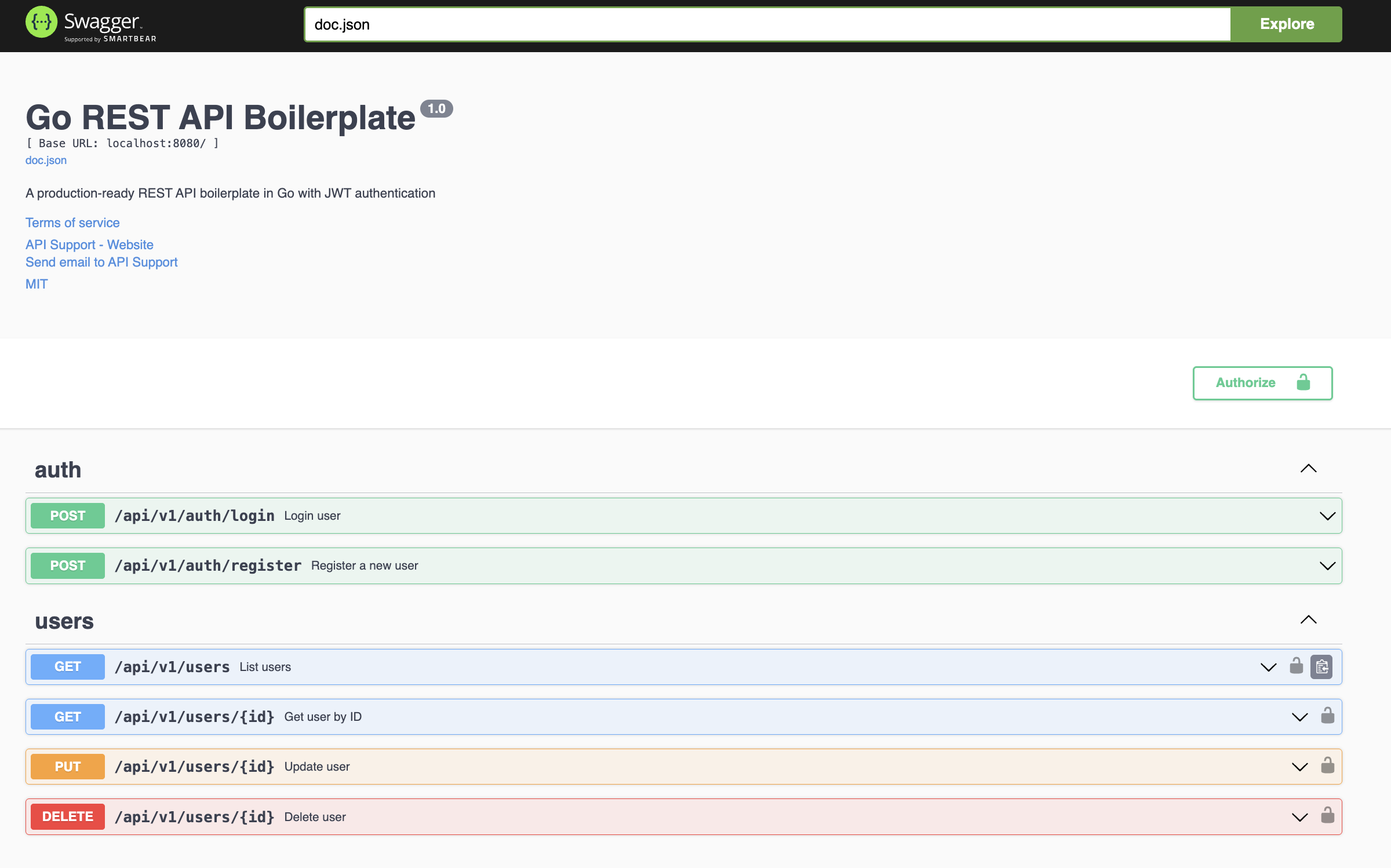
Open http://localhost:8080/swagger/index.html to explore and test all endpoints interactively.
Or Use Postman:
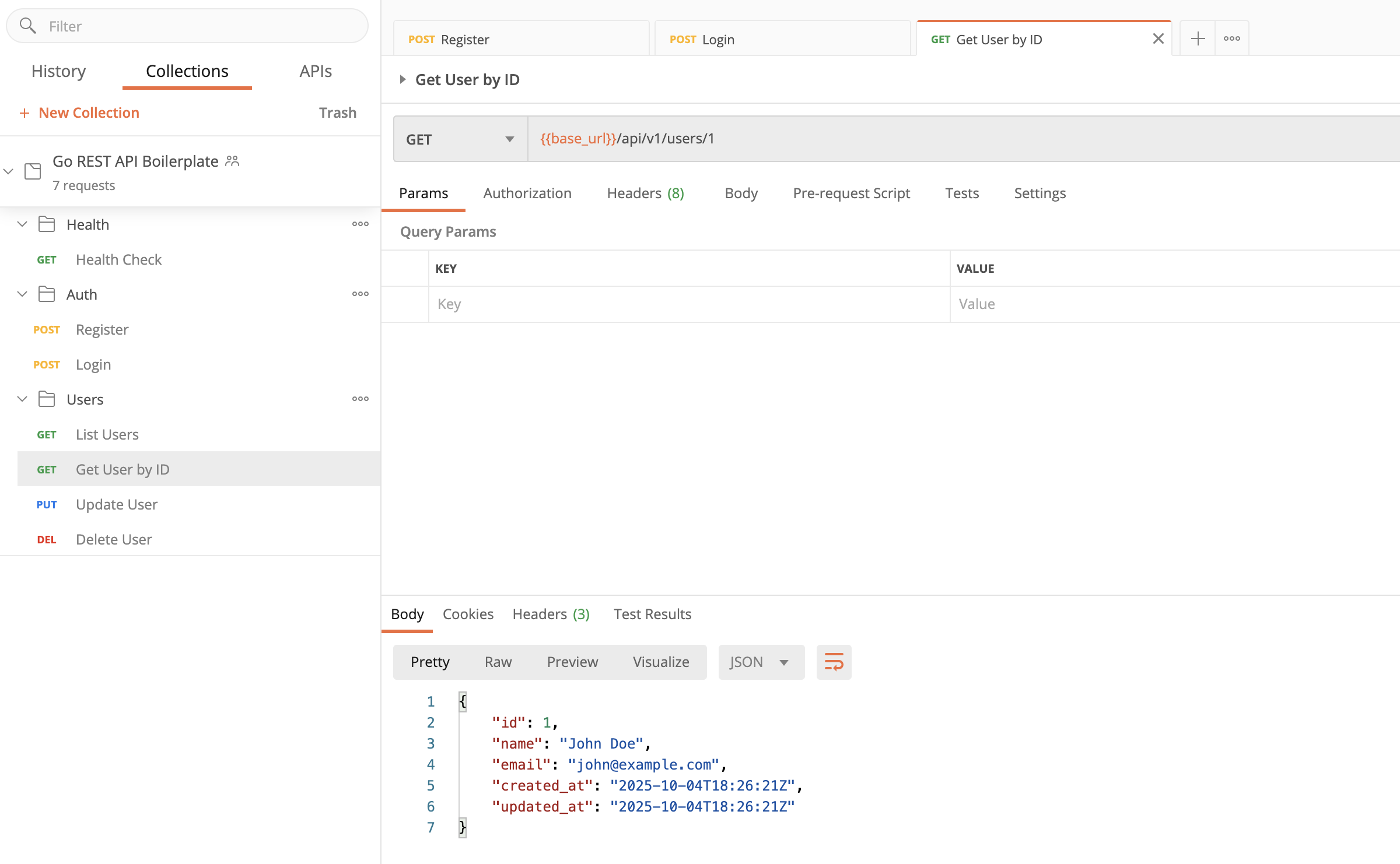
Import the pre-configured collection from api/postman_collection.json with example requests and tests.
Quick Test
# Check health
curl http://localhost:8080/health

# Register a user
curl -X POST http://localhost:8080/api/v1/auth/register \
  -H "Content-Type: application/json" \
  -d '{
    "name": "Alice Smith",
    "email": "alice@example.com",
    "password": "secret123"
  }'
🚀 Ready to Build Your Own Features?
📖 Development Guide - Learn how to add models, routes, and handlers
💡 TODO List Example - Complete step-by-step tutorial implementing a feature from scratch
✨ Features
- ✅ JWT Authentication - Secure token-based auth (HS256)
- ✅ User Management - Complete CRUD with validation
- ✅ PostgreSQL + GORM - Robust database with ORM
- ✅ Docker Development - Hot-reload with Air (~2 sec feedback)
- ✅ Docker Production - Optimized multi-stage builds
- ✅ Swagger/OpenAPI - Interactive API documentation
- ✅ Database Migrations - Version-controlled schema changes with CLI tools
- ✅ Automated Testing - Unit & integration tests
- ✅ GitHub Actions CI - Automated linting and testing
- ✅ Make Commands - Simplified workflow automation
- ✅ Postman Collection - Pre-configured API tests
- ✅ Clean Architecture - Layered, maintainable structure
- ✅ Security Best Practices - Bcrypt hashing, input validation
- ✅ CORS Support - Configurable cross-origin requests
- ✅ Request Logging - Configurable structured JSON logging with request tracking
📑 Table of Contents
💻 Development
With Docker (Recommended) 🐳
The easiest way to develop with hot-reload and zero setup:
# Start everything
make quick-start

# Or manually
make up

# Edit code in your IDE
# Changes auto-reload in ~2 seconds! ✨

# View logs
make logs

# Stop containers
make down
Features:
- 🔥 Hot-reload - Code changes reflect in ~2 seconds (powered by Air)
- 📦 Volume mounts - Edit code in your IDE, runs in container
- 🗄️ PostgreSQL - Database on internal Docker network
- 📚 All tools pre-installed - No Go installation needed on host
Development Workflow
# Start containers
make up

# Run tests
make test

# Check code quality
make lint

# Fix linting issues
make lint-fix

# Generate/update Swagger docs
make swag

# Database migrations
make migrate-create NAME=add_new_table
make migrate-up
make migrate-down
make migrate-version

# View logs
make logs

# Stop containers
make down
Available Make Commands
Run make help to see all commands. Key commands:
make quick-start       # Complete automated setup
make up                # Start development containers
make down              # Stop containers
make test              # Run tests (auto-detects environment)
make lint              # Run linter (auto-detects environment)
make swag              # Generate Swagger docs (auto-detects environment)
make migrate-up        # Run migrations (auto-detects environment)
make build-binary      # Build Go binary directly (requires Go on host)
make run-binary        # Build and run binary directly (requires Go on host)
💡 Most commands auto-detect whether to run in Docker or on your host machine!
Without Docker (Native Development)
Want to run without Docker? You'll need Go 1.23+ installed on your machine.
See the Manual Setup Guide for detailed instructions on:
- Installing Go and development tools
- Setting up PostgreSQL locally
- Building and running the binary directly
- Manual migration commands
Quick native build:
make build-binary    # Build binary to bin/server
make run-binary      # Build and run (requires PostgreSQL on localhost)
🏭 Production
Overview
GRAB provides optimized production builds with:
- ✅ Multi-stage Docker builds (minimal image size)
- ✅ No development dependencies
- ✅ No mounted volumes
- ✅ Production-ready configuration
- ✅ Health checks
Simple Deployment (VPS/Server)
# Clone repository on your server
git clone https://github.com/vahiiiid/go-rest-api-boilerplate.git
cd go-rest-api-boilerplate

# Install development tools (needed for Swagger generation)
make install-tools

# Create production environment file
cp .env.example .env
nano .env  # Edit with production values (database, JWT secret, etc.)

# Generate API documentation
make swag

# Start production containers
make docker-up-prod
Production Configuration
Update .env with production values:
ENV=production
PORT=8080
DB_HOST=your-db-host
DB_PORT=5432
DB_USER=your-db-user
DB_PASSWORD=your-strong-password
DB_NAME=your-db-name
JWT_SECRET=your-very-strong-random-secret
JWT_TTL_HOURS=24
Docker Production Build
# Build production image
docker build -t grab-api:latest .

# Run production container
docker run -p 8080:8080 --env-file .env grab-api:latest
Cloud Deployment
GRAB is ready to deploy to:
- AWS ECS/Fargate - Container orchestration
- Google Cloud Run - Serverless containers
- Azure Container Instances - Managed containers
- DigitalOcean App Platform - Platform-as-a-service
- Kubernetes - Self-managed orchestration
- Any VPS - Using Docker Compose
For detailed deployment guides, database migrations, and Docker production setup, see the Setup Guide and Docker Guide.
📚 API Documentation
Swagger UI
Interactive API documentation is available at:
http://localhost:8080/swagger/index.html
Try endpoints directly from your browser with the built-in "Try it out" feature.
Postman Collection
Import the pre-configured Postman collection with example requests and tests:
api/postman_collection.json
Includes:
- Pre-configured requests for all endpoints
- Environment variables
- Automated tests
- Example payloads
API Endpoints
Authentication
| Method | Endpoint | Description |
|---|---|---|
| POST | /api/v1/auth/register |
Register new user |
| POST | /api/v1/auth/login |
Login user |
Users (Protected)
| Method | Endpoint | Description | Auth Required |
|---|---|---|---|
| GET | /api/v1/users/:id |
Get user by ID | ✅ |
| PUT | /api/v1/users/:id |
Update user | ✅ |
| DELETE | /api/v1/users/:id |
Delete user | ✅ |
Health
| Method | Endpoint | Description |
|---|---|---|
| GET | /health |
Health check |
Example Requests
Register User:
curl -X POST http://localhost:8080/api/v1/auth/register \
  -H "Content-Type: application/json" \
  -d '{
    "name": "John Doe",
    "email": "john@example.com",
    "password": "securepass123"
  }'
Login:
curl -X POST http://localhost:8080/api/v1/auth/login \
  -H "Content-Type: application/json" \
  -d '{
    "email": "john@example.com",
    "password": "securepass123"
  }'
For more examples, see the Quick Reference Guide.
🧪 Testing
Run Tests
# Run all tests
make test

# Run tests with coverage
make test-coverage

# Run tests in verbose mode
go test ./... -v
Test Coverage
The project includes:
- ✅ Unit tests - Handler, service, repository layers
- ✅ Integration tests - Full request/response cycle
- ✅ In-memory SQLite - No external dependencies for tests
- ✅ Test fixtures - Reusable test data
- ✅ HTTP mocking - Using
httptestpackage
Test Suites:
TestRegisterHandler- User registration flowsTestLoginHandler- Authentication flowsTestHealthEndpoint- Health check validation
Continuous Integration
GitHub Actions automatically runs on every push:
- ✅ Run all tests
- ✅ Check code with
go vet - ✅ Run
golangci-lint - ✅ Generate coverage reports
See .github/workflows/ci.yml for CI configuration.
📖 Documentation
Full API documentation, usage guides, and tutorials are maintained in a separate repository:
📘 Documentation Site
Complete, searchable documentation site featuring:
- 🚀 Getting Started guides
- 💻 Development tutorials with examples
- 🏗️ Architecture overview
- 🐳 Docker deployment guides
- 📚 API reference with Swagger
- 🗄️ Database migration guides
📦 Documentation Repository
The documentation repository includes:
- Complete setup and deployment guides
- Step-by-step development tutorials
- TODO list implementation example
- Best practices and patterns
- Troubleshooting guides
- Contributing guidelines
🤝 Contributing to Documentation
To contribute to the documentation:
- Visit the docs repository
- Follow the contributing guidelines
- Submit pull requests for improvements
For contributing to the codebase, see CONTRIBUTING.md
🏗️ Project Structure
go-rest-api-boilerplate/
├── api/
│   ├── docs/                      # Swagger documentation (auto-generated)
│   │   ├── docs.go                # Swagger Go package
│   │   ├── swagger.json           # OpenAPI JSON spec
│   │   └── swagger.yaml           # OpenAPI YAML spec
│   └── postman_collection.json    # Postman API tests with examples
├── bin/                           # Compiled binaries (gitignored)
│   └── server                     # Built Go binary (from make build-binary)
├── cmd/
│   └── server/
│       └── main.go                # Application entry point
├── configs/
│   └── config.yaml                # Configuration file example
├── docs/                          # Documentation site (MkDocs)
│   ├── docs/                      # Documentation source files
│   │   ├── DEVELOPMENT_GUIDE.md   # Development tutorial
│   │   ├── DOCKER.md              # Docker setup guide
│   │   ├── LOGGING.md             # Logging configuration
│   │   ├── MIGRATIONS_GUIDE.md    # Database migration guide
│   │   ├── SETUP.md               # Manual setup instructions
│   │   ├── SWAGGER.md             # API documentation guide
│   │   ├── TESTING.md             # Testing guide
│   │   ├── TODO_EXAMPLE.md        # Complete feature implementation example
│   │   └── images/                # Documentation images and assets
│   ├── site/                      # Generated documentation site
│   ├── mkdocs.yml                 # MkDocs configuration
│   └── requirements.txt           # Python dependencies for docs
├── internal/                      # Private application code
│   ├── auth/                      # Authentication & authorization
│   │   ├── dto.go                 # JWT claims & auth DTOs
│   │   ├── middleware.go          # JWT middleware
│   │   └── service.go             # Token generation & validation
│   ├── config/                    # Configuration management
│   │   ├── config.go              # Config structs and loading logic
│   │   └── config_test.go         # Configuration tests
│   ├── db/
│   │   └── db.go                  # Database connection setup (GORM)
│   ├── middleware/                # HTTP middleware
│   │   ├── logger.go              # Request logging middleware
│   │   ├── logger_test.go         # Logger middleware tests
│   │   └── README.md              # Middleware documentation
│   ├── server/
│   │   └── router.go              # Route definitions & middleware
│   └── user/                      # User domain (example feature)
│       ├── dto.go                 # Request/Response DTOs
│       ├── handler.go             # HTTP handlers with Swagger annotations
│       ├── model.go               # GORM database model
│       ├── repository.go          # Data access layer (CRUD)
│       └── service.go             # Business logic layer
├── migrations/                    # Database migration files (SQL)
│   ├── 000001_create_users_table.up.sql
│   └── 000001_create_users_table.down.sql
├── scripts/                       # Helper automation scripts
│   └── quick-start.sh             # One-command Docker setup
├── tests/
│   ├── handler_test.go            # Integration tests (httptest + SQLite)
│   └── README.md                  # Testing guide
├── tmp/                           # Air hot-reload temp files (gitignored)
├── .air.toml                      # Hot-reload configuration (Air)
├── .gitignore                     # Git ignore rules
├── .golangci.yml                  # Linter configuration
├── .github/
│   └── workflows/
│       └── ci.yml                 # GitHub Actions CI/CD pipeline
├── CHANGELOG.md                   # Version history (SemVer)
├── CONTRIBUTING.md                # Contribution guidelines
├── docker-compose.yml             # Development with hot-reload & volumes
├── docker-compose.prod.yml        # Production optimized (no volumes)
├── Dockerfile                     # Multi-stage build (dev + prod)
│                                  # Dev: All tools pre-installed
│                                  # Prod: Minimal Alpine image
├── go.mod                         # Go module dependencies
├── go.sum                         # Dependency checksums
├── LICENSE                        # MIT License
├── Makefile                       # Build automation & shortcuts
│                                  # Auto-detects Docker/host environment
├── README.md                      # This file
└── server.log                     # Application logs (gitignored)
Key Highlights
- 🐳 Docker-First: All dev tools pre-installed in container (swag, golangci-lint, migrate, air)
- 🔥 Hot-Reload: Code changes reflect in ~2 seconds via Air + volume mounts
- 🗄️ Migrations: SQL-based migrations with golang-migrate
- 📚 Clean Architecture: Clear separation: Handler → Service → Repository
- 🧪 Fully Tested: Unit & integration tests with in-memory SQLite
- ⚙️ Auto-Detection: Make commands work in Docker or on host automatically
📚 Documentation: All guides, tutorials, and API docs are in a separate repository and published at vahiiiid.github.io/go-rest-api-docs
🏛️ Architecture
GRAB follows clean architecture principles with clear separation of concerns:
Layers
┌─────────────────────────────────────┐
│         Handler Layer               │  ← HTTP handlers, request/response
│   (internal/user/handler.go)        │     validation, error handling
└─────────────────────────────────────┘
              ↓
┌─────────────────────────────────────┐
│         Service Layer               │  ← Business logic, orchestration
│   (internal/user/service.go)        │     transactions, domain rules
└─────────────────────────────────────┘
              ↓
┌─────────────────────────────────────┐
│       Repository Layer              │  ← Data access, CRUD operations
│  (internal/user/repository.go)      │     database queries
└─────────────────────────────────────┘
              ↓
┌─────────────────────────────────────┐
│         Database (PostgreSQL)       │  ← Data persistence
└─────────────────────────────────────┘
Key Principles
- ✅ Separation of Concerns - Each layer has a single responsibility
- ✅ Dependency Injection - Loose coupling between layers
- ✅ Testability - Easy to mock and test each layer
- ✅ Maintainability - Clear structure, easy to navigate
- ✅ Scalability - Easy to extend with new features
Want to Build Your Own Features?
The Development Guide provides a complete walkthrough of this architecture with a real TODO list implementation showing you exactly how to:
- Add new models and database tables
- Create repositories, services, and handlers
- Register routes and add Swagger documentation
- Follow the same patterns used in the user management system
🔐 Security Features
- Password Hashing - Bcrypt with configurable cost (default: 10)
- JWT Tokens - Secure token generation and validation (HS256)
- Input Validation - Request validation using Gin binding tags
- SQL Injection Protection - GORM parameterized queries
- CORS - Configurable cross-origin resource sharing
- Rate Limiting - (Add via middleware - see docs)
- Environment Variables - Sensitive data never hardcoded
⚠️ Production Checklist:
- Change
JWT_SECRETto a strong, random value - Use strong database passwords
- Enable HTTPS/TLS
- Configure proper CORS origins
- Set up rate limiting
- Enable database connection encryption
- Regular dependency updates
🤝 Contributing
Contributions are welcome! See CONTRIBUTING.md for:
- Code style guidelines
- Pull request process
- Testing requirements
- Commit conventions
Quick Guidelines
- Fork the repository
- Create a feature branch (
git checkout -b feature/amazing-feature) - Make your changes
- Run tests and linter (
make lint && make test) - Commit your changes (
git commit -m 'feat: add amazing feature') - Push to the branch (
git push origin feature/amazing-feature) - Open a Pull Request
📋 Changelog
See CHANGELOG.md for a detailed history of changes.
Current Version: v1.0.0 - Initial stable release
📄 License
This project is licensed under the MIT License - see the LICENSE file for details.
🙏 Acknowledgments
Built with these amazing tools:
- Gin - HTTP web framework
- GORM - ORM library
- golang-jwt - JWT implementation
- swaggo - Swagger documentation
- Air - Hot-reload for development
- golang-migrate - Database migrations
📧 Support
- 📖 Check the documentation
- 🐛 Report bugs
- 💬 Ask questions
- ⭐ Star this repo if you find it helpful!
Made with ❤️ for the Go community
⭐ Star this repo if you find it useful!
 Directories