

 README

README

chill
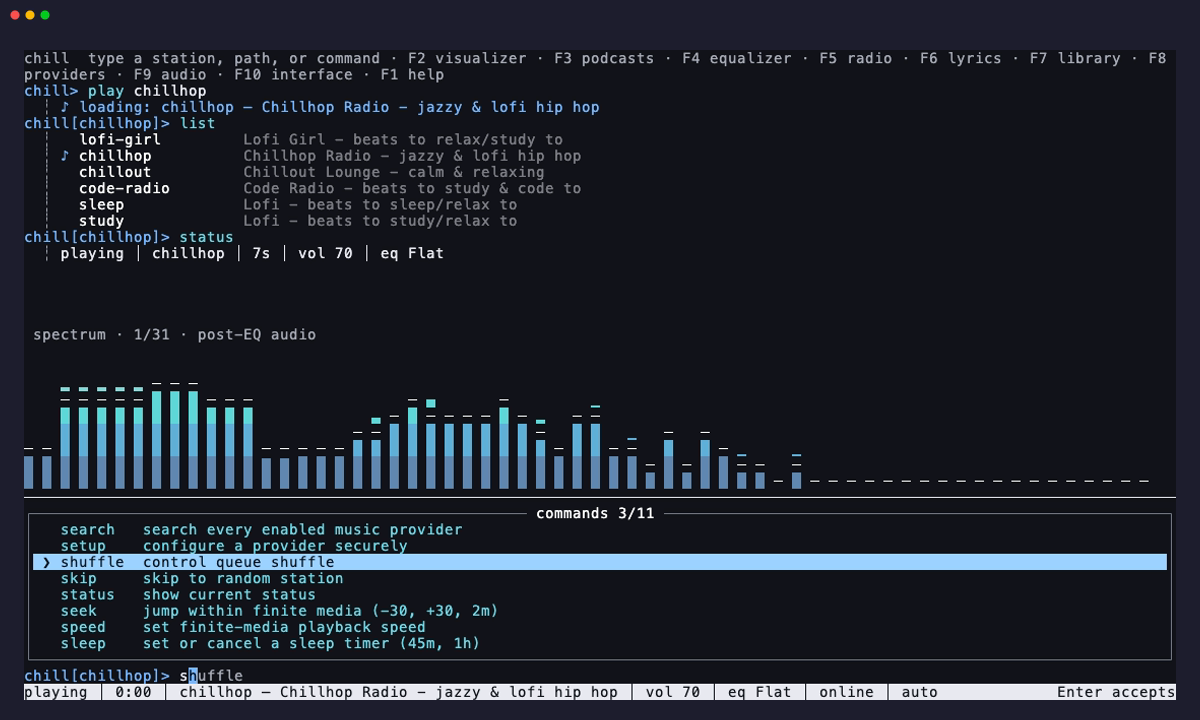
Terminal audio, radio, and podcast player.
Install
Homebrew (macOS and Linux)
brew install willibrandon/tap/chill
Scoop (Windows)
scoop bucket add willibrandon https://github.com/willibrandon/scoop-bucket
scoop bucket add extras
scoop install chill
Both packages include FFmpeg, yt-dlp, and Deno for full playback. Audio output is built into Chill.
Go or release binary
MP3, FLAC, PCM WAV, and Ogg Vorbis play with Chill alone. For built-in YouTube stations and additional formats, install FFmpeg, yt-dlp, and Deno. See playback dependencies and diagnostics for optional capabilities, portable installations, and alternate JavaScript runtimes.
macOS:
brew install ffmpeg yt-dlp deno
Linux:
sudo apt install ffmpeg pipx
pipx install 'yt-dlp[default]'
Also install Deno.
Windows:
choco install ffmpeg yt-dlp deno
Then install chill:
go install github.com/willibrandon/chill@latest
Or download a release binary
and put it in your PATH.
For Go installs, add the Go bin directory to your PATH:
- macOS/Linux:
export PATH="$HOME/go/bin:$PATH" - Windows: Add
%USERPROFILE%\go\binto your PATH
Update
Use chill update for Go installs and release binaries,
brew upgrade willibrandon/tap/chill for Homebrew, or scoop update chill for Scoop.
Usage
chill                             # open the interactive REPL
chill chillhop                    # play a station
chill song.flac                   # play a local track
chill ~/Music                     # recursively play a folder
chill album.m3u --fg              # play a playlist in the foreground
chill open                        # browse files, queues, and playlists
chill queue next song.flac        # put a track next
chill queue move 4 1              # reorder pending media
chill playlist save commute       # save the current queue
chill playlist import mix.pls     # import M3U, M3U8, or PLS
chill library favorites           # list favorite media
chill search ambient              # search every enabled provider
chill browse navidrome albums     # browse a provider catalog
chill providers --check           # validate provider connections
chill setup navidrome             # configure a provider securely
chill podcasts                    # browse podcasts and the listening inbox
chill podcasts sync               # refresh subscriptions and automatic downloads
chill podcasts downloads          # show offline download progress
chill radio                       # browse internet radio
chill radio search jazz           # search stations
chill history                     # recently heard live tracks
chill lyrics                      # lyrics for the current track
chill notifications on            # opt in to track-change notifications
chill seek -30                    # jump back 30 seconds
chill speed 1.5                   # finite-media playback speed
chill shuffle on                  # shuffle the universal queue
chill repeat all                  # repeat the complete playback cycle
chill device list                 # list audio output devices
chill audio profile Lossless      # select an audio quality profile
chill --device auto --fg          # use default audio output in foreground mode
chill remote state                # read the complete runtime snapshot
chill remote events runtime.queue # stream revisioned queue events
chill link register               # register secure chill:// links
chill completion zsh              # generate shell completion
chill theme set "High Contrast"   # select a contrast-tested terminal theme
chill keys search favorite        # find active keybindings
chill interface panel queue off   # hide an optional full-layout panel
chill --theme Paper --simplified  # use accessible session-only presentation
chill --no-color --fg             # foreground playback without ANSI color
chill --toggle                    # pause/resume, or play the default station when stopped
chill --vol 60                    # set volume (also +5, -10, up, down)
chill eq Rock                     # select an equalizer preset
chill eq --band 1k +3             # edit one band and switch to Custom
chill --status --json             # show status and queue state as JSON
chill doctor                      # check dependencies, runtime, and daemon versions
chill --sleep 45m                 # stop playback after 45 minutes
chill --stop                      # stop playback
chill --help                      # show help
chill update                      # install the latest release
help, version, and list also work without --. doctor checks the tools
needed by your default station; the built-in YouTube stations need FFmpeg,
yt-dlp, and a JavaScript runtime. Deno is the default recommendation, and Node
or QuickJS can also be selected in tools.json. Use doctor --stream <source>
to check a particular file, URL, or station instead.
Architecture
chill owns audio playback in its background daemon, so music keeps playing when you close the terminal. You can control it from another terminal.
native decoder or yt-dlp/FFmpeg → speed/mono/EQ → bounded PCM → native audio output
                                           │
                                      bounded audio tap
                                           │
                                      FFT / stereo levels
                                           │
CLI/REPL ←── versioned JSON IPC ──→ daemon ── events/jobs ──→ scripts and clients
                                      ↑
                    providers, audio devices, durable library state
After an update, the next control command restarts an older daemon and restores your playback settings. Volume, the active EQ preset, your Custom curve, and the notification preference are saved between sessions.
The daemon decodes each source into configurable stereo float PCM. Local albums preload the
next decoder and keep the PCM output open across track boundaries. Visualizers analyze the
post-EQ samples sent to playback; they do not open another network stream or
capture system audio. FFT work runs only while a REPL is subscribed. doctor
reports native playback and optional FFmpeg, yt-dlp, probing, and JavaScript
runtime capabilities. Explicit source checks verify actual decoding.
If a stream disconnects, chill keeps reconnecting with increasing delays, capped
at 30 seconds. --status and the REPL show the retry count and countdown; JSON
status includes state: "reconnecting" and retry_at while waiting. Volume,
mute, pause, and the sleep deadline survive reconnects. Stop playback or switch
stations to cancel a reconnect.
Sleep timer
chill --sleep 45m stops playback after 45 minutes. Durations such as 1h30m
work too. The timer keeps running while paused or switching stations.
Use chill --sleep off to cancel it.
Stations
| Station | Description |
|---|---|
lofi-girl |
Lofi Girl - beats to relax/study to |
chillhop |
Chillhop Radio - jazzy & lofi hip hop |
chillout |
Chillout Lounge - calm & relaxing |
code-radio |
Code Radio - beats to study & code to |
sleep |
Lofi - beats to sleep/relax to |
study |
Lofi - beats to study/relax to |
Type play in the REPL to start the default station, lofi-girl.
Change it with chill default <name>.
Your own stations
Add a YouTube stream with chill add <name> <url> [description], or edit the config:
- macOS:
~/Library/Application Support/chill/stations.json - Linux:
~/.config/chill/stations.json(or$XDG_CONFIG_HOME/chill/stations.json) - Windows:
%AppData%\chill\stations.json
{
  "default_station": "synthwave",
  "stations": [
    {
      "name": "synthwave",
      "url": "https://www.youtube.com/watch?v=4xDzrJKXOOY",
      "desc": "Synthwave Radio - retro electronic beats"
    }
  ]
}
A custom station with a built-in name overrides it. chill remove <name> removes
the custom station and restores any built-in. After editing the file by hand,
run reload in the REPL.
Interactive Mode
chill (or chill -i) opens the REPL. Type help for commands or press F1 for keys.
A station name starts playback. doctor takes the same options as the CLI.
Diagnostic findings appear as each check finishes. Press Ctrl+C (when nothing
is selected) or type cancel to cancel diagnostics and discard queued commands.
Quitting also cancels diagnostics; music keeps playing.
sleep plays the station. sleep 45m sets the timer.
| Key | |
|---|---|
Tab |
complete with the highlighted suggestion |
→ |
take the ghost text |
↑ / ↓ |
pick a suggestion or browse history |
Enter |
run the line, or take a suggestion picked with ↑ / ↓ |
Esc |
dismiss the suggestions |
PgUp / PgDn |
scroll the transcript |
Shift+↑ / Shift+↓ |
select lines of the transcript |
y / Enter / Ctrl+C |
copy what is selected |
| mouse | drag to select, right click to copy, or to paste when nothing is selected |
Ctrl+C |
cancel diagnostics, otherwise clear the line (when nothing is selected) |
Ctrl+L |
clear the screen |
F1 |
help |
F2 |
open/focus the visualizer; return to the prompt when focused |
F3 |
open podcasts or return to the prompt |
F4 |
open the equalizer or return to the prompt |
F5 |
open radio discovery or return to the prompt |
F6 |
show lyrics for the current track or return to the prompt |
F7 |
browse the universal queue, saved playlists, local files, favorites, bookmarks, and recent media |
F8 |
browse and search providers or return to the prompt |
F9 |
configure audio profiles and output devices or return to the prompt |
F10 |
preview themes, layouts, panels, and accessibility settings |
Ctrl+K |
search the effective keybindings for the current screen |
Ctrl+Q |
quit, music keeps playing |
Terminal interface
Chill adapts between full, content-first, compact, and minimal layouts. It has dark, light, high-contrast, monochrome, and color-blind-friendly built-in themes, validated user themes, optional information panels, remappable scoped keys, and true-color, ANSI-256, ANSI-16, no-color, Unicode, and ASCII modes. Simplified and low-power modes reduce decoration, motion, polling, and redraws.
Press F10 for live preview and Ctrl+K for the searchable binding
overlay. Use chill theme, chill keys, and chill interface for the same
settings from scripts. --theme, --no-color, --simplified, and
--low-power are session-only overrides and work with both the REPL and
--fg.
See Terminal interface for custom theme files, contrast rules, layout thresholds, every configurable setting, and scoped key remapping.
Equalizer
The ten-band parametric equalizer covers 70 Hz, 180 Hz, 320 Hz, 600 Hz, 1 kHz, 3 kHz, 6 kHz, 12 kHz, 14 kHz, and 16 kHz. It includes Flat, Rock, Pop, Jazz, Classical, Bass Boost, Treble Boost, Vocal, Electronic, Acoustic, Hip-Hop, R&B, Loudness, Late Night, Podcast, and Small Speakers presets, plus Custom.
Press F4 for the full-screen editor. Use ←/→ (or h/l) to choose a band, ↑/↓ (or k/j) to change it by 1 dB, 0 to zero it, e/E to cycle presets, r for Flat, and c to restore your saved Custom curve. Edits apply to live radio or podcast audio without restarting playback. The Custom curve survives restarts and remains saved while you audition presets.
The same controls are scriptable: chill eq reports the curve,
chill eq <preset> selects one, and chill eq --band <0-9|frequency> <-12..12>
edits a band. Preset names are case-insensitive; spaces may be written as
hyphens, as in Bass-Boost.
See Equalizer architecture for the signal path, state, and live-update design.
Radio discovery
Press F5 or run chill radio to browse top-voted, popular, trending, and
random internet radio. Search by name, country, region, language, genre, or tag;
favorite stations in the universal library; pin useful country and tag views;
and replay a station from Recently Heard. F5 shows the station subset of the
same Favorites collection available in F7. The browser supports filtering,
paging, refresh, sort changes, and direct playback without adding a station to
your config.
chill radio --help lists the scriptable commands and options. Result lists
support --json, --play <number>, --favorite <number>, and --fg.
Nearby suggestions are opt-in and infer only from the system timezone or locale.
See Radio discovery for every key, command, and saved-data rule.
Live tracks, history, and lyrics
When a station publishes track metadata, Chill shows it in status, the REPL,
foreground playback, and the operating system's now-playing surface. chill history keeps the latest 200 distinct track changes locally. Press F6 or run
chill lyrics to look up lyrics for the current track. Synced lyrics are shown
as readable lines with manual scrolling because a live stream has no reliable
song playhead.
Track-change notifications are off by default. Enable them with chill notifications on and disable them with chill notifications off.
See Now playing for metadata sources, lyrics caching, privacy, notifications, and history behavior.
System media controls
Chill registers a native media session during daemon and foreground playback. Headset buttons, media keys, lock-screen controls, desktop media widgets, and supported volume or seek controls operate the same state as the CLI and REPL. Radio exposes next and previous station navigation; finite media exposes queue navigation and absolute seeking. Metadata, artwork, pause state, and playback position stay synchronized.
See System media controls for platform behavior.
Podcasts
Press F3 or run chill podcasts for Apple's top shows, 19 categories,
search, subscriptions, the listening inbox, and managed offline downloads. You
can also open any podcast RSS URL.
Enter opens a show or plays an episode; f subscribes locally.
Shift+←/→ skips 30 seconds, Space pauses, and F3 returns to the prompt.
Listening progress is saved automatically. No account or API key.
Use chill podcasts --help for CLI commands, including search, feeds,
subscriptions, and queueing. --json is available for scripting.
See Podcasts for every browser key, command, playback rule, and saved-data detail.
Local library, queue, and playlists
Files, folders, direct audio URLs, stations, and podcast episodes share one
durable queue. play next, append, replace, search, reorder, remove, undo,
shuffle, repeat-one, and repeat-all therefore behave the same for mixed media.
Saved playlists retain complete media metadata and import or export M3U, M3U8,
and PLS files.
Local tags supply title, artist, album artist, album, disc and track numbers, genre, artwork, duration, and embedded lyrics. Playback progress, favorites, bookmarks, and the latest 200 items are saved locally. Folder loading is recursive. Albums are grouped by title and album artist (falling back to the track artist), then ordered by disc and track. Compilation tags keep different performers together. Untagged files use natural filename order. Unreadable entries are skipped; explicit file lists and playlists retain their order and report unreadable files. Consecutive local tracks use gapless decoder preloading.
Press F7 or run chill open for the full-screen browser. See Library,
queues, and playlists for every command, key, format, and
saved-data rule.
Providers and global search
Press F8 to browse every enabled catalog, search them concurrently, and play, queue, favorite, or bookmark results without leaving the TUI. YouTube, YouTube Music, SoundCloud, and Mixcloud work through yt-dlp. Account-backed providers include Navidrome/Subsonic, Plex, Jellyfin, Emby, Audiobookshelf, Spotify, Tidal, and Qobuz. The hosted catalogs expose explicit previews when their APIs supply one; they are labeled separately from full-track playback.
Run chill setup for the protected connection form. Public settings and
owner-readable credentials are stored separately. chill providers --check
validates all enabled connections, while chill search and chill browse
offer text and JSON output plus play, queue, play-next, and foreground actions.
See Providers and search for setup, commands, TUI keys, identity rules, and saved-data behavior.
Audio output
Press F9 or run chill audio to choose Automatic, Lossless, Low Latency,
or Stable Streaming, switch output devices live, or tune sample rate, buffer,
resampling, mono downmix, channel layout, and exclusive mode. The selection is
remembered. A disconnected device falls back to the system default and is
selected again when it returns.
See Audio output for profiles, commands, status fields, and platform behavior.
Remote control and automation
chill remote exposes versioned JSON requests, stable errors, complete state,
asynchronous jobs, cancellation, queue conflict detection, and bounded event
streams. Unix uses an owner-only socket; Windows uses an owner-only named pipe.
The same API drives playback, queues, playlists, providers, podcast downloads,
and audio settings.
Secure chill://play and chill://queue links can target direct URLs,
provider items, searches, albums, and playlists. Generate native Bash, Zsh,
Fish, or PowerShell completions with chill completion <shell>.
See Remote control for the envelope, operations, events, deep-link grammar, and completion setup.
Visualizers
31 modes, including spectrum bars, waveforms, matrix, flame, and stereo meters.
Press F2 or type viz to open. While focused, v cycles modes,
V toggles fullscreen, and Enter returns to the prompt.
Use viz led to pick a mode, viz list to see them all, or viz off to close.
See Visualizer architecture for the audio tap, rendering, layouts, and performance design.
Foreground Mode
Use --fg to run the same PCM and equalizer pipeline in the terminal without a
daemon. The active preset and Custom curve carry between foreground and daemon
sessions.
| Key | Action |
|---|---|
q |
quit |
m |
mute |
y |
show or hide lyrics |
f / B |
toggle favorite / bookmark |
9 / 0 |
volume down / up |
← / → |
seek |
< / > |
previous / next queue item |
[ / ] |
decrease / increase speed |
z / R |
toggle shuffle / cycle repeat mode |
h / l |
select EQ band |
j / k |
decrease / increase the selected band |
x |
zero the selected band |
e / E |
next / previous preset |
r / c |
Flat / saved Custom curve |
Foreground playback also publishes native now-playing metadata and accepts system play, pause, stop, next, previous, and volume controls.
Build and test
Building requires Go and a C compiler with CGO enabled (Xcode command-line tools on macOS, GCC or Clang on Linux, and MinGW on Windows). Release binaries include the compiled audio backend. Linux requires PulseAudio or ALSA runtime libraries.
The normal test suite exercises native codecs using generated local audio and a paced test output, with no audio device or network required. Install FFmpeg to include additional-codec integration tests. See native playback validation for race tests, CLI integration, hardware checks, and release targets.
go build .
go test ./...
License
MIT
 Documentation

Documentation

Overview 
Package main implements chill, a terminal audio, radio, and podcast player. It uses a client-server architecture where a background daemon manages native audio playback and clients communicate over a Unix socket.
Usage:
chill              # open the interactive REPL
chill chillhop     # play specific station
chill -i           # interactive mode (repl)
chill --vol 60     # set volume (or +5, -10, up, down)
chill eq Rock      # select an equalizer preset
chill --mute       # toggle mute
chill --status     # show what's playing
chill --stop       # stop playback
chill add n url    # save your own station
chill update       # install the latest release
 Source Files

Source Files

- audio_settings.go
- build_identity.go
- client.go
- completion.go
- config.go
- console_unix.go
- daemon.go
- daemon_library.go
- daemon_podcast.go
- deeplink.go
- deeplink_handler_other.go
- deeplink_register_linux.go
- diagnostics.go
- doctor.go
- equalizer.go
- foreground.go
- foreground_library.go
- help.go
- history_commands.go
- install.go
- interface_keys.go
- interface_settings.go
- interface_tui.go
- library.go
- local_folder.go
- local_media.go
- local_metadata.go
- local_mp4.go
- lyrics_commands.go
- main.go
- playback_buffer.go
- playback_events.go
- playback_resolve.go
- playback_session.go
- playback_sources.go
- playlist_commands.go
- podcast_commands.go
- podcast_downloads.go
- podcast_library.go
- provider_commands.go
- provider_http.go
- provider_setup.go
- providers.go
- radio_commands.go
- radio_favorites.go
- remote.go
- remote_client.go
- repl.go
- repl_task.go
- requirements.go
- selection.go
- signal_unix.go
- sleep.go
- socket_namespace.go
- socket_unix.go
- status.go
- stream_metadata.go
- tools.go
- tui.go
- tui_audio.go
- tui_equalizer.go
- tui_library.go
- tui_lyrics.go
- tui_podcasts.go
- tui_providers.go
- tui_radio.go
- tui_transcript.go
- tui_visualizer.go
- update.go
- update_unix.go
- upgrade.go
- upgrade_unix.go
- visualizer_stream.go
 Directories

Directories

| Path | Synopsis |
|---|---|
|
internal
|
|
|
audio
Package audio analyzes interleaved stereo PCM independently of playback and UI.
|
Package audio analyzes interleaved stereo PCM independently of playback and UI. |
|
episode
Package episode buffers a finite media download on disk for seekable playback.
|
Package episode buffers a finite media download on disk for seekable playback. |
|
lyrics
Package lyrics retrieves song lyrics for recognized now-playing metadata.
|
Package lyrics retrieves song lyrics for recognized now-playing metadata. |
|
media
Package media publishes playback state to the host operating system and translates its media controls into application commands.
|
Package media publishes playback state to the host operating system and translates its media controls into application commands. |
|
notify
Package notify presents optional track-change notifications through the host desktop's notification service.
|
Package notify presents optional track-change notifications through the host desktop's notification service. |
|
playback
Package playback owns native audio output and bounded sample transport.
|
Package playback owns native audio output and bounded sample transport. |
|
podcast
Package podcast reads public podcast directories and publisher feeds.
|
Package podcast reads public podcast directories and publisher feeds. |
|
radio
Package radio provides discovery for public internet radio stations.
|
Package radio provides discovery for public internet radio stations. |
|
streammeta
Package streammeta extracts now-playing data from live audio streams.
|
Package streammeta extracts now-playing data from live audio streams. |
|
tracklog
Package tracklog persists live-radio title changes.
|
Package tracklog persists live-radio title changes. |
|
visualizer
Package visualizer renders audio snapshots into bounded terminal canvases.
|
Package visualizer renders audio snapshots into bounded terminal canvases. |
|
vhs
|
|
|
fixtures
command
Command fixtures supplies deterministic media and isolated Chill sessions for VHS.
|
Command fixtures supplies deterministic media and isolated Chill sessions for VHS. |