

 README

blipgloss
Style definitions for nice terminal layouts. Powered by lipgloss and bun:ffi.
Install
bun add blipgloss
Usage
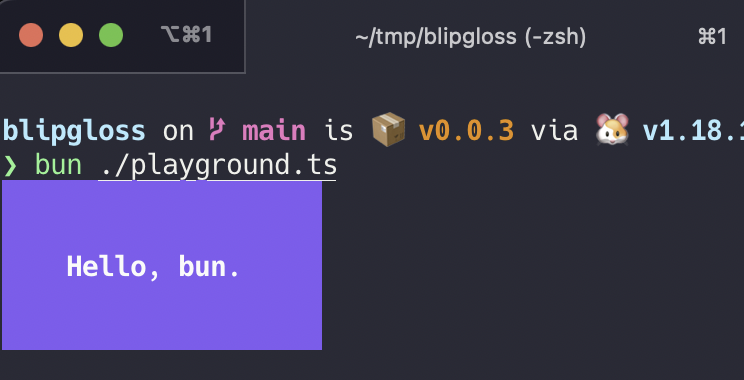
Blipgloss takes an expressive, declarative approach to terminal rendering. Users familiar with CSS will feel at home with B
import { NewStyle } from 'blipgloss'

const style = NewStyle()
  .Bold(true)
  .Foreground("#FAFAFA")
  .Background("#7D56F4")
  .PaddingTop(2)
  .PaddingLeft(4)
  .Width(22)

console.log(style.Render("Hello, bun."))
Colors
Blipgloss supports the following color profiles:
ANSI 16 colors (4-bit)
Background("5")  // magenta
Background("9")  // red
Background("12") // light blue
ANSI 256 colors (8-bit)
Background("86")  // aqua
Background("201") // hot pink
Background("202") // orange
True Color (16,777,216 colors; 24-bit)
Background("#0000FF") // good ol' 100% blue
Background("#04B575") // a green
Background("#3C3C3C") // a dark gray
...as well as a 1-bit Ascii profile, which is black and white only.
The terminal's color profile will be automatically detected, and colors outside the gamut of the current palette will be automatically coerced to their closest available value.
Adaptive Colors
You can also specify color options for light and dark backgrounds:
Background({
  Light: '236',
  Dark: '248'
})
The terminal's background color will automatically be detected and the appropriate color will be chosen at runtime.
Inline Formatting
Blipgloss supports the usual ANSI text formatting options:
const style = NewStyle()
  .Bold(true)
  .Italic(true)
  .Faint(true)
  .Blink(true)
  .Strikethrough(true)
  .Underline(true)
  .Reverse(true)
Block-Level Formatting
Blipgloss also supports rules for block-level formatting:
// Padding
const style = NewStyle()
  .PaddingTop(2)
  .PaddingRight(4)
  .PaddingBottom(2)
  .PaddingLeft(4)

// Margins
const style = NewStyle()
  .MarginTop(2)
  .MarginRight(4)
  .MarginBottom(2)
  .MarginLeft(4)
There is also shorthand syntax for margins and padding, which follows the same format as CSS:
TODO
Aligning Text
TODO
Width and Height
Setting a minimum width and height is simple and straightforward.
const str = NewStyle()
  .Width(24)
  .Height(32)
  .Foreground("63")
  .Render("What’s for lunch?")
Borders
TODO
Copying Styles
Just use Copy():
const style = NewStyle().Foreground("219")

const wildStyle = style.Copy().Blink(true)
Copy() performs a copy on the underlying data structure ensuring that you get a true, dereferenced copy of a style. Without copying it's possible to mutate styles.
Unsetting Rules
All rules can be unset:
const style = NewStyle().
    Bold(true).                        // make it bold
    UnsetBold().                       // jk don't make it bold
    Background("227"). // yellow background
    UnsetBackground()                  // never mind
Rendering
Generally, you just call the Render(string) method:
console.log(NewStyle().Bold(true).Render("Hello, bun."))
License
MIT
 Documentation


There is no documentation for this package.
 Source Files