

 README
¶
pf-simple
A small TCP port forwarder that supports multiple mappings.
Zero copy on Linux.
Screenshots
Quick start
Give each mapping as listen@target, either as plain arguments or with
--forward/-f:
./pf-simple 8080@10.0.0.6                     # :8080 -> 10.0.0.6:8080
./pf-simple 8080@10.0.0.6:80 9030@db:9030     # two listeners
./pf-simple -f 127.0.0.1:4100@10.0.0.7:3306 --console 18222@secret
Defaults keep the common case short:
| You write | It means |
|---|---|
8080@10.0.0.6 |
listen on every interface, port 8080; forward to 10.0.0.6:8080 |
127.0.0.1:4100@db:3306 |
exactly those addresses |
9030@[2001:db8::6] |
IPv6 target (brackets required), port 9030 |
--console 18222 |
console on 127.0.0.1:18222 only; use :18222 for every interface |
--console 18222@secret |
console password secret; without @... it comes from $PF_PASSWORD |
Flags and mappings can come in any order. pf-simple -h prints the usage.
Anything more (names, connection caps, speed limits) goes in a
configuration file, started with -c/--config.
The two directions of a connection are copied independently. When one direction reaches EOF, the forwarder half-closes the corresponding destination socket so the other side can still send a final response. If the connection is idle for 30 seconds after that half-close, both sockets are closed. Intentional waits for bandwidth limits do not count as idle time. SIGINT and SIGTERM stop the listeners.
Docker
Images for linux/amd64 and linux/arm64 are published for every release
as wushilin/pf-simple on Docker Hub and ghcr.io/wushilin/pf-simple.
Tags are the version (0.7.0), the minor line (0.7) and latest.
Host networking is the simplest fit for a forwarder: listeners bind straight
on the host, including ones added later in the console, with no -p per
port. The arguments are the same as for the binary:
docker run -d --name pf-simple --restart unless-stopped --network host \
  wushilin/pf-simple 8080@10.0.0.6 9030@db:9030 --console 18222@secret
The console is then on http://127.0.0.1:18222/pf/ of the host.
With a config file, mount a writable directory at /data; the console
writes listener changes back to the file:
mkdir -p pf-data
cp pf-simple.example.toml pf-data/pf-simple.toml   # edit it first
chmod 600 pf-data/pf-simple.toml
docker run -d --name pf-simple --restart unless-stopped --network host \
  -v "$PWD/pf-data:/data" \
  wushilin/pf-simple -c /data/pf-simple.toml
Without --network host, publish each listen port and make the console
listen on every interface inside the container (:18222, not
127.0.0.1:18222):
docker run -d -p 8080:8080 -p 18222:18222 \
  wushilin/pf-simple 8080@10.0.0.6 --console :18222@secret
The image runs as root so listeners can bind ports below 1024 on the host
network. Add --user 65532:65532 to run unprivileged; low ports then fail
to bind on the host network, and a mounted /data must be writable by that
user.
Configuration file
For anything beyond simple mappings, put the setup in a TOML file:
./pf-simple -c /etc/pf-simple.toml # or --config /etc/pf-simple.toml
-c/--config cannot be combined with any other flag or with mappings on
the command line: pf-simple -c pf.toml --forward 8080@x exits with an
error naming --forward. Unknown keys are errors too, so a typo stops
pf-simple at startup instead of being silently ignored. The address
shorthand above works in the file as well.
# Optional web console; leave the table out to disable it.
[console]
listen = "127.0.0.1:18222"
password = "change-me"        # or leave out to use $PF_PASSWORD

[[forward]]
name = "HTTP"                 # optional; the console shows "HTTP [0.0.0.0:8080]"
listen = "0.0.0.0:8080"
target = "10.0.0.6:8080"

[[forward]]
name = "Doris MySQL"
listen = "0.0.0.0:9030"
target = "10.0.0.6:9030"
max_connections = 200
total_speed = "1GiB/s"
per_connection_max_speed = "15MiB/s"
Each [[forward]] takes:
| Key | Required | Meaning |
|---|---|---|
listen |
yes | Address to accept connections on. |
target |
yes | Address to forward each connection to. |
name |
no | Label for the console and logs. Without it the listen address is shown. |
max_connections |
no | Most simultaneous connections. Further clients are refused with an immediate TCP reset and counted as "refused" in the console. Default: unlimited. |
total_speed |
no | Speed limit shared by all connections on this listener. Default: unlimited. |
per_connection_max_speed |
no | Speed limit for each connection. Default: unlimited. |
low_latency |
no | true copies every read at once instead of batching busy streams (see Batching). Default: false. |
Speed limits exist only in config files, not on the command line. When both
are set, both are enforced: a connection never exceeds its own cap, and all
connections together never exceed the total. Each limit applies to each
direction separately (client to target and target to client), like a
full-duplex link. Units are B, KB, MB, GB (1000-based), KiB, MiB,
GiB (1024-based), or bit rates bit, Kbit, Mbit, Gbit (also Kbps,
Mbps, Gbps); /s is optional, so 512B/s, 14KiB/s, 100Mbit and
1GiB/s all work.
Limits keep the splice data path: pf-simple reserves bandwidth before sending
each chunk. Limited listeners use smaller chunks to keep the rate smooth.
On a Linux test host a listener with
per_connection_max_speed = "40MiB/s" held one iperf3 stream at 40.0 MiB/s,
and total_speed = "100MiB/s" held four streams at 100.0 MiB/s combined.
A config file may also hold only a [console] table and no forwards, since
the console can add them; with neither, pf-simple refuses to start.
The [console] table takes listen (required) and password (optional,
falling back to $PF_PASSWORD; empty means no password). If the file holds a
password and is readable by every user, pf-simple prints a warning; use
chmod 600. See pf-simple.example.toml for a
commented example.
To run it as a systemd service without a console, keep the file root-owned
with chmod 600 and pass it in with LoadCredential, so the unprivileged
service user can read it while nobody else can:
[Service]
LoadCredential=pf-simple.toml:/etc/pf-simple.toml
ExecStart=/usr/local/bin/pf-simple --config %d/pf-simple.toml
DynamicUser=yes
Restart=always
With a [console], the console writes listener changes back to the file, so
it must live somewhere writable instead; see
Managing listeners from the console.
Managing listeners from the console
What the console may change depends on how pf-simple was started:
| Action | Command line | Config file (-c) |
|---|---|---|
| Disconnect a pipe (Stop on a row) | yes | yes |
| Stop / Start a listener | yes, until restart | yes, saved |
| Add a listener | no | yes |
| Edit a listener (every field) | no | yes, while stopped |
| Delete a listener | no | yes, while stopped |
On the command line, a console alone is refused, because it could not add
anything (unless --tunnel turns the relay hub on). In a config file, [console] alone is fine: start it empty and add
listeners from the browser. Every change is written back to the config file.
[console]
listen = "0.0.0.0:20000"
password = "change-me"
# Optional fences for listeners added or edited in the console.
# An omitted one means no restriction.
allow_target_hosts = ["10.0.0.6", "10.0.0.0/24", "db.internal"]   # IPs, CIDRs, exact hostnames
allow_target_ports = "80, 8080, 9030, 3000-3999"
allow_bind_hosts = ["0.0.0.0", "127.0.0.1"]                       # "0.0.0.0" or "::" allows "all interfaces"
allow_bind_ports = "18000-19999"
- Fences. A hostname is matched by name only and never resolved, so DNS
cannot redirect it. Without any fences, anyone with the console password can
make the host relay to any address it can reach, so set at least
allow_target_hostson a host that is exposed. - Stop stops accepting, resets every open pipe, and waits for them to
close before it reports success. A stopped listener is saved as
enabled = false. - Edit and Delete need a stopped listener. Edit keeps the listener's counters; it stays stopped until you start it.
- Saving rewrites the whole file atomically (temporary file, fsync,
rename) with mode 600.
[console]is written back exactly as loaded; a password that came from$PF_PASSWORDis never written into the file. Comments are not kept. - Startup. In config mode a listener whose port is busy shows "failed to start" in the console while the others keep running. On the command line a busy port stops pf-simple, as before.
- Writable location. With a
[console], pf-simple checks at startup that it can create files in the config file's directory and refuses to start otherwise. Under systemd, keep the file in aStateDirectory(see Running under systemd).
Relay hub: ad-hoc tunnels with pf-client
Two machines that cannot reach each other, but can both reach a pf-simple
server over HTTPS, can meet there. One runs pf-client serve, the other
pf-client connect, and the server joins them when they give the same
word. Both dial out; neither opens an inbound port.
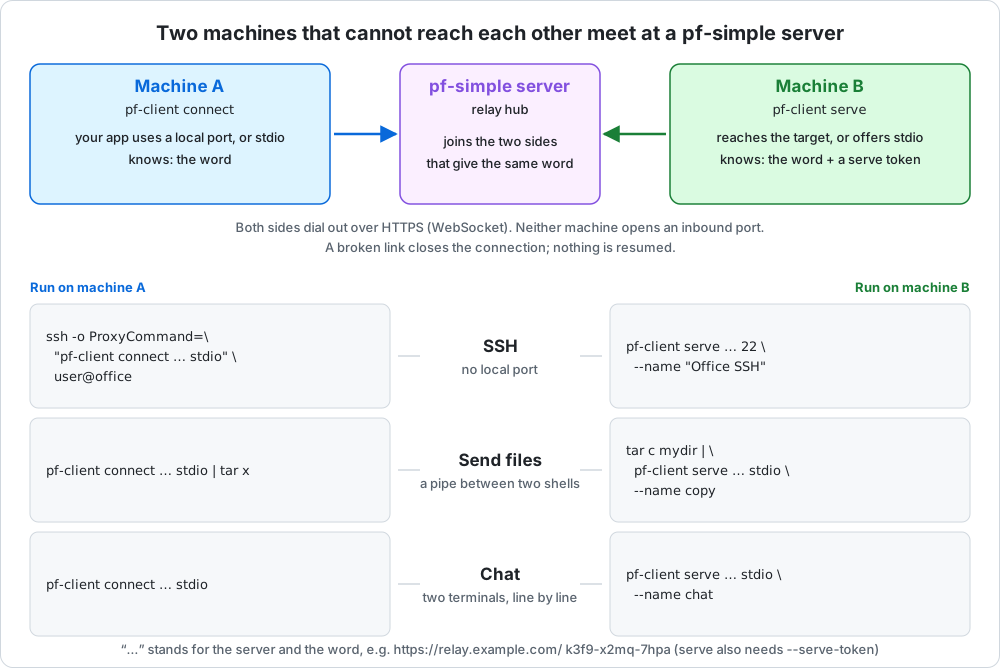
In the examples the server is https://relay.example.com/, machine B is
the one that serves and machine A the one that connects. serve needs a
serve token from the server's admin, here in $PF_SERVE_TOKEN.
Use case: a port on another machine
B can reach a service (its own sshd here; 192.168.1.20:5432 would work
the same). A gets it on a local port.
# machine B
pf-client serve https://relay.example.com/ 22 --name "Office SSH"
# ... word: k3f9-x2mq-7hpa   (connect with: pf-client connect https://relay.example.com/ k3f9-x2mq-7hpa <listen>)

# machine A
pf-client connect https://relay.example.com/ k3f9-x2mq-7hpa 2222
ssh -p 2222 user@127.0.0.1
Both commands stay up and recover by themselves, and the port takes any number of connections, so this suits a tunnel you leave running.
Use case: SSH without a local port
With stdio as the listen address, connect carries one connection over
its stdin/stdout and exits, which is what ssh's ProxyCommand wants. B runs
the same serve as above; A needs nothing running beforehand:
# machine A
ssh -o ProxyCommand="pf-client connect https://relay.example.com/ k3f9-x2mq-7hpa stdio" user@office
For everyday use, put it in ~/.ssh/config, and ssh office, scp and
rsync all go through the tunnel:
Host office
    User user
    ProxyCommand pf-client connect https://relay.example.com/ k3f9-x2mq-7hpa stdio
ssh starts one pf-client per connection. In this mode pf-client prints
nothing unless the connection fails, and it cannot ask about an untrusted
certificate, so the server needs a valid one (or -k). The host name after
user@ only names the entry in known_hosts; the tunnel decides where the
connection goes.
Use case: send files
serve takes stdio as its target too. Then there is no service at all:
what one side writes to pf-client, the other reads from it, like a pipe
between two shells.
# machine B: send a directory
tar c mydir | pf-client serve https://relay.example.com/ stdio --name copy
# ... word: k3f9-x2mq-7hpa   (connect with: pf-client connect https://relay.example.com/ k3f9-x2mq-7hpa stdio)

# machine A: receive it
pf-client connect https://relay.example.com/ k3f9-x2mq-7hpa stdio | tar x
A single file is serve ... stdio < file and connect ... stdio > file.
It works the other way round as well, since the stream is two-way:
serve ... stdio | tar x on B receives what tar c mydir | pf-client connect ... stdio sends from A. The word and the log go to stderr, so only
the data is on stdout. Both sides exit when the stream ends, with status 0
if it ended cleanly and 1 if a link broke, so check the status before
trusting the copy.
Use case: chat
The same pipe with a terminal on each side: every line typed on one appears on the other. Ctrl-D ends your side; the chat is over when both have.
# machine B
pf-client serve https://relay.example.com/ stdio --name chat
# machine A
pf-client connect https://relay.example.com/ k3f9-x2mq-7hpa stdio
A stdio serve is one stream between two people. It waits (registering
again if it loses the server) until the first connection arrives, carries
that one and exits; another that arrives meanwhile is refused. Stdin cannot
be read twice, so nothing is retried once the connection has started.
Words, tokens and the server
serve made up the word and printed it; give your own as
serve <server> <word> <target> to keep the same one across restarts. A
wrong word gets access denied; the right one gets
connected; listening on 127.0.0.1:2222.
Up to three secrets are involved:
| Secret | Who has it | What it is for |
|---|---|---|
| Serve token | One holder: whoever may run serve with it |
Permission to register tunnels on this server. Without one, anyone who can reach the server could relay through it. |
| Word | Both sides of one tunnel | Names the tunnel. |
| Client token (optional) | Both sides of one tunnel | A second secret the serving side may ask for. connect then needs it as well as the word. |
To ask for a client token, give serve one, and give connect the same:
pf-client serve   https://relay.example.com/ 22 --name "Office SSH" --client-token correct-horse
pf-client connect https://relay.example.com/ k3f9-x2mq-7hpa 2222   --client-token correct-horse
It is 8 to 128 printable characters without spaces, and can also come from
$PF_CLIENT_TOKEN or client_token in the config file. The server checks it before anything reaches the serving side: it
keeps only the token's SHA-256, which serve registers, and a missing or
wrong token gets the same access denied as a wrong word, counted against
the sender's address like any other wrong guess. The console marks such a
tunnel Client token.
A word is three groups of four letters or digits, like k3f9-x2mq-7hpa,
and case does not matter. A generated word (from serve without one, or
pf-client word) is random, 59 bits, and leaves out 0, o, 1, i and
l, so it is easy to read out. Prefer a generated word to an invented one:
anyone who guesses a word can connect to its tunnel. A serve token is 32 to
128 printable characters; the console generates them.
Every tunnel also has a name, which serve must give (--name "Office SSH"). It is how the tunnel appears in the console and the flow log.
The hub is multi-tenant: every holder gets their own named serve token. The first token to register a word owns it for good: no other token can serve that word until an admin clears the binding in the console. Nothing caps how many tunnels or connections a token has.
The console's Relay hub tab has a Settings card with two switches,
and a Details card with the tokens and tunnels. Both switches are saved
in the config file's [tunnel] table, which the console adds if the file
has none:
| Switch | In the file | Meaning |
|---|---|---|
| Relay hub | enabled |
Off (the default without a [tunnel] table), the tunnel endpoints answer 404, as on a server without a hub, and the tab shows only this switch. Turning it off ends every tunnel; tokens and bindings are kept. |
| Enable anonymous serve | anonymous_serve |
pf-client serve needs no serve token. Off by default. |
[tunnel]
enabled = true
anonymous_serve = false
With anonymous serve on, anyone who can reach the server can relay through
it, so turn it on only where that is meant. A serve without a token then
registers as the built-in tenant anonymous, listed last in the console.
Because that tenant is everybody, it works a little differently: a word
that is being served cannot be taken over by a second anonymous serve
(it is told to wait, and gets the word once the first is gone), all
anonymous words together share one token's limit of 256, and turning the
switch off ends those tunnels and frees their words. A token that is given
must still be right, and a word bound to a token cannot be served
anonymously.
Add token generates a 40-character serve token and shows it once. The config file gets only its SHA-256, so a leaked config file does not let anyone serve, and a lost token is replaced with New token rather than recovered:
[[tunnel.tenant]]
name = "alice-laptop"
token_sha256 = "5f2b…"     # written by the console
New token ends that holder's tunnels and keeps their words; Delete ends them and frees the words.
Without a config file, --tunnel <serve-token> (repeatable) turns the hub
on with fixed tokens named cli-1, cli-2, ...; they cannot be changed in
the console:
pf-simple --console 18222@secret --tunnel "$PF_SERVE_TOKEN"
The hub is served on the console's own listener, under /pf/api/tunnel/;
there is no separate port. Tunnels are https only, at both ends:
pf-client refuses an http:// server, and the hub refuses a tunnel
request that did not arrive over TLS, so the word and the tokens never
travel in the clear. There are two ways to give it TLS:
- pf-simple's own, with nothing else to run. See HTTPS without a proxy below.
- A TLS reverse proxy in front, as for the console. It
must pass the WebSocket
Upgradeheaders and setX-Forwarded-Proto: https, which is how the hub knows.
Reusing the serving side's connections
Every connection through a tunnel needs a connection from the serving side to the server: a TCP connect, a TLS handshake and a WebSocket upgrade, all before the first byte. With tunnel protocol 2 (pf-simple and pf-client 0.15.0, and the SDKs), that connection is reused. When a connection ends cleanly, its connection to the serving side stays open, idle, and carries the tunnel's next connection. That saves two or three round trips for each connection after the first, which matters for many short connections through a distant server.
It needs nothing from you, and it is safe:
- On by default wherever both the server and the serving side speak protocol 2. With any older side, every connection gets a new connection to the serving side, as before; nothing else changes. The connecting side can be of any version.
- Only idle connections, never pre-opened ones. Only a connection that just carried something can be kept, and only by the serving side that registered the tunnel, which proves it with a secret it got when it registered.
- A failed connection is never reused. Its reason reaches both ends, as before.
- Idle connections are pinged every 10 seconds by both ends, so a dead one is noticed and dropped, and NATs and proxies keep the live ones.
The limits are in the console's Relay hub tab, and in [tunnel.reuse]:
| Setting | Default | Meaning |
|---|---|---|
idle_seconds |
60 | An idle connection unused this long is closed... |
min_idle |
3 | ...unless it is one of the 3 used last. None is ever opened to make them up. |
max_idle |
10 | The most idle connections one tunnel keeps. |
tenant_cap, hub_cap |
256, 4096 | The most for all the tunnels of one token, and for the whole hub. |
enabled |
true | Reuse at all. |
A word can have its own idle_seconds, min_idle and max_idle, set
under Reuse limits on its card. The card also shows the tunnel's idle
connections, marks each connection that runs on a reused one with ↻, and
counts how many were reused. The protocol is in
docs/PROTOCOL.md §12.
QUIC: pf-client-quic
pf-client-quic is pf-client over QUIC (tunnel protocol 3): the same
commands, flags and config file, with the hub reached on a UDP port instead
of over WebSockets. Connections open faster, because QUIC does the
transport and TLS handshake in one round trip, and a serving side keeps one
QUIC connection on which each new connection is just a new stream; a lost
packet holds up only its own stream.
# machine B
pf-client-quic serve https://relay.example.com/ localhost:22 --name "Office SSH"
# machine A, or in ~/.ssh/config as the ProxyCommand
pf-client-quic connect https://relay.example.com/ k3f9-x2mq-7hpa stdio
The two kinds of client work with each other: a pf-client-quic serving
side takes connections from pf-client, and the other way round; the hub
joins them. There is no fallback: where UDP is blocked on the way,
pf-client-quic cannot connect, and pf-client is the one to use.
The hub turns its QUIC listener on in [tunnel.quic], or in the console's
Relay hub tab:
[tunnel.quic]
enabled = true
listen = ":12354"                       # a UDP port; open it in the firewall
advertise_host = "relay.example.com"    # what clients are told to reach
# advertise_port = 12354                # if a NAT in front changes the port
# max_connections = 10000
# max_buffered_mib = 1024
A client asks the hub's https address where the QUIC listener is, and
which certificate it uses, and then trusts exactly that certificate. So the
QUIC listener needs no certificate of its own from a CA: the hub makes one,
keeps it beside the config file, and replaces it every 45 days (it is valid
for 60). Clients pick up a new one at their next connection; connections
already open are not affected. The protocol is in
docs/PROTOCOL.md §13.
HTTPS without a proxy
The console's listener can serve https itself. It is off unless you turn it
on, in the Relay hub tab's Settings card or in [console]:
[console]
listen = "0.0.0.0:18222"
tls = "self_signed"            # or "directory"; leave out for plain http
tls_dir = "certs"              # where the files are; this is the default
tls_names = ["relay.example.com"]
tls |
What pf-simple does |
|---|---|
"self_signed" |
It is its own certificate authority. In tls_dir it makes ca.key, ca.pem, server.key and server.pem, and renews both certificates on its own, at start and while running (the server's every eight months, the CA's every eight years). Only the certificates are ever replaced, never the keys, so whoever trusts ca.pem keeps trusting the server through every renewal. |
"directory" |
It serves your server.pem (certificate, then its chain) with server.key from tls_dir, and reads them again when they change, within half a minute. Replace the files by hand or let whatever renews them do it; no restart. A replacement that cannot be read is logged and the old certificate stays in use. |
tls_dir is relative to the config file unless it is absolute. A
self-signed certificate always names localhost, the machine's host name
and its IPv4 addresses; put the names clients really use, and any fixed
IPv6 address, in tls_names. It is issued again (same key) when that list
grows.
Clients trust a self-signed server through its CA. Copy ca.pem to them
once:
pf-client serve   https://relay.example.com:18222/ 22 --name "Office SSH" --ca ca.pem
pf-client connect https://relay.example.com:18222/ k3f9-x2mq-7hpa stdio --ca ca.pem
With --ca (or ca = "ca.pem" in the client's config file) nothing is
asked and nothing is skipped: the certificate must come from that CA and
name the host in the URL. Without it, pf-client shows the fingerprint and
asks, or -k skips the check. A browser warns about the console until
ca.pem is imported as a trusted authority.
Changing the mode in the console switches the listener in place: the
certificate is prepared first, so a directory without a usable certificate
changes nothing, connections that are open stay as they are, and the page
moves itself to the new http:// or https:// address. Behind a reverse
proxy leave it off, or the proxy can no longer reach pf-simple. From the
command line, --console-tls is the self-signed mode with ./certs.
With a config file, the bindings of words to tokens are kept next to
it as <name>.relay.json (mode 600; the words in it are secrets). Started
from the command line, they last until a restart.
Versions: which pf-client works with which server
pf-client and the hub speak a tunnel protocol with a version of its own,
separate from the release numbers, and agree on one at every request. One
pf-client therefore works with servers of several ages, and a server with
clients of several ages; the two do not have to be the same release.
| Tunnel protocol | Spoken by | What it covers |
|---|---|---|
| 2 | 0.15.0 and later | Protocol 1, plus reusing the serving side's connections (below). |
| 1 (sealed) | 0.14.0 and later | Everything on this page: serve tokens, serving without one, client tokens, stdio. |
| 0 | 0.11.0 to 0.13.0, which announce no version | Plain tunnels: a word, a serve token, a name and a target. |
Protocol 1 is sealed: it will not change. Protocol 2 adds one optional feature, and both programs keep speaking the older protocols, so upgrading one side does not force the other.
What happens when the two sides differ:
- Plain tunnels work across all of them, in both directions.
- A feature the server is too old for is refused, never silently
dropped.
pf-client0.14.0 will not use--client-token, or serve without a serve token, against a server older than 0.14.0, and says so: such a server may ignore the client token and leave the tunnel open to anyone with the word. (0.12.0 and 0.13.0 do check it, but do not say so, and are treated the same; upgrade them.) - An older
pf-clientagainst a newer server works for plain tunnels, and getsaccess deniedfrom a tunnel that asks for a client token it cannot send. - A
pf-clientthat needs a protocol the server does not have is answered426with which versions each side speaks and what to upgrade.
pf-client version and pf-simple --version print the program's version
and the protocol range it speaks. To ask a server which one it is, use a
serve token of that server:
pf-client version
# pf-client 0.15.0 (tunnel protocol 0-2)

pf-client server-version --server https://relay.example.com/ --token "$PF_SERVE_TOKEN"
# server:  pf-simple 0.15.0, tunnel protocol 0-2
# client:  pf-client 0.15.0, tunnel protocol 0-2
# in use:  tunnel protocol 2
# token:   alice-laptop
Without a valid serve token the hub says nothing about its version, on any
tunnel request: server-version gets access denied, also where serving
needs no token. A server older than 0.14.0 cannot be asked. (The
console's own /pf/api/health does report the version to whoever can
reach the console's address.) The console
shows, for each tunnel, the serving side's pf-client version and the
protocol in use. The rules for changing the protocol are in
AGENTS.md and at the top of
internal/tunnel/proto.go.
pf-client arguments:
| Argument | Meaning |
|---|---|
<server> |
The pf-simple server: https://host[:port]/. The /pf/api/tunnel path is added for you. |
<word> |
The tunnel's word, the same on both sides. serve may leave it out. |
<target> (serve) |
host:port, or a port alone for 127.0.0.1. stdio (any case) or - offers pf-client's own stdin/stdout instead: it waits for one connection, carries it, and exits when it ends (exit status 1 if it broke). Further connections meanwhile are refused. |
<listen> (connect) |
host:port, or a port alone to listen on 127.0.0.1 only. stdio (any case) or - carries one connection over stdin/stdout and then exits, for ssh -o ProxyCommand='pf-client connect https://relay.example.com/ <word> stdio' user@host; nothing listens locally, and it is silent unless the connection fails. |
-n, --name |
The tunnel's name in the console. serve needs it. |
-s, --serve-token |
Your serve token, for serve. Defaults to $PF_SERVE_TOKEN. Without one the registration is anonymous, which works only where the server allows it. |
-t, --client-token |
A second secret on top of the word. Given to serve, connect needs the same one. Defaults to $PF_CLIENT_TOKEN. |
--ca |
Trust the server's certificate if this CA issued it: a PEM file, such as ca.pem of a pf-simple that serves https itself. |
-k, --insecure |
Do not verify the server's certificate. |
-c, --config |
Read everything from a TOML file instead; cannot be combined with other arguments. |
With -c, the parameters come from a file, and one file can serve both
commands (see pf-client.example.toml):
server = "https://relay.example.com/"
word = "k3f9-x2mq-7hpa"
target = "192.168.44.132:22"     # for: pf-client serve -c client.toml
name = "Office SSH"
serve_token = "..."              # or $PF_SERVE_TOKEN; chmod 600 the file
client_token = "..."             # optional, both commands; or $PF_CLIENT_TOKEN
listen = "2222"                  # for: pf-client connect -c client.toml
Without -k, a certificate that does not verify (self-signed, private CA)
is shown with its subject and SHA-256 fingerprint, and pf-client asks
whether to trust it; a yes pins that exact certificate for the run. When it
cannot ask (no terminal, or - mode), it refuses.
How it behaves:
-
Both commands are meant to be started once and left.
serveregisters again whenever it loses the server, pausing 1s, 2s, 4s ... up to 30s between attempts and starting over from 1s once it has been up for a minute.connectkeeps listening whether or not the tunnel is up and logs when that changes. Only a mistake stops them: a malformed argument, or the server refusing the very firstserve(a wrong serve token, or a word that belongs to another token). -
Whatever breaks, at any point of the chain, every party lets go: the side that sees the break at once, the far side after the 30 second idle rule. A link that goes silent without closing is noticed after 30 seconds without a keepalive (one is sent every 10). Each client logs the end of every connection with its lifetime, the bytes each way, and the hop that broke, named the same at both ends:
connection 61578a5b closed after 2h3m10s: app->target 86 B, target->app 3.0 MiB; the target reset its connection to pf-client serve -
Each forwarded TCP connection is one WebSocket from each side, joined at the hub, with its own connection id: both clients log it and the console shows it. Bytes travel in frames of up to 64 KiB; a half-close (FIN) travels too, with the same 30 second idle rule as any other pipe.
-
Nothing is resumed or replayed. If any link breaks, that connection is closed on both ends, exactly as a broken TCP connection would be, and whatever was using it connects again. No byte is ever delivered twice or skipped.
-
servereconnects on its own when it loses the server. The tunnel's open connections end with the lost link;connectkeeps listening and new connections work as soon asserveis back. -
The hub sees the bytes it relays, and this path is not zero-copy. Use it for protocols that bring their own encryption, such as ssh.
-
Guessing is slow by design. A wrong word or serve token is answered
access deniedafter a one-second delay, and a source address refused 30 times within a minute gets no further answers, right or wrong, until the minute has passed (429). Behind a reverse proxy on the same host or private network the address is the one the proxy reports inX-Forwarded-For, so the proxy must set it; a client that reaches pf-simple directly is counted by its own address. -
A token may have up to 256 words bound to it. Past that, the word it served longest ago and is not serving now is released, so a
servethat makes up a new word at every start cannot fill the hub. A server holds up to 10,000 tokens.
The Relay hub tab has three levels. Each token is a group; under it are
the backends it is serving now, each shown as word → target with where it
is served from, its speed each way and totals; and under each backend are
its connections, each with when it was opened, its age and a state: Active (green), Half closed
(yellow: one side has finished sending) or Closed (red). A closed
connection stays listed for 30 seconds in the page that saw it close, then
goes. A backend is listed from the moment serve registers
it, before anyone connects, and a token that is serving opens on its own.
Words bound to the token that nobody is serving are listed after them.
Stop resets one connection, Reset ends a tunnel
and its connections (the serving side comes back on its own), and Clear
binding frees a word for whichever token registers it next. The tab shows
the words in full, so treat console access as access to every tunnel.
SDKs: serve and connect from your own program
A program can serve a tunnel, or connect through one, without running
pf-client. The Go SDK is pfrelay, and pf-client itself is
built on it. Serving gives you a net.Listener, and connecting gives you a
net.Conn:
import "github.com/wushilin/pf-simple/pfrelay"

// machine B: serve
c, _ := pfrelay.NewClient("https://relay.example.com/", "k3f9-x2mq-7hpa", nil)
c.ServeToken, c.Name = os.Getenv("PF_SERVE_TOKEN"), "My service"
ln, _ := c.Listen(ctx)             // registered; re-registers on its own
http.Serve(ln, handler)            // or ln.Accept() in a loop

// machine A: connect
c, _ := pfrelay.NewClient("https://relay.example.com/", "k3f9-x2mq-7hpa", nil)
conn, _ := c.Dial(ctx)             // one connection through the tunnel
A *pfrelay.Conn also has CloseWrite (half-close), Fail(reason) (drop
the connection, telling the far end why) and Err() (why the far end
dropped it). Client.Stats() and Client.Conns() report the client's own
connections and byte counts.
Client.Serve(ctx, "localhost:22") and Client.Connect(ctx, listener)
forward to a TCP target and from a local port, as pf-client does.
Client.Watch keeps checking whether the tunnel is up.
For lifecycle rules, set handlers in Client.Events. None is set by
default. Every event names its connection by a ConnID, an opaque id that
prints as the hub's connection id, and Client.Drop(id, reason) ends any
open connection by that id:
c.Events = pfrelay.Events{
	OnOpen:  func(ci pfrelay.ConnInfo) { log.Printf("%s opened", ci.ID) },
	OnClose: func(ci pfrelay.ConnInfo, err error) { log.Printf("%s closed: %v", ci.ID, err) },
	OnRefuse: func(id pfrelay.ConnID, why string) { log.Printf("%s refused: %s", id, why) },
	OnServing: func(up bool) { log.Printf("registered: %v", up) },
}
// e.g. no connection may last longer than an hour
go func() {
	for range time.Tick(time.Minute) {
		for _, ci := range c.Conns() {
			if time.Since(ci.Opened) > time.Hour {
				c.Drop(ci.ID, "connections are limited to an hour")
			}
		}
	}
}()
Over QUIC, use pfrelayquic: pfrelayquic.NewClient
returns the same *pfrelay.Client, so everything above works unchanged,
with the hub reached over QUIC (see QUIC).
SDKs for other languages are under sdk/: pfrelay over WebSockets
and pfrelay-quic over QUIC, for Python, Rust and Java. All of them speak
the
same protocol, which is specified in docs/PROTOCOL.md.
Every SDK has to pass the conformance suite in
conformance/, which runs it against a real hub
and against the Go SDK.
Running under systemd
# /etc/systemd/system/pf-simple.service
[Unit]
Description=pf-simple TCP port forwarder
After=network-online.target
Wants=network-online.target

[Service]
Type=simple
StateDirectory=pf-simple
ExecStart=/usr/local/bin/pf-simple --config /var/lib/pf-simple/pf-simple.toml
DynamicUser=yes
Restart=always
RestartSec=2
NoNewPrivileges=yes

[Install]
WantedBy=multi-user.target
DynamicUser=yes runs pf-simple as a throwaway unprivileged user, and
StateDirectory=pf-simple gives that user a writable
/var/lib/pf-simple/ for the config file, which the console rewrites. Let
systemd create the directory rather than making it yourself: on a host with
SELinux enforcing, systemd cannot adopt a directory that already exists
there. So, in order:
systemctl daemon-reload
systemctl start pf-simple          # fails on the missing config, but creates the directory
systemctl stop pf-simple
install -m 0600 pf-simple.toml /var/lib/pf-simple/pf-simple.toml
chown --reference=/var/lib/private/pf-simple /var/lib/pf-simple/pf-simple.toml
systemctl enable --now pf-simple
/var/lib/pf-simple is a symlink into root-only /var/lib/private/, so
only root and the service can read the file (it holds the console
password). Root can edit it by hand while the service is stopped. If you
run without a console, a read-only file passed in with LoadCredential=
works too, as shown in Configuration file.
Ports below 1024 need AmbientCapabilities=CAP_NET_BIND_SERVICE in the
[Service] section, because the unprivileged user cannot bind them.
Web console
Add --console (or a [console] table in the config file) to serve a live
dashboard:
./pf-simple --forward 0.0.0.0:8080@10.0.0.6:8080 --console 127.0.0.1:18222@xyz123
The value is listen-address[@password]. Without a password after @, the
password comes from $PF_PASSWORD; if that is empty too, the console is open
to anyone who can reach it.
Everything the console serves, the page, its assets and the api/ endpoints,
lives under /pf/, so open http://127.0.0.1:18222/pf/. The bare /
redirects there; nothing else is served. The session cookie is scoped to
/pf as well. This lets a reverse proxy mount the console next to other
applications by path without rewriting anything:
location /pf/ {
    proxy_pass http://127.0.0.1:18222;
    proxy_http_version 1.1;
    proxy_set_header Upgrade $http_upgrade;     # the live view is a WebSocket
    proxy_set_header Connection "upgrade";
    proxy_set_header Host $host;
}
The page builds its WebSocket URL from its own location, so it works at
whatever host and scheme the proxy presents. The Origin of the handshake
must match the Host the proxy forwards, hence Host $host above.
What it shows (the build version sits next to the name in the top bar;
pf-simple --version prints it too):
- A summary strip: active pipes, accepted connections, current throughput in each direction, bytes transferred, uptime, and a two-minute throughput chart.
- One table per listener (
listen → target, orname [listen] → target) with a sparkline, live rates and totals, plus its connection cap and speed limits when set. Expand it to list its active pipes (forwarded connections), newest first, with client address, age, TCP state (ESTABLISHED,CLIENT FIN,UPSTREAM FIN,CLOSING,RESET) and per-direction rates. - Expand a pipe to see both legs, client ⇄ pf-simple and pf-simple ⇄ upstream, with bytes counted in all four directions, half-close markers and bytes still in flight.
- A filter box that matches addresses, ports and
#id. - Stop on each pipe (click twice to confirm) resets it: both sockets close
with
SO_LINGER 0, so both peers get a TCP RST. - Per-listener Stop/Start, and in config mode Add listener, Edit and Delete (see Managing listeners from the console).
- A Flow log tab: every connection from accept to close, newest first,
including ones that never became pipes. Each row shows the listener,
client, upstream, start time, duration, bytes each way and how it ended:
OPEN,CLOSED,RESET(from the console, or its listener stopped),IDLE TIMEOUT,FAILED(target unreachable) orREFUSED(max_connections, or the listener was stopping). Hover a result for the reason. Filter by text or result, pause the view, or reset an open connection from its row. The last 2000 ended connections are kept in memory, so the log starts filled when you open it. - A Relay hub tab, to turn the hub on and off and watch it (see Relay hub).
- An API tab: Swagger UI over the REST API, to read the docs and try each call live with the page's session.
How it stays light:
- The server pushes state over a WebSocket only when something changed, at most once every 400 ms. An idle forwarder sends nothing but a ping every 30 seconds. The page never polls.
- Each push is serialized once and handed to every open tab through a bounded broadcast queue (go-named-queue). The queue keeps 8 frames and drops the oldest when full, so a tab on a slow link misses stale frames instead of slowing the others, and nothing is serialized at all while no tab is open.
- Byte counters are per-pipe atomics. Live pipes sit in one registry whose mutex is only taken to add, remove or list them, so the console does not slow the copy path (see the benchmark below).
- A page left open forever uses bounded memory. Chart history is a fixed ring of 120 points, rate samples are capped, state for a closed pipe is dropped as soon as it disappears, at most 200 rows per listener are drawn, and each push carries at most the 500 newest pipes per listener (the true count is still shown).
- If the connection drops, the page reconnects on its own with backoff.
Everything the page needs (HTML, CSS, JavaScript, logo, Swagger UI) is compiled into the
binary with go:embed. It loads nothing from other sites, and the
Content-Security-Policy (default-src 'self') makes the browser refuse
anything external. A test enforces both.
Security notes: the console speaks plain HTTP, so the password and session
cookie cross the network unencrypted. Bind it to 127.0.0.1 and use an SSH
tunnel (ssh -L 18222:127.0.0.1:18222 host), or keep it on a trusted network.
Sessions use an HttpOnly, SameSite=Strict cookie that lasts 12 hours and
are kept in memory, so restarting the forwarder signs everyone out. Logout and
session expiry also close that session's open WebSocket connections. Every
state-changing request needs a custom header, WebSocket connections from
other origins are refused, and a wrong password is answered after a one-second
delay.
Flow log
The Flow log tab has its own WebSocket (/pf/api/flows), open only while
the tab is showing. Each connection's open and close events go to a second
broadcast queue (4096 events, drop-oldest), and nothing is built while no
page watches. Every 5 seconds the page also gets the authoritative list of
open connections, which repairs any event a slow page missed. Closed
connections live in a fixed ring of 2000 slots written with one atomic add,
so recording one never takes a lock.
REST API
Everything the console does is also a JSON API under /pf/api/, described
by /pf/openapi.json and browsable in the console's API tab (or at
/pf/swagger/).
| Method & path | What it does |
|---|---|
GET /pf/api/health |
Liveness and build version; needs no authentication |
GET /pf/api/stats |
Totals: uptime, listeners, active connections, bytes |
GET /pf/api/policy |
Whether management is on, and the allow_* fences |
GET /pf/api/listeners |
Every listener with its counters |
POST /pf/api/listeners |
Add, start and save a listener |
POST /pf/api/listeners/validate[?id=N] |
Check a spec as add (or edit of N) would, without changing anything |
GET /pf/api/listeners/{id} |
One listener |
PUT /pf/api/listeners/{id} |
Edit a stopped listener (409 while running) |
DELETE /pf/api/listeners/{id} |
Delete a stopped listener |
POST /pf/api/listeners/{id}/start, /stop |
Start or stop it |
GET /pf/api/listeners/{id}/connections |
Its open connections |
GET /pf/api/connections[?listener=N] |
Every open connection, with live byte counters |
GET /pf/api/connections/{id} |
One open connection |
DELETE /pf/api/connections/{id} |
Reset it (TCP RST both ways) |
GET /pf/api/flows[?since=ms] |
Flow log as JSON; upgraded to a WebSocket, the live stream |
GET /pf/api/relay |
The relay hub's tokens (tenants), words, tunnels and their connections |
POST /pf/api/relay/{id}/reset, /clear |
End a word's tunnel, or also clear its binding to a token |
POST /pf/api/relay/tenants |
Add a named token ({"name": "..."}); answers with the serve token, once |
POST /pf/api/relay/tenants/{name}/rotate, /delete |
Replace a serve token, or delete it |
Authenticate with the console password in an X-API-Token header, or with
a console session cookie. A request that changes something must also carry
X-PF-Console: 1 or X-API-Token. A browser cannot add either header to a
cross-site request, which is what stops cross-site request forgery. A wrong
token gets its 401 after a one-second delay, the same as a wrong password at
sign-in.
T='X-API-Token: secret'
curl -H "$T" http://127.0.0.1:18222/pf/api/listeners
curl -H "$T" -X POST -d '{"name":"web","listen":"18080","target":"10.0.0.6:8080"}' \
     http://127.0.0.1:18222/pf/api/listeners
curl -H "$T" -X POST http://127.0.0.1:18222/pf/api/listeners/2/stop
curl -H "$T" -X PUT -d '{"name":"web","listen":"18080","target":"10.0.0.7:8080"}' \
     http://127.0.0.1:18222/pf/api/listeners/2
curl -H "$T" -X POST http://127.0.0.1:18222/pf/api/listeners/2/start
The older routes the console page uses (POST /pf/api/listeners/{id}/edit,
/delete, POST /pf/api/pipes/{id}/stop, GET /pf/api/state) still work.
Swagger UI 5.17.14 is vendored under console/swagger/ (Apache-2.0, see its
LICENSE).
Data path: zero-copy on Linux
On Linux, pf-simple moves bytes with splice(2), so payload data never
enters user space:
client socket ──splice──▶ kernel pipe (64 KiB) ──splice──▶ upstream socket
Each direction of each connection owns one kernel pipe. pf-simple asks the
kernel to move up to 64 KiB from the source socket into the pipe, then from
the pipe into the destination socket. The data stays in kernel memory the
whole way, so there is no read() into a Go buffer and no write() back
out, and two system calls move each chunk. "Zero-copy" here means no copies
into or out of user space; the kernel may still copy internally, depending on
the network driver.
The sockets stay non-blocking. When a socket has no data or no room, the goroutine parks in Go's network poller instead of holding a thread, so thousands of idle connections cost almost nothing. Closing a socket from another goroutine (Stop in the console, the idle timeout, shutdown) wakes it immediately.
Go's own TCPConn.ReadFrom also splices, but it returns only after its byte
limit or EOF, so the console would see a slow trickle of traffic only in large
steps and the idle timer would misfire. pf-simple runs its own splice loop and
counts every chunk, which keeps the console accurate and the half-close idle
timeout correct. Speed limits keep this path too: pf-simple waits between
chunks instead of switching to a buffer.
In numbers, on a Linux test host (see the benchmark below), splice forwarded
a single localhost stream 20 to 35% faster than a user-space copy, and four
streams at about the speed of a direct connection. strace during a transfer
shows only splice calls carrying data, no read or write.
macOS, FreeBSD and Windows have no socket-to-socket splice, so there pf-simple uses a read/write loop with a 64 KiB buffer.
Batching busy streams
A stream that arrives a few packets at a time costs a wakeup and two splices per chunk, however small the chunk. So on Linux, when a read comes back short in the middle of a stream, pf-simple waits 5 ms, tops the pipe up once, and copies what is there. Each direction decides on its own, from its own reads:
- A read that fills the pipe is copied at once. From a network card the pipe holds 16 packets (about 23 KB at MTU 1500), locally 64 KiB; pf-simple measures which every 100 ms.
- A wait that catches nothing turns waiting off: nothing kept arriving, as with a request waiting for its reply. Every 100 ms it is tried again.
- Reads more than 5 ms apart are separate messages and never wait.
Over a 1 Gbit/s LAN, 10 connections at 20 Mbit/s each used 4.5 s of CPU in
12 s without batching and 1.1 s with it, with 7 times fewer system calls; one
connection still ran at line rate. Request/reply round trips are unchanged
except for the 100 ms retry, which can hold one message 5 ms. Set
low_latency = true on a listener (or tick Low latency in the console) when
that matters more than CPU.
Performance test (localhost to localhost)
Run an iperf3 server, put the forwarder in front of it, and point the
client at the forwarded port:
iperf3 -s -p 5201 &
./pf-simple --forward 127.0.0.1:5202@127.0.0.1:5201 &

iperf3 -c 127.0.0.1 -p 5201 -t 10        # baseline, no forwarder
iperf3 -c 127.0.0.1 -p 5202 -t 10        # through pf-simple
iperf3 -c 127.0.0.1 -p 5202 -t 10 -R     # reverse direction
iperf3 -c 127.0.0.1 -p 5202 -t 10 -P 4   # 4 parallel streams
Sample results, 10 second runs:
| Host | Path | 1 stream | 1 stream -R |
4 streams |
|---|---|---|---|---|
| Linux 6.12 x86_64, 12 cores | direct (no forwarder) | 59.1 Gbit/s | — | 59.3 Gbit/s |
| pf-simple, splice | 35.8 Gbit/s | 33.8 Gbit/s | 62.7 Gbit/s | |
| pf-simple, 64KiB buffer | 28.3 Gbit/s | 29.2 Gbit/s | 51.5 Gbit/s | |
previous io.Copy version |
29.5 Gbit/s | 25.6 Gbit/s | 45.9 Gbit/s | |
| macOS, Apple Silicon | direct (no forwarder) | 92.1 Gbit/s | — | — |
| pf-simple, 64KiB buffer | 36.1 Gbit/s | — | — |
The forwarded path uses two loopback hops instead of one, so a single stream cannot match the direct baseline. With 4 streams the forwarder spreads work across more cores and keeps up with the direct path.
License
pf-simple, pf-client and the SDKs are licensed under the Apache License 2.0; see LICENSE.
 Documentation

 Source Files
¶
 Directories
¶
| Path | Synopsis |
|---|---|
|
cmd
|
|
|
pf-client
command
pf-client is the client of pf-simple's ad-hoc tunnels over WebSocket: one side serves a local target, the other connects to it through a local port, and they meet at a pf-simple server by a shared word.
|
pf-client is the client of pf-simple's ad-hoc tunnels over WebSocket: one side serves a local target, the other connects to it through a local port, and they meet at a pf-simple server by a shared word. |
|
pf-client-quic
command
pf-client-quic is pf-client over QUIC (tunnel protocol 3): the same commands and flags, with the hub reached over its QUIC listener instead of WebSockets.
|
pf-client-quic is pf-client over QUIC (tunnel protocol 3): the same commands and flags, with the hub reached over its QUIC listener instead of WebSockets. |
|
conformance
|
|
|
go-driver
command
Command go-driver is the Go SDK's conformance driver: the small program the conformance suite runs to put an SDK through its cases.
|
Command go-driver is the Go SDK's conformance driver: the small program the conformance suite runs to put an SDK through its cases. |
|
internal
|
|
|
clientcli
Package clientcli is pf-client, the client of pf-simple's ad-hoc tunnels: one side serves a local target, the other connects to it through a local port, and they meet at a pf-simple server by a shared token.
|
Package clientcli is pf-client, the client of pf-simple's ad-hoc tunnels: one side serves a local target, the other connects to it through a local port, and they meet at a pf-simple server by a shared token. |
|
quictun
Package quictun holds what the hub and pfrelayquic share of protocol 3, the QUIC transport (docs/PROTOCOL.md §13): the QUIC settings, the pinned certificate, the request and answer messages, the error codes, and a QUIC stream as a net.Conn for tunnel.NewFramed.
|
Package quictun holds what the hub and pfrelayquic share of protocol 3, the QUIC transport (docs/PROTOCOL.md §13): the QUIC settings, the pinned certificate, the request and answer messages, the error codes, and a QUIC stream as a net.Conn for tunnel.NewFramed. |
|
relayhook
Package relayhook lets a transport other than WebSocket drive a pfrelay.Client: pfrelayquic attaches its QUIC transport here, and the Client keeps everything else (listeners, retries, reasons, events, stats).
|
Package relayhook lets a transport other than WebSocket drive a pfrelay.Client: pfrelayquic attaches its QUIC transport here, and the Client keeps everything else (listeners, retries, reasons, events, stats). |
|
tunnel
Package tunnel holds what pf-simple (the relay) and pf-client share: a minimal WebSocket, the stream that carries one TCP connection over it, and the client side of ad-hoc tunnels.
|
Package tunnel holds what pf-simple (the relay) and pf-client share: a minimal WebSocket, the stream that carries one TCP connection over it, and the client side of ad-hoc tunnels. |
|
Package pfrelay is the Go SDK for the pf-simple relay hub: serve a tunnel or connect through one from your own program.
|
Package pfrelay is the Go SDK for the pf-simple relay hub: serve a tunnel or connect through one from your own program. |
|
Package pfrelayquic is the Go SDK for the pf-simple relay hub over QUIC: tunnel protocol 3 (docs/PROTOCOL.md §13).
|
Package pfrelayquic is the Go SDK for the pf-simple relay hub over QUIC: tunnel protocol 3 (docs/PROTOCOL.md §13). |