

 README

README

gpass



gpass is an open source password manager API written with Go.
By using this API you can store your passwords wherever you want and manage easily event with just Postman etc.
What's possible with gpass API?
Currently, gpass is focused on storing URL, username and password which is basically called Login at gpass.
An admin can;
- View all logins
- View a specific login
- Create login with automatically generated strong password
- Update login
- Delete login
API Documentation
API documentation available at:
Click to see at Public Postman Templates
Clidk to download Postman JSON file
Authentication
This API uses Basic Auth to secure endpoints. So do not forget to update config.yml for user information and add Basic Auth authorization to your requests from clients like Postman.
Development usage
Just change config-sample.yml to config.yml in store folder and update the content of this file for your usage. Then you can run API with standard command:
go run main.go
docker-compose
You can start gpass with a database by one line command:
P.S: You should uncomment database service sections
docker-compose up --build
Docker usage
First get into you project folder. Then:
To build
docker build -t gpass .
To run
cp ./store/config-sample.yml ./store/config.yml
docker run --name gpass --rm -v $(pwd)/store:/app/store -p 3625:3625 gpass
To store persistent data (config.yml and gpass.db)
mkdir $HOME/docker/volumes/gpass
cp ./store/config-sample.yml $HOME/docker/volumes/gpass/config.yml
docker run --name gpass -d --restart=always -v $HOME/docker/volumes/gpass:/app/store -p 3625:3625 gpass
Import
There are different kinds of password managers. Almost all of them can export login information as CSV file. Here is an example CSV file (let's say example.csv).

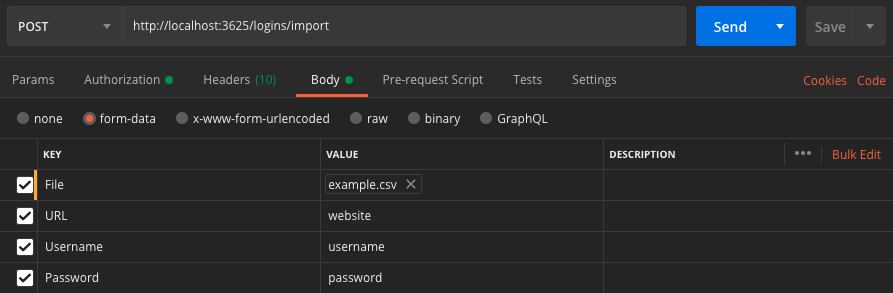
You need to fill the import form as below picture.
 Documentation

Documentation


There is no documentation for this package.
 Source Files
 Directories