

 README

README

dagu

A simple command to run workflows (DAGs) defined in YAML format
dagu is a single command that generates and executes a DAG (Directed acyclic graph) from a simple YAML definition. dagu also comes with a convenient web UI & REST API interface. It aims to be one of the easiest option to manage DAGs executed by cron.
Contents
- dagu
Motivation
Currently, my environment has many problems. Hundreds of complex cron jobs are registered on huge servers and it is impossible to keep track of the dependencies between them. If one job fails, I don't know which job to re-run. I also have to SSH into the server to see the logs and manually run the shell scripts one by one.
So I needed a tool that can explicitly visualize and manage the dependencies of the pipeline.
How nice it would be to be able to visually see the job dependencies, execution status, and logs of each job in a web browser, and to be able to rerun or stop a series of jobs with just a mouse click!
Why not existing tools, like Airflow?
I considered many potential tools such as Airflow, Rundeck, Luigi, DigDag, JobScheduler, etc.
But unfortunately, they were not suitable for my existing environment. Because they required a DBMS (Database Management System) installation, relatively high learning curves, and more operational overheads. We only have a small group of engineers in our office and use a less common DBMS.
Finally, I decided to build my own tool that would not require any DBMS server, any daemon process, or any additional operational burden and is easy to use.
Quick start
Installation
Download the binary from Releases page and place it on your system.
Usage
dagu start [--params=<params>] <job file>- run a jobdagu status <job file>- display the current status of the jobdagu retry --req=<request-id> <job file>- retry the failed/canceled jobdagu stop <job file>- cancel a jobdagu dry [--params=<params>] <job file>- dry-run a jobdagu server- start a web server for web UI
Features
- Simple command interface (See Usage)
- Simple configuration YAML format (See Simple example)
- Web UI to visualize, manage jobs and watch logs
- Parameterization
- Conditions
- Automatic retry
- Cancellation
- Retry
- Prallelism limits
- Environment variables
- Repeat
- Basic Authentication
- E-mail notifications
- REST API interface
- onExit / onSuccess / onFailure / onCancel handlers
- Automatic history cleaning
Use cases
- ETL Pipeline
- Batches
- Machine Learning
- Data Processing
- Automation
User interface
-
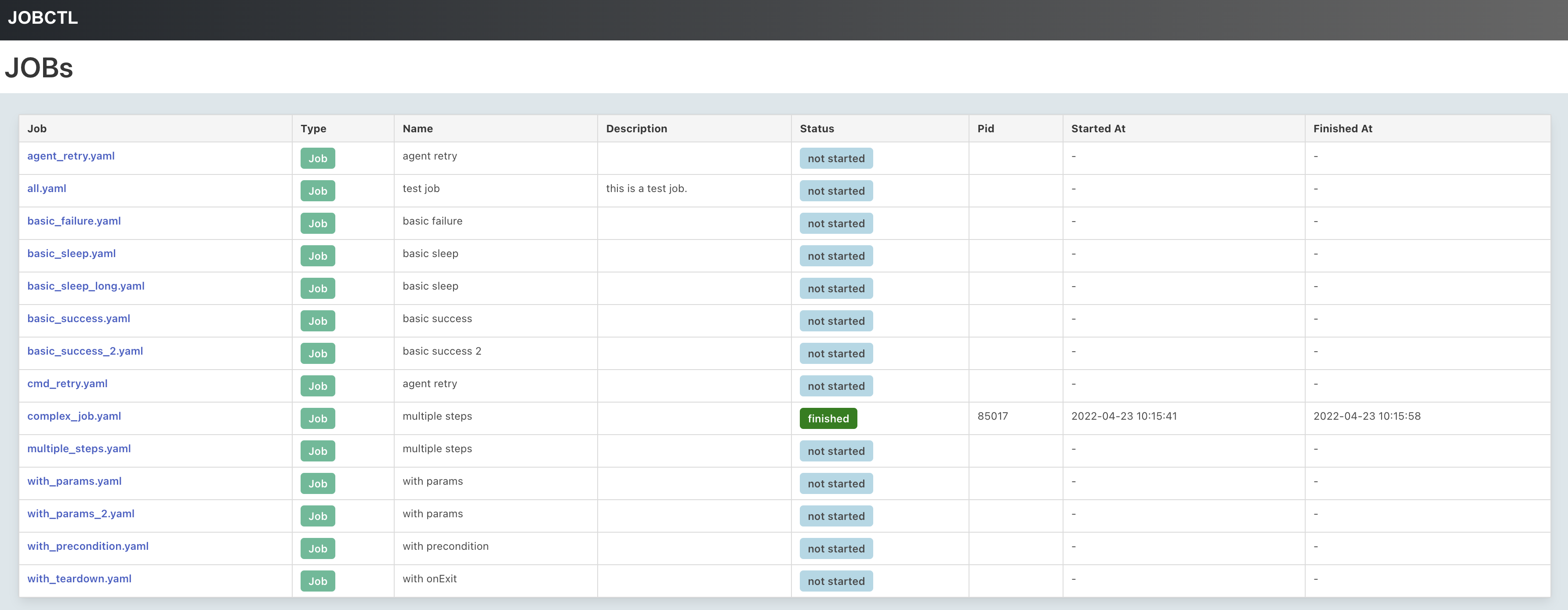
JOBs: Overview of all JOBs in your environment.
-
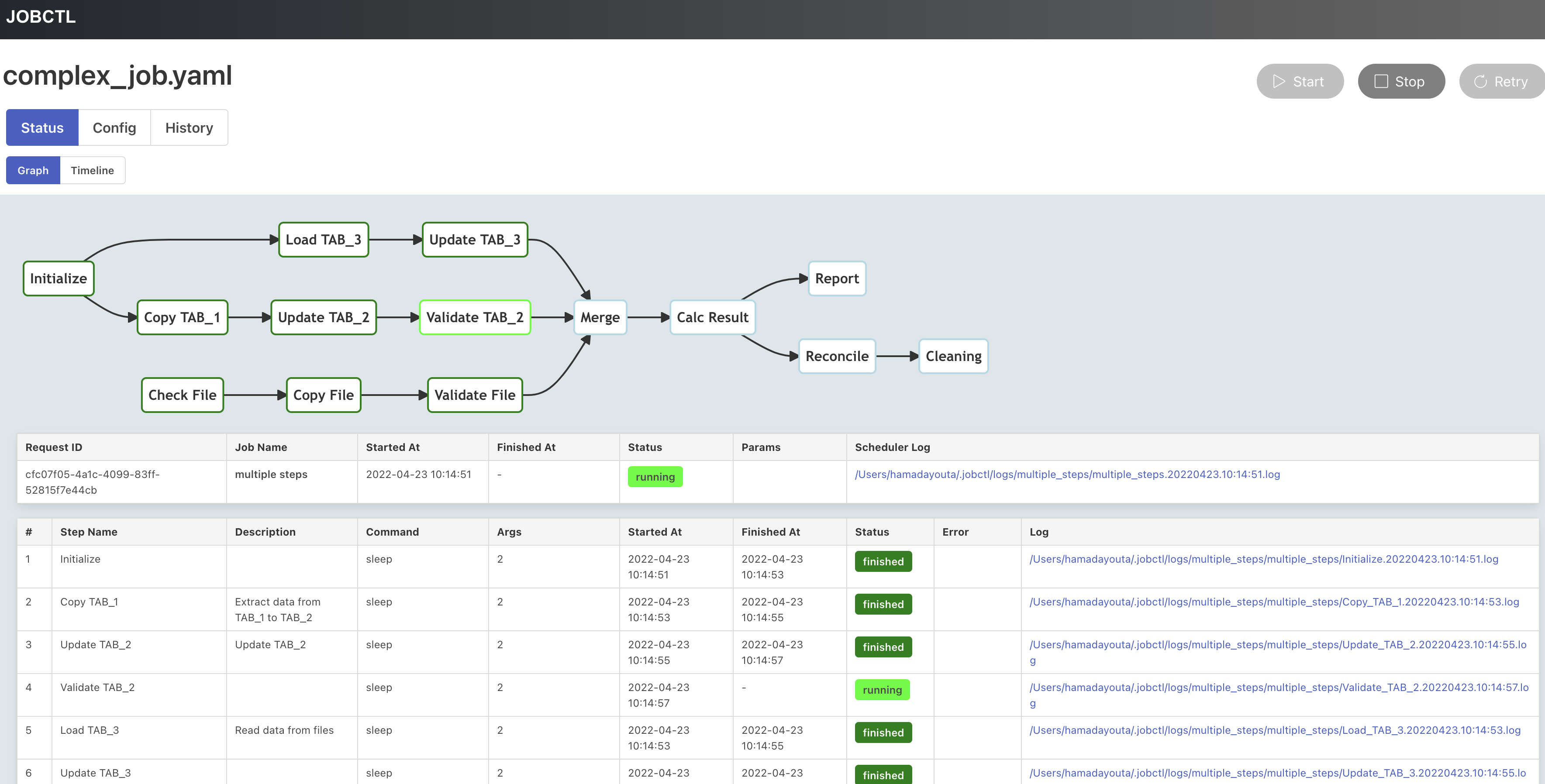
Detail: Current status of the job.
-
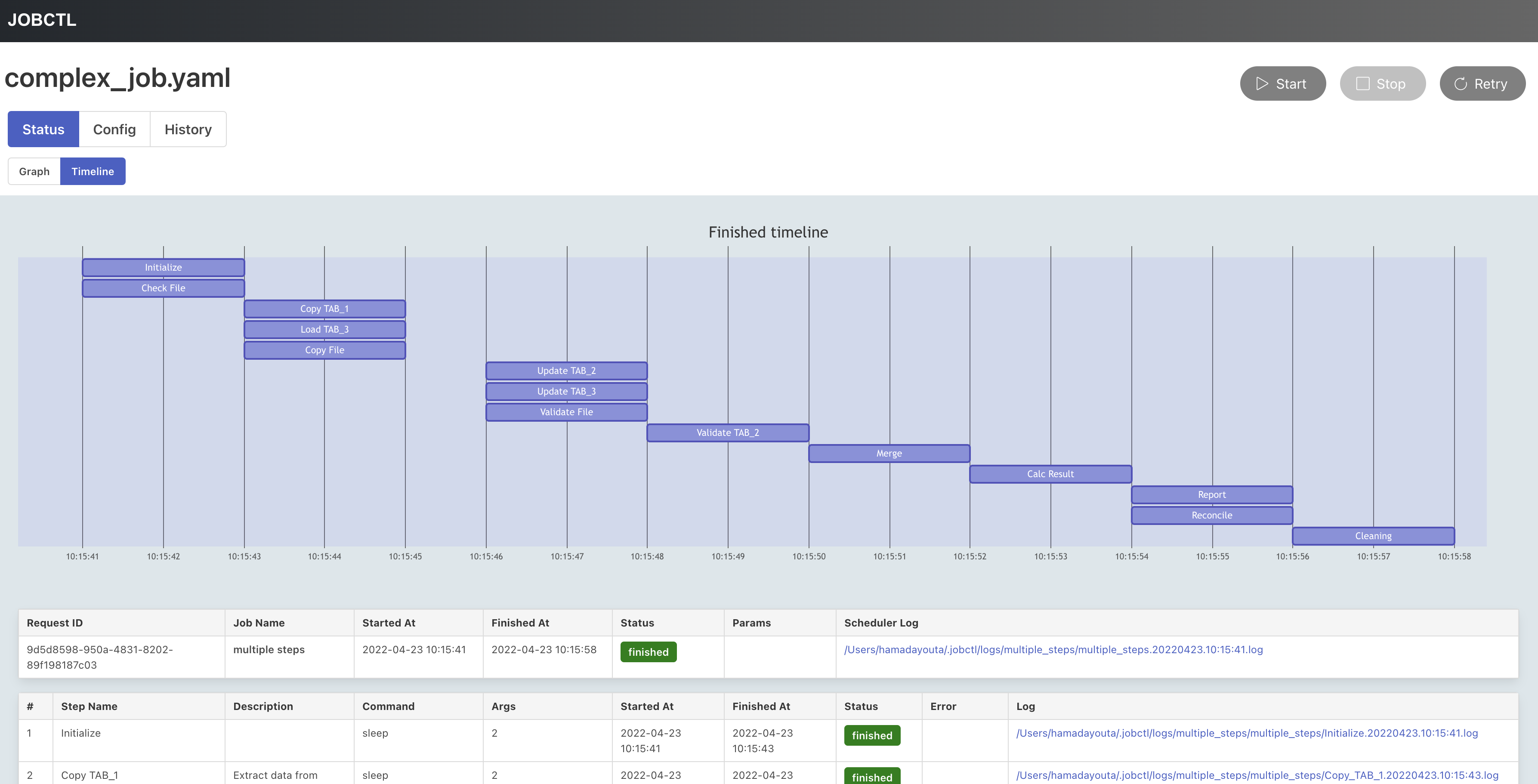
Timeline: Timeline of each steps in the pipeline.
-
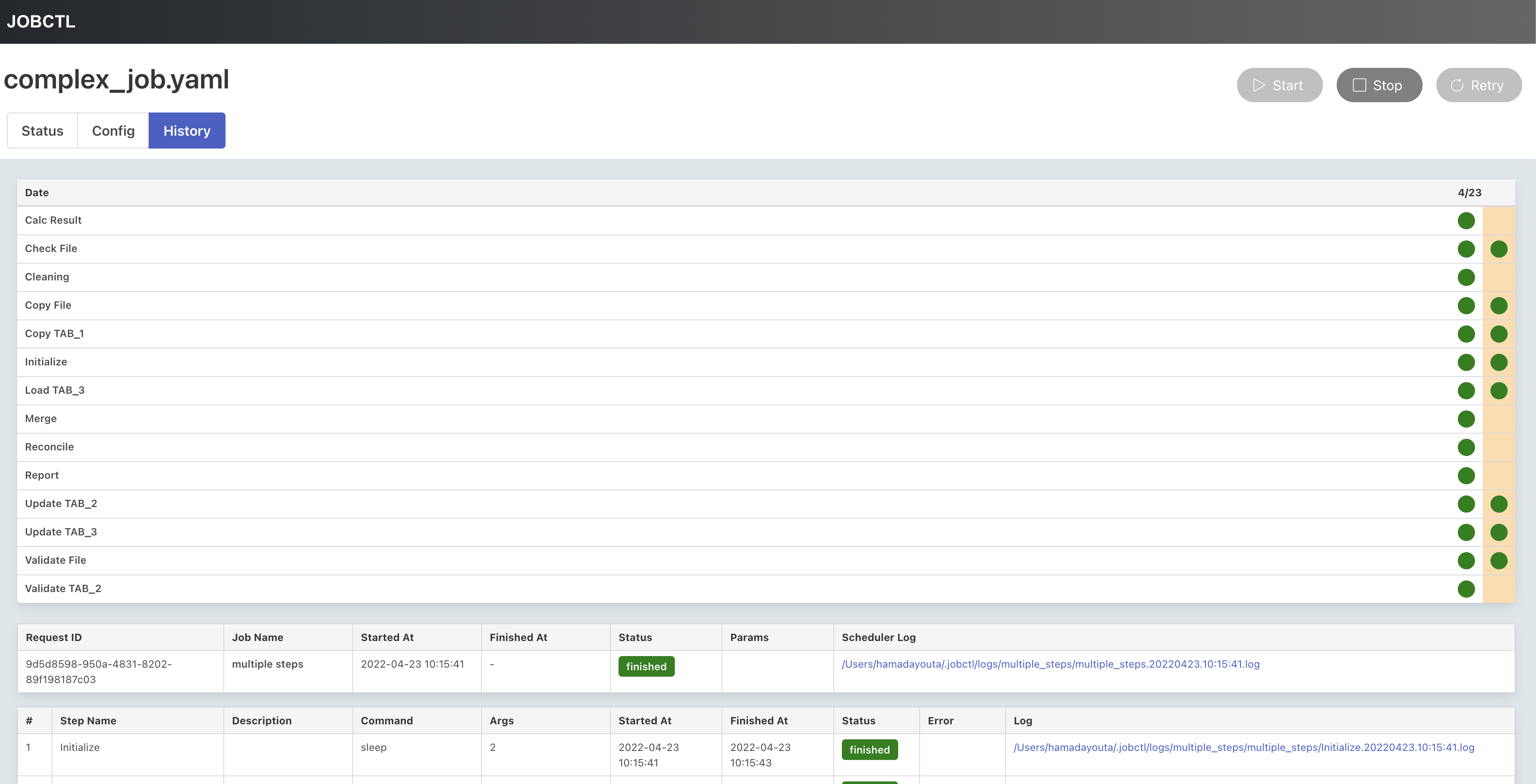
History: History of the execution of the pipeline.
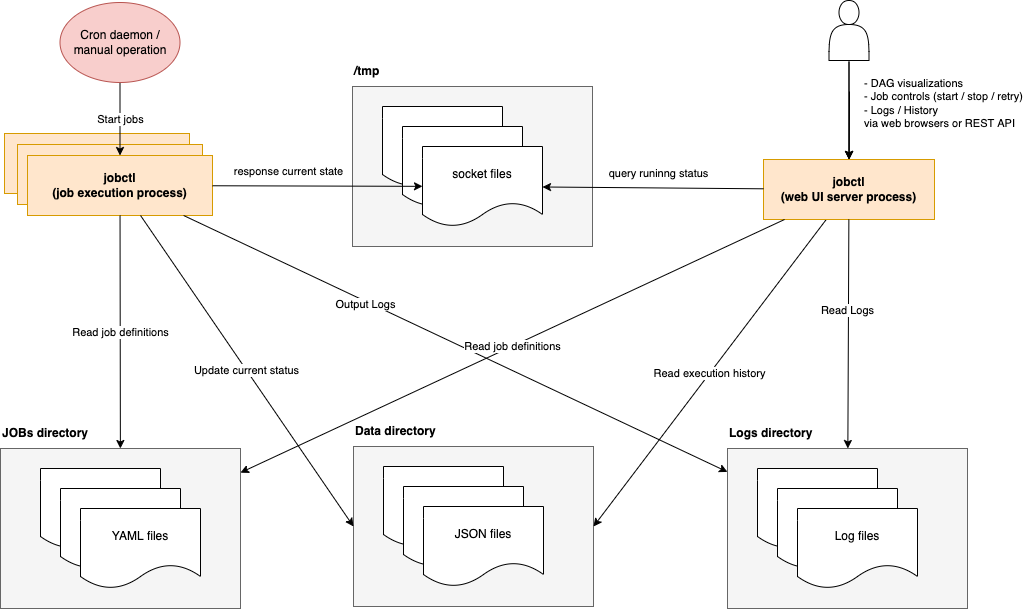
Architecture
- uses plain JSON files as history database, and unix sockets to communicate with running processes.
Configuration
Environment variables
DAGU__DATA- path to directory for internal use by dagu (default :~/.dagu/data)DAGU__LOGS- path to directory for logging (default :~/.dagu/logs)
Web UI configuration
Please create ~/.dagu/admin.yaml.
host: <hostname for web UI address>             # default : ${HOST}
port: <port number for web UI address>          # default : 8080
jobs: <the location of job configuration files> # default : current working directory

# optional
command: <Absolute path of dagu binary if it's not in $PATH>
isBasicAuth: <true|false>
basicAuthUsername: <username for basic auth of web UI>
basicAuthPassword: <password for basic auth of web UI>
Global configuration
Please create ~/.dagu/config.yaml. All settings can be overridden by individual job configurations.
Creating a global configuration is a convenient way to organize common settings.
logDir: <path-to-write-log>   # log directory to write standard output from the job steps
histRetentionDays: 3 # job history retention days (not for log files)

# E-mail server config (optional)
smtp:
  host: <smtp server host>
  port: <stmp server port>
errorMail:
  from: <from address to send error mail>
  to: <to address to send error mail>
  prefix: <prefix of mail subject for error mail>
infoMail:
  from: <from address to send notification mail>
  to: <to address to send notification mail>
  prefix: <prefix of mail subject for notification mail>
Job configuration
Simple configuration
name: simple configuration
steps:
  - name: step 1
    command: python some_batch_1.py
    dir: ${HOME}/jobs/                  # working directory for the job (optional)
  - name: step 2
    command: python some_batch_2.py
    dir: ${HOME}/jobs/
    depends:
      - step 1
All configuration
name: all configuration
description: run python jobs

# Define environment variables
env:
  LOG_DIR: ${HOME}/jobs/logs
  PATH: /usr/local/bin:${PATH}

logDir: ${LOG_DIR}   # log directory to write standard output from the job steps
histRetentionDays: 3 # job history retention days (not for log files)
delaySec: 1          # interval seconds between job steps
maxActiveRuns: 1     # max parallel number of running step

# Define parameters
params: param1 param2 # they can be referenced by each steps as $1, $2 and so on.

# Define preconditions for whether or not the job is allowed to run
preconditions:
  - condition: "`printf 1`" # This condition will be evaluated at each execution of the job
    expected: "1"           # If the evaluation result do not match, the job is canceled

# Mail notification configs
mailOnError: true    # send a mail when a job failed
mailOnFinish: true   # send a mail when a job finished

# Handler on Success, Failure, Cancel, Exit
handlerOn:
  success:
    command: "echo succeed"
  failure:
    command: "echo failed"
  cancel:
    command: "echo canceled"
  exit:
    command: "echo finished"

# Job steps
steps:
  - name: step 1
    description: step 1 description
    dir: ${HOME}/jobs
    command: python some_batch_1.py $1
    mailOnError: false # do not send mail on error
    continueOn:
      failed: true     # continue to the next step regardless the error of this job
      skipped: true    # continue to the next step regardless the evaluation result of preconditions
    retryPolicy:
      limit: 2         # retry up to 2 times when the step failed
    # Define preconditions for whether or not the step is allowed to run
    # If the specified conditions are not met, this step and subsequent steps are skipped.
    preconditions:
      - condition: "`printf 1`"
        expected: "1"
  - name: step 2
    description: step 2 description
    dir: ${HOME}/jobs
    command: python some_batch_2.py $1
    depends:
      - step 1
The global config file ~/.dagu/config.yaml is useful to gather common settings such as mail-server configs or log directory.
Examples
To check all examples, visit this page.
- Sample 1

name: example job
steps:
  - name: "1"
    command: echo hello world
  - name: "2"
    command: sleep 10
    depends:
      - "1"
  - name: "3"
    command: echo done!
    depends:
      - "2"
- Sample 2

name: example job
env:
  LOG_DIR: ${HOME}/logs
logDir: ${LOG_DIR}
params: foo bar
steps:
  - name: "check precondition"
    command: echo start
    preconditions:
      - condition: "`echo $1`"
        expected: foo
  - name: "print foo"
    command: echo $1
    depends:
      - "check precondition"
  - name: "print bar"
    command: echo $2
    depends:
      - "print foo"
  - name: "failure and continue"
    command: "false"
    continueOn:
      failure: true
    depends:
      - "print bar"
  - name: "print done"
    command: echo done!
    depends:
      - "failure and continue"
handlerOn:
  exit:
    command: echo finished!
  success:
    command: echo success!
  failure:
    command: echo failed!
  cancel:
    command: echo canceled!
- Complex example

name: complex job
steps:
  - name: "Initialize"
    command: "sleep 2"
  - name: "Copy TAB_1"
    description: "Extract data from TAB_1 to TAB_2"
    command: "sleep 2"
    depends:
      - "Initialize"
  - name: "Update TAB_2"
    description: "Update TAB_2"
    command: "sleep 2"
    depends:
      - Copy TAB_1
  - name: Validate TAB_2
    command: "sleep 2"
    depends:
      - "Update TAB_2"
  - name: "Load TAB_3"
    description: "Read data from files"
    command: "sleep 2"
    depends:
      - Initialize
  - name: "Update TAB_3"
    command: "sleep 2"
    depends:
      - "Load TAB_3"
  - name: Merge
    command: "sleep 2"
    depends:
      - Update TAB_3
      - Validate TAB_2
      - Validate File
  - name: "Check File"
    command: "sleep 2"
  - name: "Copy File"
    command: "sleep 2"
    depends:
      - Check File
  - name: "Validate File"
    command: "sleep 2"
    depends:
      - Copy File
  - name: Calc Result
    command: "sleep 2"
    depends:
      - Merge
  - name: "Report"
    command: "sleep 2"
    depends:
      - Calc Result
  - name: Reconcile
    command: "sleep 2"
    depends:
      - Calc Result
  - name: "Cleaning"
    command: "sleep 2"
    depends:
      - Reconcile
FAQ
How to contribute?
Feel free to contribute in any way you want. Share ideas, submit issues, create pull requests. You can start by improving this README.md or suggesting new features Thank you!
Todo
- Documentation for YAML definitions
- Prettier CLI interface
- JWT authentication
- History compaction
- History sub command
- Edit YAML on Web UI
- Pause & Resume pipeline
- Docker container
- Edit node status on Web UI
License
This project is licensed under the GNU GPLv3 - see the LICENSE.md file for details
 Directories