

 README

go-zero
go-zero is a web and rpc framework with lots of builtin engineering practices. It’s born to ensure the stability of the busy services with resilience design and has been serving sites with tens of millions of users for years.



🤷 What is go-zero?

go-zero (listed in CNCF Landscape: https://landscape.cncf.io/?selected=go-zero) is a web and rpc framework with lots of builtin engineering practices. It’s born to ensure the stability of the busy services with resilience design and has been serving sites with tens of millions of users for years.
go-zero contains simple API description syntax and code generation tool called goctl. You can generate Go, iOS, Android, Kotlin, Dart, TypeScript, JavaScript from .api files with goctl.
Advantages of go-zero:
- Improves the stability of the services with tens of millions of daily active users
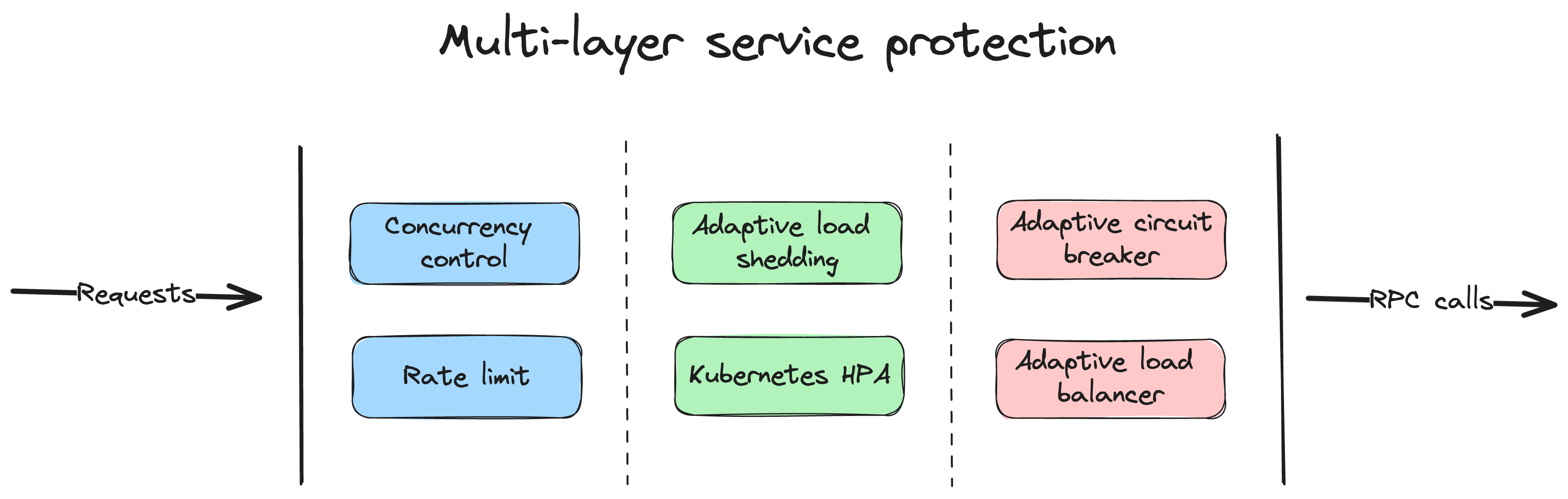
- Builtin chained timeout control, concurrency control, rate limit, adaptive circuit breaker, adaptive load shedding, even no configuration needed
- Builtin middlewares also can be integrated into your frameworks
- Simple API syntax, one command to generate a couple of different languages
- Auto validate the request parameters from clients
- Plenty of builtin microservice management and concurrent toolkits
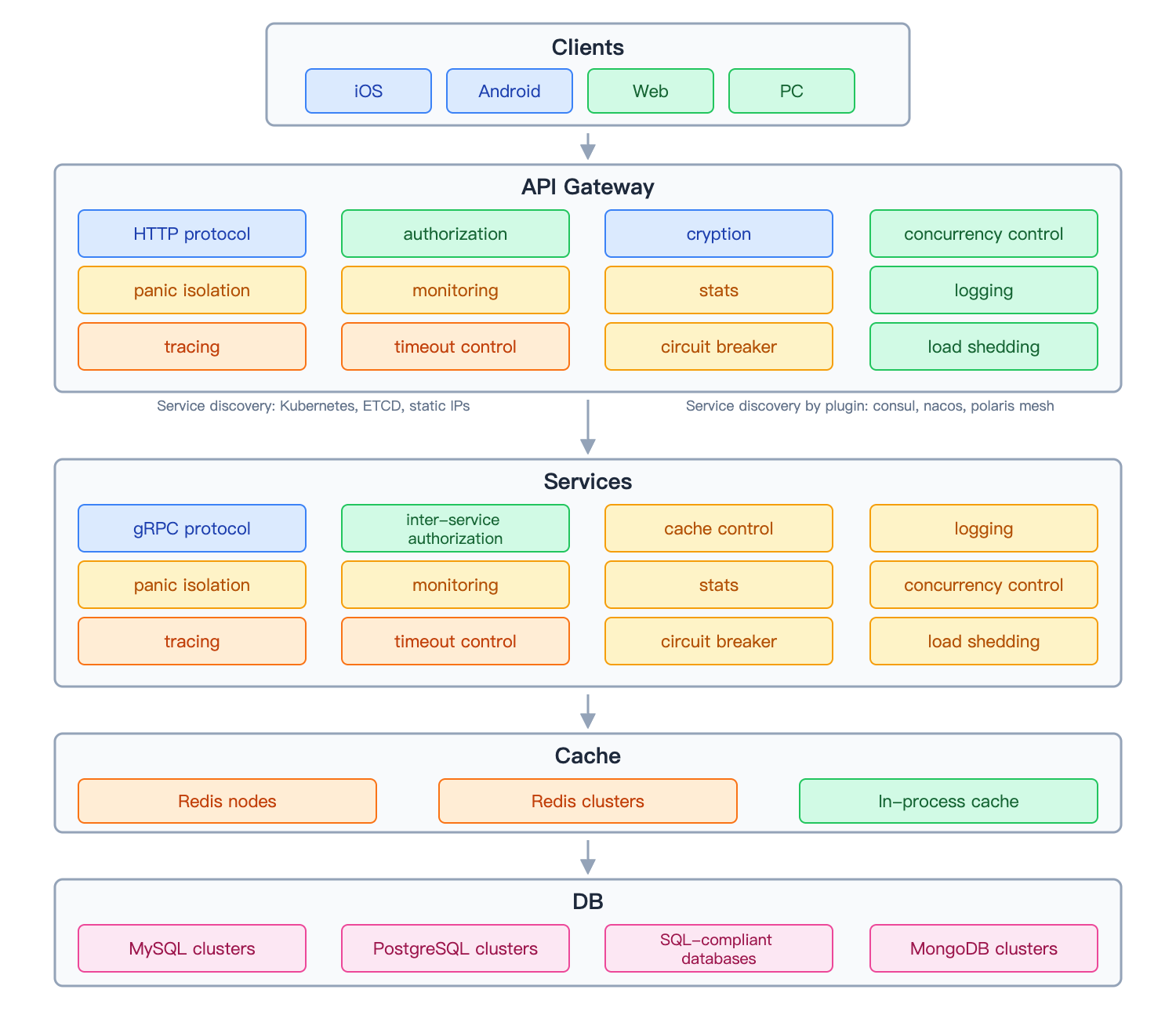
Backgrounds of go-zero
In early 2018, we transitioned from a Java+MongoDB monolithic architecture to microservices, choosing:
- Golang - High performance, simple syntax, excellent deployment experience, and low resource consumption
- Self-designed microservice framework - Better problem isolation, easier feature extension, and faster issue resolution
Design considerations on go-zero
go-zero follows these core design principles:
- Simplicity - Keep it simple, first principle
- High availability - Stable under high concurrency
- Resilience - Failure-oriented programming with adaptive protection
- Developer friendly - Encapsulate complexity, one way to do one thing
- Easy to extend - Flexible architecture for growth
The implementation and features of go-zero
go-zero integrates engineering best practices:
- Code generation - Powerful tools to minimize boilerplate
- Simple API - Clean interfaces, fully compatible with net/http
- High performance - Optimized for speed and efficiency
- Resilience - Built-in circuit breaker, rate limiting, load shedding, timeout control
- Service mesh - Service discovery, load balancing, call tracing
- Developer tools - Auto parameter validation, cache management, metrics and monitoring
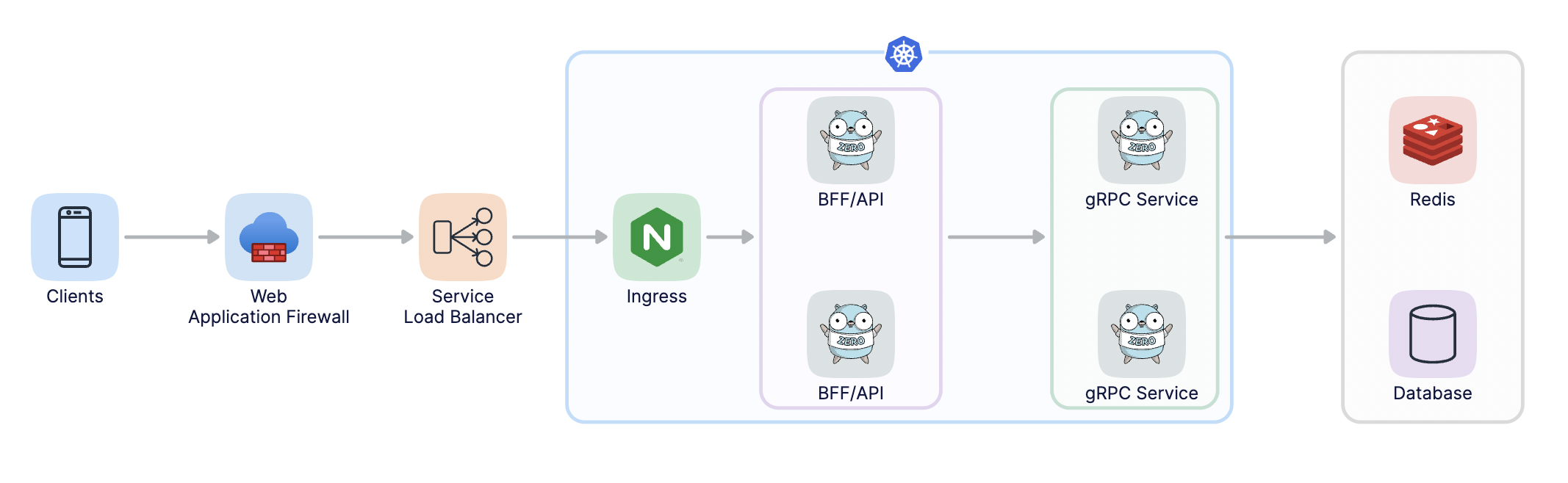
Architecture with go-zero
Installation
Run the following command under your project:
go get -u github.com/zeromicro/go-zero
AI-Native Development
The go-zero team provides workflow guidance and implementation patterns for AI coding assistants such as Claude Code, GitHub Copilot, and Cursor. For assistants with terminal access, the recommended workflow is to run goctl directly to generate framework-compliant code.
AI Tooling Projects
- ai-context - Workflow guidance: how to approach go-zero development tasks and when to use goctl.
- zero-skills - Implementation patterns, examples, and goctl command reference, loaded as needed.
- mcp-zero - Optional adapter that exposes goctl code generation through the Model Context Protocol (MCP).
Quick Setup
Install goctl and ensure it is available in your $PATH:
go install github.com/zeromicro/go-zero/tools/goctl@latest
goctl --version
Follow the ai-context setup guide and zero-skills integration guides to configure your assistant's workflow instructions and pattern library.
How It Works
- Consult ai-context for the workflow and zero-skills for relevant patterns.
- Define the
.apior.protospecification, then run goctl in the terminal to generate code. - Implement business logic, resolve dependencies, build, and test the service.
Example: Create a REST API → write the .api specification → run goctl api go → implement the logic using zero-skills patterns → run go mod tidy, go build ./..., and go test ./....
Optional MCP Integration
For clients that use MCP tools, such as Claude Desktop, configure mcp-zero to invoke goctl through MCP. It uses the same code generation engine; assistants with terminal access can use the direct workflow above without an MCP server.
Quick Start
-
Full examples:
-
Install goctl
# for Go
go install github.com/zeromicro/go-zero/tools/goctl@latest

# For Mac
brew install goctl

# docker for all platforms
docker pull kevinwan/goctl
# run goctl
docker run --rm -it -v `pwd`:/app kevinwan/goctl --help
Ensure goctl is executable and in your $PATH.
-
Create the API file (greet.api):
type (
  Request {
    Name string `path:"name,options=[you,me]"` // parameters are auto validated
  }

  Response {
    Message string `json:"message"`
  }
)

service greet-api {
  @handler GreetHandler
  get /greet/from/:name(Request) returns (Response)
}
Generate .api template:
goctl api -o greet.api -
Generate Go server code
goctl api go -api greet.api -dir greetGenerated structure:
├── greet
│   ├── etc
│   │   └── greet-api.yaml        // configuration file
│   ├── greet.go                  // main file
│   └── internal
│       ├── config
│       │   └── config.go         // configuration definition
│       ├── handler
│       │   ├── greethandler.go   // get/put/post/delete routes are defined here
│       │   └── routes.go         // routes list
│       ├── logic
│       │   └── greetlogic.go     // request logic can be written here
│       ├── svc
│       │   └── servicecontext.go // service context, mysql/redis can be passed in here
│       └── types
│           └── types.go          // request/response defined here
└── greet.api                     // api description file
Run the service:
cd greet
go mod tidy
go run greet.go -f etc/greet-api.yaml
Default port: 8888 (configurable in etc/greet-api.yaml)
Test with curl:
curl -i http://localhost:8888/greet/from/youResponse:
HTTP/1.1 200 OK Date: Sun, 30 Aug 2020 15:32:35 GMT Content-Length: 0 -
Write business logic
- Pass dependencies (mysql, redis, etc.) via servicecontext.go
- Add logic code in the logic package per .api definition
-
Generate client code for multiple languages
goctl api java -api greet.api -dir greet
goctl api dart -api greet.api -dir greet
...
Kubernetes RPC discovery
RPC clients can discover services inside Kubernetes by using the k8s target
scheme:
c := zrpc.RpcClientConf{
    NonBlock: true,
    Target:   "k8s://dev/demo-rpc:8080",
}
The target format is k8s://<namespace>/<service>:<port>. If the namespace is
omitted, default is used. The resolver runs in-cluster and reads Kubernetes
EndpointSlices, so the service account used by the client must be allowed to
read EndpointSlices in the target namespace:
rules:
  - apiGroups: ["discovery.k8s.io"]
    resources: ["endpointslices"]
    verbs: ["list", "watch"]
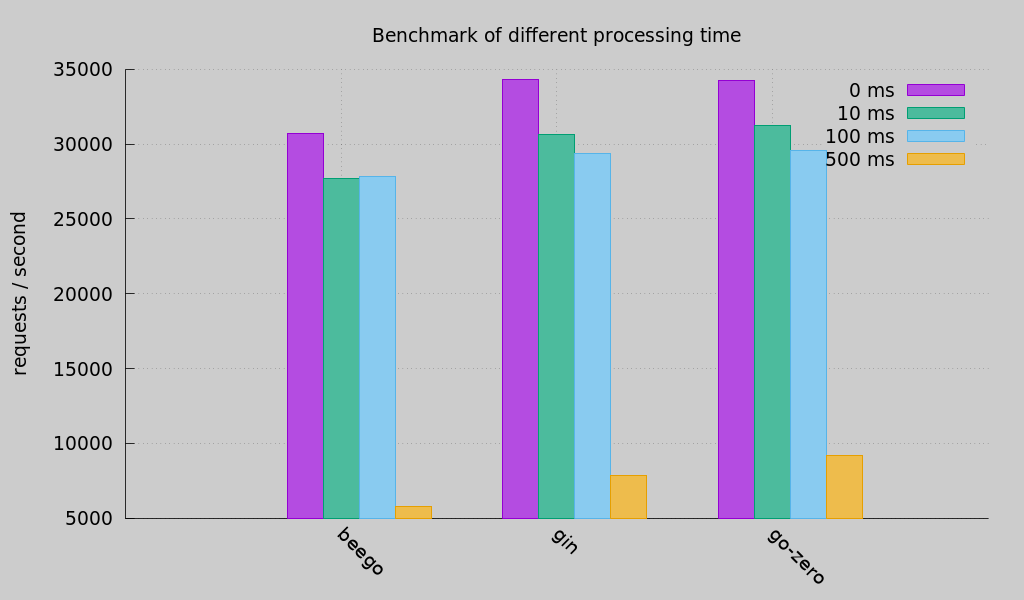
Benchmark
Documents
- Documents
- Rapid development of microservice systems
- Rapid development of microservice systems - multiple RPCs
- Examples
Chat group
Join the chat via https://discord.gg/4JQvC5A4Fe
Cloud Native Landscape


go-zero enlisted in the CNCF Cloud Native Landscape.
Give a Star! ⭐
If you like this project or are using it to learn or start your own solution, give it a star to get updates on new releases. Your support matters!
 Directories

| Path | Synopsis |
|---|---|
|
core
|
|
|
discov/internal
Package internal is a generated GoMock package.
|
Package internal is a generated GoMock package. |
|
stores/mon
Package mon is a generated GoMock package.
|
Package mon is a generated GoMock package. |
|
internal
|
|
|
tools
|
|
|
goctl
module
|
|