 The highest tagged major version is


 README

README

GT Telemetry


GT Telemetry is a module for reading Gran Turismo race telemetry streams in Go.
Features
- Support for all fields contained within the telemetry data packet.
- Access data in both metric and imperial units.
- An additional field for the differential gear ratio is computed based on the rolling wheel diameter of the driven wheels.
- A vehicle inventory database for providing the follwing information on a given vehicle ID:
- Manufacturer
- Model
- Year
- Drivetrain
- Aspiration
- Type (racing or street)
- Racing category
- Open cockpit exposure
Installation
To start using gt-telemetry, install Go 1.21 or above. From your project, run the following command to retrieve the module:
go get github.com/zetetos/gt-telemetry
Usage
import telemetry_client "github.com/zetetos/gt-telemetry"
Construct a new GT client and start reading the telemetry stream. All configuration fields are optional with the default values show in the example.
config := telemetry_client.GTClientOpts{
    Source: "udp://255.255.255.255:33739"
    Format: telemetrysrc.TelemetryFormatA,
    LogLevel: "warn",
    StatsEnabled: false,
    VehicleDB: "./internal/vehicles/inventory.json",
}
gt, _ := telemetry_client.NewGTClient(config)
go func() {
    err, recoverable = gt.Run()
    if err != nil {
        if recoverable {
            log.Printf("Recoverable error: %s", err.Error())
        } else {
            log.Fatalf("Fatal client error: %s", err.Error())
        }
    }
}()
If the PlayStation is on the same network segment then you will probably find that the default broadcast address 255.255.255.255 will be sufficient to start reading data. If it does not work then enter the IP address of the PlayStation device instead.
Read some data from the stream:
    fmt.Printf("Sequence ID:  %6d    %3.0f kph  %5.0f rpm\n",
        gt.Telemetry.SequenceID(),
        gt.Telemetry.GroundSpeedKPH(),
        gt.Telemetry.EngineRPM(),
    )
Replay files
Offline saves of replay files can also be used to read in telemetry data. Files can be in either plain (*.gtr) or compressed (*.gtz) format.
Read telemetry from a replay file by setting the Source value in the GTClientOpts to a file URL, like so:
config := telemetry_client.GTClientOpts{
    Source: "file://examples/simple/replay.gtz"
}
Saving a replay to a file
Replays can be captured and saved to a file using cmd/capture_replay/main.go. Captures will be saved in plain or compressed formats according to the file extension as mentioned in the section above.
A replay can be saved to a default file by running:
make run/capture-replay
Alternatively, the replay can be captured to a compressed file with a different name and location by running:
go run cmd/capture_replay/main.go -o /path/to/replay-file.gtz
Vehicle Inventory Management
The inventory CLI tool allows you to import and export vehicle inventory data between JSON and CSV formats, and manage vehicle entries with interactive add, edit, and delete operations. The tool uses action-based commands and outputs to stdout, making it compatible with Unix pipes and redirections.
The output format is automatically determined by the input file extension:
.jsonfiles are converted to CSV format.csvfiles are converted to JSON format
Adding new vehicles interactively
go run cmd/inventory/main.go add internal/vehicles/inventory.json
The tool will prompt for each field and display a summary before saving. It also checks for duplicate vehicle IDs and provides confirmation prompts.
Editing existing vehicles
go run cmd/inventory/main.go edit internal/vehicles/inventory.json 3267
The edit action loads the existing vehicle data and allows you to modify any field. Current values are shown in brackets, and pressing Enter without input keeps the existing value.
Deleting vehicles
go run cmd/inventory/main.go delete internal/vehicles/inventory.json 3267
The delete action shows the vehicle details and asks for confirmation before removal.
Converting JSON to CSV
go run cmd/inventory/main.go convert internal/vehicles/inventory.json
Converting CSV to JSON
go run cmd/inventory/main.go convert data/inventory.csv
CSV Format
The CSV format includes the following columns:
- CarID: Unique vehicle identifier
- Manufacturer: Vehicle manufacturer
- Model: Vehicle model name
- Year: Model year (0 for unknown)
- OpenCockpit: Boolean indicating if the vehicle has an open cockpit
- CarType: Vehicle type (street, race)
- Category: Racing category (e.g., Gr.1, Gr.3, Gr.4, Gr.B)
- Drivetrain: Drivetrain type (FR, FF, MR, RR, 4WD)
- Aspiration: Engine aspiration (NA, TC, SC, EV, etc.)
- EngineLayout: Engine layout configuration
- EngineBankAngle: Engine cylinder bank angle in degrees
- EngineCrankPlaneAngle: Engine crank plane angle in degrees
## Examples ##

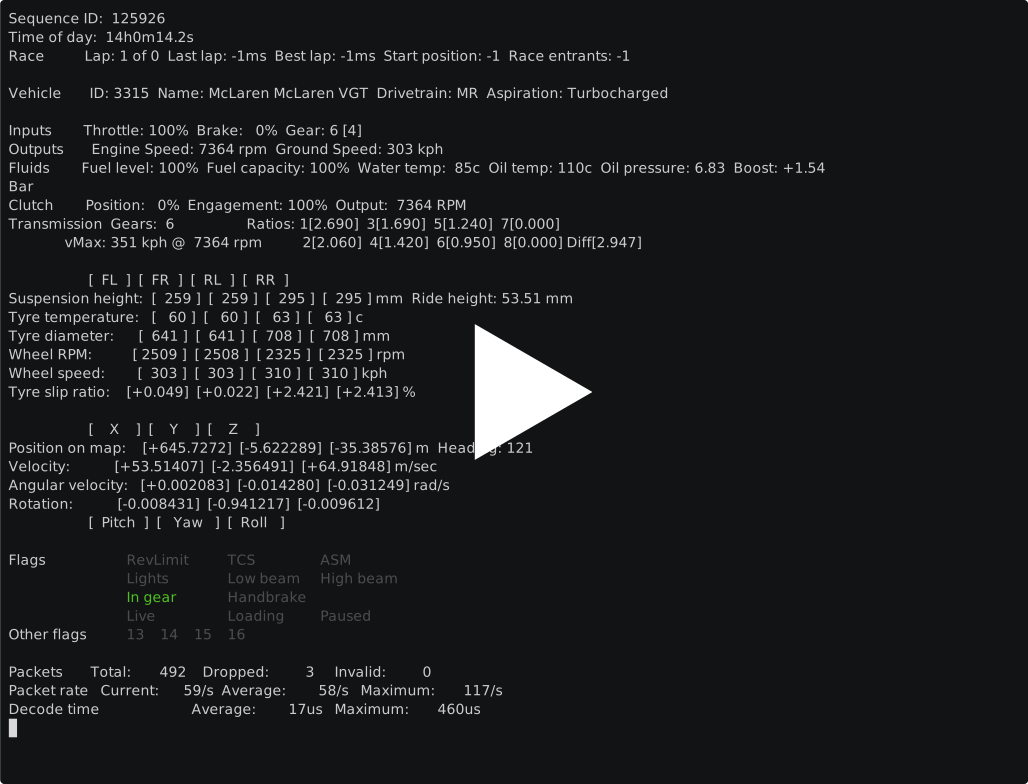
The [examples](./examples) directory contains example code for accessing most data made available by the library. The example app shown at the top of this page can be run against a replay file with the following command:

```bash
make run
The example code can also read live telemetry data from a PlayStation by removing the Source field in the GTClientOpts.
Acknowledgements
Special thanks to Nenkai for the excellent work documenting the Gran Turismo telemetry protocol.
 Documentation

Documentation

Index 
Constants 
This section is empty.
Variables 
This section is empty.
Functions 
func NewTransformer 
Types 
type GTClient 
type GTClient struct {
	DecipheredPacket []byte
	Finished         bool
	Statistics       *statistics
	Telemetry        *transformer
	// contains filtered or unexported fields
}
func NewGTClient 
func NewGTClient(opts GTClientOpts) (*GTClient, error)
type GTClientOpts 
type GTClientOpts struct {
	Source       string
	Format       telemetrysrc.TelemetryFormat
	LogLevel     string
	Logger       *zerolog.Logger
	StatsEnabled bool
	VehicleDB    string
}
type RotationalEnvelope ¶ added in v1.8.0
type SymmetryAxes 
type TranslationalEnvelope ¶ added in v1.8.0
type Transmission 
 Source Files
 Directories

Directories

| Path | Synopsis |
|---|---|
|
cmd
|
|
|
capture_replay
command
|
|
|
inventory
command
|
|
|
examples
|
|
|
simple
command
|
|
|
internal
|
|