

 README

README

VHS (library fork)
This is a fork of charmbracelet/vhs that
exposes vhs as a Go library. The upstream repository root is package main, so
it cannot be imported. Here the root is package vhs, the executable lives in
./cmd/vhs, and vhs.Evaluate(ctx, tape, out) renders a tape from another Go
program. It also waits for ttyd to start listening before pointing the browser
at it, which removes a connection-refused race on a warm browser.
Everything else is upstream vhs and is governed by its MIT license. If you just
want the vhs command, use the original. This fork exists so
ascii-gif can drive vhs in-process.
The original README follows.



Write terminal GIFs as code for integration testing and demoing your CLI tools.

The above example was generated with VHS (view source).
Tutorial
To get started, install VHS and create a new .tape file.
vhs new demo.tape
Open the .tape file with your favorite $EDITOR.
vim demo.tape
Tape files consist of a series of commands. The commands are instructions for VHS to perform on its virtual terminal. For a list of all possible commands see the command reference.
# Where should we write the GIF?
Output demo.gif

# Set up a 1200x600 terminal with 46px font.
Set FontSize 46
Set Width 1200
Set Height 600

# Type a command in the terminal.
Type "echo 'Welcome to VHS!'"

# Pause for dramatic effect...
Sleep 500ms

# Run the command by pressing enter.
Enter

# Admire the output for a bit.
Sleep 5s
Once you've finished, save the file and feed it into VHS.
vhs demo.tape
All done! You should see a new file called demo.gif (or whatever you named
the Output) in the directory.

For more examples see the examples/ directory.
Installation
[!NOTE] VHS requires
ttydandffmpegto be installed and available on yourPATH.
Use a package manager:
# macOS or Linux
brew install vhs

# Arch Linux (btw)
pacman -S vhs

# Nix
nix-env -iA nixpkgs.vhs

# Windows using scoop
scoop install vhs
Or, use Docker to run VHS directly, dependencies included:
docker run --rm -v $PWD:/vhs ghcr.io/charmbracelet/vhs <cassette>.tape
Or, download it:
- Packages are available in Debian and RPM formats
- Binaries are available for Linux, macOS, and Windows
Or, just install it with go:
go install github.com/charmbracelet/vhs@latest
Windows, Debian, Ubuntu, Fedora, RHEL, Void Instructions
- Debian / Ubuntu
# Debian/Ubuntu
sudo mkdir -p /etc/apt/keyrings
curl -fsSL https://repo.charm.sh/apt/gpg.key | sudo gpg --dearmor -o /etc/apt/keyrings/charm.gpg
echo "deb [signed-by=/etc/apt/keyrings/charm.gpg] https://repo.charm.sh/apt/ * *" | sudo tee /etc/apt/sources.list.d/charm.list
# Install ttyd from https://github.com/tsl0922/ttyd/releases
sudo apt update && sudo apt install vhs ffmpeg
- Fedora / RHEL
echo '[charm]
name=Charm
baseurl=https://repo.charm.sh/yum/
enabled=1
gpgcheck=1
gpgkey=https://repo.charm.sh/yum/gpg.key' | sudo tee /etc/yum.repos.d/charm.repo
# Install ttyd from https://github.com/tsl0922/ttyd/releases
sudo yum install vhs ffmpeg
- Void
sudo xbps-install vhs
- Windows
winget install charmbracelet.vhs
# or scoop
scoop install vhs
Record Tapes
VHS has the ability to generate tape files from your terminal actions!
To record to a tape file, run:
vhs record > cassette.tape
Perform any actions you want and then exit the terminal session to stop
recording. You may want to manually edit the generated .tape file to add
settings or modify actions. Then, you can generate the GIF:
vhs cassette.tape
Publish Tapes
VHS allows you to publish your GIFs to our servers for easy sharing with your
friends and colleagues. Specify which file you want to share, then use the
publish sub-command to host it on vhs.charm.sh. The output will provide you
with links to share your GIF via browser, HTML, and Markdown.
vhs publish demo.gif
The VHS Server
VHS has an SSH server built in! When you self-host VHS you can access it as though it were installed locally. VHS will have access to commands and applications on the host, so you don't need to install them on your machine.
To start the server run:
vhs serve
Configuration Options
VHS_PORT: The port to listen on (1976)VHS_HOST: The host to listen on (localhost)VHS_GID: The Group ID to run the server as (current user's GID)VHS_UID: The User ID to run the server as (current user's UID)VHS_KEY_PATH: The path to the SSH key to use (.ssh/vhs_ed25519)VHS_AUTHORIZED_KEYS_PATH: The path to the authorized keys file (empty, publicly accessible)
Then, simply access VHS from a different machine via ssh:
ssh vhs.example.com < demo.tape > demo.gif
VHS Command Reference
[!NOTE] You can view all VHS documentation on the command line with
vhs manual.
There are a few basic types of VHS commands:
Output <path>: specify file outputRequire <program>: specify required programs for tape fileSet <Setting> Value: set recording settingsType "<characters>": emulate typingLeftRightUpDown: arrow keysBackspaceEnterTabSpace: special keysScrollUpScrollDown: scroll terminal viewportCtrl[+Alt][+Shift]+<char>: press control + key and/or modifierSleep <time>: wait for a certain amount of timeWait[+Screen][+Line] /regex/: wait for specific conditionsHide: hide commands from outputShow: stop hiding commands from outputScreenshot: screenshot the current frameCopy/Paste: copy and paste text from clipboard.Source: source commands from another tapeEnv <Key> Value: set environment variables
Output
The Output command allows you to specify the location and file format
of the render. You can specify more than one output in a tape file which
will render them to the respective locations.
Output out.gif
Output out.mp4
Output out.webm
Output frames/ # a directory of frames as a PNG sequence
Require
The Require command allows you to specify dependencies for your tape file.
These are useful to fail early if a required program is missing from the
$PATH, and it is certain that the VHS execution will not work as expected.
Require commands must be defined at the top of a tape file, before any non- setting or non-output command.
# A tape file that requires gum and glow to be in the $PATH
Require gum
Require glow
Settings
The Set command allows you to change global aspects of the terminal, such as
the font settings, window dimensions, and GIF output location.
Setting must be administered at the top of the tape file. Any setting (except
TypingSpeed) applied after a non-setting or non-output command will be
ignored.
Set Shell
Set the shell with the Set Shell <shell> command
Set Shell fish
Set Font Size
Set the font size with the Set FontSize <number> command.
Set FontSize 10
Set FontSize 20
Set FontSize 40


Set Font Family
Set the font family with the Set FontFamily "<font>" command
Set FontFamily "Monoflow"

Set Width
Set the width of the terminal with the Set Width command.
Set Width 300

Set Height
Set the height of the terminal with the Set Height command.
Set Height 1000

Set Letter Spacing
Set the spacing between letters (tracking) with the Set LetterSpacing
Command.
Set LetterSpacing 20

Set Line Height
Set the spacing between lines with the Set LineHeight Command.
Set LineHeight 1.8

Set Typing Speed
Set TypingSpeed 500ms # 500ms
Set TypingSpeed 1s    # 1s
Set the typing speed of seconds per key press. For example, a typing speed of
0.1 would result in a 0.1s (100ms) delay between each character being typed.
This setting can also be overwritten per command with the @<time> syntax.
Set TypingSpeed 0.1
Type "100ms delay per character"
Type@500ms "500ms delay per character"

Set Theme
Set the theme of the terminal with the Set Theme command. The theme value
should be a JSON string with the base 16 colors and foreground + background.
Set Theme { "name": "Whimsy", "black": "#535178", "red": "#ef6487", "green": "#5eca89", "yellow": "#fdd877", "blue": "#65aef7", "magenta": "#aa7ff0", "cyan": "#43c1be", "white": "#ffffff", "brightBlack": "#535178", "brightRed": "#ef6487", "brightGreen": "#5eca89", "brightYellow": "#fdd877", "brightBlue": "#65aef7", "brightMagenta": "#aa7ff0", "brightCyan": "#43c1be", "brightWhite": "#ffffff", "background": "#29283b", "foreground": "#b3b0d6", "selection": "#3d3c58", "cursor": "#b3b0d6" }

You can also set themes by name:
Set Theme "Catppuccin Frappe"
See the full list by running vhs themes, or in THEMES.md.
Set Padding
Set the padding (in pixels) of the terminal frame with the Set Padding
command.
Set Padding 0

Set Margin
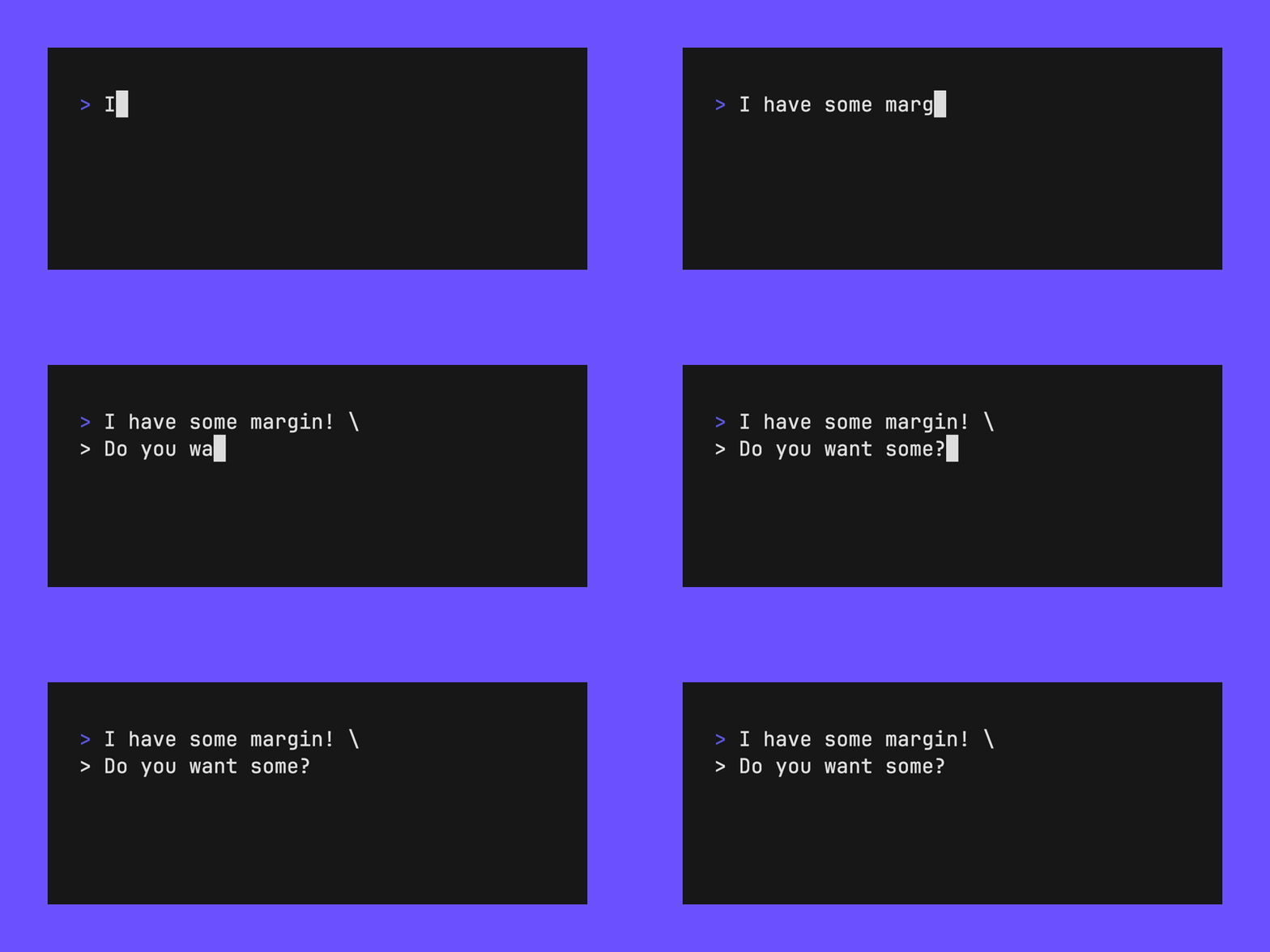
Set the margin (in pixels) of the video with the Set Margin command.
Set Margin 60
Set MarginFill "#6B50FF"
Set Window Bar
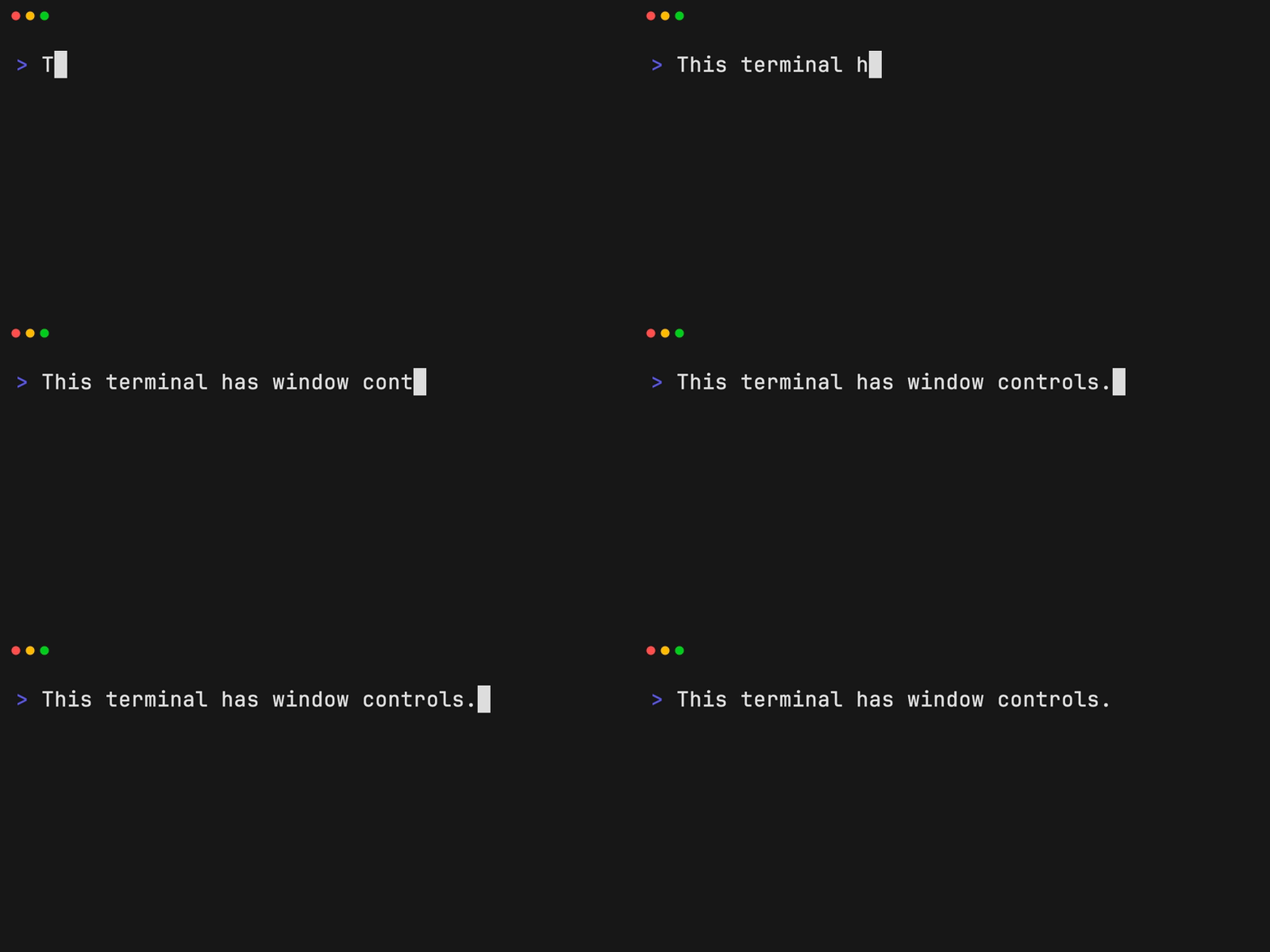
Set the type of window bar (Colorful, ColorfulRight, Rings, RingsRight) on the terminal window with the Set WindowBar command.
Set WindowBar Colorful
Set Border Radius
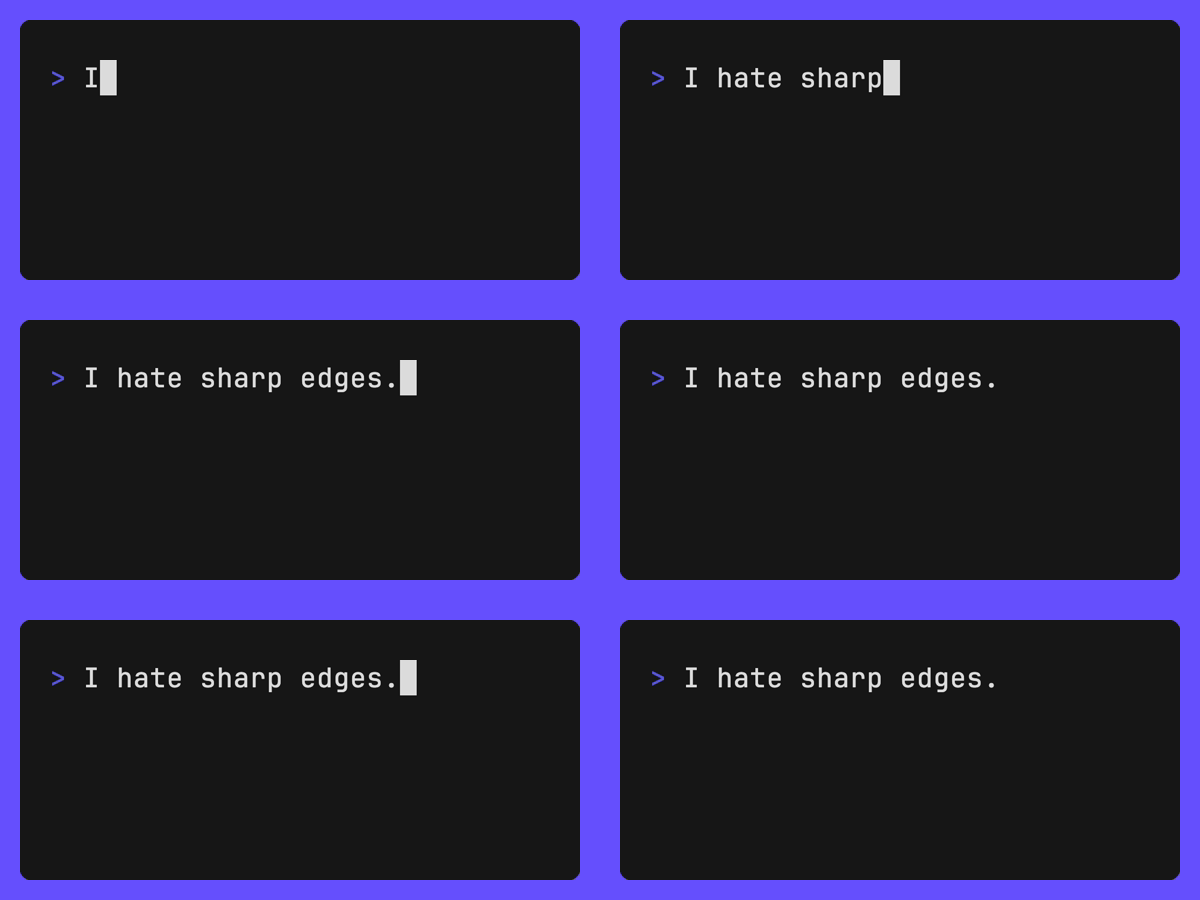
Set the border radius (in pixels) of the terminal window with the Set BorderRadius command.
# You'll likely want to add a Margin + MarginFill if you use BorderRadius.
Set Margin 20
Set MarginFill "#674EFF"
Set BorderRadius 10
Set Framerate
Set the rate at which VHS captures frames with the Set Framerate command.
Set Framerate 60
Set Playback Speed
Set the playback speed of the final render.
Set PlaybackSpeed 0.5 # Make output 2 times slower
Set PlaybackSpeed 1.0 # Keep output at normal speed (default)
Set PlaybackSpeed 2.0 # Make output 2 times faster
Set Loop Offset
Set the offset for when the GIF loop should begin. This allows you to make the first frame of the GIF (generally used for previews) more interesting.
Set LoopOffset 5 # Start the GIF at the 5th frame
Set LoopOffset 50% # Start the GIF halfway through
Set Cursor Blink
Set whether the cursor should blink. Enabled by default.
Set CursorBlink false

Type
Use Type to emulate key presses. That is, you can use Type to script typing
in a terminal. Type is handy for both entering commands and interacting with
prompts and TUIs in the terminal. The command takes a string argument of the
characters to type.
You can set the standard typing speed with Set TypingSpeed
and override it in places with a @time argument.
# Type something
Type "Whatever you want"

# Type something really slowly!
Type@500ms "Slow down there, partner."
Escape single and double quotes with backticks.
Type `VAR="Escaped"`

Keys
Key commands take an optional @time and optional repeat count for repeating
the key press every interval of <time>.
Key[@<time>] [count]
Backspace
Press the backspace key with the Backspace command.
Backspace 18

Ctrl
You can access the control modifier and send control sequences with the Ctrl
command.
Ctrl+R

Enter
Press the enter key with the Enter command.
Enter 2

Arrow Keys
Press any of the arrow keys with the Up, Down, Left, Right commands.
Up 2
Down 2
Left
Right
Left
Right
Type "B"
Type "A"

Tab
Enter a tab with the Tab command.
Tab@500ms 2

Space
Press the space bar with the Space command.
Space 10

Page Up / Down
Press the Page Up / Down keys with the PageUp or PageDown commands.
PageUp 3
PageDown 5
Scroll Up / Down
Scroll the terminal viewport directly with ScrollUp and ScrollDown.
Both commands use the same optional @time and repeat count shape as other
repeatable key commands: ScrollUp[@<time>] [count].
ScrollUp 10
ScrollDown 4
ScrollDown@100ms 12
Wait
The Wait command allows you to wait for something to appear on the screen.
This is useful when you need to wait on something to complete, even if you don't
know how long it'll take, while including it in the recording like a spinner or
loading state.
The command takes a regular expression as an argument, and optionally allows to
set the duration to wait and if you want to check the whole screen or just the
last line (the scope).
Wait
Wait            /World/
Wait+Screen     /World/
Wait+Line       /World/
Wait@10ms       /World/
Wait+Line@10ms  /World/
The default regular expression is />$/, the wait timeout is 15s, and the
default scope is Line.
Sleep
The Sleep command allows you to continue capturing frames without interacting
with the terminal. This is useful when you need to wait on something to
complete while including it in the recording like a spinner or loading state.
The command takes a number argument in seconds.
Sleep 0.5   # 500ms
Sleep 2     # 2s
Sleep 100ms # 100ms
Sleep 1s    # 1s
Hide
The Hide command instructs VHS to stop capturing frames. It's useful to pause
a recording to perform hidden commands.
Hide
This command is helpful for performing any setup and cleanup required to record a GIF, such as building the latest version of a binary and removing the binary once the demo is recorded.
Output example.gif

# Setup
Hide
Type "go build -o example . && clear"
Enter
Show

# Recording...
Type 'Running ./example'
...
Enter

# Cleanup
Hide
Type 'rm example'
Enter
Show
The Show command instructs VHS to begin capturing frames, again. It's useful
after a Hide command to resume frame recording for the output.
Hide
Type "You won't see this being typed."
Show
Type "You will see this being typed."

Screenshot
The Screenshot command captures the current frame (png format).
# At any point...
Screenshot examples/screenshot.png
Copy / Paste
The Copy and Paste copy and paste the string from clipboard.
Copy "https://github.com/charmbracelet"
Type "open "
Sleep 500ms
Paste
Env
Env command sets the environment variable via key-value pair.
Env HELLO "WORLD"

Type "echo $HELLO"
Enter
Sleep 1s
Source
The source command allows you to execute commands from another tape.
Source config.tape
Continuous Integration
You can hook up VHS to your CI pipeline to keep your GIFs up-to-date with the official VHS GitHub Action:
VHS can also be used for integration testing. Use the .txt or .ascii output
to generate golden files. Store these files in a git repository to ensure there
are no diffs between runs of the tape file.
Output golden.ascii
Syntax Highlighting
There’s a tree-sitter grammar for .tape files available for editors that
support syntax highlighting with tree-sitter:
It works great with Neovim, Emacs, and so on!
Contributing
See contributing.
Feedback
We’d love to hear your thoughts on this project. Feel free to drop us a note!
License
Part of Charm.

Charm热爱开源 • Charm loves open source
 Documentation

Documentation

Overview 
Package vhs keys.go defines the key map for the Type command. The `keymap` map is used to convert runes from a string into the appropriate go-rod input.
Type Hello, world!
The above command will type the string "Hello, world!" into the terminal, by converting each rune into the correct input.
Hello, world! { shift(input.KeyH), input.KeyE, ..., input.KeyD, shift(input.Digit1) }
Package main theme.go contains the information about a terminal theme. It stores the 16 base colors as well as the background and foreground colors of the terminal theme.
It can be changed through the Set command.
Set Theme {"background": "#171717"} Set Theme "Catppuccin Mocha"
Package vhs tty.go spawns the ttyd process. It runs on the specified port and is generally meant to run in the background so that other processes (go-rod) can connect to the tty.
xterm.js is used for rendering the terminal and can be adjusted using the Set command.
Set FontFamily "DejaVu Sans Mono" Set FontSize 12 Set Padding 50
Package vhs video.go spawns the ffmpeg process to convert the frames, collected by go-rod's screenshots into the input folder, to a GIF, WebM, MP4.
MakeGIF takes several options to modify the behaviour of the ffmpeg process, which can be configured through the Set command.
Set MaxColors 256
Index 
- Constants
- Variables
- func Evaluate(ctx context.Context, tape string, out io.Writer, opts ...EvaluatorOption) []error
- func Execute(c parser.Command, v *VHS) error
- func ExecuteAlt(c parser.Command, v *VHS) error
- func ExecuteCopy(c parser.Command, _ *VHS) error
- func ExecuteCtrl(c parser.Command, v *VHS) error
- func ExecuteEnv(c parser.Command, _ *VHS) error
- func ExecuteHide(_ parser.Command, v *VHS) error
- func ExecuteLoopOffset(c parser.Command, v *VHS) error
- func ExecuteNoop(_ parser.Command, _ *VHS) error
- func ExecuteOutput(c parser.Command, v *VHS) error
- func ExecutePaste(_ parser.Command, v *VHS) error
- func ExecuteRequire(c parser.Command, _ *VHS) error
- func ExecuteScreenshot(c parser.Command, v *VHS) error
- func ExecuteSet(c parser.Command, v *VHS) error
- func ExecuteSetBorderRadius(c parser.Command, v *VHS) error
- func ExecuteSetCursorBlink(c parser.Command, v *VHS) error
- func ExecuteSetFontFamily(c parser.Command, v *VHS) error
- func ExecuteSetFontSize(c parser.Command, v *VHS) error
- func ExecuteSetFramerate(c parser.Command, v *VHS) error
- func ExecuteSetHeight(c parser.Command, v *VHS) error
- func ExecuteSetLetterSpacing(c parser.Command, v *VHS) error
- func ExecuteSetLineHeight(c parser.Command, v *VHS) error
- func ExecuteSetMargin(c parser.Command, v *VHS) error
- func ExecuteSetMarginFill(c parser.Command, v *VHS) error
- func ExecuteSetPadding(c parser.Command, v *VHS) error
- func ExecuteSetPlaybackSpeed(c parser.Command, v *VHS) error
- func ExecuteSetShell(c parser.Command, v *VHS) error
- func ExecuteSetTheme(c parser.Command, v *VHS) error
- func ExecuteSetTypingSpeed(c parser.Command, v *VHS) error
- func ExecuteSetWaitPattern(c parser.Command, v *VHS) error
- func ExecuteSetWaitTimeout(c parser.Command, v *VHS) error
- func ExecuteSetWidth(c parser.Command, v *VHS) error
- func ExecuteSetWindowBar(c parser.Command, v *VHS) error
- func ExecuteSetWindowBarSize(c parser.Command, v *VHS) error
- func ExecuteShift(c parser.Command, v *VHS) error
- func ExecuteShow(_ parser.Command, v *VHS) error
- func ExecuteSleep(c parser.Command, _ *VHS) error
- func ExecuteType(c parser.Command, v *VHS) error
- func ExecuteWait(c parser.Command, v *VHS) error
- func Highlight(c parser.Command, faint bool) string
- func LineNumber(line int) string
- func Main()
- func MakeBorderRadiusMask(width, height, radius int, targetpng string)
- func MakeGIF(opts VideoOptions) *exec.Cmd
- func MakeMP4(opts VideoOptions) *exec.Cmd
- func MakeScreenshots(opts ScreenshotOptions) []*exec.Cmd
- func MakeWebM(opts VideoOptions) *exec.Cmd
- func MakeWindowBar(termWidth, termHeight int, opts StyleOptions, file string)
- func Publish(ctx context.Context, path string) (string, error)
- func Record(_ *cobra.Command, _ []string) error
- func Underline(n int) string
- type CommandFunc
- type EvaluatorOption
- type FilterComplexBuilder
- func (fb *FilterComplexBuilder) Build() []string
- func (fb *FilterComplexBuilder) WithBorderRadius(cornerMarkStream int) *FilterComplexBuilder
- func (fb *FilterComplexBuilder) WithGIF() *FilterComplexBuilder
- func (fb *FilterComplexBuilder) WithMarginFill(marginStream int) *FilterComplexBuilder
- func (fb *FilterComplexBuilder) WithWindowBar(barStream int) *FilterComplexBuilder
- type InvalidSyntaxError
- type Options
- type ScreenshotOptions
- type Shell
- type StreamBuilder
- type StyleOptions
- type TestOptions
- type Theme
- type ThemeNotFoundError
- type VHS
- func (vhs *VHS) ApplyLoopOffset() error
- func (v *VHS) Buffer() ([]string, error)
- func (vhs *VHS) Cleanup() error
- func (v *VHS) CurrentLine() (string, error)
- func (vhs *VHS) PauseRecording()
- func (vhs *VHS) Record(ctx context.Context) <-chan error
- func (vhs *VHS) Render() error
- func (vhs *VHS) ResumeRecording()
- func (v *VHS) SaveOutput() error
- func (vhs *VHS) ScreenshotNextFrame(path string)
- func (vhs *VHS) Setup()
- func (vhs *VHS) Start() error
- type VideoOptions
- type VideoOutputs
Constants 
const (
	Background    = "#171717"
	Foreground    = "#dddddd"
	Black         = "#282a2e" // ansi 0
	BrightBlack   = "#4d4d4d" // ansi 8
	Red           = "#D74E6F" // ansi 1
	BrightRed     = "#FE5F86" // ansi 9
	Green         = "#31BB71" // ansi 2
	BrightGreen   = "#00D787" // ansi 10
	Yellow        = "#D3E561" // ansi 3
	BrightYellow  = "#EBFF71" // ansi 11
	Blue          = "#8056FF" // ansi 4
	BrightBlue    = "#9B79FF" // ansi 12
	Magenta       = "#ED61D7" // ansi 5
	BrightMagenta = "#FF7AEA" // ansi 13
	Cyan          = "#04D7D7" // ansi 6
	BrightCyan    = "#00FEFE" // ansi 14
	White         = "#bfbfbf" // ansi 7
	BrightWhite   = "#e6e6e6" // ansi 15
	Indigo        = "#5B56E0"
)
Theme colors.
const ErrorColumnOffset = 5
ErrorColumnOffset is the number of columns that an error should be printed to the left to account for the line number.
const WaitTick = 10 * time.Millisecond
WaitTick is the amount of time to wait between checking for a match.
Variables 
var (
	// Version stores the build version of VHS at the time of packaging through -ldflags.
	Version string

	// CommitSHA stores the commit SHA of VHS at the time of packaging through -ldflags.
	CommitSHA string
)
var (
	CommandStyle    = lipgloss.NewStyle().Foreground(lipgloss.Color("12"))
	FaintStyle      = lipgloss.NewStyle().Foreground(lipgloss.AdaptiveColor{Light: "242", Dark: "238"})
	NoneStyle       = lipgloss.NewStyle()
	KeywordStyle    = lipgloss.NewStyle()
	URLStyle        = lipgloss.NewStyle().Foreground(lipgloss.Color("3"))
	NumberStyle     = lipgloss.NewStyle().Foreground(lipgloss.Color("3"))
	StringStyle     = lipgloss.NewStyle().Foreground(lipgloss.Color("10"))
	TimeStyle       = lipgloss.NewStyle().Foreground(lipgloss.Color("11"))
	LineNumberStyle = lipgloss.NewStyle().Foreground(lipgloss.Color("8"))
	ErrorStyle      = lipgloss.NewStyle().Foreground(lipgloss.Color("1"))
	GrayStyle       = lipgloss.NewStyle().Foreground(lipgloss.Color("8"))
	ErrorFileStyle  = lipgloss.NewStyle().
					Border(lipgloss.NormalBorder()).
					BorderForeground(lipgloss.Color("8")).
					Foreground(lipgloss.Color("1")).
					Padding(0, 1).
					Width(defaultColumns)
)
Styles for syntax highlightin.
var CommandFuncs = map[parser.CommandType]CommandFunc{
	token.BACKSPACE:   ExecuteKey(input.Backspace),
	token.DELETE:      ExecuteKey(input.Delete),
	token.INSERT:      ExecuteKey(input.Insert),
	token.DOWN:        ExecuteKey(input.ArrowDown),
	token.ENTER:       ExecuteKey(input.Enter),
	token.LEFT:        ExecuteKey(input.ArrowLeft),
	token.RIGHT:       ExecuteKey(input.ArrowRight),
	token.SPACE:       ExecuteKey(input.Space),
	token.UP:          ExecuteKey(input.ArrowUp),
	token.TAB:         ExecuteKey(input.Tab),
	token.ESCAPE:      ExecuteKey(input.Escape),
	token.PAGE_UP:     ExecuteKey(input.PageUp),
	token.PAGE_DOWN:   ExecuteKey(input.PageDown),
	token.SCROLL_UP:   ExecuteScroll(-1),
	token.SCROLL_DOWN: ExecuteScroll(1),
	token.HIDE:        ExecuteHide,
	token.REQUIRE:     ExecuteRequire,
	token.SHOW:        ExecuteShow,
	token.SET:         ExecuteSet,
	token.OUTPUT:      ExecuteOutput,
	token.SLEEP:       ExecuteSleep,
	token.TYPE:        ExecuteType,
	token.CTRL:        ExecuteCtrl,
	token.ALT:         ExecuteAlt,
	token.SHIFT:       ExecuteShift,
	token.ILLEGAL:     ExecuteNoop,
	token.SCREENSHOT:  ExecuteScreenshot,
	token.COPY:        ExecuteCopy,
	token.PASTE:       ExecutePaste,
	token.ENV:         ExecuteEnv,
	token.WAIT:        ExecuteWait,
}
CommandFuncs maps command types to their executable functions.
var DefaultTheme = Theme{
	Background:    Background,
	Foreground:    Foreground,
	Cursor:        Foreground,
	CursorAccent:  Background,
	Black:         Black,
	BrightBlack:   BrightBlack,
	Red:           Red,
	BrightRed:     BrightRed,
	Green:         Green,
	BrightGreen:   BrightGreen,
	Yellow:        Yellow,
	BrightYellow:  BrightYellow,
	Blue:          Blue,
	BrightBlue:    BrightBlue,
	Magenta:       Magenta,
	BrightMagenta: BrightMagenta,
	Cyan:          Cyan,
	BrightCyan:    BrightCyan,
	White:         White,
	BrightWhite:   BrightWhite,
}
DefaultTheme is the default theme to use for recording demos and screenshots.
Taken from https://github.com/meowgorithm/dotfiles.
var EscapeSequences = map[string]string{
	"\x1b[A":  token.UP,
	"\x1b[B":  token.DOWN,
	"\x1b[C":  token.RIGHT,
	"\x1b[D":  token.LEFT,
	"\x1b[1~": token.HOME,
	"\x1b[2~": token.INSERT,
	"\x1b[3~": token.DELETE,
	"\x1b[4~": token.END,
	"\x1b[5~": token.PAGE_UP,
	"\x1b[6~": token.PAGE_DOWN,
	"\x01":    token.CTRL + "+A",
	"\x02":    token.CTRL + "+B",
	"\x03":    token.CTRL + "+C",
	"\x04":    token.CTRL + "+D",
	"\x05":    token.CTRL + "+E",
	"\x06":    token.CTRL + "+F",
	"\x07":    token.CTRL + "+G",
	"\x08":    token.BACKSPACE,
	"\x09":    token.TAB,
	"\x0b":    token.CTRL + "+K",
	"\x0c":    token.CTRL + "+L",
	"\x0d":    token.ENTER,
	"\x0e":    token.CTRL + "+N",
	"\x0f":    token.CTRL + "+O",
	"\x10":    token.CTRL + "+P",
	"\x11":    token.CTRL + "+Q",
	"\x12":    token.CTRL + "+R",
	"\x13":    token.CTRL + "+S",
	"\x14":    token.CTRL + "+T",
	"\x15":    token.CTRL + "+U",
	"\x16":    token.CTRL + "+V",
	"\x17":    token.CTRL + "+W",
	"\x18":    token.CTRL + "+X",
	"\x19":    token.CTRL + "+Y",
	"\x1a":    token.CTRL + "+Z",
	"\x1b":    token.ESCAPE,
	"\x7f":    token.BACKSPACE,
}
EscapeSequences is a map of escape sequences to their VHS commands.
var GlamourTheme = ansi.StyleConfig{
	Document: ansi.StyleBlock{
		StylePrimitive: ansi.StylePrimitive{
			BlockPrefix: "\n",
			BlockSuffix: "\n",
		},
		Margin: uintPtr(margin),
	},
	Heading: ansi.StyleBlock{
		StylePrimitive: ansi.StylePrimitive{
			BlockSuffix: "\n",
			Color:       stringPtr("99"),
			Bold:        boolPtr(true),
		},
	},
	Item:     ansi.StylePrimitive{Prefix: "· "},
	Emph:     ansi.StylePrimitive{Color: stringPtr(BrightBlack)},
	Strong:   ansi.StylePrimitive{Bold: boolPtr(true)},
	Link:     ansi.StylePrimitive{Color: stringPtr("42"), Underline: boolPtr(true)},
	LinkText: ansi.StylePrimitive{Color: stringPtr("207")},
	Code:     ansi.StyleBlock{StylePrimitive: ansi.StylePrimitive{Color: stringPtr("204")}},
}
GlamourTheme is the theme for printing out the manual page ('vhs man').
var Settings = map[string]CommandFunc{
	"FontFamily":    ExecuteSetFontFamily,
	"FontSize":      ExecuteSetFontSize,
	"Framerate":     ExecuteSetFramerate,
	"Height":        ExecuteSetHeight,
	"LetterSpacing": ExecuteSetLetterSpacing,
	"LineHeight":    ExecuteSetLineHeight,
	"PlaybackSpeed": ExecuteSetPlaybackSpeed,
	"Padding":       ExecuteSetPadding,
	"Theme":         ExecuteSetTheme,
	"TypingSpeed":   ExecuteSetTypingSpeed,
	"Width":         ExecuteSetWidth,
	"Shell":         ExecuteSetShell,
	"LoopOffset":    ExecuteLoopOffset,
	"MarginFill":    ExecuteSetMarginFill,
	"Margin":        ExecuteSetMargin,
	"WindowBar":     ExecuteSetWindowBar,
	"WindowBarSize": ExecuteSetWindowBarSize,
	"BorderRadius":  ExecuteSetBorderRadius,
	"WaitPattern":   ExecuteSetWaitPattern,
	"WaitTimeout":   ExecuteSetWaitTimeout,
	"CursorBlink":   ExecuteSetCursorBlink,
}
Settings maps the Set commands to their respective functions.
var Shells = map[string]Shell{
	// contains filtered or unexported fields
}
Shells contains a mapping from shell names to their Shell struct.
Functions 
func Evaluate 
Evaluate takes as input a tape string, an output writer, and an output file and evaluates all the commands within the tape string and produces a GIF.
func ExecuteAlt 
ExecuteAlt is a CommandFunc that presses the argument key with the alt key held down on the running instance of vhs.
func ExecuteCopy 
ExecuteCopy copies text to the clipboard.
func ExecuteCtrl 
ExecuteCtrl is a CommandFunc that presses the argument keys and/or modifiers with the ctrl key held down on the running instance of vhs.
func ExecuteEnv 
ExecuteEnv sets env with given key-value pair.
func ExecuteHide 
ExecuteHide is a CommandFunc that starts or stops the recording of the vhs.
func ExecuteLoopOffset 
ExecuteLoopOffset applies the loop offset option on the vhs.
func ExecuteNoop 
ExecuteNoop is a no-op command that does nothing. Generally, this is used for Unknown commands when dealing with commands that are not recognized.
func ExecuteOutput 
ExecuteOutput applies the output on the vhs videos.
func ExecutePaste 
ExecutePaste pastes text from the clipboard.
func ExecuteRequire 
ExecuteRequire is a CommandFunc that checks if all the binaries mentioned in the Require command are present. If not, it exits with a non-zero error.
func ExecuteScreenshot 
ExecuteScreenshot is a CommandFunc that indicates a new screenshot must be taken.
func ExecuteSet 
ExecuteSet applies the settings on the running vhs specified by the option and argument pass to the command.
func ExecuteSetBorderRadius 
ExecuteSetBorderRadius sets corner radius.
func ExecuteSetCursorBlink 
ExecuteSetCursorBlink sets cursor blinking.
func ExecuteSetFontFamily 
ExecuteSetFontFamily applies the font family on the vhs.
func ExecuteSetFontSize 
ExecuteSetFontSize applies the font size on the vhs.
func ExecuteSetFramerate 
ExecuteSetFramerate applies the framerate on the vhs.
func ExecuteSetHeight 
ExecuteSetHeight applies the height on the vhs.
func ExecuteSetLetterSpacing 
ExecuteSetLetterSpacing applies letter spacing (also known as tracking) on the vhs.
func ExecuteSetLineHeight 
ExecuteSetLineHeight applies the line height on the vhs.
func ExecuteSetMargin 
ExecuteSetMargin sets vhs margin size.
func ExecuteSetMarginFill 
ExecuteSetMarginFill sets vhs margin fill.
func ExecuteSetPadding 
ExecuteSetPadding applies the padding on the vhs.
func ExecuteSetPlaybackSpeed 
ExecuteSetPlaybackSpeed applies the playback speed option on the vhs.
func ExecuteSetShell 
ExecuteSetShell applies the shell on the vhs.
func ExecuteSetTheme 
ExecuteSetTheme applies the theme on the vhs.
func ExecuteSetTypingSpeed 
ExecuteSetTypingSpeed applies the default typing speed on the vhs.
func ExecuteSetWaitPattern 
ExecuteSetWaitPattern applies the default wait pattern on the vhs.
func ExecuteSetWaitTimeout 
ExecuteSetWaitTimeout applies the default wait timeout on the vhs.
func ExecuteSetWidth 
ExecuteSetWidth applies the width on the vhs.
func ExecuteSetWindowBar 
ExecuteSetWindowBar sets window bar type.
func ExecuteSetWindowBarSize 
ExecuteSetWindowBarSize sets window bar size.
func ExecuteShift 
ExecuteShift is a CommandFunc that presses the argument key with the shift key held down on the running instance of vhs.
func ExecuteShow 
ExecuteShow is a CommandFunc that resumes the recording of the vhs.
func ExecuteSleep 
ExecuteSleep sleeps for the desired time specified through the argument of the Sleep command.
func ExecuteType 
ExecuteType types the argument string on the running instance of vhs.
func ExecuteWait 
ExecuteWait is a CommandFunc that waits for a regex match for the given amount of time.
func Highlight 
Highlight syntax highlights a command for prettier printing. It takes an argument whether or not to print the command in a faint style to represent hidden commands.
func LineNumber 
LineNumber returns a formatted version of the given line number.
func Main 
func Main()
Main runs the vhs command-line interface. The fork moves the executable into ./cmd/vhs so the root package can be imported as a library; this is the entry point that thin main calls.
func MakeBorderRadiusMask 
MakeBorderRadiusMask a mask to round a terminal's corners.
func MakeGIF 
func MakeGIF(opts VideoOptions) *exec.Cmd
MakeGIF takes a list of images (as frames) and converts them to a GIF.
func MakeMP4 
func MakeMP4(opts VideoOptions) *exec.Cmd
MakeMP4 takes a list of images (as frames) and converts them to an MP4.
func MakeScreenshots 
func MakeScreenshots(opts ScreenshotOptions) []*exec.Cmd
MakeScreenshots generates screenshots by given ScreenshotOptions.
func MakeWebM 
func MakeWebM(opts VideoOptions) *exec.Cmd
MakeWebM takes a list of images (as frames) and converts them to a WebM.
func MakeWindowBar 
func MakeWindowBar(termWidth, termHeight int, opts StyleOptions, file string)
MakeWindowBar a window bar and save it to a file.
Types 
type CommandFunc 
CommandFunc is a function that executes a command on a running instance of vhs.
func ExecuteKey 
func ExecuteKey(k input.Key) CommandFunc
ExecuteKey is a higher-order function that returns a CommandFunc to execute a key press for a given key. This is so that the logic for key pressing (since they are repeatable and delayable) can be re-used.
i.e. ExecuteKey(input.ArrowDown) would return a CommandFunc that executes the ArrowDown key press.
func ExecuteScroll 
func ExecuteScroll(direction int) CommandFunc
ExecuteScroll returns a command function that scrolls xterm's viewport.
The direction argument is expected to be:
-1 for ScrollUp
+1 for ScrollDown
Each command repeat applies one viewport row movement with the same timing semantics as other repeatable key-like commands (Options is the per-step delay, Args is repeat count).
A caller that wires an unexpected direction (for example 10) will still call xterm's scroll API with that value and produce larger jumps per step.
type EvaluatorOption 
type EvaluatorOption func(*VHS)
EvaluatorOption is a function that can be used to modify the VHS instance.
type FilterComplexBuilder 
type FilterComplexBuilder struct {
	// contains filtered or unexported fields
}
FilterComplexBuilder generates -filter_complex option of ffmepg.
func NewScreenshotFilterComplexBuilder 
func NewScreenshotFilterComplexBuilder(style *StyleOptions) *FilterComplexBuilder
NewScreenshotFilterComplexBuilder returns instance of FilterComplexBuilder with screenshot config.
func NewVideoFilterBuilder 
func NewVideoFilterBuilder(videoOpts *VideoOptions) *FilterComplexBuilder
NewVideoFilterBuilder returns instance of FilterComplexBuilder with video config.
func (*FilterComplexBuilder) Build 
func (fb *FilterComplexBuilder) Build() []string
Build returns filter_complex used in ffmepg.
func (*FilterComplexBuilder) WithBorderRadius 
func (fb *FilterComplexBuilder) WithBorderRadius(cornerMarkStream int) *FilterComplexBuilder
WithBorderRadius adds border radius options to ffmepg filter_complex.
func (*FilterComplexBuilder) WithGIF 
func (fb *FilterComplexBuilder) WithGIF() *FilterComplexBuilder
WithGIF adds gif options to ffmepg filter_complex.
func (*FilterComplexBuilder) WithMarginFill 
func (fb *FilterComplexBuilder) WithMarginFill(marginStream int) *FilterComplexBuilder
WithMarginFill adds margin options to ffmepg filter_complex.
func (*FilterComplexBuilder) WithWindowBar 
func (fb *FilterComplexBuilder) WithWindowBar(barStream int) *FilterComplexBuilder
WithWindowBar adds window bar options to ffmepg filter_complex.
type InvalidSyntaxError 
InvalidSyntaxError is returned when the parser encounters one or more errors.
func (InvalidSyntaxError) Error 
func (e InvalidSyntaxError) Error() string
type Options 
type Options struct {
	Shell         Shell
	FontFamily    string
	FontSize      int
	LetterSpacing float64
	LineHeight    float64
	TypingSpeed   time.Duration
	Theme         Theme
	Test          TestOptions
	Video         VideoOptions
	LoopOffset    float64
	WaitTimeout   time.Duration
	WaitPattern   *regexp.Regexp
	CursorBlink   bool
	Screenshot    ScreenshotOptions
	Style         StyleOptions
}
Options is the set of options for the setup.
func DefaultVHSOptions 
func DefaultVHSOptions() Options
DefaultVHSOptions returns the default set of options to use for the setup function.
type ScreenshotOptions 
type ScreenshotOptions struct {
	// contains filtered or unexported fields
}
ScreenshotOptions holds options related with screenshots.
func NewScreenshotOptions 
func NewScreenshotOptions(input string, style *StyleOptions) ScreenshotOptions
NewScreenshotOptions returns ScreenshotOptions by given input.
type StreamBuilder 
type StreamBuilder struct {
	// contains filtered or unexported fields
}
StreamBuilder generates streams used by ffmepg.
func NewStreamBuilder 
func NewStreamBuilder(streamCounter int, input string, style *StyleOptions) *StreamBuilder
NewStreamBuilder returns instance of StreamBuilder.
func (*StreamBuilder) Build 
func (sb *StreamBuilder) Build() []string
Build returns streams for using with ffmepg.
func (*StreamBuilder) WithBar 
func (sb *StreamBuilder) WithBar() *StreamBuilder
WithBar adds bar stream.
func (*StreamBuilder) WithCorner 
func (sb *StreamBuilder) WithCorner() *StreamBuilder
WithCorner adds corner stream.
func (*StreamBuilder) WithMP4 
func (sb *StreamBuilder) WithMP4() *StreamBuilder
WithMP4 adds mp4 stream with required config.
func (*StreamBuilder) WithMargin 
func (sb *StreamBuilder) WithMargin() *StreamBuilder
WithMargin adds margin stream.
func (*StreamBuilder) WithWebm 
func (sb *StreamBuilder) WithWebm() *StreamBuilder
WithWebm adds webm stream with required config.
type StyleOptions 
type StyleOptions struct {
	Width           int
	Height          int
	Padding         int
	BackgroundColor string
	MarginFill      string
	Margin          int
	WindowBar       string
	WindowBarSize   int
	WindowBarColor  string
	BorderRadius    int
}
StyleOptions represents the ui options for video and screenshots.
func DefaultStyleOptions 
func DefaultStyleOptions() *StyleOptions
DefaultStyleOptions returns default Style config.
type TestOptions 
TestOptions is the set of options for the testing functionality.
func DefaultTestOptions 
func DefaultTestOptions() TestOptions
DefaultTestOptions returns the default set of options for the testing functionality.
type Theme 
type Theme struct {
	Name          string `json:"name"`
	Background    string `json:"background"`
	Foreground    string `json:"foreground"`
	Selection     string `json:"selection"`
	Cursor        string `json:"cursor"`
	CursorAccent  string `json:"cursorAccent"`
	Black         string `json:"black"`
	BrightBlack   string `json:"brightBlack"`
	Red           string `json:"red"`
	BrightRed     string `json:"brightRed"`
	Green         string `json:"green"`
	BrightGreen   string `json:"brightGreen"`
	Yellow        string `json:"yellow"`
	BrightYellow  string `json:"brightYellow"`
	Blue          string `json:"blue"`
	BrightBlue    string `json:"brightBlue"`
	Magenta       string `json:"magenta"`
	BrightMagenta string `json:"brightMagenta"`
	Cyan          string `json:"cyan"`
	BrightCyan    string `json:"brightCyan"`
	White         string `json:"white"`
	BrightWhite   string `json:"brightWhite"`
}
Theme is a terminal theme for xterm.js It is used for marshalling between the xterm.js readable json format and a valid go struct. https://xtermjs.org/docs/api/terminal/interfaces/itheme/
type ThemeNotFoundError 
ThemeNotFoundError is returned when a requested theme is not found.
func (ThemeNotFoundError) Error 
func (e ThemeNotFoundError) Error() string
type VHS 
type VHS struct {
	Options *Options
	Errors  []error
	Page    *rod.Page

	TextCanvas   *rod.Element
	CursorCanvas *rod.Element
	// contains filtered or unexported fields
}
VHS is the object that controls the setup.
func (*VHS) ApplyLoopOffset 
ApplyLoopOffset by modifying frame sequence.
func (*VHS) CurrentLine 
CurrentLine returns the current line from the buffer.
func (*VHS) PauseRecording 
func (vhs *VHS) PauseRecording()
PauseRecording indicates to VHS that the recording should be paused.
func (*VHS) ResumeRecording 
func (vhs *VHS) ResumeRecording()
ResumeRecording indicates to VHS that the recording should be resumed.
func (*VHS) SaveOutput 
SaveOutput saves the current buffer to the output file.
func (*VHS) ScreenshotNextFrame 
ScreenshotNextFrame indicates to VHS that screenshot of next frame must be taken.
type VideoOptions 
type VideoOptions struct {
	Framerate     int
	PlaybackSpeed float64
	Input         string
	MaxColors     int
	Output        VideoOutputs
	StartingFrame int
	Style         *StyleOptions
}
VideoOptions is the set of options for converting frames to a GIF.
func DefaultVideoOptions 
func DefaultVideoOptions() VideoOptions
DefaultVideoOptions is the set of default options for converting frames to a GIF, which are used if they are not overridden.
 Source Files

Source Files

 Directories

Directories

| Path | Synopsis |
|---|---|
|
examples
|
|
|
gum/src/lipgloss
Package lipgloss is an example package.
|
Package lipgloss is an example package. |
|
neofetch
Package neofetch is an example package.
|
Package neofetch is an example package. |
|
Package lexer provides a lexer for the VHS Tape language.
|
Package lexer provides a lexer for the VHS Tape language. |
|
Package parser provides a parser for the VHS Tape language.
|
Package parser provides a parser for the VHS Tape language. |
|
Package token provides the token types and structures for the VHS Tape language.
|
Package token provides the token types and structures for the VHS Tape language. |