

 README

README

chill
Terminal lofi radio. Streams the best 24/7 lofi beats from YouTube.
Install
Homebrew (macOS and Linux)
brew install willibrandon/tap/chill
Scoop (Windows)
scoop bucket add willibrandon https://github.com/willibrandon/scoop-bucket
scoop bucket add extras
scoop install chill
Both packages install mpv,
yt-dlp, and Deno for YouTube extraction.
Update them with brew upgrade willibrandon/tap/chill or scoop update chill.
Go or release binary
Install mpv and yt-dlp first. Current yt-dlp also needs a JavaScript runtime for full YouTube support; Deno is its default choice.
macOS:
brew install mpv yt-dlp deno
Linux:
sudo apt install mpv pipx
pipx install yt-dlp
Also install Deno.
Windows:
choco install mpv yt-dlp deno
Then install chill:
go install github.com/willibrandon/chill@latest
Or grab a binary for your platform from the releases page and put it somewhere in your PATH.
To update an installed copy:
chill update
chill -update, chill --update, and chill upgrade work too. This downloads
the latest release for your platform, verifies its checksum, and updates the
running daemon while preserving playback settings.
For a Homebrew or Scoop installation, chill update instead tells you which
package-manager command to use; it does not replace a package-owned executable.
Make sure your Go bin directory is in your PATH:
- macOS/Linux:
export PATH="$HOME/go/bin:$PATH" - Windows: Add
%USERPROFILE%\go\binto your PATH
Usage
chill                   # play default station (starts daemon automatically)
chill chillhop          # play specific station
chill -i                # interactive mode (repl)
chill --skip            # skip to random station
chill --toggle          # pause/resume
chill --vol 60          # set volume (also +5, -10, up, down)
chill --mute            # toggle mute
chill --status          # show what's playing
chill --status --json   # read-only, machine-readable status
chill doctor            # check dependencies, config, and daemon compatibility
chill doctor --stations # resolve every configured stream without playing audio
chill --stop            # stop playback
chill --list            # show all stations
chill add n url desc    # save your own station
chill remove n          # remove a custom station or restore a built-in
chill default n         # choose the station played by chill
chill --sleep 45m       # stop playback after 45 minutes
chill --sleep off       # cancel the sleep timer
chill --version         # show version
chill --help            # show commands, options, and examples
chill update            # install the latest release
chill --fg              # run in foreground (no daemon)
Architecture
chill uses a client-server architecture. The first playback command spawns a background daemon. CLI commands and the REPL communicate with that daemon over IPC: a Unix socket on macOS/Linux, or localhost TCP on Windows.
The daemon starts and supervises mpv, sends playback controls over mpv's JSON IPC, and listens for player events to track loading and failures. This second connection uses a Unix socket on macOS/Linux and a named pipe on Windows. mpv uses yt-dlp to resolve YouTube streams.
+-------------+      +-------------+           +-------------+
| chill       | <--> | daemon      | <-------> | mpv         |
| (CLI/REPL)  | IPC  | (server)    | JSON IPC  | (playback)  |
+-------------+      +-------------+           +-------------+
This means:
- Music keeps playing after the command exits
- Control playback from any terminal
- Playback controls use the running player; starting a stream still takes time
- The daemon owns reconnects and sleep timers, so they work after the client exits
After installing a newer version, your next command automatically upgrades an outdated daemon. Playback restarts once, preserving your station, volume, mute, pause state, and sleep timer.
Volume, mute, and pause/resume use mpv's native IPC controls, so adjusting the
volume never restarts the stream or resumes paused music. Mute preserves your
volume, and the last volume is remembered across daemon restarts in state.json
beside the station config. Mute itself is temporary.
Status distinguishes loading, playing, paused, failed, and idle.
If a stream drops or fails to load, chill reports the player error and retries
up to three times, after 1, 2, and 4 seconds. Each load has a 45-second timeout.
A minute of successful playback replenishes the retry budget. Errors and retry
progress also appear in the REPL; use play or choose another station to try
again after the retries are exhausted.
Sleep timer
While a station is playing or loading, chill --sleep 45m schedules playback to
stop. Durations accept units such as 30s, 45m, or 1h30m. A new timer replaces
the previous one; chill --sleep off cancels it. chill --status and the REPL
status bar show the remaining time.
The timer continues while paused, switching stations, or reconnecting. When it
expires, playback stops and the daemon becomes idle; chill --toggle starts the
default station again. Explicitly stopping chill clears the timer. Timers are
not restored across daemon restarts.
Stations
| Station | Description |
|---|---|
lofi-girl |
Lofi Girl - beats to relax/study to |
chillhop |
Chillhop Radio - jazzy & lofi hip hop |
chillout |
Chillout Lounge - calm & relaxing |
code-radio |
Code Radio - beats to study & code to |
sleep |
Lofi - beats to sleep/relax to |
study |
Lofi - beats to study/relax to |
Your own stations
Add any YouTube stream with chill add <name> <url> [description], or edit the
station config:
- macOS:
~/Library/Application Support/chill/stations.json - Linux:
~/.config/chill/stations.json(or$XDG_CONFIG_HOME/chill/stations.json) - Windows:
%AppData%\chill\stations.json
{
  "default_station": "synthwave",
  "stations": [
    {
      "name": "synthwave",
      "url": "https://www.youtube.com/watch?v=4xDzrJKXOOY",
      "desc": "Synthwave Radio - retro electronic beats"
    },
    {
      "name": "jazz",
      "url": "https://www.youtube.com/watch?v=HuFYqnbVbzY",
      "desc": "Jazz Cafe - smooth jazz for work"
    },
    {
      "name": "rain",
      "url": "https://www.youtube.com/watch?v=mPZkdNFkNps",
      "desc": "Rain on a window - for deep focus"
    }
  ]
}
A station with the name of a built-in overrides it. chill remove <name> removes
a custom station; removing an override restores the built-in. Built-ins cannot
be removed. chill default <name> chooses what chill, REPL play, and
chill --fg play without a station argument. The initial default is lofi-girl;
removing a custom station that was the default returns to lofi-girl.
Built-in streams were checked on September 20, 2026. Their channels host multiple
broadcasts, so a channel's /live URL can silently select a different mix. The
built-ins pin the intended broadcasts, including Lofi Girl's study stream. Use
chill doctor --stations to recheck their resolved titles and live status when
YouTube changes them. An unavailable stream can be overridden with chill add.
Add, remove, and default commands update the running daemon automatically. For
manual file edits, use chill -i then reload, or restart the daemon. Reload
rebuilds the list from the built-ins and the current file, including removals.
Reloading or removing a station does not interrupt a stream already playing.
Diagnostics
chill doctor
chill doctor --stream lofi-girl
chill doctor --stream 'https://www.youtube.com/watch?v=rFZHOHl-L8A'
chill doctor --stations --timeout 30s
chill doctor --logs
Doctor reports executable paths and versions for chill, mpv, yt-dlp, and Deno;
checks the station config; and inspects daemon connectivity and compatibility.
It warns about old yt-dlp versions and gives installation or recovery guidance.
The basic check makes no stream requests. --stream checks one stream;
--stations checks all effective stations, including custom overrides. Each
check resolves an audio format without downloading or playing audio and reports
the title and live status. These checks use the discovered extractor with its
config disabled for reproducibility; mpv/yt-dlp cookies, proxy settings, and
custom extractor overrides can make actual playback behave differently.
Doctor never starts, upgrades, or stops the daemon. It distinguishes:
- Matching versions and protocols. The client and daemon agree.
- Outdated daemon. A normal playback/control command will automatically upgrade it, preserving playback settings.
- Newer compatible daemon. The client should be updated; the daemon is not downgraded.
- Newer incompatible protocol. Update the client before sending controls.
- Development/dirty builds. Freshness cannot be verified from version labels;
chill --stopfollowed bychillrestarts with the selected executable. - Stale or unreachable IPC. The discovery file exists, but status cannot be read. This is reported separately from a normally stopped daemon.
Warnings exit successfully; failed checks exit with code 1. Missing dependencies, invalid config, unreachable/incompatible daemons, and failed stream resolution are failures. A stopped daemon is normal. A resolved stream that is not live is a warning, since custom stations can intentionally be recordings.
Each daemon launch saves its startup output to daemon.log beside
stations.json, replacing the previous startup log. Startup failures include
the recent output directly in the error. --logs shows the latest startup log,
which may be from an earlier run. Playback errors remain available in status;
mpv failures before its control socket opens now include stderr diagnostics.
Machine-readable status
chill --status --json emits one uncolored JSON object. Like doctor, it is a
read-only inspection and does not perform the automatic daemon upgrade that
ordinary CLI/REPL commands perform. Playback fields are at the top level:
chill --status --json | jq '{running, state, station, volume, muted, compatibility}'
The output includes running, state, playing, paused, volume, muted,
daemon version and protocol, client_version, client_protocol, and
compatibility. Optional playback details include station, url, desc,
uptime, error, retries, sleep, and sleep_until (an absolute timestamp).
Compatibility values are current, daemon-outdated, client-outdated,
incompatible, unverifiable, not-running, or unreachable.
With no daemon, running is false, state is stopped, daemon version is empty,
and daemon protocol is zero; the command exits successfully. If inspection fails,
it still emits JSON with state: "unknown", compatibility: "unreachable", and
an error, then exits with code 1. In that case running: false means a running
daemon could not be confirmed. A successfully inspected daemon may have
state: "failed" or incompatible versions without making the inspection itself
fail. Config warnings never contaminate JSON output.
Interactive Mode
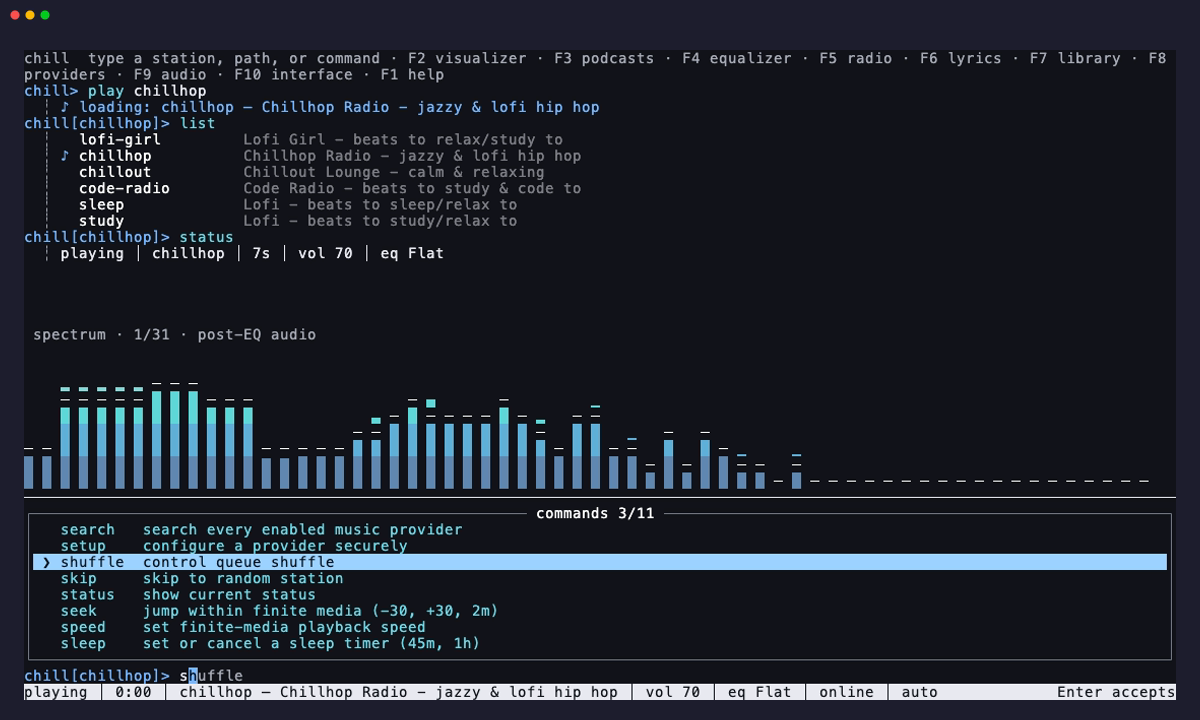
chill -i opens a fullscreen REPL that suggests commands and stations as you type, shown above.
Commands: play, vol, mute, skip, pause, resume, toggle, status, doctor, list, add, remove, default, sleep, reload, stop, clear, help, quit. A station name on its own plays that station.
Use doctor, doctor --stations, doctor --stream <station-or-url>, or
doctor --logs in the REPL with the same options as the CLI. Tab completes doctor
options and station names. Checks run in the background, and their report appears
in the transcript, including findings from failed checks. doctor --help lists
all options; F1 also shows diagnostic examples.
Use sleep 45m or sleep off for the timer. sleep on its own still plays the
sleep station, as does play sleep.
| Key | |
|---|---|
Tab |
complete with the highlighted suggestion |
→ |
take the ghost text |
↑ / ↓ |
pick a suggestion, otherwise walk through history (kept across sessions) |
Enter |
run the line, or take a suggestion picked with ↑ / ↓ |
Esc |
dismiss the suggestions |
PgUp / PgDn |
scroll the transcript, so does the mouse wheel |
Shift+↑ / Shift+↓ |
select lines of the transcript |
y / Enter / Ctrl+C |
copy what is selected |
| mouse | drag to select, right click to copy, or to paste when nothing is selected |
Ctrl+C |
clear the line, when nothing is selected |
Ctrl+L |
clear the screen |
F1 |
help |
Ctrl+Q |
quit, music keeps playing |
Foreground Mode
Use --fg to run in the terminal with mpv controls:
| Key | Action |
|---|---|
q |
quit |
m |
mute |
9 / 0 |
volume down / up |
← / → |
seek |
Build and test
go build .
go test ./...
With mpv installed, run the playback integration test:
CHILL_TEST_MPV=1 go test -count=1 -run TestMPVIntegration -v ./...
The manually triggered YouTube smoke test workflow can also audit all built-in stations before testing playback. Live checks depend on YouTube access and stay separate from deterministic CI.
After publishing a stable release, the release workflow automatically updates
Formula/chill.rb in willibrandon/homebrew-tap and bucket/chill.json in
willibrandon/scoop-bucket, using the published checksums.txt, and commits and
pushes each change to main. Scoop's versioned extraction directories are updated
along with its URLs and hashes. Prerelease tags skip package updates, reruns are
idempotent, and older releases cannot roll back a newer package version.
Configure these repository Actions secrets on willibrandon/chill:
HOMEBREW_TAP_TOKEN: write access towillibrandon/homebrew-tapcontents.SCOOP_BUCKET_TOKEN: write access towillibrandon/scoop-bucketcontents.
To retry a failed package update, rerun the failed workflow jobs. The release workflow also accepts an existing tag through Run workflow to rebuild and republish assets, then update both packages.
Test the package updater with:
python3 -m unittest discover -s .github/scripts -p 'test_*.py'
License
MIT
 Documentation

Documentation

Overview 
Package main implements chill, a terminal lofi radio that streams 24/7 lofi beats from YouTube. It uses a client-server architecture where a background daemon manages mpv playback and clients communicate over a Unix socket.
Usage:
chill              # play default station
chill chillhop     # play specific station
chill -i           # interactive mode (repl)
chill --vol 60     # set volume (or +5, -10, up, down)
chill --mute       # toggle mute
chill --status     # show what's playing
chill --stop       # stop playback
chill add n url    # save your own station
chill update       # install the latest release
 Source Files